
Picking the best Bitcoin wallet for Android really boils down to what you need it for. If you're a long-term investor focused on security, a non-custodial wallet that links up with a hardware device is probably your best bet. But if you're using Bitcoin more frequently and want something quick and easy, a simpler software wallet might be all you need.
This guide will walk you through the essentials, so you can find the perfect fit.
Why Your Android Phone Is a Great Place for Bitcoin
It’s never been easier to find a solid Bitcoin wallet for an Android device, and that's largely because of the platform's huge global reach and open-source DNA. Your phone isn't just for calls and texts anymore; it’s a powerful, portable gateway to the Bitcoin network. With the right app, it becomes a secure vault for your digital assets, letting you send, receive, and manage your crypto from just about anywhere.
The numbers back this up. Android dominates the crypto wallet scene, making it the go-to platform for the best mobile Bitcoin wallets. With over 3 billion active devices in use worldwide, it has sprinted past other operating systems. This has cemented its role in a global crypto wallet market valued at USD 12.59 billion, according to market trend analysis from Grand View Research.
This guide is here to help you cut through the noise. We'll start by breaking down the main types of wallets and what makes them tick, so you can understand the trade-offs between security and convenience.
Understanding Your Options at a Glance
Before we get into the weeds, let's take a high-level look at the main categories. This table provides a snapshot comparison of the main types of Bitcoin wallets available for Android, helping you quickly identify which category best fits your needs.
Quick Comparison of Android Bitcoin Wallet Types
| Wallet Type | Who Holds Keys? | Best For | Security Level |
|---|---|---|---|
| Non-Custodial | You (Self-Sovereign) | Long-term holding, full control | Very High |
| Custodial | A third party (e.g., an exchange) | Beginners, frequent trading | Lower |
| Hardware-Integrated | You (Offline) | Maximum security, large amounts | Highest |
| Software (Hot Wallet) | You (Online) | Daily use, small amounts | Good |
This table gives you a starting point. Think of a custodial wallet like a bank account—someone else holds the funds for you. A non-custodial wallet is more like a personal safe where you, and only you, have the key.
From here, we’ll dig into crucial ideas like what it means to control your own digital keys and how to set up your wallet like a security pro. By the time we’re done, you’ll feel confident managing your Bitcoin safely right from your Android device.
Your Wallet, Your Keys: The Most Important Choice You'll Make

Before we can even talk about the best Bitcoin wallet for Android, we need to get one thing straight. A Bitcoin wallet isn't like the leather billfold in your back pocket. It doesn't actually hold your coins.
Think of it more like a high-tech digital keychain. This keychain holds the special cryptographic keys that prove you own your bitcoin and give you the power to spend it. The single biggest decision you'll make is who controls that keychain.
This one choice dictates your control, your security, and your financial freedom. It's the line in the sand between truly owning your bitcoin and just having an IOU from a company that's holding it for you. This brings us to the two fundamental types of wallets: custodial and non-custodial.
The Custodian Choice: Custodial vs. Non-Custodial
A custodial wallet works a lot like a bank. When you buy bitcoin on a big exchange and just leave it there, you're using their custodial wallet. The exchange holds your bitcoin—and the all-important private keys—on your behalf. It’s convenient, for sure, but that convenience comes at a steep price.
- Pros: Super easy to get started, and if you forget your password, you can usually just reset it. You don't have to stress about key management.
- Cons: You don't actually own your bitcoin. You're trusting the exchange to protect your assets from hackers, internal fraud, or even a government freeze. The old crypto saying, "not your keys, not your coins," was born from the hard lessons learned here.
A non-custodial wallet, on the other hand, is your own personal, digital vault. You, and only you, hold the private keys. This is the path to true self-sovereignty, where you are in complete command of your own money. Most of the dedicated Android wallet apps you'll find are non-custodial.
With a non-custodial wallet, you become your own bank. This gives you incredible freedom, but it also means the responsibility for securing your funds is 100% on you. There's no customer service hotline to call if you lose your keys.
This is the very essence of what makes Bitcoin so powerful. It enables direct, peer-to-peer value transfer without a middleman, but it demands that you take personal responsibility seriously.
Your Master Key: The Seed Phrase
So what exactly are these keys? The one that matters most is your private key, a long, complex string of characters that signs off on your transactions. Since nobody can realistically memorize that, non-custodial wallets use a clever backup system: the seed phrase (sometimes called a recovery phrase).
When you set up a new non-custodial wallet, it will generate a list of 12 or 24 simple words. That is your seed phrase. This phrase is the master key to your entire wallet. If your phone gets lost, stolen, or smashed, you can use these words to restore your bitcoin on any other compatible device.
Protecting this phrase is the most important job you have. The rules are non-negotiable:
- Write It Down: Use a pen and paper. Better yet, etch it into metal. Do not store it on any digital device.
- Never Screenshot It: A screenshot puts your master key on a device connected to the internet. That's a huge security risk.
- No Cloud Storage: Don't ever save your seed phrase in a text file, an email draft, or cloud services like Google Drive or Dropbox.
- Store It Securely: Keep your physical backup somewhere safe, private, and offline where no one else can find it.
Getting this right is everything. To really grasp how this works and why it's your ultimate safety net, it's worth taking the time to learn more about what a wallet seed phrase is and how to protect it. Mastering this concept is the first real step toward securely managing your bitcoin, especially when you're looking for the best Bitcoin wallet for Android.
Essential Security Features for Your Android Wallet
When you're picking a Bitcoin wallet for your Android, it’s easy to get drawn in by a slick design or a long list of supported coins. But the real meat is in its security. Not all wallets are built the same, and the difference between a good one and a great one is how well it protects your funds.
Think of it like this: you wouldn't keep your life savings in a shoebox. So why would you trust your bitcoin to a wallet with flimsy security? Let's get into the non-negotiable features that create a digital fortress for your assets, protecting you from both hackers and simple human error.
The Power of Community Audits: Open-Source Code
One of the most important security features isn’t a fancy algorithm, but a simple philosophy: open-source code. This just means the wallet's code is public, allowing anyone in the world to pop the hood, inspect it, and look for flaws.
Imagine you’re buying a high-tech vault. Would you buy it from a company that keeps its schematics a total secret? Of course not. You’d want independent experts to verify its claims. That’s what open-source software does. It lets thousands of the world’s best security researchers and developers act as your personal inspection team.
This constant, collaborative oversight means vulnerabilities get spotted and fixed by the good guys before the bad guys can ever find them. It's a cornerstone of the Bitcoin ethos for a reason.
A closed-source wallet asks for your blind faith. An open-source wallet earns your trust through verifiable proof. When your money is on the line, proof always beats promises.
Advanced Access Control and Transaction Security
Beyond the code, you need to look at how a wallet actually handles access and approves transactions. These features are your layers of defense, making it incredibly difficult for someone to spend your bitcoin—even if they have your phone.
Don’t dismiss these as optional extras. On a mobile device that goes everywhere with you, they are absolutely fundamental.
Here’s what to look for:
- Multi-Signature (Multi-Sig) Support: This is the digital equivalent of a safe deposit box that needs two different keys to open. A multi-sig wallet requires confirmation from multiple devices before a transaction is sent, which crushes the risk of a single point of failure.
- Biometric and PIN Authentication: Any decent Android wallet today must let you lock the app with your fingerprint, face, or a PIN. It’s a simple but powerful barrier that stops someone who gets ahold of your unlocked phone from just opening your wallet and sending your funds.
- Hardware Wallet Integration: For the ultimate peace of mind, find a wallet that can pair with a hardware device like a Ledger or Trezor. Your mobile app becomes a view-only "watch wallet," while all transactions have to be physically approved on the offline hardware device. This keeps your private keys completely disconnected from the internet.
Secure Backup and Recovery Options
Let’s be real—phones get lost, stolen, or just break. The best wallets are designed with this reality in mind, offering clear and secure ways to back up and recover your funds. Your seed phrase is your master key, and a good wallet will treat it that way.
A top-tier wallet will guide you through the backup process with an almost paranoid level of caution, stressing the need for offline storage. It should never suggest insecure shortcuts like taking a screenshot or saving your seed phrase to a cloud drive.
Security Feature Checklist for Android Wallets
As you compare different Android Bitcoin wallets, run them through this checklist. A wallet that ticks all these boxes is one that takes your security seriously.
| Security Feature | What It Does | Why It's Important |
|---|---|---|
| BIP-39 Standard | Generates a standard 12 or 24-word seed phrase for backup. | This industry standard ensures your backup is portable. You can restore your wallet on hundreds of other compatible apps, so you're never locked in. |
| Encrypted Backups | Lets you create a password-protected digital backup file of your wallet. | It gives you a second line of defense. Just remember to store the encrypted file and its password in separate, secure, and offline locations. |
| Clear Backup Guidance | Provides direct, unmissable warnings about how to properly secure your seed phrase. | This reinforces good habits and helps you avoid the common, devastating mistakes that can lead to a total loss of your bitcoin. |
By making these three areas—open-source transparency, layered access controls, and rock-solid backup options—your top priorities, you'll be in the best possible position to keep your digital wealth safe and sound.
Comparing the Top Bitcoin Wallets for Android Users
Picking the "best" Bitcoin wallet for your Android phone isn't about finding one single perfect app. It's more like choosing the right tool for the job. You need to match the wallet's philosophy with your own needs, how comfortable you are with the tech, and what you value most in terms of security.
The good news is, the ecosystem is packed with fantastic options. Whether you're just starting out or you've been around the block a few times, there's a wallet built for you. Let's cut through the noise and look at some of the top contenders based on who they're really designed for.
Best for Beginners: Simplicity and a Clean Start
When you're new to Bitcoin, the last thing you want is an app that feels like a cockpit. The best beginner wallets get out of your way and make sending and receiving Bitcoin feel natural, without burying you in jargon and complex settings.
- BlueWallet: This is a phenomenal all-rounder, and it really shines for newcomers. The interface is clean and simple, making it a breeze to create and manage your wallets. It also supports both the main Bitcoin network and the Lightning Network, giving you a taste of faster, cheaper payments without a huge learning curve.
- Muun Wallet: Muun takes simplicity to a whole new level. It cleverly merges your on-chain and Lightning funds into one unified balance, so you never have to think about managing separate channels or balances. For just sending and receiving payments of any size, the experience is completely seamless.
Both of these are non-custodial, which is a crucial point—it means you, and only you, control your keys. They do an excellent job of walking you through the all-important seed phrase backup process, making sure you start your journey on solid ground.
Best for Advanced Users: Total Control and Power Features
If you're an advanced user, you're not just looking for a simple interface. You want the keys to the kingdom. You want granular control over every piece of your transactions, from managing UTXOs to setting custom fees and plugging in your hardware wallets.
- Sparrow Wallet (with a Server): Sparrow is primarily a desktop wallet, but it turns into an absolute powerhouse on Android when you connect it to your own node or a trusted server. This setup lets you use your phone as a secure "watch-only" wallet or as a signing device with a hardware wallet. It gives you unmatched control over coin selection, fee-bumping (RBF and CPFP), and complex multi-signature setups.
- Electrum: As one of the oldest and most respected names in the game, Electrum delivers a feature-packed experience on Android. It might not win any beauty contests against the newer apps, but its power is undeniable. You get total control over fees, multi-sig support, and the ability to connect to your own server for rock-solid privacy and security.
These are the digital equivalent of a professional toolkit. They’re for people who are comfortable taking full responsibility for their setup and want every possible tool to optimize for cost, speed, and security.
Best for Privacy Users: Shielding Your Financial Data
For a lot of people, privacy is what Bitcoin is all about. But here's the thing: Bitcoin transactions are pseudonymous, not anonymous. They can be tracked on the public blockchain. Wallets built for privacy use special techniques to break those links and protect your financial history.
A common misconception is that all Bitcoin transactions are private. In reality, the public ledger allows for sophisticated chain analysis. Wallets that prioritize privacy use techniques to obscure the origins and destinations of funds, making it significantly harder for third parties to track your spending habits.
Here’s how some of the best ones tackle this challenge:
- Samourai Wallet: This wallet was built from the ground up with a laser focus on privacy. It’s loaded with features like Stonewall and Stowaway that construct transactions in a way that makes them much harder to analyze. Its killer feature is Whirlpool, a CoinJoin service that mixes your coins with others to completely sever the links between your past and future transactions.
- Blockstream Green: While Green offers a great user-friendly experience, it also packs a punch with its security and privacy features. Its main selling point is a multi-signature security model. By default, it requires a second signature from Blockstream's servers for any transaction, which helps prevent theft if your phone is compromised (you can remove this after a time delay). For a deeper look at different security models, our digital wallet comparison breaks down how various platforms stack up.
In the end, the best Bitcoin wallet for Android is the one that lets you use the network on your own terms. Whether you want the simple elegance of Muun, the surgical precision of Sparrow, or the privacy shield of Samourai, the Android ecosystem has you covered.
Alright, you've done your homework, weighed the options, and picked out the perfect Bitcoin wallet for your Android. Now comes the most important part: the setup. This isn't just a formality; it's the moment you lay the foundation for the security of your funds.
Think of it like building a physical vault. You wouldn't just slap it together. You'd be meticulous about pouring the concrete and installing the lock, making sure every single detail is perfect. Let's walk through the setup process with that same level of care.
Step 1: Get the Real Deal—Verify and Download the Official App
First things first, we need to make sure you're downloading the genuine wallet app. This is a huge stumbling block for many. Scammers are notoriously good at creating convincing fakes and sneaking them onto app stores, just waiting for someone to slip up. Downloading one of these is like giving a thief a copy of your house key.
To sidestep this trap, you need a strict process:
- Go Directly to the Source: Always start on the wallet developer's official website. Never, ever just search for the wallet by name in the Google Play Store.
- Follow Their Link: The official site will have a direct link to their app in the Play Store. That's the only one you should click.
- Do a Quick Sanity Check: Before you tap "Install," glance at the app details. Does it have a high number of downloads (thousands, or even millions)? A long history of reviews? The developer's name matches the website? Fake apps usually look deserted by comparison.
Step 2: Create Your Wallet and Guard Your Seed Phrase
With the official app installed, it's time to fire it up and tap "Create a new wallet." This is the magic moment. The app will generate your 12 or 24-word seed phrase. Pay close attention, because this is the single most critical piece of information you will ever handle.
This isn't just some password. This phrase is the master key to your Bitcoin. If your phone ever gets lost, stolen, or just gives up the ghost, these words are your only way back in. They deserve your absolute, undivided attention.
Your seed phrase is your ultimate lifeline. It should never, ever be stored on any device that connects to the internet. Saving it in a notes app, snapping a screenshot, or adding it to your password manager is the digital equivalent of taping your vault combination to the front door.
Follow these rules religiously:
- Write It Down. Offline. Grab a pen and a piece of paper. Write down every word, double-checking the spelling, and make sure you number them in the correct order.
- Confirm Your Backup. The app will make you re-enter the words to prove you wrote them down correctly. Don't get lazy and skip this. One tiny typo or a word out of order makes the whole backup worthless.
- Think About Metal. For holding funds long-term, consider a more permanent solution like stamping the phrase onto a metal plate. Metal backups can survive things paper can't, like fire and floods.
- Store It Like Treasure. Hide your physical backup somewhere safe and private. If you're storing a significant amount, it’s a good idea to have multiple copies in different secure locations—think one in a home safe and another in a bank's safe deposit box.
Step 3: Lock Down the App Itself
Your seed phrase is now safely offline, so the last step is to fortify the app on your phone. These settings are your day-to-day defense, stopping someone from getting into your wallet if they happen to get their hands on your unlocked phone.
Dive into your new wallet's security settings and turn these on right away:
- Set a PIN Code: Choose a strong, unique PIN you haven't used anywhere else. Please, no birthdays or "123456."
- Enable Biometrics: Turn on fingerprint or face unlock. It's fast, convenient, and adds a surprisingly strong layer of security that makes it incredibly difficult for anyone but you to open the app.
By carefully following these three steps—verifying the download, securing your seed phrase offline, and locking down the app—you've built a seriously strong security posture from the get-go. This initial diligence is your best defense, ensuring your Bitcoin stays right where it belongs: in your control.
How to Recover Your Wallet and Avoid Common Pitfalls
So, what happens if your phone takes a swim, gets stolen, or just decides to quit on you? It’s a totally valid fear for anyone with a crypto wallet in their pocket, but it doesn't have to mean your Bitcoin is gone for good.
If you’re using a non-custodial wallet, your phone is just the window to your funds—it’s not the vault itself. The real vault is your seed phrase.
This master key is your ultimate lifeline. It’s what lets you restore full access to your Bitcoin on a brand new device, using pretty much any compatible wallet. All you have to do is install a new wallet app, pick the "restore" or "import" option, and punch in your 12 or 24-word seed phrase. Once it's confirmed, your balance and transaction history will pop right back up, like nothing ever happened.
This is exactly why protecting that seed phrase is the single most important job you have. If you lose the phrase, you lose the Bitcoin. No ifs, ands, or buts. And if someone else gets their hands on it, they can take everything. It’s the one and only key to your digital wealth.
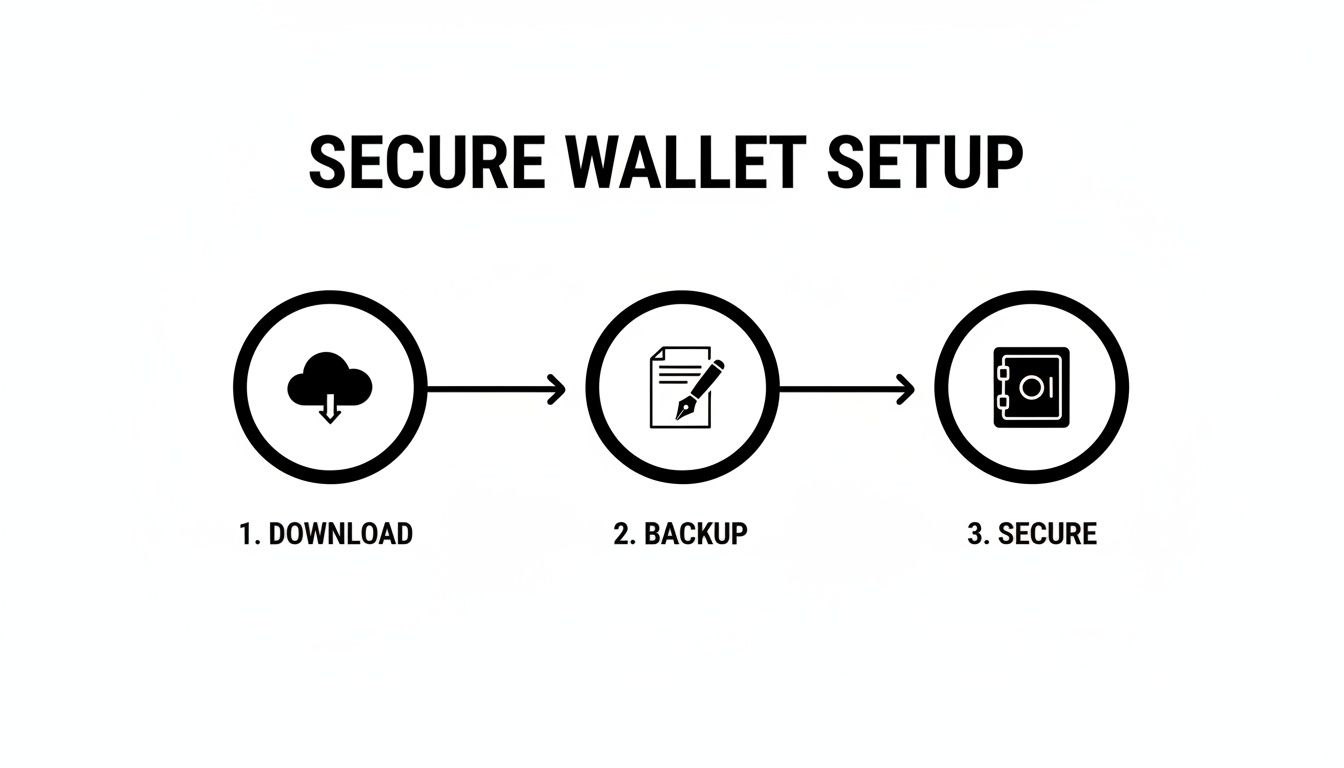
The process is simple but critical: download a wallet, back up your phrase, and then secure your funds. That backup step is the non-negotiable bridge between just having an app and actually protecting your assets.
Recognizing a Compromised Wallet
Recovery is for accidents, but what about when someone is actively trying to get into your wallet? You need to know the red flags that scream "compromise." Acting fast can be the difference between a close call and a total loss.
Keep an eye out for these warning signs:
- Transactions You Didn't Make: This is the big one. If you see Bitcoin leaving your wallet and you weren't the one who sent it, you have a problem.
- Your Balance Vanishes: If you open your wallet and the balance has suddenly dropped to zero, it's a code-red emergency.
- The App Acts Weird: Is the wallet app crashing a lot, glitching out, or suddenly asking you for your seed phrase? It could be a fake or malicious version trying to trick you.
If you even suspect your wallet has been compromised, there's no time to waste. Your only mission is to get your remaining funds out and into a new, secure wallet. Don't wait around trying to figure out what happened.
Your Emergency Action Plan
If you spot any of those red flags, you need to move—now. The plan is to create a brand new, clean wallet and sweep any remaining funds into it before a thief can.
- Grab a Secure Device: Use a different phone or computer that you trust completely. Do not use the device you think is compromised.
- Create a New Wallet: Install a trusted wallet app and set up a completely new wallet with a new seed phrase. Write this new phrase down and get it offline immediately.
- Transfer Everything: Get the receiving address from your new, secure wallet. Jump back to the old, compromised wallet and send all remaining funds to that new address in a single transaction. Crank up the transaction fee to make sure it confirms on the network as fast as possible.
Think of this as your financial fire escape. Knowing how to recover from a lost phone and how to react to a security breach turns abstract knowledge into a real-world shield for your Bitcoin.
If you've lost access to your wallet and the situation feels overwhelming, professional help is available. Wallet Recovery AI uses advanced techniques to help users securely regain access to their locked digital assets.
Leave a Reply