
That gut-wrenching moment when a password completely vanishes from your mind is something we've all felt. But before you jump to reset it, take a deep breath. The solution is often hiding in plain sight.
Your fastest route back in is usually to check the password managers built right into your web browser or a dedicated app you might be using. These tools are literally designed for this exact problem, and a quick check can solve the issue in minutes.
Your First Steps to Find a Lost Password
It’s no wonder passwords get forgotten. With the sheer number of online accounts we all juggle, our brains just can't keep up anymore. The mental load is real.
Just a few years ago, in 2020, industry reports showed the average person managed about 100 passwords. That figure has since ballooned to over 250 passwords today. As a result, roughly 51% of us reset a password at least once a month simply because we can’t recall it, and a surprising number of people still rely on memory alone. If you're curious, you can learn more about password usage trends from recent surveys.
So, instead of hitting that "Forgot Password" link out of habit, let’s try a more strategic approach. A quick, targeted search in the most likely places can save you the headache of email verifications and having to create another new password you’ll probably forget.
Before you go digging, this quick-reference table points you to the most common digital hiding spots for your credentials.
Quick-Check Locations for Saved Passwords
| Location | Where to Check | Best For |
|---|---|---|
| Web Browser | Settings > Autofill/Passwords (Chrome, Firefox, Safari) | Passwords for websites you frequently visit on that specific browser. |
| Dedicated App | Your password manager app's main vault (e.g., 1Password, Bitwarden) | Your single, most reliable source if you use one of these tools. |
| Mobile Device | iOS Keychain or Google Password Manager (Android) | Credentials saved on your phone or tablet, especially for mobile apps. |
| Another Device | A different laptop, tablet, or even a smart TV | Finding an active, logged-in session you can use to reset the password. |
This table should give you a solid game plan. Now let’s dive into exactly how to check each of these spots.
Check Your Browser's Built-In Password Manager
Most modern browsers—Chrome, Safari, Firefox, you name it—have a native password manager that prompts you to save login details. It’s the path of least resistance, so it's the first and easiest place to look.
- Google Chrome: Head to
Settings > Autofill and passwords > Google Password Manager. From there, you can search for the site and reveal the password after you verify it’s you with your computer’s login. - Apple Safari: On a Mac, go to
Safari > Settings > Passwords. You'll need to enter your Mac's password or use Touch ID to see your list of saved logins. - Mozilla Firefox: Click the menu icon (the three horizontal lines), go to
Settings > Privacy & Security, and scroll to "Logins and Passwords." Click "Saved Logins" to search your vault.
Pro Tip: I see this all the time—people use different browsers on different machines. If you use Chrome on your work laptop but Safari on your personal MacBook, make sure you check both. Your password might be saved in one but not the other.
Search Your Dedicated Password Manager
If you use a third-party app like 1Password, Bitwarden, or NordPass, this should be your first stop. Period. These tools are built to be a fortified digital vault for your credentials, and finding what you need is as simple as opening the app and hitting search.
The key advantage here is centralization. Unlike a browser’s manager, which is tied to that one application, a dedicated manager syncs across all your devices. It’s your single source of truth.
Look for Active Sessions on Other Devices
This one is so simple it’s often overlooked: are you already logged in somewhere else? A forgotten Netflix password doesn't matter much if you're still signed in on your smart TV. The same goes for apps on an old tablet or a secondary phone tucked away in a drawer.
An active session is a lifesaver. It not only gets you back in immediately but also lets you navigate to your account settings to change the password from the inside. This is almost always a smoother process than dealing with external "Forgot Password" flows.
The Good Ol’ "Forgot Password" Trick (And How to Do It Safely)
When you've checked all the usual hiding spots and come up empty-handed, the "Forgot Password" link is your next best friend. We've all been there. But clicking it isn't just a simple fix; it kicks off a chain of security handoffs designed to verify you are who you say you are.
Think of it as remote identity verification. The service needs proof it's you before handing over the keys to your account. This is almost always done through a recovery email or phone number you set up ages ago.
Kicking Off the Reset
You’ll find the link right on the login page. Once you click it, you'll be asked for your username or email. Here's a small but important detail to watch for: a well-designed site will give you a vague confirmation, like "If an account with that email exists, we've sent instructions."
This isn't just lazy design. It’s a deliberate security measure to prevent something called account enumeration, where a hacker could plug in random emails to see which ones are registered. It's a subtle feature, but it protects your privacy.
After that, it's a waiting game. An email or text with a special one-time-use link or code should land in your inbox within minutes.
What to Do When the Reset Email Never Arrives
Of course, sometimes it doesn't show up. Don't panic just yet. Before you start hammering the "resend" button, run through this quick checklist:
- Check your spam folder. This is the number one culprit. Aggressive filters often mistake automated password resets for junk mail.
- Wait 5-10 minutes. Email servers get busy, and sometimes there's a slight delay. Give it a bit before you assume it's lost.
- Did you type your email correctly? It happens to the best of us. A simple typo like
gamil.cominstead ofgmail.comwill send the reset link into the digital abyss.
Quick tip: Those reset links are designed to be temporary. Most expire within 15 to 60 minutes. This is intentional—it drastically reduces the risk of an old, forgotten email becoming a security backdoor later.
Don't Just Reset—Upgrade Your Password
Once you've clicked the link and are prompted to create a new password, pause for a second. This is your chance to seriously upgrade your account's security, not just get back in. Resist the urge to use an old password or a minor variation like Password123!.
A genuinely strong password has three key ingredients:
- Length: Go for at least 12-16 characters. More is always better.
- Complexity: Mix it up with uppercase letters, lowercase letters, numbers, and symbols.
- Uniqueness: This is non-negotiable. Never, ever reuse a password. If another site gets breached, all your accounts using that same password are now vulnerable.
After setting your new password, you might see an option to "log out of all other devices" or "invalidate all other sessions." Always, always click this. It’s a final, crucial step that ensures any unauthorized person who might have been logged into your account is immediately kicked out.
How to Reconstruct a Password from Memory
So, you’ve hit a brick wall. The password isn't in your browser, your password manager is coming up empty, and the "Forgot Password" link isn't an option. It feels like you're completely locked out, but don't give up just yet.
Often, the password isn't truly gone—it's just buried in your memory. The trick is to stop searching for it and start reconstructing it, piece by piece. This is where we go offline and get a little methodical.
The whole idea is to reverse-engineer your own habits. We’re all creatures of habit, and our passwords are no exception. We tend to lean on the same base words, number patterns, and special characters. We just need to systematically explore those patterns in a safe environment, far away from any prying eyes.
First, Get Offline. Seriously.
Before you even think about typing a single guess into a login box, stop. This is the single most important rule: do this offline.
Open a basic text editor like Notepad on Windows or TextEdit on a Mac. This gives you a secure, local sandbox to type out every possible combination without any risk.
Trying to guess directly on a website is a recipe for disaster. Why?
- You'll Get Locked Out: Most services lock your account after a few wrong guesses—usually just 3 to 5 attempts. This turns a simple problem into a drawn-out support nightmare.
- They're Watching: Every failed attempt is logged. This creates a digital breadcrumb trail of your password patterns, which is a security risk if that service’s logs are ever breached.
The Golden Rule: Never try to reconstruct a password on a live login form. Always use a local, offline text document to build your list of potential candidates first. It keeps you from getting locked out and keeps your attempts private.
The Mnemonic Method: Hacking Your Own Brain
Think about your forgotten password not as some random string of characters, but as a formula you probably came up with on the fly. This is what we call mnemonic association—you linked the password to something you could (in theory) remember.
Let's break down the components of your personal formula.
1. What Are Your Go-To Base Words?
We all have them. These are the words that feel familiar and easy to type, often tied to our lives and interests.
- Pets: A childhood dog’s name (
Buddy,Max) or your current cat's quirky nickname. - Family: Nicknames, middle names, or even a maiden name.
- Hobbies: Think about gaming (
Ragnarok,Zelda), sports teams (GoBucs,LakersFan), or bands (FloydFan,GratefulD). - Places: A favorite vacation spot (
Santorini), the street you grew up on (MapleAve), or your university mascot.
Jot down a few of your usual suspects.
2. How Do You Add Numbers?
People rarely use truly random numbers. We use numbers that mean something to us.
- Key Dates: Birth years (
1988), anniversaries (2015), or graduation (2004). - Meaningful Digits: An old jersey number (
23), a former address (724), or just a lucky number. - Easy Patterns: Don't forget the simple stuff you might use in a rush, like
123,999, or1122.
3. What’s Your Signature Symbol and Capitalization Style?
This is how you satisfy those pesky "password complexity" requirements. Everyone develops a habit.
- Symbols: Do you always tack an exclamation point (
!) on the end? Or maybe start with a dollar sign ($)? A common trick is swapping letters for symbols, like inP@ssword. - Capitalization: Are you a
Firstletterkind of person? Or do you capitalize the first two (PAsword)? Maybe you throw a random capital in the middle (pasSword) to be tricky.
Now, you can start combining these elements. A base word like Fluffy, a year like 2021, and a symbol like ! could easily become Fluffy2021!, fluffy!2021, or !Fluffy2021.
Build Your Personalized Wordlist
With your core components brainstormed, it's time to create a structured list in your offline text file. Don't just throw things down randomly—a little organization goes a long way.
Start with the combinations that feel most familiar and work your way down to the long shots. Sometimes just the act of writing them out is enough to jog your memory.
You could even create a small table in your text file to keep things clean.
| Base Word | Number Suffix | Symbol | Possible Combinations |
|---|---|---|---|
Santorini |
2019 |
! |
Santorini2019!, santorini!2019 |
GoBucs |
12 |
# |
GoBucs#12, GoBucs12# |
Zelda |
1998 |
* |
Zelda*1998, Zelda1998* |
This methodical approach is far more powerful than just guessing wildly. You're tapping into your own predictable psychology. Once you have a solid list, you can carefully try your top 5-10 contenders on the actual login page, one by one.
Recovering a Lost Crypto Wallet Password
Losing access to a regular online account is a headache. But losing the password to your crypto wallet? That’s a whole different level of stress. In the decentralized world, there’s no customer support hotline or a simple “Forgot Password?” link to click. You’re in charge. You are your own bank, and that means you’re also your own head of security.
The good news is that even if the password feels lost forever, your assets might not be. It all comes down to understanding the critical difference between your wallet's password and its seed phrase. Think of the password as the key to a single safe deposit box, while the seed phrase is the master key to the entire bank vault.
Your Seed Phrase Is the Ultimate Master Key
When you first set up most crypto wallets—think MetaMask, Trust Wallet, or Exodus—you were told to write down a sequence of 12 or 24 random words. This is your seed phrase, sometimes called a recovery phrase. This isn't just a backup; it's the raw, direct source of your private keys, which represent the actual ownership of your crypto.
If you have this phrase, you can get full access to your funds back, even if you’ve completely forgotten the wallet's password. You’d simply install the wallet software on a new device (or reinstall it on your current one) and choose the option to "Import" or "Restore from Seed Phrase" instead of creating a brand-new wallet.
Crucial Takeaway: Your wallet password just encrypts the local wallet file on your device. Your seed phrase, on the other hand, can regenerate your private keys and restore your entire wallet on any device, anywhere in the world. Guard it with your life.
Navigating Hardware Wallet PINs and Keystore Files
The recovery game changes a bit depending on what kind of wallet you’re using. Hardware wallets and some older desktop wallets have their own quirks.
Resetting a Hardware Wallet PIN
Hardware wallets like Ledger and Trezor bring a physical device into the mix, protected by a PIN you punch in directly.
- Ledger: If you get the PIN wrong three times, the device wipes itself clean. It sounds terrifying, but it doesn't touch your crypto. You just grab your 24-word recovery phrase and use it to restore your wallet on the same (or a new) Ledger.
- Trezor: Much like Ledger, too many wrong PINs will trigger a lockout with increasingly long wait times. If the PIN is truly gone, you'll need your seed phrase to wipe the device and set it up again.
Using Keystore Files for Recovery
Some wallets, especially older Ethereum wallets like MyEtherWallet (MEW) or MyCrypto, rely on a keystore file. This is an encrypted JSON file that holds your private key, and the password you forgot is the only thing that can decrypt it. If you have the file but not the password, you’re stuck.
This is a classic example of why having more than one recovery method is so important. If you were smart enough to save both your keystore file and your seed phrase, the forgotten password for that file doesn't matter. You can just use the seed phrase to restore access. If you're stuck in a situation like this, you can explore our comprehensive guide on finding lost passwords for more advanced techniques.
This decision tree gives you a simple path for trying to reconstruct a password when a seed phrase isn't an option.
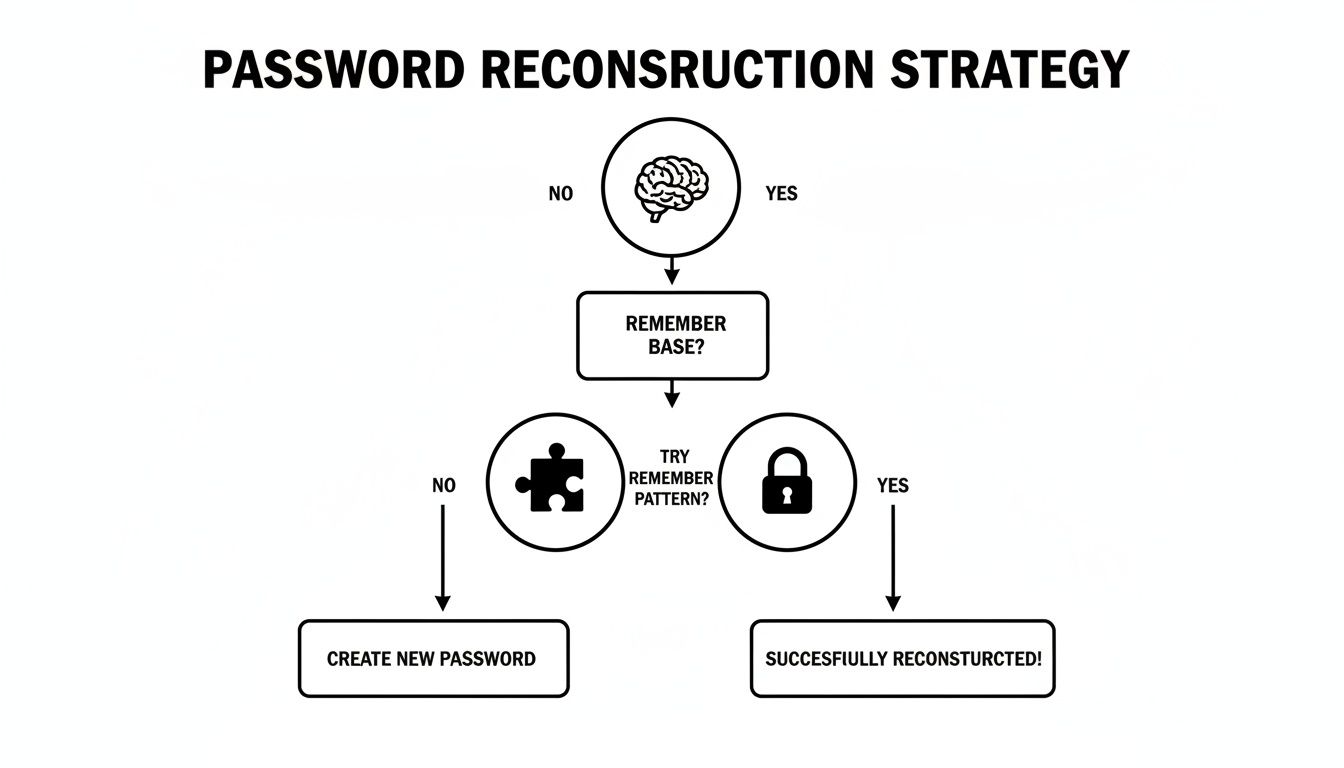
As the flowchart shows, any memory-based recovery attempt is all about recalling those core elements—base words, common patterns, and personal habits—while keeping the process offline for security.
A Quick Look at Different Recovery Paths
To make sense of these different recovery methods, it helps to see them side-by-side. Each approach has its place, depending on the type of wallet you're using and what information you still have.
Crypto Wallet Recovery Methods at a Glance
| Recovery Method | What It Is | Primary Use Case | Security Level |
|---|---|---|---|
| Seed Phrase | A 12 or 24-word phrase that can regenerate all your private keys. | The master key for most software and hardware wallets; restores a full wallet. | Highest |
| Password | A user-created password that encrypts the local wallet file. | Unlocking daily access to a wallet on a specific device. | Medium |
| PIN Code | A short numerical code used to unlock a physical hardware wallet. | Quick access to a hardware wallet; device resets after too many wrong guesses. | Medium |
| Keystore File | An encrypted file containing your private key, protected by a password. | Older Ethereum wallets (e.g., MyEtherWallet); requires the password to unlock. | Low |
| Private Key | A long alphanumeric string that directly controls a single crypto address. | Importing a single address into a new wallet; not a full wallet backup. | High |
Ultimately, the seed phrase remains the gold standard for recovery, but knowing how these other elements work is key to navigating a potential lockout.
The High Stakes of Forgotten Credentials
The consequences of a forgotten password go way beyond simple frustration; they have serious financial and security implications. Forgetting a password is so routine that one survey found 48% of people have bailed on an online purchase just because they couldn't log in. Worse, bad security habits are rampant, with 37% admitting to using weak or insecurely stored passwords—a direct line to getting compromised. You can see more insights on password and passkey trends from the FIDO Alliance report.
In crypto, these stakes are infinitely higher. A forgotten password can mean the permanent, irreversible loss of your assets. This is why having a solid recovery plan before you ever need it is non-negotiable.
- Store Your Seed Phrase Securely: Never, ever store it digitally. Don't take a photo of it, don't save it in a text file, and definitely don't upload it to the cloud. Write it on paper or, even better, stamp it into metal and keep it somewhere safe and private.
- Create Redundancies: Think about storing copies in more than one secure location, like a fireproof safe at home and a safe deposit box at a bank.
- Test Your Backup: Every so often, it’s a good idea to test your recovery phrase with a fresh wallet installation just to be 100% sure it works.
When you've tried absolutely everything—especially for a high-value wallet where the seed phrase is also missing—it might be time to bring in a professional service.
When It’s Time to Call in a Professional Recovery Service
You’ve tried everything. You’ve gone through your old wordlists, dug through every ancient hard drive you own, and the grim reality is setting in: your crypto wallet password is gone. Maybe the seed phrase is gone, too.
This is where DIY methods hit a hard wall. When you’re dealing with a serious amount of money, the stakes are just too high to give up.
This is the moment to consider a professional recovery service. These aren't your typical IT support folks. They are specialists armed with serious computational power, ready to test millions—or even billions—of password combinations based on the fragments of memory you can provide.
The Tipping Point for Getting Help
Handing over this kind of task is a big deal, and it’s not a decision to be made lightly. This isn’t for a forgotten Netflix password; the situation has to justify the trust and cost involved.
It’s time to call in a pro when:
- You've Lost Both the Password and Seed Phrase: In the crypto world, this is the nightmare scenario. Without one or the other, your funds are essentially stuck on the blockchain forever. The only way back in is to crack the password.
- The Value of the Assets Is Significant: If you have thousands, or even millions, locked away, the fee for a professional service becomes a small investment to get it all back.
- You Have Some Clues: This is huge. Maybe you remember a base word, a specific pattern of numbers, or the special characters you always used. For a recovery expert, these clues are gold—they slash the number of possibilities from astronomical to manageable.
Think of it this way: a professional service takes the offline methods we talked about and puts them on steroids. They use powerful computing clusters to run targeted brute-force attacks, turning what feels like a hopeless guessing game into a solvable math problem.
How to Spot a Reputable Recovery Service
Trust is absolutely everything here. The crypto space is, unfortunately, rife with scams, so you have to do your homework. A legitimate service will be completely transparent and put your security first, always.
Here’s a quick checklist for vetting a service:
- Clear Process & Fees: A trustworthy company will tell you exactly how they work and what it costs. Look for a "no-win, no-fee" model. If they can't get your funds back, you shouldn't pay a dime. Run from anyone asking for a big payment upfront.
- Real Reviews & Success Stories: Hunt down genuine testimonials and case studies. Check out what people are saying on independent review sites and crypto forums to get the real story on their track record.
- Solid Security Protocols: How are they handling your data? A legitimate service will never ask for your seed phrase. All they should need is the encrypted wallet file and your password hints.
For instance, this is the kind of straightforward layout you should look for on a professional recovery service's website.
See how the process is laid out? It starts with a secure way to explain your problem. A pro service makes it easy to see the steps involved and focuses on secure communication from the get-go.
That kind of clarity is a great sign. It shows they're focused on the client and on security, which helps build the confidence you need to move forward. If you're curious about the nitty-gritty of how this works, you can learn more about professional crypto recovery services and the techniques they use.
The Magic Behind an AI-Powered Recovery
Services like ours don't just guess randomly. We use sophisticated algorithms to analyze your password habits, test common character swaps (like e for 3 or a for @), and explore millions of combinations of the words, numbers, and symbols you provide.
It's still a numbers game, but it's a highly intelligent one. The truth is, passwords made by humans—even the "complex" ones—are often surprisingly predictable. Password cracking studies show just how weak our habits can be. One report found that about 78% of the most common passwords can be cracked in under one second, and automated password attacks happen somewhere in the world roughly every 39 seconds. For anyone interested in the data, you can read more about the state of password security in 2025.
A professional service uses these very human patterns against the lock. They leverage your own habits to reverse-engineer the one password you can’t remember. When every other door has slammed shut, this calculated, high-tech approach might just be the only key left.
Got Questions About Password Recovery? We’ve Got Answers.
When you’re locked out of something important—especially a crypto wallet—the questions start piling up fast. It’s a stressful situation, and it’s easy to feel lost. We’ve been there, and we’ve helped countless people navigate this exact scenario.
Here are some of the most common questions we hear, along with some straight-shooting, practical advice.
Are Third-Party Crypto Recovery Services Actually Safe?
This is the big one, and you’re right to be cautious. Entrusting your wallet to a third party feels risky, but it can be perfectly safe if you do your homework. The key is to find a reputable, professional service that knows what they’re doing.
Look for a team that is completely transparent about their methods. They should have a solid track record with real, verifiable client testimonials. A legitimate service will never ask for your seed phrase. Ever. Their work focuses on the encrypted wallet file itself, using password hints you provide to crack it.
The real danger comes from scammers. That’s why the research phase is so critical.
A Pro Tip From Experience: Genuine recovery services almost always work on a "no-win, no-fee" basis. If a company demands a hefty upfront payment just to start the process, that’s a massive red flag. Walk away.
My Recovery Email Is Locked Too. Now What?
Okay, this definitely throws a wrench in the works, but don’t panic just yet. It's a tough spot, but not necessarily a dead end.
Your first move should be trying to get back into that email account. Go through the provider’s recovery process—you might be surprised. Sometimes an old security question or a backup phone number you forgot you added is all it takes.
If you can't get the email back, your only other option is to contact the support team for whatever service you're locked out of. Be ready for a long haul. They’ll likely put you through a rigorous identity verification process, and you may need to provide official documents. It’s slow and not always successful, which is a stark reminder to keep your recovery info current.
Can I Recover a Password I Never Saved Anywhere?
If a password was never written down or saved in a browser, password manager, or file, then there's simply no digital trace of it to "find." The data doesn't exist.
Your only real shots are jogging your memory or using the service’s official “Forgot Password” feature. This is where those offline reconstruction methods we talked about really come into play. Fire up a secure, offline text editor and start methodically building a wordlist based on your personal patterns.
- Your Go-To Words: Think about the names of pets, family members, or favorite places you often lean on.
- Your Number Habits: Are you always using a specific birthday or a lucky number sequence?
- Your Symbol Quirks: Do you have a habit of ending with
!or starting with$?
It feels like a long shot, but you'd be surprised what you can unearth with a little focused brainstorming. If memory fails and a reset isn't possible, the password might be gone for good. The only exception is for high-value crypto wallets, where a professional service could still be your last, best hope.
How Long Does a Password Reset Link Last?
This is a fantastic and important security question. The answer is: not long at all. Any service that takes its security seriously will have those links expire very quickly, usually within 15 to 60 minutes.
This short lifespan is a deliberate security measure. It drastically cuts down the chances that someone could stumble upon an old email in your inbox and use it as a backdoor to your account weeks or months down the line. As soon as you click it, the link should become invalid. It's a one-and-done deal, as it should be.
Have you tried everything and still can’t get back into your crypto wallet? When you’re out of options and dealing with significant assets, it’s time to call in the professionals. At Wallet Recovery AI, we use advanced, AI-driven techniques to give you the best possible chance of regaining access to your funds, all done securely and confidentially.
Leave a Reply