
When you need to lock down your crypto, a hardware wallet is your best bet. The KeepKey is one of the classic options, acting as a physical vault for your digital assets and keeping them safe from online threats.
It holds your private keys—the secret codes proving you own your crypto—in a completely offline environment. This makes them totally inaccessible to hackers, viruses, and malware. Think of it as a personal, high-security safe for your Bitcoin and other coins.
What Is a KeepKey Hardware Wallet
At its core, the KeepKey is a "cold storage" device. This just means it secures your crypto while being completely disconnected from the internet. That's the fundamental principle behind all hardware wallets, and it’s what makes them vastly more secure than software wallets (like apps on your computer or phone) that are always online and exposed.
If you're new to this concept, our guide on what is a hardware wallet is a great place to start.
Imagine your crypto is locked in a digital fortress. A software wallet leaves the key to that fortress sitting on your computer, which is connected to the internet—a tempting target for a hacker. A hardware wallet like the KeepKey, on the other hand, locks that key inside a separate, offline device. To open the fortress and send funds, you have to physically approve the transaction on the KeepKey itself.
To give you a quick summary, here’s a look at the KeepKey’s main attributes.
KeepKey Hardware Wallet at a Glance
| Feature | Description |
|---|---|
| Wallet Type | Hardware (Cold Storage) |
| Security | Offline private key storage, PIN protection, recovery phrase backup |
| Display | Large screen for clear transaction verification |
| Build | Anodized aluminum casing |
| Integration | Native integration with the ShapeShift platform |
| Ease of Use | Designed to be simple and accessible for beginners |
| Coin Support | Supports major cryptocurrencies like Bitcoin, Ethereum, Litecoin, and various ERC-20 tokens |
This table highlights why the KeepKey has remained a popular choice: it focuses on delivering core security features in a user-friendly package.
Origins and Market Position
Launched back in 2014 by ShapeShift, the KeepKey quickly made a name for itself in the crypto security world. It was specifically designed to make self-custody less intimidating for beginners, a focus that helped it find a solid foothold in the market.
In fact, by the end of 2026, global hardware wallet shipments flew past 5.8 million units. KeepKey was one of the top four manufacturers, which together command over 60% of the entire market.
A hardware wallet's main job is to create a secure, offline bubble for your private keys. The KeepKey gets this done with a design that puts the user first, balancing serious security with an easy-to-use interface that makes it a great entry point into self-custody.
Key Features That Set It Apart
So what makes the KeepKey hardware wallet different from competitors like Ledger and Trezor? A few design choices really make it stand out.
- Large Display Screen: The KeepKey has a noticeably bigger screen than most other wallets. This isn’t just for looks; it makes it much easier to verify transaction details like the recipient's address and the amount, cutting down the risk of sending funds to the wrong place.
- Premium Design: With its solid, anodized aluminum case, the device feels sturdy and durable. It gives you a sense of confidence right out of the box.
- Simplified User Experience: From the initial setup to confirming your first transaction, the whole process is streamlined for people new to crypto. It avoids overly technical language wherever possible.
These features reinforce its reputation as a secure and highly accessible option for anyone looking to protect their digital assets.
How Your KeepKey Secures Your Crypto
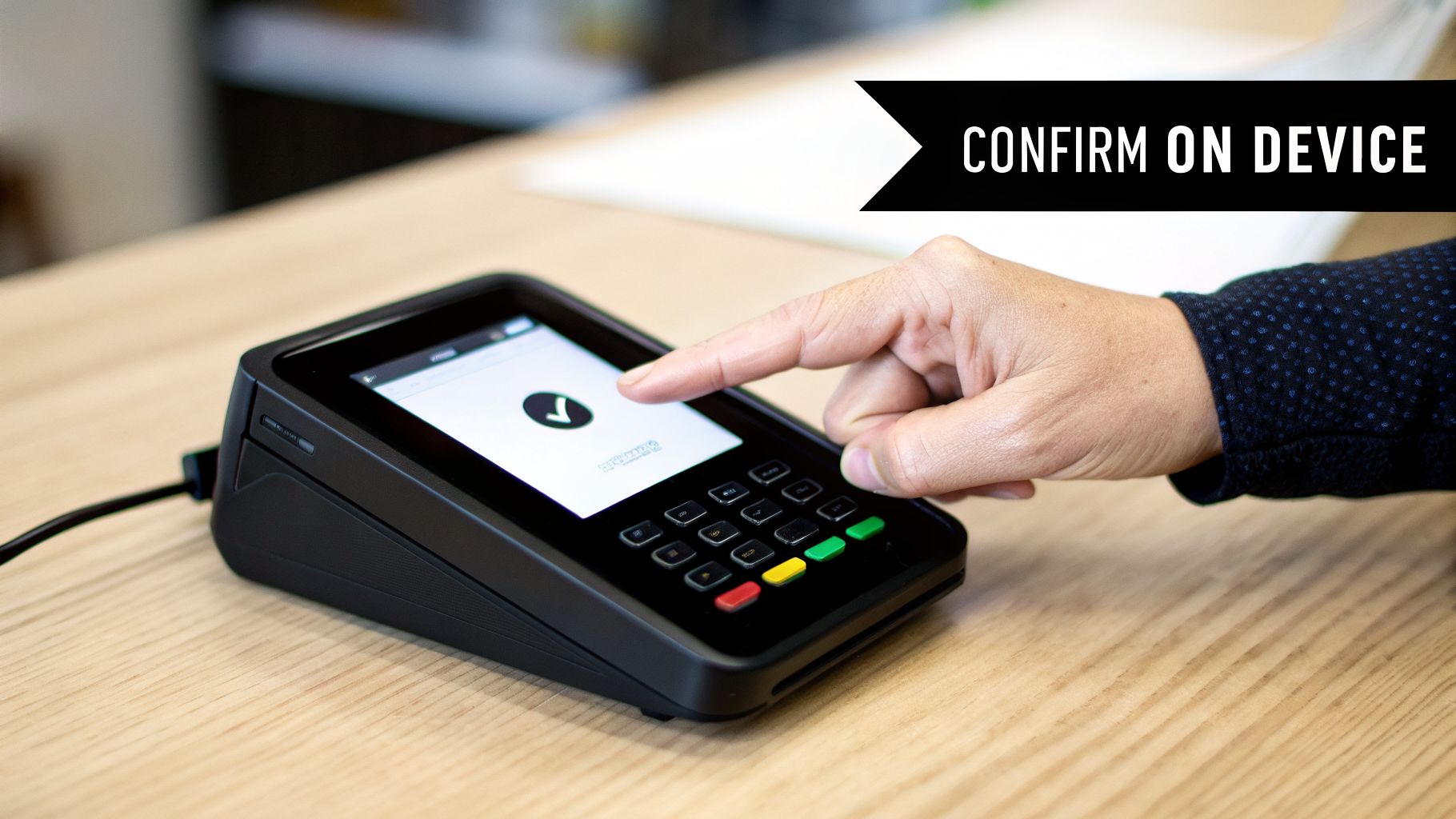
The entire security model of a KeepKey hinges on a simple but powerful idea: your private keys never, ever connect to the internet. It’s easy to think your crypto is stored inside the device, but that's not quite right. Your KeepKey is more like a physical key to a digital vault, holding the one thing needed to access your funds on the blockchain.
That "key" is generated during the initial setup as a recovery seed phrase, which is a list of 12 words. This phrase isn't just a password; it's the master blueprint for your entire crypto portfolio. Your most important job is to write it down and store it somewhere completely offline and safe from prying eyes.
The Seed Phrase: Your Master Key
The recovery seed phrase is, without a doubt, the most critical piece of information you will own. If your KeepKey is ever lost, stolen, or stops working, this phrase is what allows you to restore access to all your crypto on a new device.
Think of your seed phrase as the DNA for your digital assets. From that specific sequence of words, the KeepKey can mathematically rebuild every single private key for every cryptocurrency you hold. It's an incredibly powerful secret that you must guard fiercely.
Since the phrase is generated and shown only on the KeepKey's screen, it's never exposed to your computer, which could be infected with malware. This offline generation creates an immediate shield against online attacks right from the very start.
The Transaction Approval Process
So, what happens when you actually want to spend your crypto? This is where the physical design of the KeepKey becomes your best defense. Every single outgoing transaction has to be approved by you, on the device itself.
Let's say you're sending 0.1 BTC to a friend. Here’s how that security checkpoint works:
- Initiate Transaction: You'll start the process on your computer through a wallet interface like ShapeShift.
- Send to KeepKey: The transaction data is then sent to your connected KeepKey.
- Verify on Device: The recipient's address and the amount are displayed on the KeepKey’s large screen for you to review.
- Physical Confirmation: You must physically press the button on the device to confirm the details are correct.
This simple, manual step creates a physical barrier—an "air gap"—that malware can't jump. Even if a keylogger on your PC tried to secretly swap the destination address with a hacker's, you'd see the wrong address on your KeepKey's screen and simply reject the transfer.
No physical confirmation, no transfer. It’s a straightforward but incredibly effective security measure, and it's the core reason a KeepKey provides far more robust protection than a software-only wallet.
Common KeepKey Issues and User Risks
Your KeepKey is a vault, but even vaults have weak points. Thinking about what can go wrong is the best way to make sure it never does. At the end of the day, it's still a piece of consumer electronics, and it lives in the real world where coffee spills, gravity wins, and power surges happen.
Physical damage is the most obvious threat. A cracked screen or a busted USB port can turn your KeepKey into a paperweight. While your crypto is still safe and sound on the blockchain, you can't sign any transactions to access it. This is exactly why your recovery phrase isn't just a backup—it's your only way out if the device itself gives up the ghost.
Human Error: The Most Common Risk
Truth be told, the biggest danger to your crypto isn't a faulty device; it's you. The most sophisticated security in the world can't protect you from a simple mistake.
The greatest vulnerability in any security system is the human element. For a KeepKey hardware wallet, this means the safety of your assets ultimately depends on how well you manage your PIN and, most importantly, your recovery seed phrase.
When we see people lose access, it almost always comes down to one of three all-too-human errors:
- Losing Your Recovery Phrase: This is the crypto equivalent of losing the master key to your entire fortune. If you misplace your 12-word seed and your device is lost or broken, your funds are effectively gone. There's no "forgot my password" link.
- Forgetting Your PIN: The PIN is your day-to-day key. Get it wrong three times, and the device locks you out for a bit. Get it wrong 16 times, and the KeepKey does exactly what it's designed to do: it wipes itself completely. At that point, your recovery phrase is the only thing that can save you.
- Firmware Corruption: Sometimes, things go wrong during a firmware update. A flaky USB cable, a sudden power outage, or a software glitch can "brick" the device, leaving it totally unresponsive.
Navigating Access Problems
Finding yourself in one of these situations is stressful, to put it mildly. Staring at a corrupted device or trying to recall a PIN when you have no idea where your seed phrase is can feel like hitting a brick wall.
But it's not always a dead end. In complex cases, you're not entirely alone. Services like Wallet Recovery AI offer a lifeline with discreet, AI-powered recovery methods for hardware wallets, all done without ever needing your private keys. This kind of specialized help is crucial, especially when you consider that an estimated 10-20% of crypto users get locked out each year. You can dig into more of the numbers behind this on our post about crypto recovery statistics.
Ultimately, how this story ends depends on how well you prepared. Securing your seed phrase isn't a friendly suggestion; it is the single most important action you will ever take. Without it, you are completely at the mercy of a fragile piece of hardware and your own memory. Understanding these failure points helps you see why that backup is so vital—and when it's time to call in a professional.
That heart-stopping moment when your KeepKey is missing, damaged, or just won’t turn on can be terrifying. Before you do anything else, just take a breath. As long as you have your 12-word recovery seed, your crypto is perfectly safe. The trick is to be methodical and avoid any rushed mistakes that could make things worse.
Let’s get one thing straight right away: Never, ever type your 12-word recovery phrase into a website, a software app, or a browser extension. Scammers build convincing fake "wallet restore" pages designed to steal your master key the second you type it in. Your seed phrase should only ever be entered directly on a trusted hardware wallet.
The Standard Recovery Process
As long as you have that seed phrase, getting your funds back is actually pretty simple. You'll just need your physical seed phrase backup and either a new or a freshly reset KeepKey.
The device itself walks you through the whole thing, keeping it secure and offline.
- Start the Recovery on Your New KeepKey: Power on the new or wiped device. Look for the "Recover KeepKey" option and select it. Don't choose "Initialize KeepKey," as that will create a brand new, empty wallet.
- Set a New PIN: You'll be asked to create a PIN for this specific device. It doesn’t have to match your old one; it's just for this new piece of hardware.
- Enter Your Recovery Phrase: This is the most important step. The KeepKey will display a scrambled cipher, and you'll use it to enter your 12-word recovery phrase, one word at a time.
- Confirm and Sync: After you’ve correctly entered all 12 words, the KeepKey uses them to regenerate your private keys. In a few moments, it will sync up, and you’ll see all your original accounts and balances.
This flowchart breaks down the most common failure points. Notice how the seed phrase is the ultimate backstop for both physical device issues and a forgotten PIN.
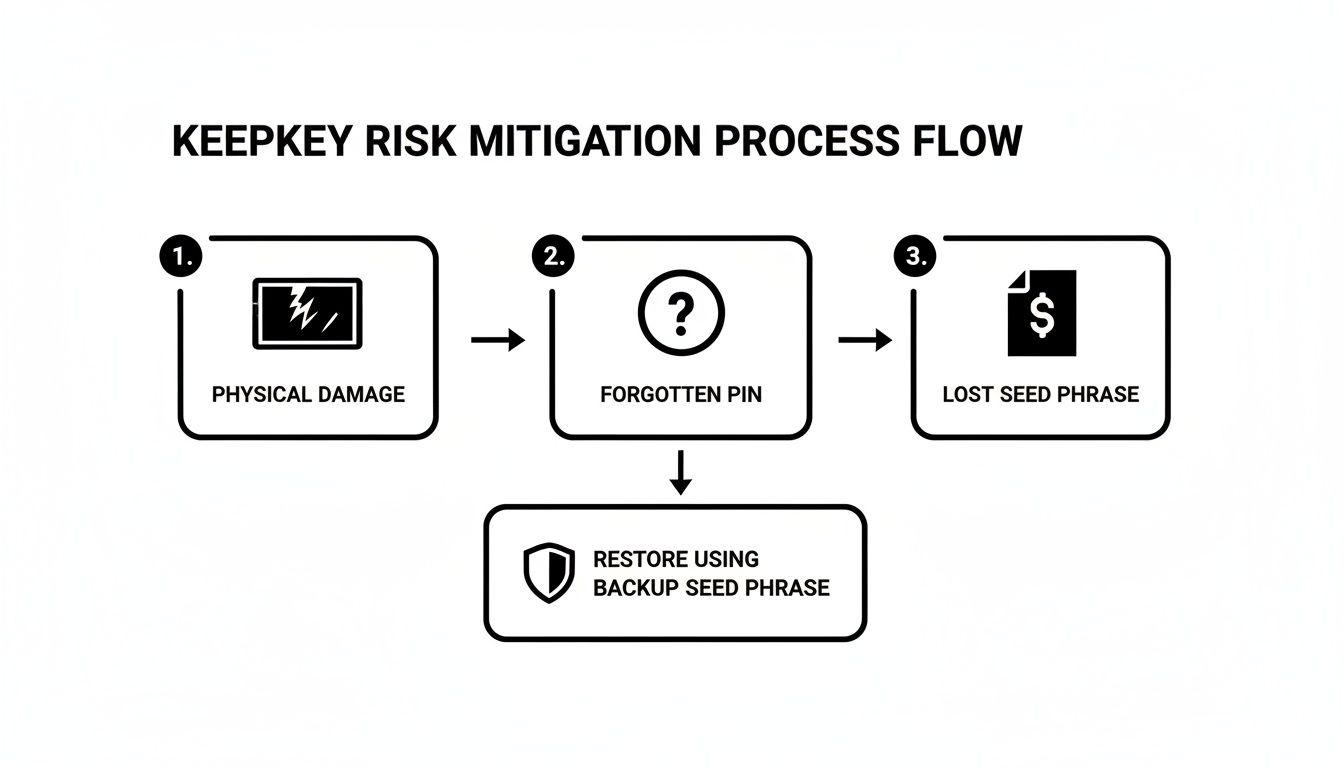
As you can see, losing the device or forgetting the PIN are recoverable problems. Losing your seed phrase is the real danger.
What If It's Just a Connection Issue?
Before you rush to wipe your device or buy a new one, run through a few simple checks. Often, the problem isn't the KeepKey itself but the connection to your computer.
A bad USB cable or a simple driver glitch can make it seem like your wallet is dead when it's perfectly fine. These basic troubleshooting steps often fix the issue without needing a full recovery.
If your computer doesn't see your KeepKey:
- Try a different USB port.
- Swap out the USB cable. This is a very common point of failure.
- Connect directly to your computer instead of using a USB hub.
Sometimes, the standard recovery process isn't an option, especially if your seed phrase is lost or incomplete. That’s when you need to consider more advanced solutions.
To help you figure out what to do next, here’s a quick summary of common issues and the first things you should try.
KeepKey Issues and Safe First-Aid Actions
| Problem | Recommended Safe Action | Critical Warning |
|---|---|---|
| KeepKey is lost or physically damaged | Purchase a new KeepKey (or another BIP39-compatible wallet). Use your 12-word seed phrase to recover your funds on the new device. | Do not attempt to repair a heavily damaged device yourself. Do not enter your seed phrase online. |
| Forgot your PIN | After 3 incorrect PIN attempts, the device will prompt you to wipe and recover. Wipe the device and restore it using your 12-word seed phrase. | If you also lost your seed phrase, stop. Incorrect PIN attempts will eventually lock you out permanently. |
| Device not detected by computer | Try a new USB cable and a different USB port. Reboot your computer. Reinstall the KeepKey client software. | Avoid running random scripts or third-party "driver fixers" you find online, as they can contain malware. |
| Firmware update failed / device bricked | Attempt to reboot the device into bootloader mode and re-flash the firmware. If unsuccessful, recover on a new device with your seed phrase. | Never use unofficial firmware. Only download updates directly from the official KeepKey source. |
| Lost your 12-word seed phrase | Stop. Do not wipe or reset your device. If you still have PIN access, immediately move your funds to a new, secure wallet. | This is a critical situation. If you cannot access the device, your funds are at high risk of being permanently lost. |
This table covers the initial, safe steps you can take on your own. For any situation involving a lost seed phrase where you've also lost access to the device, the problem becomes much more complex.
You can learn more about these advanced scenarios in our detailed guide on KeepKey wallet recovery. This will help you understand when it’s time to call in a professional for help.
Essential Security Habits for KeepKey Owners
A KeepKey hardware wallet gives you a massive leg up in securing your crypto, but the device itself is just one piece of the puzzle. What really keeps your assets safe are your personal security habits. It’s a lot like owning a top-of-the-line safe; if you leave the key under the doormat, the strength of the steel doesn't mean much.
Sticking to a few non-negotiable rules will slash your risk of loss. These aren't just arbitrary guidelines—they’re designed to protect you from the most common points of failure, which almost always come down to human error, not a flaw in the hardware.
Master Your Seed Phrase and PIN
Your entire crypto fortress is built on two things: your recovery seed phrase and your PIN. Getting into the habit of treating them with the respect they deserve is job number one.
Your recovery seed phrase is your master key, your absolute last resort. A simple piece of paper is a fragile thing—easily lost, destroyed by a water leak, or gone in a fire. To give your backup a real fighting chance, you need to make it tough.
- Upgrade from Paper: Ditch the paper and etch your seed phrase onto something made to last, like a steel plate or a purpose-built metal crypto wallet. These can survive the kind of physical damage that would turn a paper backup to pulp.
- Keep It Offline and Secret: Never, ever store your seed phrase digitally. That means no photos on your phone, no text files in a cloud drive, and no entries in a password manager. Keep your physical backup somewhere secure and private that only you know about.
Think of your PIN as the key you use every day. Its strength comes from being unique and keeping it separate.
- Create a Strong PIN: Go for a PIN that's at least 4-6 digits long and avoid anything obvious like your birthday. The scrambled keypad on the KeepKey screen is there to shield you from prying eyes and keyloggers, so you can enter it with confidence.
- Never Store Your PIN with Your Device: Leaving your PIN and your KeepKey together is like taping your house key to the front door. If someone gets their hands on both, it's game over for your security.
Cultivate Safe Transaction Habits
Beyond your backups, how you handle day-to-day transactions is crucial. This is where your KeepKey really shines, but you still have to play your part.
Always, always verify transaction details directly on your KeepKey's screen before you give the final okay. That big, clear display is your last line of defense against malware that might try to swap the recipient's address on your computer. Trust what the device shows you, not what you see in your browser.
Finally, make sure you're starting with a clean slate. Only purchase your KeepKey hardware wallet from an official, authorized retailer. A device from a secondhand seller could be a trap, pre-loaded with a compromised seed phrase that lets the seller drain any funds you send to it. By building these fundamental habits, you ensure your crypto stays exactly where it belongs: in your control.
When to Call a Professional Recovery Service
Your KeepKey is designed for secure self-custody, but let's be honest—some situations are just too risky to tackle on your own. Knowing when to stop and call in an expert can be the crucial decision that saves your assets.
If you're staring at a locked device with no clear way forward, it's time to get help. Think of it like this: recovering your wallet with a seed phrase is like using a spare key to get into your house. Losing that seed phrase is like having the house sealed with no doors or windows. You need a specialist.
Scenarios Demanding Expert Intervention
Stop what you’re doing immediately and consider professional help if you find yourself in one of these situations:
- You Lost Your Recovery Seed: This is the big one. If your PIN is also forgotten or the device is broken, your crypto is effectively trapped on the blockchain without a key.
- You Only Have a Partial Seed Phrase: Maybe you only have 11 of the 12 words, or a crucial word is smudged and unreadable. Professionals can run algorithms to brute-force the missing pieces.
- You Forgot Your PIN (And Have No Seed Backup): Without your seed phrase, every wrong PIN guess gets you closer to the device wiping itself completely. An expert can try to bypass this without triggering a reset.
- Severe Firmware or Hardware Failure: A botched firmware update or a physically dead device can make the standard recovery process impossible.
In these moments, trying to "guess" your way out of the problem is one of the worst things you can do. Every wrong PIN attempt or random reset can permanently destroy your chances of recovery.
How Professional Services Work
Services like Wallet Recovery AI use advanced, often AI-powered, methods to crack these kinds of problems. While KeepKey has had a solid security track record since its 2015 integration with ShapeShift, user error is something no device can prevent. That's where expert intervention becomes necessary. For anyone locked out of their KeepKey hardware wallet, these services offer a confidential path to recovering assets like Bitcoin and Ethereum. You can discover more about the crypto hardware wallet market and its growth over time.
When you contact a service, be ready to give them an honest, detailed history of the wallet. Gather any partial seed words you have, a list of possible PINs you might have used, and a clear description of what happened to your KeepKey. The more clues you can provide, the better their odds of getting your funds back.
Frequently Asked Questions
When you're getting started with a hardware wallet like the KeepKey, a few key questions always come up. Here are the straight answers from our team of experts.
What Coins Can I Store on a KeepKey?
Naturally, the first thing most people want to know is which assets they can actually store on it. The good news is that KeepKey has you covered for all the major players and a massive number of tokens.
It natively supports the big ones:
- Bitcoin (BTC)
- Ethereum (ETH)
- Litecoin (LTC)
- Dogecoin (DOGE)
- Bitcoin Cash (BCH)
- All ERC-20 tokens (which includes thousands of assets built on Ethereum)
And because it was designed to integrate tightly with the ShapeShift platform, you can manage and swap a huge range of other digital assets right from your secure device.
What Happens If KeepKey Goes Out of Business?
This is a critical question, and the answer should give you a lot of confidence in the principles of self-custody. If the company behind KeepKey ever disappeared, your crypto would be completely safe and accessible.
The KeepKey is built on open industry standards—specifically BIP39 for the recovery phrase. This means you can just take your 12-word recovery phrase and use it to restore your funds on almost any other compatible wallet, like a Trezor or Ledger. Your assets are on the blockchain, not tied to the device or the company.
Is My KeepKey Compatible with My Computer?
Your KeepKey should work smoothly with most modern computers, including those running Windows, macOS, and Linux. It just plugs in with a standard USB cable and you interact with it through a web interface like ShapeShift.
Sometimes, though, a device just won't show up, especially on Windows. Before you worry that the wallet is broken, always try these simple checks first:
- Try a different USB port on your machine.
- Get a brand-new USB cable. Cables fail all the time and are a common culprit.
- Plug the KeepKey directly into your computer, not through a USB hub or adapter.
These quick steps solve the vast majority of connection hiccups without any fuss.
If you're facing a more serious issue—like a lost seed phrase or a forgotten PIN—simple fixes won't work. Wallet Recovery AI uses specialized, AI-powered services to help you get back into your wallet safely and confidentially. Find out more about our secure recovery process at https://walletrecovery.ai.
Leave a Reply