

Getting into your crypto wallet isn't like logging into your bank account. There’s no "forgot password" link that emails you a reset. In crypto, "logging in" really just means proving you own the keys that control your funds. It’s a subtle but crucial difference.
Figuring out which key to use, and when, is the first and most important step to keeping your assets safe.
Understanding Your Wallet Access Keys
Before you can get into your wallet, you have to know what you’re actually working with. Unlike your typical online accounts, the crypto world relies on a few different credentials to prove you're the rightful owner.
Your exact login method will depend on your wallet type, as each one strikes a different balance between easy access and rock-solid security. This table gives you a quick breakdown of what to expect.
Wallet Types and Their Primary Access Methods
| Wallet Type | Primary Access Method | Security Level | Common Examples |
|---|---|---|---|
| Browser Extension | Password (to unlock) & Seed Phrase (for recovery) | Medium | MetaMask, Phantom |
| Mobile App | PIN/Biometrics & Seed Phrase (for recovery) | Medium | Trust Wallet, Exodus Mobile |
| Hardware Wallet | Device PIN & Physical Confirmation | High | Ledger, Trezor |
| Web Wallet | Username/Password & 2FA | Low to Medium | Blockchain.com, Coinbase Wallet |
As you can see, most wallets use a combination of credentials for daily access versus full recovery. Knowing which is which is where most people get into trouble.
The Three Keys You Need to Know
There are three main credentials you'll run into. From my experience, confusing these is the single most common reason people lose access to their crypto.
- Wallet Password: This is a simple password you set to unlock the wallet app on your phone or computer. It only works on that specific device and usually doesn't control the funds directly. If you have your master recovery phrase, you can almost always reset this.
- Private Keys: Think of these as the direct keys to your crypto. They are long strings of code that give anyone who has them complete control. You'll rarely, if ever, need to handle these directly. Your wallet software manages them for you in the background.
- Secret Recovery Phrase: This is your master key, often called a seed phrase. It's a list of 12 to 24 words that can restore your entire wallet—and all the private keys inside it—on a brand-new device. This is the holy grail.
Your Secret Recovery Phrase is the most valuable piece of information you own. Never, ever type it into a website or give it to anyone. Only use it when you are 100% certain you are restoring your own wallet on a device you trust.
The stakes are incredibly high. For instance, our recovery firm alone helped clients unlock over $2.5 million in trapped crypto in 2025, with Bitcoin accounting for 70% of that value. It’s a widespread problem affecting users from the US to the EU who get locked out of their non-custodial wallets. You can see more details in these wallet recovery statistics and trends.
Because of this, understanding the role of each key isn't just a good idea—it's essential. Using your password for daily access is perfectly normal. But reaching for your Secret Recovery Phrase should be a rare event that you handle with extreme care.
Accessing Browser and Web-Based Wallets
For many people, browser extension wallets like MetaMask or Phantom are the front door to Web3. They’re incredibly convenient for interacting with dApps, but that very convenience can create confusion and security risks when it's time to log in. Getting the process right from the start is non-negotiable.
Let's look at a situation we see all the time. You get a new computer and need to access the DeFi portfolio you manage with your browser wallet. So, how do you get your wallet from the old machine to the new one safely?
The answer hinges on one critical distinction: the difference between your password and your Secret Recovery Phrase. They are not the same thing.
Daily Access Versus Full Wallet Recovery
On your trusted, primary computer, you use a password to unlock your wallet extension. Simple. Think of this as the key to a specific app on a specific device—it keeps prying eyes out but has no power beyond that single installation.
When you need to log into blockchain assets on a new device, you aren't really "logging in." You're performing a full wallet recovery. This requires your Secret Recovery Phrase—those 12 or 24 words you were told to write down and hide when you first set up the wallet. This phrase is the master key. It can rebuild your entire wallet, with all its assets, on any device in the world.
Pro Tip: Never, ever type your Secret Recovery Phrase for a routine, daily login. It should only be used once during the official wallet import process on a new, secure device. The number one way people get their funds stolen is by entering this phrase on a fake login page they mistake for the real one.
Avoiding Phishing Attacks During Login
Scammers are experts at creating perfect replicas of wallet websites, login prompts, and dApp connection windows. They'll use phishing emails, paid search engine ads, and malicious links to lure you to their fake sites. Their only goal is to trick you into entering your Secret Recovery Phrase. The moment you do, your wallet can be drained in seconds.
Protect yourself with these hard-and-fast rules:
- Bookmark Your Way In: Always access your web wallet or find the official extension download page using a bookmark you saved previously. Don't rely on search engines.
- Inspect the URL: Before you type anything, check the address bar. Then check it again. A scam site will use subtle typos, like
phantorn.appinstead ofphantom.app. - Ignore Random Pop-ups: If a website suddenly pops up a window asking you to "re-validate" or "re-sync" your wallet by entering your seed phrase, it is 100% a scam. A legitimate wallet will never ask for your master phrase to interact with a dApp.
What if You Forget Your Wallet Password
If you've just forgotten the simple password for your browser extension, don't panic. As long as the extension is still on a device you can access, you’re okay for now.
But if you’re completely locked out or setting up a fresh machine, your Secret Recovery Phrase is your only way back in. You'll need to download the official extension, choose the "Import an existing wallet" or "Restore from Secret Recovery Phrase" option, and carefully type in your words.
After you enter the phrase, the wallet will be restored, and you’ll be asked to create a new password for that specific device. This process highlights why your recovery phrase is the single most important piece of information you own. It's your ultimate safety net.
Unlocking Hardware and Desktop Wallets
When you move up to hardware and desktop wallets, you’re stepping into a higher tier of security. This added protection means the process to log into blockchain assets is a bit different. Unlike wallets that live entirely in your browser, these methods keep your private keys tucked away in a much more controlled—and often offline—environment.
Getting comfortable with how they work is just as much about peace of mind as it is about security.
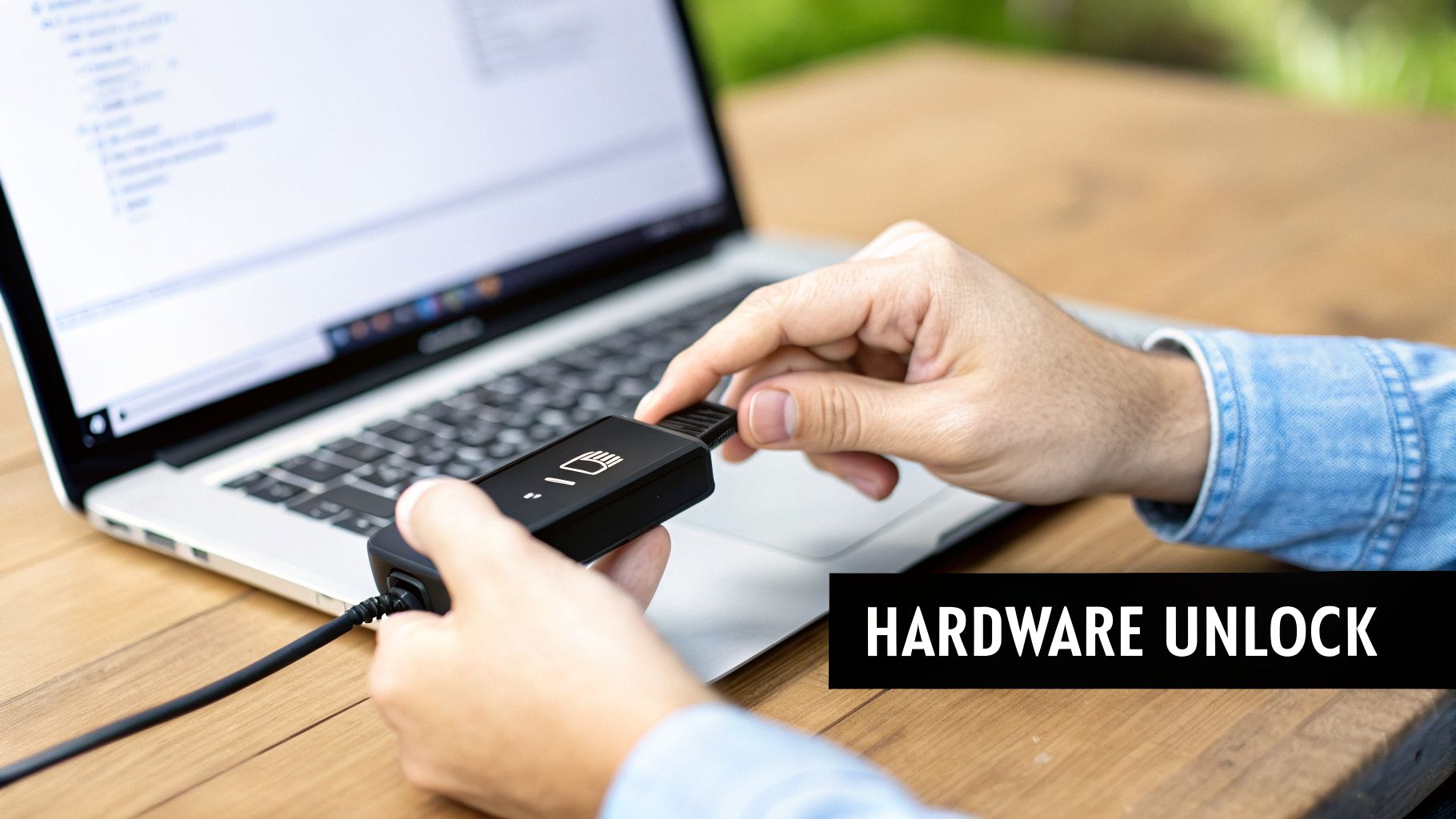
Let's imagine a scenario I’ve seen play out many times: you’ve lost your Ledger, or maybe it got crushed in a move. The device is gone. But you were smart and wrote down your 24-word recovery phrase. Your funds are perfectly safe; you just need to know the right recovery dance.
Accessing Your Hardware Wallet
The entire point of a hardware wallet, whether it’s a Ledger or a Trezor, is that your private keys never touch the internet or your computer. This is why getting in always involves interacting with the physical device itself. You can get a deeper look at the mechanics behind this in our guide on what is a hardware wallet.
Your day-to-day login looks something like this:
- Connect Your Device: First, you plug the hardware wallet into your computer via USB.
- Enter Your PIN: The device will light up and ask for a PIN. You’ll enter this using the physical buttons right on the wallet. This PIN just unlocks the device for this session.
- Confirm Transactions: Whenever you want to send crypto or sign a smart contract, you’ll have to physically press a button on the device to approve the action.
That last step is your fortress. Even if a hacker managed to get malware onto your computer, they can't drain your funds. Why? Because they can't reach over and press the buttons on the device sitting on your desk.
What to Do If Your Device Is Lost or Broken
If your hardware wallet is gone for good, that 24-word recovery phrase is your lifeline. To get your crypto back, you simply buy a new hardware wallet—it can even be from a different compatible brand.
During the initial setup, you’ll choose the "restore from recovery phrase" option and carefully type in your words. Just like that, your entire portfolio will reappear, completely intact.
The single most important thing to remember is that your PIN and your recovery phrase are two totally different things. The PIN is for daily access to a specific device. The recovery phrase is the master key to your funds, capable of bringing them back on any compatible device, anywhere.
Navigating Desktop Wallets
Desktop wallets like Exodus or Electrum work a little differently. They store an encrypted wallet file right on your computer’s hard drive. To get in, you just open the application and type in the password you set up. This password decrypts that local file, giving you access to your keys and coins.
Of course, this creates a specific vulnerability. If your computer’s hard drive fails or the wallet file gets corrupted, you could be locked out. But just like with hardware wallets, your Secret Recovery Phrase is the ultimate safety net. It lets you restore everything on a fresh installation.
Losing access is a frighteningly common problem, but I can tell you from experience that recovery is often possible. For instance, in 2025 alone, professional recovery efforts successfully brought back $2.5 million from wallets like Ledger, MetaMask, and even Bitcoin Core. One of those recoveries was a single wallet worth $1.5 million. Interestingly, Bitcoin made up 70% of the total value recovered, which shows that even long-time holders aren't immune to access issues. You can dig into the numbers in this report on cryptocurrency recovery trends.
Lock It Down: Essential Security for Every Login
Getting into your wallet is one thing. Keeping everyone else out is the real challenge. Every single time you go to log into blockchain assets, you're performing a security check, whether you realize it or not. It's time to move past the generic "use a strong password" advice and build real habits that protect you from some very clever threats.
Think of it as building a security-first mindset. These are simple, repeatable habits that act as your best defense against the most common ways people lose their crypto.
Verify Before You Connect
Phishing is, without a doubt, the number one threat you'll face when logging in. Scammers are masters at creating perfect copies of real wallet websites and login pages, just waiting for you to slip up and enter your credentials. The best defense is a healthy dose of suspicion and a rock-solid verification routine.
Before you even think about typing a password or connecting a wallet, burn these steps into your brain:
- Bookmark Your Official Sites: Never, ever use a search engine to find your wallet's login page. Scammers frequently buy ads that put their fake sites at the very top of the results. Find the official URL, save it as a bookmark, and only ever use that link.
- Triple-Check That URL: Get into the habit of glancing at the address bar. Scammers love to use subtle misspellings that are painfully easy to miss (think
metamask.iovs. the fakemetarnask.io). Read the full URL, every single time. - Ignore Urgent Pop-ups: A legitimate wallet will never, ever show you a random pop-up asking for your seed phrase to "re-sync" or "validate" your funds. If you see this, it is 100% a scam. Close the window immediately.
This simple flowchart is a great way to visualize the quick security check you should be doing before every single login.
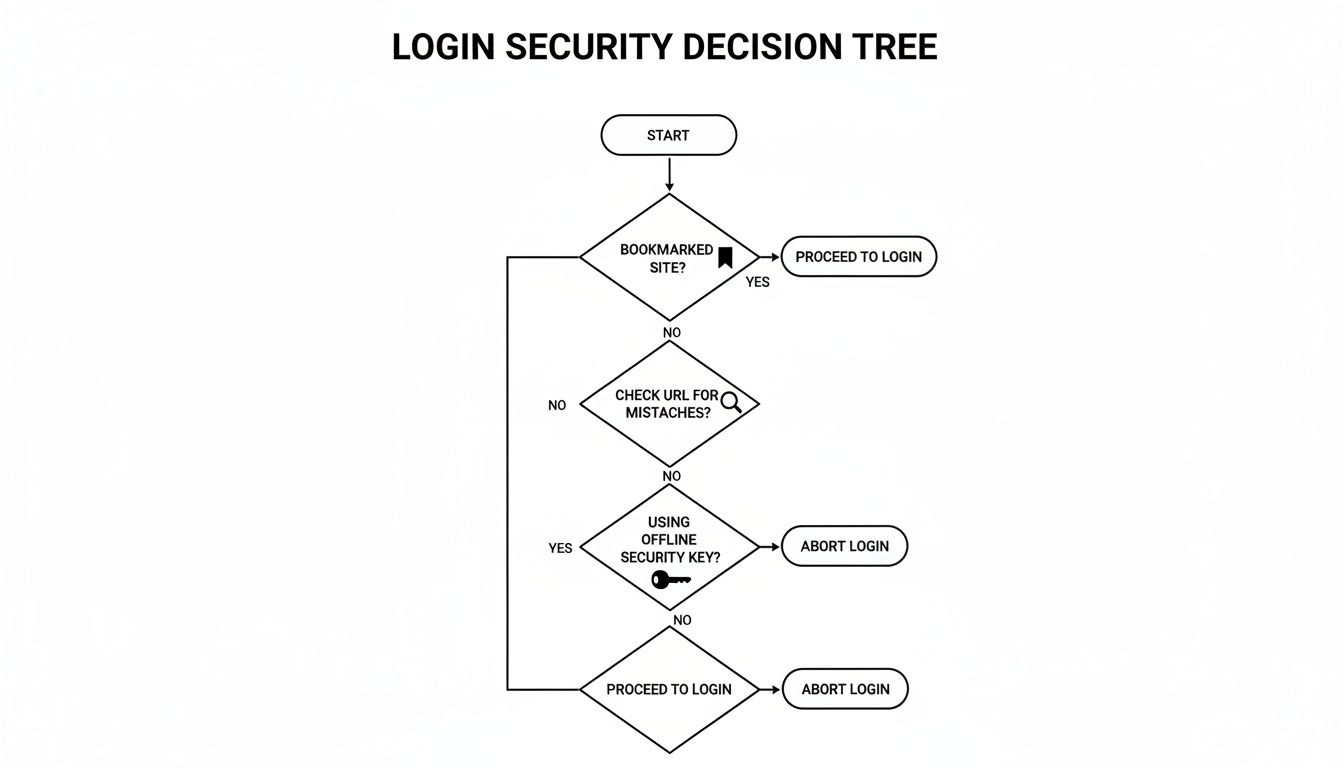
The key takeaway here is that verifying the site's authenticity is the absolute first step. Don't even think about your password until you've confirmed you're in the right place.
Keep Your Master Key Offline
Your Secret Recovery Phrase is exactly what it sounds like: the master key to your entire crypto life. It should never, ever live on a device connected to the internet. That means no password managers, no notes apps, and no email drafts. If a device is online, it can be hacked.
Store your phrase on something physical and keep it somewhere secure and private. This can be as simple as a piece of paper or as robust as a steel plate designed to survive fire and floods.
Let's be crystal clear about the most fundamental rule in crypto security: Your keys, your crypto. If a scammer gets your recovery phrase, it instantly becomes their crypto. There's no bank to call and no transaction to reverse.
For an added digital safeguard, always enable two-factor authentication (2FA) wherever it's offered, especially on centralized exchanges. It’s a simple step that adds a powerful layer of protection. If you want a deeper dive, check out our guide on two-factor authentication.
Troubleshooting Common Login and Access Issues
It’s a feeling every crypto owner dreads. You go to log in, and… nothing. An error message flashes, your hardware wallet won't connect, or the dApp you want to use just sits there, ignoring you. This is the moment where a little bit of panic can set in, but a methodical approach is your best friend here.
Before you start clicking everything in sight, take a breath. The key is to figure out what is actually going wrong. Different symptoms point to very different problems, and trying the wrong fix can waste time or, in some cases, make things worse.
First, What’s the Problem?
Let's run through some of the most common login headaches I see. Pinpointing your exact situation is the first step toward getting back in safely.
- "Invalid Password" Error: This is a classic, especially with browser or mobile wallets. It simply means the password you're using to unlock the wallet file on your device isn't the right one.
- Wallet Won't Connect to a dApp: You’ve successfully unlocked your wallet, but the decentralized app refuses to see it. This is almost always an issue with your browser settings or the connection itself, not your password or seed phrase.
- Hardware Device Not Recognized: You plug in your Ledger or Trezor, but the software (like Ledger Live or Trezor Suite) acts like it isn't there. This usually points to a physical problem—a bad cable, a faulty USB port, or a driver issue.
These are frustrating, for sure, but they’re often solvable. The bigger picture, however, is a bit more stark. We're facing a massive crisis of inaccessible funds. By 2026, it's estimated that between 3 to 4 million Bitcoins will be locked away in "dead wallets," representing billions in lost value.
It's a widespread problem. In fact, 21% of crypto owners have reported net losses, with a significant portion of that coming from access issues on popular wallets like Blockchain.com, Trust Wallet, or Exodus. You can dig into the numbers and see the scale of this issue in a recent report on inaccessible crypto assets.
Before we get to the point of no return, it's helpful to have a quick diagnostic checklist. I've put together this table to help you identify the symptom and try a few safe first steps.
Common Login Issues and Initial Fixes
This table is your first line of defense. Use it to match your symptom with a possible cause and a safe, preliminary action you can take.
| Error/Symptom | Possible Cause | First Steps to Try |
|---|---|---|
| "Invalid Password" or "Incorrect Password" | Typo, Caps Lock on, wrong password memory. | Double-check for typos. Try common variations you might have used. Ensure Caps Lock is off. |
| Hardware Wallet Not Detected | Bad USB cable/port, outdated drivers, or conflicting software. | Try a different USB cable and port. Restart your computer. Close other crypto-related apps. |
| Wallet Not Connecting to a dApp | Browser cache issue or a stale connection. | Clear your browser's cache and cookies. Disconnect and reconnect the wallet from within the dApp's interface. |
| Mobile App Freezes or Crashes on Login | Outdated app version or a temporary glitch. | Make sure the wallet app is updated to the latest version. Restart your phone. |
| "Cannot Decrypt Wallet File" | The password is incorrect, or the wallet file itself is corrupted. | Focus on password attempts first. Do not try to manually edit or replace the file. |
These simple fixes can resolve many of the most common hiccups. But what happens when they don't work?
Knowing When to Stop
This is the most critical part of the process: knowing your limits. For the simple errors we just covered, trying a few things on your own is perfectly safe. If a new USB cable makes your hardware wallet pop right up, great. If clearing your cache gets the dApp working, problem solved.
But there is an absolute red line.
The moment you realize you've lost both your password and your Secret Recovery Phrase, you must stop. Any further attempts on your own are not only pointless but could corrupt the wallet file, destroying the very data a professional might need for a recovery.
This is the scenario where you need to call in a specialist. It’s why services like ours at Wallet Recovery AI exist. We're here for the worst-case scenarios, using advanced methods to tackle problems that are far beyond simple troubleshooting.
Our work often involves:
- Brute-forcing passwords based on your partial memories or hints.
- Rebuilding and repairing corrupted wallet files.
- Extracting keys from physically damaged hardware devices.
If you've tried the basics and you’re still locked out—and especially if your seed phrase is gone—getting professional help is your safest and most effective next step. It protects you from causing more damage and puts a structured, expert-led process in motion to get your funds back.
Frequently Asked Questions About Wallet Access
When you're trying to log into a blockchain wallet, a few common questions always come up. The process isn't like a traditional bank account, and the differences can be confusing. Here are direct answers to the most critical questions we see.
Can I Log Into My Blockchain Wallet With Just a Username and Password?
Almost always, the answer is no. For non-custodial wallets like MetaMask or Trust Wallet, the "password" you set simply unlocks the app on that specific device. It's not a master key.
Your real key is the Secret Recovery Phrase. That's what you need to restore your wallet on a new phone or computer.
The only exceptions are custodial services, usually on centralized exchanges. They use a standard username and password because they control your private keys for you—a model that brings its own set of risks.
Is It Safe to Log Into My Wallet on a Different Computer?
This is a dangerous move unless you are 100% certain the computer is secure and belongs to you. The only safe way to access your funds on a new machine is to restore your wallet using your Secret Recovery Phrase.
Warning: Never, ever type your Secret Recovery Phrase into a public, shared, or untrusted computer. This is the equivalent of handing someone the keys to your entire financial life.
Hardware wallet users have it a bit easier. Connecting your Ledger or Trezor to a different computer is generally safe. The private keys are designed to never leave the physical device, which keeps you protected even if the computer itself is compromised.
What Happens if I Lose My Seed Phrase and My Password?
For any non-custodial wallet, this is the worst-case scenario. If you can't unlock your existing wallet and you don't have the seed phrase to restore it, your funds are effectively gone. The system is designed so that only the keyholder has access, with no central company to call for a reset.
This is precisely where a professional wallet recovery service becomes your only option. Specialists can use advanced forensic techniques to try and recover funds from corrupted files, partial data, or password hints. It's the last line of defense when all other hope is lost.
Why Does My Wallet Say Wrong Network When I Log In?
This is a very common issue, but it's not an access problem. It's just a simple configuration mix-up.
It means your wallet is connected to a different blockchain than the dApp you're trying to use. For example, your MetaMask might be set to the Polygon network while you're trying to interact with a site on Ethereum.
The fix is easy. Look for a network selector, usually a dropdown menu at the top of your wallet's interface, and switch to the correct network.
If you're facing a worst-case scenario with a lost password and seed phrase, it's critical to stop and seek professional help. At Wallet Recovery AI, we specialize in these complex situations, using AI-enhanced methods to help users regain access to their locked assets. You can learn more and submit a confidential inquiry by visiting us at https://walletrecovery.ai.
Leave a Reply