
If you’re trying to complete a Jaxx Liberty login, the quickest path to your funds is almost always restoring your wallet on a new device. You'll need your 12-word backup phrase to do this.
Since the original Jaxx app is deprecated, it often fails to run on modern operating systems. The most reliable method is to install a compatible version of Jaxx on another device—preferably a desktop—and use the 'Pair / Restore Wallet' function.
Your Guide to a Successful Jaxx Liberty Login
Trying to access an old crypto wallet like Jaxx Liberty can be a real headache, especially after several years. The original application is no longer supported, so just firing up the app on your old phone probably won't work.
The good news? Your access hinges on one thing: your 12-word backup phrase. This guide will walk you through the most effective way to get your crypto back—restoring your wallet from scratch—and help you sidestep the common issues we see every day.
Understanding the Restoration Process
It's important to understand that "restoring" a Jaxx wallet isn't like logging into a bank account. You're not connecting to a central server. Instead, you're using your backup phrase to regenerate your private keys, which unlock your funds directly on the blockchain. The app is just a tool to view and interact with those funds.
Here's what that really means for you:
- The App Is Disposable: Your crypto isn't stored in the Jaxx Liberty app itself. It lives on the blockchain. The app is simply your window to view it.
- The Phrase Is Everything: Your 12-word phrase is the master key. As long as you have it written down correctly, you can always regain access to your funds.
- A Zero Balance Is Normal (At First): When you first restore your wallet, the app has to scan multiple blockchains to find your assets. It’s very common to see a zero balance initially, so don't panic.
Key Takeaway: Your goal isn't to fix the old, broken app on your phone. The best strategy is to use your 12-word phrase to restore the wallet on a fresh installation of Jaxx Liberty, ideally on a desktop computer for better stability.
This mindset shift is crucial. It moves you from troubleshooting a dead-end application to correctly using your backup phrase, which is the path to success. You can learn more about this process in our guide on how to log into the blockchain.
To help you figure out where to start, check the table below. It covers the most common situations people find themselves in when trying to access their Jaxx Liberty wallet.
Jaxx Liberty Access Scenarios at a Glance
This table helps you quickly identify your situation and the first action to take for accessing your Jaxx Liberty wallet.
| Your Situation | Recommended First Step | Common Challenge |
|---|---|---|
| Old app won't open, but you have your phrase. | Install Jaxx on a new device and choose "Pair / Restore Wallet." | App synchronization can be slow, causing a temporary zero balance. |
| You can open the app but see a zero balance. | Check for app updates (if possible) or force a cache reset within settings. | The app may have lost connection to the correct blockchain nodes. |
| You forgot your password but have the phrase. | Ignore the password. Restore the wallet on a new device using the backup phrase. | A password is only needed for the old installation, not for recovery. |
Find your scenario in the table and follow the recommended first step. In most cases with Jaxx, starting fresh with your backup phrase is the key.
How to Verify Your Jaxx Liberty Backup Phrase
Your 12-word backup phrase is everything. It's the only key that can unlock your funds if you get locked out, so before you even attempt a Jaxx Liberty login or restoration, you absolutely must confirm your phrase is perfect.
Even a tiny mistake—one misspelled word, a swapped number, or a simple typo—can mean the difference between getting your crypto back and losing it for good. Think of this check as a crucial bit of housekeeping. It takes just a few minutes but can save you from a complete disaster down the road.
The BIP39 Wordlist: Your Single Source of Truth
Most modern crypto wallets, including Jaxx Liberty, use a standard known as BIP39. This standard generates your phrase from a very specific list of 2048 English words. If even one of your 12 words isn't on that list, the recovery will fail. Period.
Your first job is to grab a copy of that official BIP39 English wordlist. The safest way is to find it on a trusted source like GitHub, download it, and then check your words offline. You can even print it out.
Now, go through your written-down phrase word by word.
- Check Every Spelling: Common errors happen with words that sound alike. Did you write "wait" when it should have been "weight"? Or "wear" instead of "where"? These are easy mistakes to make.
- No Plurals: The wordlist contains only base words. If you wrote down "wallets," the correct word on the list is almost certainly "wallet."
- Go Through the Full List: Don't just glance at it. Methodically find each of your 12 words on the master list to be 100% sure they exist.
Expert Tip: Never, ever type your recovery phrase into an online "phrase validator" or "checker" tool. Most of these are scams designed to steal your phrase the second you enter it. Always perform this check on an offline device or with a printed copy of the wordlist.
Confirming Word Order and Legibility
Once you know all 12 words are spelled correctly and are on the BIP39 list, you have to tackle the next common failure point: the order. The sequence of your words is just as important as the words themselves. If the order is wrong, the wallet simply generates a different—and empty—set of keys.
Take a hard look at how you wrote your phrase down. Is the numbering clear? Could you have accidentally swapped words #5 and #6 when you were writing in a hurry? A hastily scribbled "3. solar, 4. suspect" can easily be misread later.
If you have any doubts at all, make a note of the potential alternatives. For example, if you aren't sure if "liberty" was word #7 or #8, write down both possibilities. This is incredibly valuable information if you end up needing a professional recovery service. We can use those notes to dramatically speed up the process of finding the correct combination.
Troubleshooting Common Jaxx Liberty Login Issues
Hitting a roadblock with your Jaxx Liberty login is a familiar, and incredibly frustrating, experience. Even when you’re sure your backup phrase is correct, things can go wrong. Because the app is no longer updated, you’re not just dealing with simple login errors—you’re up against problems that most modern wallets fixed years ago.
Instead of running in circles, let’s walk through the actual issues I’ve seen time and again. We’ll cover everything from data corruption to sync failures and pinpoint what’s really going on. We'll start with the simple stuff first.
The Dreaded "Wallet Not Found" Error
That "Wallet Not Found" message can definitely make your heart sink, but it almost never means your funds have vanished. It’s a classic symptom of the Jaxx Liberty app failing to read its own local data. Your crypto is still safely on the blockchain; the app has just lost the plot.
I’ve seen this pop up for a few common reasons:
- Corrupted Cache: Jaxx stores data to load faster, but this cache gets scrambled easily, especially after an operating system update or on an older phone.
- Incomplete Installation: If your connection was shaky when you first installed the app, it might be missing key files.
- Device Permissions: Modern phone security can be aggressive, sometimes blocking Jaxx from accessing the files it needs to run.
Important Reminder: Whatever you do, don't just delete and reinstall the app. That's a last resort. If you do that without being 100% certain your 12-word backup phrase is perfect, you could lose access for good. Deleting the app wipes the local encrypted keys from your device.
Why You See a Zero Balance After a Successful Login
Okay, so what if you get in, but the wallet shows a big fat zero? This is probably the most common cause of panic with Jaxx Liberty, but it’s often just part of the process.
This happens because the wallet has to scan multiple blockchains to find and display your funds. For a deprecated app trying to communicate with modern networks, this sync process can be painfully slow. It’s not unusual to stare at a zero balance for several minutes or sometimes much longer.
The first thing to check is always your seed phrase. Tiny mistakes are the number one reason for seeing an empty wallet after a restore.
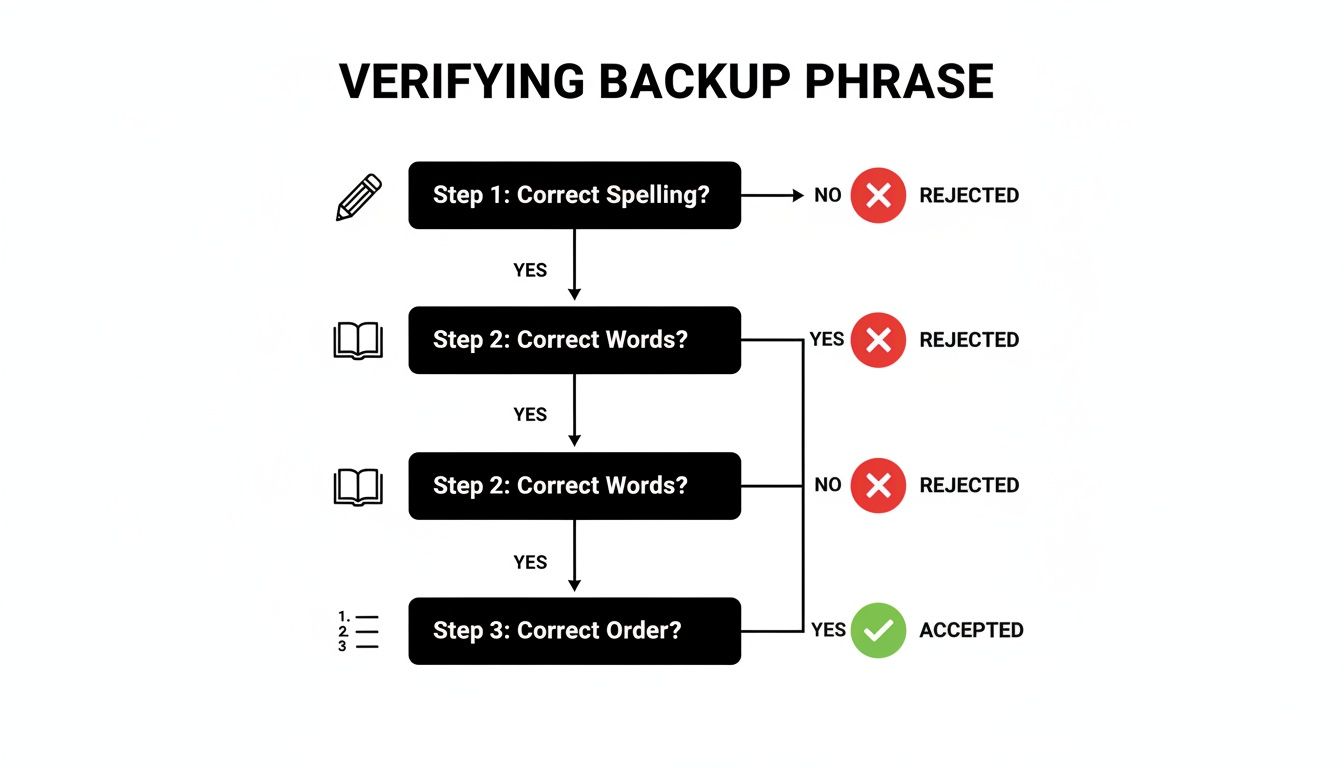
As this chart shows, you have to be meticulous. Double-check the spelling, the word itself, and the exact order before you do anything else.
Actionable Troubleshooting Steps
If you’ve waited patiently and your balance is still zero—or if you're just stuck on an error screen—it’s time to try a few things. These steps resolve the vast majority of Jaxx login issues I’ve encountered.
First Actions to Try:
- Clear the Cache: Go to the Jaxx Liberty menu -> Settings -> Tools -> Clear Jaxx Cache. This is a non-destructive way to force the app to re-sync with the blockchain.
- Toggle Your Network: Switch from Wi-Fi to your cellular data, or vice versa. Sometimes, one network has a better connection to the specific crypto nodes Jaxx needs.
- Use a VPN: In some regions or on certain networks (like public Wi-Fi), connections to crypto nodes might be blocked. Firing up a reputable VPN can often get you around this.
These older, unsupported wallets are becoming a huge problem. In our work as recovery specialists, we’re seeing a big increase in cases involving deprecated wallets like Jaxx, MultiBit, and BRD. The obsolete tech makes recovery far more complex.
In 2025 alone, one firm recovered $2.5M in assets, but noted that these legacy wallets were the most challenging due to a lack of developer support and users finding phrases written down years ago. You can read more on this trend in the full report on Fintech Weekly.
What to Do When Your Jaxx Backup Phrase Fails
Okay, so you’ve entered your 12-word backup phrase to complete your Jaxx Liberty login and… nothing. It failed. Your stomach drops, and panic starts to set in. Take a breath. This doesn't automatically mean your funds are gone forever.
Before you do anything else, stop. Frantically retyping the phrase won't help. More often than not, the issue isn't that you have a completely wrong phrase, but that a small error was made when you first wrote it down. A little methodical detective work is your best first step.
Investigating a Failed Backup Phrase
When a backup phrase doesn't work, it's almost always for one of a few common reasons. The key is to figure out which scenario you're in, because that will tell you what to do next.
Take a hard look at the written copy you have. The most frequent failure points are:
- A Single Misspelled Word: This is incredibly common. We see sound-alike words all the time, like "wait" vs. "weight" or "woman" vs. "women." One wrong letter is all it takes.
- Incorrect Word Order: You wrote down all the right words, but you accidentally swapped their positions. Maybe word #7 and #8 are switched in your notes.
- A Missing 13th Word (Passphrase): Jaxx Liberty had an optional passphrase feature. If you set one up, it acts as a 13th word. Forgetting it means your 12-word phrase is incomplete and will never work on its own.
Crucial Insight: If you enter your 12 words and the wallet opens with a zero balance, pay close attention. This means your phrase is technically valid (all words are from the BIP39 list), but it's generating a brand-new, empty wallet. This is a massive clue that points directly to a word order mistake or a forgotten passphrase.
DIY Recovery Attempts and When to Stop
If you think you've found a simple typo, you can try a few careful corrections offline. For instance, if you're unsure about one word, you could try a few logical variations. But this approach has its limits. With 12 words, the number of possible combinations gets astronomical very, very quickly. Guessing becomes impossible.
This is a much bigger problem than most people realize. In 2025 alone, our team at Crypto Recovers restored access to non-custodial wallets holding over $2.5 million. The single largest recovery was a staggering $1.5 million. A significant number of these cases involved older wallets just like Jaxx Liberty, where users ran into login issues or the software just stopped working. You can read more about these massive crypto recovery efforts on Chainwire.org.
The moment you realize you have more than one or two potential errors, it’s time to stop.
Pummeling your wallet with incorrect phrases is not only futile but risky. Worse, many of the so-called "recovery tools" you'll find online are just scams designed to steal your seed phrase and any variations you enter.
If your own logical attempts don't work after a handful of tries, or if you suspect a forgotten passphrase is the real issue, your safest and most effective move is to consult a professional service. We use secure, offline supercomputers to test millions of combinations without ever exposing your information online. It’s the best shot you have at getting your assets back.
When to Use a Professional Wallet Recovery Service

Sometimes, you just have to know when to throw in the towel. While troubleshooting your Jaxx Liberty login on your own is admirable, pushing too far can turn a recoverable situation into a permanent loss. It’s a tough pill to swallow, but recognizing when you’re out of your depth is a critical skill in crypto.
There are moments when the problem is bigger than a simple sync issue or a password you can't quite remember. In these cases, every failed DIY attempt or every download of a sketchy online tool increases your risk. You need to know the red flags that say, "Stop. It's time to call a pro."
Clear Signs You Need an Expert
If any of these scenarios sound familiar, your safest and most effective move is to seek professional help. Don't risk it.
- Your Backup Phrase is Damaged or Incomplete: Maybe a word is smudged, you know you wrote it down wrong, or you're missing a word or two. Trying to guess the missing pieces yourself is like searching for a single grain of sand on a beach—it's practically impossible.
- You've Forgotten the Passphrase (13th Word): Did you add that optional passphrase to your Jaxx wallet? If so, your 12-word backup phrase is useless without it. Experts have tools to tackle this specific problem.
- Your Wallet Files Are Corrupted or the Device is Damaged: If the phone or computer holding your wallet has died, or you suspect the files themselves are corrupted, don't give up. Specialists can often surgically extract and repair data from damaged hardware or files.
- A Lot of Money is at Stake: This one is simple. When a life-changing amount of crypto is on the line, the small cost of a professional service is an easy choice for the security and peace of mind it provides.
Why It's Worth It: A professional service isn't just about trying more passwords. They use secure, offline supercomputers to test billions of combinations safely. Your sensitive data never touches the internet, eliminating the risk of theft from malware or scam tools.
How Professional Services Work
Reputable recovery firms use specialized hardware and proprietary software that systematically attack complex wallet access problems. For example, if you have a general idea of what your forgotten passphrase might be—a list of possible words, names, or numbers—their algorithms can test every conceivable variation far beyond what any human could.
This approach is fundamentally different and infinitely safer than using random tools found on forums or YouTube. Many of those are outright scams designed to drain your wallet the second you enter your backup phrase. To see how a legitimate service operates, check out our deep dive on what a professional wallet recovery service can do. When the stakes are high, it's the smartest way to get your funds back.
Frequently Asked Questions About Jaxx Liberty
When you're trying to get into an old wallet like Jaxx Liberty, a lot of questions can pop up. It's an unusual situation, especially with the Jaxx Liberty login and recovery process. We've seen it all, so here are some straight answers to the most common concerns we hear from clients.
Can I Still Use Jaxx Liberty in 2026
Technically, you might be able to access a Jaxx Liberty wallet with your 12-word backup phrase, but the app itself is long deprecated. This means it gets zero updates, no security patches, and absolutely no support from its original developers.
We strongly advise against using it for any active transactions. The security risks are just too high. The only reason to open an old Jaxx wallet today is to migrate your assets out and into a modern, supported wallet that's actively maintained.
What Happens If I Enter My Jaxx Backup Phrase Incorrectly
Don't panic—entering the wrong backup phrase won't lock you out or destroy your funds. Your crypto is tied to that one, single, correct 12-word phrase, and nothing can alter that.
What actually happens is the wallet generates a brand new, empty wallet from the incorrect phrase you entered. If you restore your wallet and see a zero balance, the very first thing you should do is double- and triple-check your written phrase. Spelling mistakes and words in the wrong order are the most common culprits.
Key Insight: A zero balance after a restore is a huge clue. It tells you the phrase you used was technically valid (all the words were on the BIP39 list), but it wasn't your specific phrase. This almost always points to a simple word mix-up or a forgotten passphrase.
Is It Safe to Give My Backup Phrase to a Recovery Service
You should never hand over your complete backup phrase to anyone or any service you don't absolutely trust. Legitimate, professional services understand the gravity of this and have built their entire business around strict security and privacy protocols.
A reputable firm will often work with partial information you provide, like a jumbled list of words or fragments of a password you remember. They use powerful, secure, offline computers to run through the possibilities without ever exposing your full seed phrase online. Always do your homework—check a service's reputation, security practices, and what past clients have to say before you proceed.
My Jaxx Liberty App Won't Open What Should I Do
If the Jaxx Liberty app itself won't even launch, the problem is almost certainly an incompatible operating system update or corrupted app files on your phone or computer.
Whatever you do, do not delete and reinstall the app unless you are 100% certain you have the correct 12-word backup phrase written down and verified. The safest move is to try installing Jaxx on a different, compatible device and use your backup phrase to restore the wallet there.
If you've hit a dead end with a lost password, a damaged backup phrase, or corrupted files, Wallet Recovery AI is here to help. We use a secure, AI-powered process to help you get your assets back without ever compromising your privacy. Submit your case online to get a fast, confidential assessment from our team.
Leave a Reply