
Let's clear up one of the most common questions new users have: does Exodus charge a fee every time you send or receive crypto?
The short answer is no. While you will see a fee attached to your transactions, that money isn't going to Exodus. Instead, you're paying a network fee that goes directly to the miners or validators who keep the blockchain running.
Your Quick Guide to Exodus Wallet Fees
Think of it like sending a letter. Exodus provides the free envelope and address book (your wallet), but you still have to buy a stamp to pay the post office (the network) for delivery. Without that "postage," your transaction simply won't get processed.
This is a crucial distinction to understand. Exodus is the software interface that lets you manage your assets, but the actual work of confirming your transaction and recording it on the public ledger is done by a decentralized network, like Bitcoin or Ethereum.

These network operators—the miners and validators—are the ones who get paid for their work, not the wallet provider.
Where Your Money Really Goes
It’s a persistent myth that Exodus is taking a cut of these transaction costs. The reality is quite the opposite.
Exodus itself does not charge any fees for sending or receiving cryptocurrency. The company retains zero percent of these fees, with 100% going directly to the network miners or validators who process and secure your transaction.
So, whenever you see an Exodus wallet fee for a standard send/receive transaction, you are simply looking at the required network fee. Exodus just calculates and displays this cost for you. You can read more about how Exodus explains its fee policy in their official support documentation.
To give you a clearer picture, here’s a quick breakdown of the different costs you might run into while using the wallet.
Summary of Fees You Might Encounter in Exodus
| Fee Type | What It Is | Who Gets Paid | Is It Charged By Exodus? |
|---|---|---|---|
| Network Fee | A mandatory fee to process a transaction on the blockchain. | Miners or Validators on the network (e.g., Bitcoin, Ethereum). | No. Exodus passes 100% of this fee to the network. |
| Swap/Exchange Fee | A small percentage taken when you exchange one crypto for another inside the wallet. | Third-party exchange providers that facilitate the swap. | No. This is a third-party provider fee. |
| Fiat On-Ramp Fee | A fee for buying crypto with a credit/debit card or bank transfer. | Third-party payment processors that handle the fiat conversion. | No. This is a third-party provider fee. |
| Hardware Wallet Fee | The one-time cost to purchase a physical hardware wallet. | The hardware manufacturer (e.g., Trezor). | No. This is a product purchase, not a service fee. |
As the table shows, the only truly unavoidable cost for basic transactions is the network fee. Other services, like swapping assets or buying crypto with cash, are optional conveniences offered through integrated partners, and they come with their own distinct costs. We'll dive deeper into those in the sections ahead.
Decoding the Network Fees in Your Wallet
Whenever you send crypto from your Exodus wallet, you'll run into a network fee. It's the most common cost you’ll see, but it's important to know this fee isn't paid to Exodus. It’s the price of using the blockchain itself.
Think of networks like Bitcoin or Ethereum as massive, public highways. The network fee is simply the toll you pay to get your transaction from your wallet to its destination.
This toll doesn't land in Exodus's bank account. Instead, it goes directly to the miners or validators who do the hard work of verifying your transaction, adding it to a "block," and securing it on the public ledger. This process is what keeps the whole system running securely. Without these fees, there'd be no one to maintain the highway, and everything would grind to a halt.
What Drives Network Fees Up or Down
That digital toll isn't a fixed price. It moves up and down based on a couple of key factors, a lot like real-world traffic.
- Network Congestion: When tons of people are trying to send transactions all at once, the network gets backed up—it’s the blockchain's version of rush hour. Because there's only so much space in each new block, users essentially have to bid against each other with higher fees to get their transaction processed quickly.
- Transaction Size: This has nothing to do with the dollar amount you're sending. It’s all about how much data your transaction takes up. A more complex transaction, like one pulling from many small previous deposits, uses more data and costs more. It's like paying a higher toll for a big rig than you would for a small car.
Because of these dynamics, the Exodus wallet fee you see is always a real-time estimate. It's a live quote for securing your spot on the blockchain, not a static price set by the wallet.
Understanding Fee Terminology
As you jump between different blockchains in Exodus, you'll see these fees called different things. They all serve the same purpose, but the names and the way they're measured can vary.
On Ethereum and its related networks, the fee is called "gas." You pay gas to fuel transactions and smart contract actions, and it's measured in tiny units called "gwei."
For Bitcoin, the fee is usually shown in "satoshis per virtual byte" (sats/vB). A satoshi is the smallest possible piece of a Bitcoin. This metric tells miners how much you're willing to pay for every byte of data your transaction takes up. A higher sats/vB rate makes your transaction more attractive for them to include in the next block.
Exodus automatically calculates the best fee for you by looking at current network conditions. The goal is to strike a balance between cost and speed, ensuring your transaction goes through without getting stuck or costing you a fortune.
Exodus also has a smart way of handling Bitcoin fees. To help transactions confirm faster, any tiny leftover amount of Bitcoin (often called "dust") is automatically included in the fee. Specifically, any remaining balance under 0.00001501 BTC gets rolled into the fee. You can read more about this on their official support page.
This is an especially important detail if you're working with smaller amounts, as the network fee can sometimes be a big chunk of what you're sending. To get a better handle on the basics, check out our guide on how to transfer crypto to a wallet. Once you understand what these fees actually are, you can make much smarter decisions about when and how you move your crypto.
Swapping one crypto for another right inside your Exodus wallet feels incredibly easy. A few taps and your Bitcoin becomes Ethereum, or your Solana turns into USDC. But what's the real cost for that convenience? Think of it like swapping cash at an airport kiosk—you're paying a premium for speed and simplicity.
While standard network fees are one thing, the Exodus wallet fee for in-app swaps is a bit more layered. It’s not a single fee, but a mix of a direct charge and a less obvious cost called the spread, which can make a swap more expensive than you’d guess.

Getting a handle on both of these parts is the key to knowing when the convenience is actually worth the price.
Breaking Down the Spread
The biggest "hidden" cost you'll run into is the spread. Put simply, the spread is the gap between the buying price (bid) and the selling price (ask) for an asset. Exodus works with third-party exchange providers to make these swaps happen, and those providers bake their profit into this price difference.
For example, a provider might buy one ETH for $3,000 but offer it to you inside the app for $3,030. That $30 difference is the spread. It’s not labeled as a "fee," but it directly reduces how much of the new crypto you end up with.
The spread lets the exchange provider turn a profit while covering the risk of a fluctuating market. This is standard practice everywhere from stocks to forex, but you have to account for it when figuring out your true swap cost in Exodus.
This is why the exchange rate you see in Exodus probably won’t match the market rate listed on a site like CoinGecko or CoinMarketCap. That difference is where both the provider and Exodus make their money.
The Exchange Fee on Top
On top of the spread, there’s also a straightforward exchange fee. This is a small percentage taken from your total transaction amount just for handling the swap, and it’s split between Exodus and its partners to cover operational costs.
This fee isn't set in stone. It shifts based on a few things:
- The Assets You're Swapping: Trading high-volume pairs like BTC for ETH usually comes with a tighter spread and a lower fee. If you’re swapping for a less common altcoin, expect the cost to be much higher because of lower liquidity and greater risk for the provider.
- Market Volatility: When prices are swinging wildly, providers increase their spreads to protect themselves from potential losses. That makes your swap more expensive.
- Network Congestion: Remember, your swap still needs to be recorded on the blockchain, which comes with its own separate network fee.
Add it all up, and the total cost can be pretty significant. In some situations, these swap fees can climb as high as 12% of your transaction's value. That’s a huge jump from the 0.1% to 0.5% you might pay on an external decentralized exchange. To see how these costs stack up, you can discover more insights about Exodus wallet fees and their comparison to alternatives. This is exactly why you should always double-check the final quote before hitting that "swap" button.
How to View and Customize Your Transaction Fees
Knowing network fees exist is one thing, but actually controlling them is what saves you money. Exodus gives you the tools to go from just accepting the default fee to actively managing your transaction costs.
While the wallet is smart enough to pick a fee that gets your transaction through reliably, you don't have to stick with its suggestion. You have the final say.
For major assets like Bitcoin (BTC) and Ethereum (ETH), Exodus lets you unlock custom fees. Think of it as deciding how much postage to put on a letter—you can pay more for speed or save a bit if you’re not in a rush. Turning this feature on is your first step to taking control.
Activating Custom Fees in Your Wallet
Before you can fine-tune any fees, you'll need to enable the option in your wallet's settings. You only have to do this once per asset.
- Open Exodus on your desktop or mobile device.
- Go to Settings. On desktop, look for the gear icon. On mobile, it's usually under the "Profile" tab.
- Find the Assets menu within your settings.
- Select the asset you want to manage (like Bitcoin) and flip the switch to Enable Custom Fees.
Once you've done this, a new option to set a custom Exodus wallet fee will show up every time you prepare to send that crypto.
How to View the Estimated Fee
Exodus makes sure there are no surprises. It shows you the network fee before you hit send.
Imagine you're sending some Ethereum. After you've put in the recipient's address and the amount, the confirmation screen will pop up.
There, you’ll see a clear breakdown, including a line item for the “Network Fee.” Exodus displays this cost in both ETH and your local currency (for example, $5.30), so you know exactly what you’re paying. This is your moment to review the cost before committing.
Customizing Your Fee for Speed or Savings
With custom fees enabled, you'll see a button like "Edit Fee" on that same confirmation screen. Clicking it brings up a slider or a few choices, usually with clear labels.
- Fastest: Sets a high fee to get your transaction prioritized by the network. This is great for time-sensitive transfers, especially when the market is moving quickly.
- Normal: The default, balanced option. Exodus recommends this for most everyday transactions.
- Economy: This sets a much lower fee to save you money. The trade-off is a longer wait time. Your transaction goes to the back of the line and could take hours to confirm if the network is congested.
The concept is simple: you are paying for priority. A higher fee makes your transaction more attractive for miners or validators to include in the next block, so they process it faster. If you set the fee too low, you risk having it get "stuck" pending for a long time.
Getting a feel for the wallet's features is the best way to become confident. If you want a full tour, check out our guide on how to use the Exodus wallet to get started. By learning to customize your fees, you gain total control over the balance between speed and cost, making sure every transaction fits your needs perfectly.
Real-World Examples of High Exodus Fees
Theory is one thing, but seeing how fees play out in the real world is what really makes it click. Let's look at a few scenarios where Exodus fees might seem shockingly high, and break down exactly what’s happening under the hood.
One of the most common surprises, especially for Bitcoin users, is seeing a huge network fee attached to a relatively small transaction. It’s not a bug. It’s a direct result of how your wallet’s history is built over time.
The Problem of Transaction Dust
Think of your wallet not as holding one big pile of Bitcoin, but dozens of tiny, separate piles from all your past deposits. Maybe you got them from a mining pool, a crypto faucet, or just a bunch of small incoming payments. In the crypto world, we call these tiny, unspent amounts "transaction dust."
When you go to send some Bitcoin, your wallet has to scoop up enough of these little piles to match the amount you want to send. It’s like paying for a $20 coffee with a giant handful of pennies instead of a single $20 bill. The cashier—or in this case, the miner—has to count every single coin, which takes a lot more work.
On the blockchain, that "work" costs real money. A transaction that pulls from dozens of tiny inputs is physically larger in data size, so miners charge a higher fee to include it in a block. The cost isn't about the dollar value you're sending; it's all about the complexity of the package the network has to handle.
Exodus gives you a window into this process and some control over the outcome before you commit.
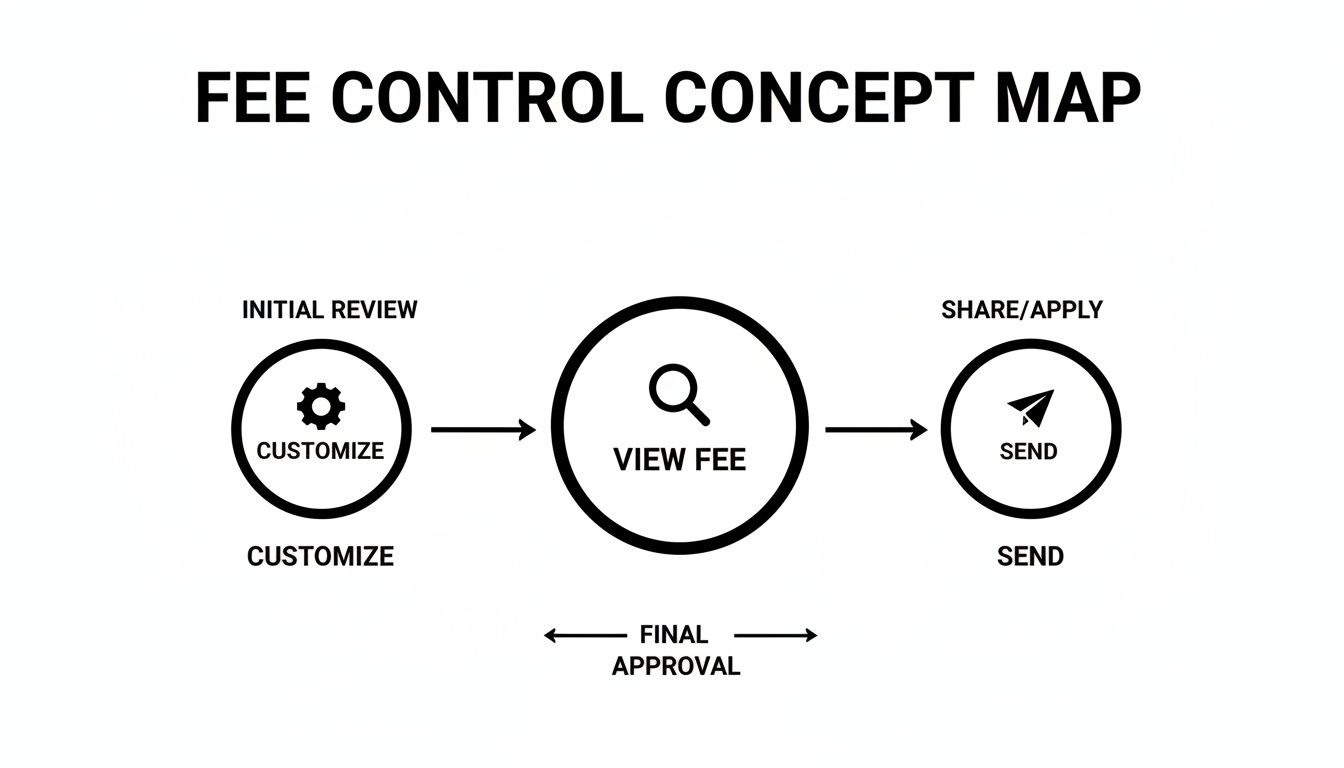
This simple flow shows that you always get to see the estimated fee, have a chance to customize it, and give the final approval before anything is sent.
A Real-Life Dust Scenario
This isn't some abstract thought experiment; it’s a situation people run into all the time. One documented case perfectly captured the frustration this can cause.
A user holding about $324 USD in Bitcoin found that the network fee to send it was going to eat up roughly 22% of their entire balance. After the fee, only $252 USD was actually spendable.
This is a classic example of a wallet filled with "dust." To move the funds, the wallet had to bundle together a huge number of tiny, old inputs, creating a data-heavy transaction with a correspondingly high Exodus wallet fee. You can actually read the original forum discussion about this high Bitcoin fee and see how other users diagnosed the problem. It’s a great lesson, especially if you're firing up an old wallet you haven't touched in years.
To really drive the point home, let’s compare two Bitcoin transactions side-by-side.
Fee Comparison Low vs High Complexity Transactions
This table shows how two transactions sending the exact same amount of BTC can end up with wildly different network fees based purely on their complexity.
| Scenario | Transaction Details | Estimated Fee Impact | Key Takeaway |
|---|---|---|---|
| Simple Transaction | Sending 0.1 BTC that came from a single previous deposit of 0.1 BTC. | Low Fee. The transaction is small in data size because it only has one input. | The fee is minimal because the transaction is clean and simple for the network to process. |
| Complex Transaction | Sending 0.1 BTC by combining 50 small deposits of 0.002 BTC each. | High Fee. The transaction is large in data size because it has to bundle all 50 inputs. | The fee is much higher, not because of the amount sent, but because of the work required to gather the funds. |
As you can see, transaction history matters. A wallet cluttered with many small UTXOs (unspent transaction outputs) will always cost more to use. Knowing this, you can be smarter about managing your crypto—for instance, by consolidating your dust into a single UTXO during times of low network traffic to save big on fees later.
How to Actually Lower Your Crypto Fees
Knowing how Exodus fees work is one thing, but actually saving money is another. A few smart moves can seriously cut down your transaction costs, leaving more crypto in your wallet.
Think of it like avoiding surge pricing. You wouldn't book a ride during rush hour if you could wait 15 minutes for the price to drop. The same logic applies to blockchains.
Time Your Transactions
Blockchains like Bitcoin and Ethereum have busy and slow periods. When everyone is trying to send transactions at once, the network gets clogged, and fees shoot up as people compete for space.
You can often cut your costs in half just by waiting for a quieter time. These lulls usually happen on weekends or late at night in major time zones. You can watch for these dips yourself using tools like an Ethereum Gas Tracker or a Bitcoin Fee Estimator to find the cheapest time to send.
Clean Up Your Bitcoin "Dust"
Like we covered earlier, a wallet full of tiny Bitcoin deposits (or "dust") makes for bigger, more expensive transactions later on. You can get ahead of this by consolidating all those small bits into one larger UTXO.
The perfect time to do this is when network fees are already rock-bottom. Pay one small fee now to combine your dust, and you'll guarantee your future transactions are simpler and much cheaper. It’s a small price to pay for big savings down the road.
Expert Tip: This is like organizing a messy toolbox. Instead of digging through dozens of tiny, loose screws, you put them all in one container. It's just more efficient when you actually need to build something.
Use the Right Tool for the Trade
Exodus's built-in swap is incredibly convenient, but it isn't always the cheapest option, especially if you're exchanging larger amounts.
If your main goal is to minimize fees on a swap, it's often worth sending your funds to an external exchange, making the trade there, and then withdrawing them back to Exodus. It takes a few more steps but can save you a good chunk of change on spread and exchange fees.
Also, always look for low-fee networks. If you're sending a stablecoin to an exchange that supports multiple networks, choosing to send it over Tron or Solana will almost always be cheaper than using Ethereum.
By putting these three habits into practice, you take direct control over your costs:
- Be Patient: Don't send crypto during peak hours when the network is congested.
- Be Proactive: Consolidate your Bitcoin dust when fees are low to save later.
- Be Smart: For big swaps, use an external exchange. For transfers, pick the cheapest network available.
These simple shifts change you from someone who just pays fees to someone who actively manages them. It ensures your money stays where it belongs—in your wallet.
Frequently Asked Questions About Exodus Fees
Once you start moving crypto around in your Exodus wallet, you’re bound to run into a few head-scratchers about fees. It happens to everyone. Let's clear up some of the most common questions we see.
Why Is My Bitcoin Fee So High for a Small Amount?
This one trips up a lot of people. The fee for a Bitcoin transaction has nothing to do with the dollar amount you’re sending. It's all about how much data your transaction takes up on the blockchain.
Imagine your wallet has received lots of small deposits over time—what some call crypto "dust." When you go to send a payment, Exodus has to bundle all those tiny pieces together. Think of it like paying for a coffee with a huge handful of pennies instead of a single dollar bill. It takes more work to count all the coins, and on the blockchain, more work costs more in fees.
So, a transaction that pulls from one big deposit will be much cheaper than one that has to gather up 50 small ones, even if the final amount sent is exactly the same.
Can I Completely Avoid Paying Fees in Exodus?
When it comes to network fees, the answer is a hard no. These fees are the lifeblood of any blockchain, going directly to the miners or validators who process and secure your transactions. Exodus doesn’t see a dime of this money.
Trying to send crypto with no network fee is like sending a letter with no stamp—it’s just not going to get there.
However, you can absolutely avoid optional fees. You’re never forced to use the built-in exchange, for example, which has its own spreads and service costs. The only fee that's truly non-negotiable is the network fee required to move your assets on-chain.
What Happens If I Set My Custom Fee Too Low?
It can be tempting to slide that custom fee way down to save a few bucks, but this can seriously backfire. If your fee is too low, miners will simply ignore your transaction and pick up the more profitable ones first. Your transaction will get stuck in a "pending" limbo, sometimes for hours or even days.
While a low fee might seem tempting, it creates a risk of your transaction getting stuck indefinitely during periods of high network congestion. If this happens, you may need to use advanced wallet features to replace or cancel it, which can be a complex process.
For most people, sticking with the "Normal" or recommended fee is the smartest move. It strikes the right balance between cost and speed, ensuring your funds actually get where they need to go without any drama.
If you've lost access to your wallet due to a forgotten password or other issues, fee management is the least of your worries. Wallet Recovery AI offers secure, confidential assistance to help you regain control of your assets. Our AI-driven techniques support a wide range of wallets, including Exodus, ensuring you can access your funds safely. Request help with your wallet recovery today.
Leave a Reply