
That gut-wrenching moment you realize your crypto password is gone… it's a unique kind of terror. But what you do next is absolutely critical. To have any real chance of getting your assets back, you have to stay calm and methodical.
Your first job is simple: secure your environment and start a "mental inventory" before those crucial memories or digital clues vanish for good.
Your First 24 Hours After Losing a Crypto Password
Panic is the enemy. I've seen it time and time again. When you first realize you’re locked out, the instinct is to mash the keyboard and try every password you've ever used. This almost never works. Worse, it can lead to mistakes or even open you up to scams.
A clear-headed plan of action is your best defense. These first 24 hours are all about triage—securing what you have, methodically jogging your memory, and grabbing every scrap of information before the trail goes cold. This isn't just about guessing a password; it's a systematic process of elimination.
The stakes are incredibly high. A recent Chainalysis report found that personal wallet thefts accounted for a staggering $713 million loss, with 158,000 individual wallet compromises. You are not alone in this, but you need to be smart about it.
To help you focus, I've put together a checklist of the immediate actions you should take. This isn't just a to-do list; it’s a strategic framework designed to maximize your recovery chances while minimizing further risk.
Immediate Action Checklist for Lost Crypto Passwords
| Action Item | Why It's Critical | What to Look For |
|---|---|---|
| Isolate Your Primary Device | Prevents malware (like keyloggers) from stealing your recovered password or seed phrase. | Disconnect from Wi-Fi/Ethernet. Run a full antivirus/anti-malware scan. |
| Start a "Clue" Document | Your memory is unreliable under stress. Writing things down prevents you from forgetting a key detail. | A secure, offline document (like a text file on a clean USB drive) to list password ideas, hints, and locations. |
| Check Physical Locations | You might have written a hint down and forgotten. This is surprisingly common. | Old notebooks, desk drawers, safes, sticky notes, the back of a business card. |
| Review Digital Breadcrumbs | Hints or backups can be scattered across your digital life. | Old emails from the wallet provider, cloud storage (Dropbox, Google Drive), password manager history. |
Following these steps methodically transforms chaotic panic into a focused investigation. Now, let's break down the two most important starting points.
Secure Your Digital Environment
Before you even think about recovery, lock down your digital surroundings. If you just forgot your password, think of this as a good-housekeeping step. If you suspect a breach, it's non-negotiable.
Isolate the main computer or phone you use for crypto. That means disconnecting it from the internet right away to cut off any potential remote access or data-stealing malware. Next, run a deep, comprehensive scan with a reputable antivirus and anti-malware program. You're hunting for keyloggers or anything else that could have been spying on you.
Securing your device first is a proactive security move, not a reactive one. It ensures that if you do get your password back, a bad actor isn't waiting to steal it the second you type it in.
This whole initial process is about bringing order to chaos.
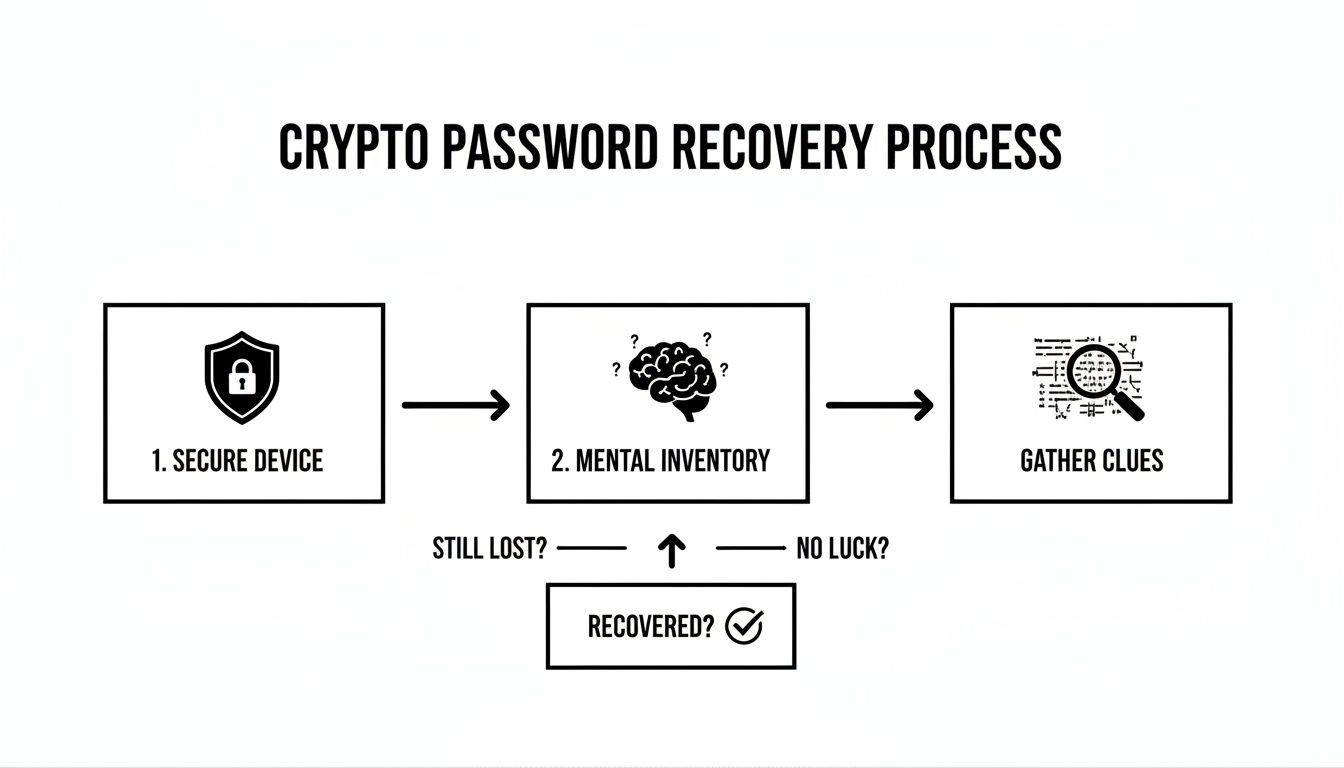
This structured approach is what separates successful recoveries from permanent losses.
Start a Structured Mental Inventory
Okay, your device is clean. Now it's time to retrace your steps—not by randomly guessing, but by creating a structured inventory of possibilities.
Think back to the moment you created that wallet.
- Context is everything. What was going on in your life then? Did you have a go-to pattern for passwords at the time? Maybe you used names, dates, or phrases that were important to you back then.
- Where were you? I mean physically. Were you at your old desk? Did you scribble a hint in a Moleskine notebook, on a Post-it, or in a daily planner? Go check those old spots.
- Hunt for digital breadcrumbs. Did you save a hint in an encrypted file on Dropbox? Search your email for anything from the wallet provider. Check your password manager's history or trash folder.
By working through these questions, you stop flailing and start investigating. You’re building a map of memory triggers and potential hiding spots, which is a far more effective way to begin.
Alright, let's get into the nitty-gritty of what you can do right now, before you even think about calling in the pros. Once your devices are clean and secure, it's time to put on your detective hat.
Think of this as an audit of your own digital life. You’re looking for breadcrumbs you left for yourself, sometimes years ago. Success at this stage often comes down to patience and being methodical, not just panicked guesswork.
Let's walk through the practical steps you can take to try and recover your password and get back into your wallet.
Systematically Check All Backup Locations
Honestly, the most common "miracle" recovery isn't a miracle at all. It's just finding a backup you completely forgot you made. Your first job is to make a checklist of every possible place you might have stored a file and go through it one by one. Don't write anything off.
I always tell people to start with the physical, then move to the digital.
- Physical Media: Go dig through that box of old tech. Check dusty USB drives, external hard drives, even old laptops you haven't turned on in years. It’s surprisingly common to make a quick backup for "safekeeping" and then forget its existence entirely.
- Paper Trails: Did you ever scribble something down? Check old notebooks, planners, or any important papers you keep in a safe or filing cabinet. A partial seed phrase or a password hint on a sticky note could be the missing piece.
- Cloud Storage: Methodically log into every cloud service you've ever used—Google Drive, Dropbox, iCloud, you name it. Use the search function and try terms like "wallet," "password," "private key," "seed," or the name of the crypto itself.
- Password Managers: Even if you're sure it's not in your current password manager like 1Password or Bitwarden, check the archives or trash. You might've deleted an entry thinking you no longer needed it.
Being thorough here is everything. The more disciplined you are, the better your odds.
Reconstruct a Partial Seed Phrase
Found only part of your seed phrase? Don't give up. A partial phrase is a massive leap forward. If you have a good chunk of the words, especially if you know their general order, you have a real chance.
Remember, most wallets use the BIP39 wordlist, which is a list of 2048 specific words. If you have 10 of your 12 words, for example, you're not just guessing randomly. You're filling in the blanks from a defined list, which makes the problem much, much smaller.
A partial seed phrase, especially when combined with a few password hints, gives recovery tools a powerful head start. Even if you can't guess the rest yourself, this info is gold if you need to escalate to professional help later.
Write down every word you know, in the order you think they go. For the missing ones, try to remember anything—the first letter, how many syllables it had, what it rhymed with. You'd be surprised what your memory can dig up.
Locate and Inspect Wallet Files
For many desktop wallets, your private keys are locked inside an encrypted file right on your computer. Finding this file is a huge win. The two most common types are wallet.dat files (used by Bitcoin Core and many others) and Keystore/JSON files (popularized by MyEtherWallet).
Your mission is to find this file, make a safe copy, and then try to unlock it with your password ideas.
- For
wallet.dat: Do a full computer search for this exact filename. It's often tucked away in a hidden "Application Data" or "AppData" folder. - For Keystore/JSON files: These were often downloaded straight to your "Downloads" folder when you first created a wallet. Search for files ending in
.jsonor with "UTC–" in the name.
Once you find the file, do not just double-click it or upload it to some random online tool. The very first thing you should do is copy it to an encrypted USB drive for safekeeping. This file is your wallet. Even with the right password, you're stuck without it.
If you want to dig deeper into these search techniques, exploring a guide on how to find old passwords can give you more structured strategies you might not have considered. It helps ensure you've truly checked every possible digital hiding spot.
Knowing When to Call It Quits on DIY Recovery (and How to Spot the Scammers)

Trying to recover your crypto on your own can feel empowering, but it’s crucial to know when you've hit a wall. Pushing too hard when you’re out of ideas doesn't just lead to burnout; it can make you a magnet for scammers preying on your frustration.
Knowing your limits isn't failure. It's a smart, strategic move to protect what you have left and keep your options open.
There are just some situations where DIY methods won't cut it. If you’ve completely forgotten a long, complex, randomly generated password and have zero hints to work from, your chances of guessing it are basically zero. The same goes for a corrupted wallet file with no backup—that’s usually beyond the scope of simple recovery tools.
The numbers don't lie. It's estimated that between 2.3 million and 3.7 million Bitcoins are gone for good, which is roughly 20% of all Bitcoin out there. This usually happens because of lost passwords or dead hardware. Chainalysis has more details on these staggering statistics.
Time to Switch Gears: When to Ask for Help
Knowing when to stop is just as vital as knowing where to begin. Hammering away with password guesses can sometimes get your wallet permanently locked after too many failed tries.
You should seriously consider pausing your own efforts if you're in one of these spots:
- You’ve Hit a Total Mental Blank: You can't remember anything about the password—not the length, structure, or any words it might contain.
- The Files Are Missing: You can’t find the
wallet.dat, Keystore/JSON, or other critical wallet file anywhere. - Your Hardware Is Fried: The drive holding your wallet is physically busted and won't even power on.
- You're Completely Burned Out: You’ve spent days getting nowhere, and the stress is becoming too much.
At this point, your energy is far better spent researching professional help than chasing a dead end.
The Anatomy of a Recovery Scam
The second you start Googling "how to recover my crypto," you step into a minefield. Scammers are waiting, and they feed on desperation. They use clever social engineering to look like the real deal, but their only goal is to drain your remaining assets or trick you into paying for a service they have no intention of providing.
You’ll find these bad actors lurking in Telegram groups, popping up on social media, or running slick-looking fake websites. They’ll promise you the moon, because they know hope is a powerful motivator. Understanding their playbook is your best defense.
Scammers love to create a false sense of urgency. They'll tell you your funds are about to be lost forever unless you act right now. This is a classic trick to get you to panic and hand over sensitive information without thinking.
Spotting the red flags isn't just a good idea—it's essential. A legitimate service will always put your security first. A scam will always put getting your info or money first.
Red Flags That Scream "Scam!"
You need to approach this with a healthy dose of skepticism. Real recovery experts get how sensitive this is. They will never pressure you or ask for anything that puts your funds at risk.
Keep an eye out for these massive warning signs:
- They Demand Upfront Fees: Reputable services almost always work on a success-fee model. If someone wants hundreds or thousands of dollars before they’ve even started, it’s a scam. Full stop.
- They Ask for Your Seed Phrase: Never, ever, ever give your full seed phrase to anyone. A real service will find a way to work with you—often through a secure, remote session—so you can use it on your own machine, under your control. Handing it over is like giving a thief the master key to your vault.
- They Guarantee Success: Recovery is complicated and never a sure thing. A professional will give you a realistic assessment of your chances. Anyone who promises a 100% success rate is flat-out lying to you.
- Their Reputation is Sketchy: Scammers use fake testimonials and have no real online history. Look for legitimate third-party reviews, official company registration, and a professional digital footprint that goes back more than a few weeks.
If you run into any of these red flags, walk away. Immediately. Your priority just shifted from recovery to protecting yourself. It’s far better to back off from a potential scam than to risk losing everything you have left.
You’ve tried everything. The password hints are a dead end, your backups are nowhere to be found, and you're starting to lose hope. I get it. This is usually the point where most people give up, but it's actually the exact moment when bringing in a professional can change everything.
When your own attempts stall, specialized services have advanced tools and deep expertise that are simply out of reach for the average person. It's crucial to know when to stop digging a deeper hole and call in the experts. If you've spent days chasing ghosts and are no closer to your funds, it's time for a new game plan.
Situations That Demand Professional Expertise
Look, DIY methods are fantastic if you just forgot a minor detail. But some problems are on a whole different level. When you're dealing with complex technical issues, you need a different caliber of tools and the experience to wield them.
You should seriously consider an expert if you’re facing one of these scenarios:
- You Have Solid Password Hints: This is the sweet spot. If you remember parts of your password—a base phrase, a pattern, certain numbers, but not the exact order—an AI-powered service can run millions of targeted combinations faster than you could in a lifetime.
- Hardware Wallet Nightmares: A forgotten PIN or a firmware glitch on a Ledger or Trezor isn't a simple fix. These cases often demand forensic analysis that goes way beyond what you can do at home.
- Corrupted Wallet Files: If your
wallet.dator Keystore JSON file is damaged, all hope isn't lost. Professionals often have forensic techniques that can repair the file or extract the private keys directly. - Old or Obscure Wallets: Remember that wallet you set up years ago? It might have unique encryption standards that require very specific knowledge to crack.
These are the moments where raw computational power and genuine expertise become the only path to a successful recovery.
Preparing for Your Consultation
To give yourself the best shot, you need to show up prepared. The more information you can give a recovery service, the better their chances are of getting your funds back. Think of yourself as building a case file for a detective—every little detail matters.
Your goal is to paint a crystal-clear picture of your situation. This lets the team accurately assess your odds and build the right strategy from the get-go.
Here's a look at the Wallet Recovery AI homepage, designed to make this first step as straightforward as possible.
The clean interface is there to guide you through gathering the essentials without overwhelming you.
Before you make contact, get these details written down in a secure document:
- Wallet Information: The name of the software (e.g., MetaMask, Electrum, Trust Wallet) and its version number if you can find it.
- Cryptocurrency Details: List the specific assets in the wallet (e.g., Bitcoin, Ethereum, certain tokens).
- Password Clues: This is huge. Write down every single fragment, hint, pattern, or rule you can recall. Nothing is too small or insignificant.
- Your Recovery Attempts: Briefly summarize what you've already tried to do on your own.
This prep work doesn't just speed things up; it shows the service you're serious and helps them prioritize your case. If you want to see what's possible, you can learn more about how a professional wallet recovery service works.
The success of a professional recovery often hinges on the quality of the information you provide. That one seemingly random memory fragment could be the key that unlocks a multi-million-parameter AI search.
What to Expect From the Process
A reputable service operates with absolute professionalism and security. The entire workflow is built to protect your privacy while giving you the best chance of success. It usually kicks off with a confidential consultation where you share the info you've prepared.
From there, you'll likely sign a legal agreement that outlines the work and the success-based fee—typically a percentage of the recovered crypto. This "no win, no fee" model is a massive green flag.
For example, one Dutch firm unlocked over $2.5 million in a single year, and 70% of that was Bitcoin. They operate entirely on legal agreements and charge a commission of around 20% only after a successful recovery. It's proof that even wallets that have been locked for years can be opened with the right help. You can read more about their work in this report on inaccessible crypto assets.
Once the process starts, the service uses your hints to fuel powerful AI algorithms for sophisticated brute-force attacks. They'll keep you updated on their progress, but they will never ask for full control of your assets or your complete seed phrase. That secure, transparent approach is the hallmark of a partner you can trust.
You're in. You’ve recovered your wallet, and that wave of relief is washing over you. It's a huge win, but don't stop there. What you do next is just as important as the recovery itself.
Think of it this way: you just found the keys to your house after being locked out. You wouldn't just walk in and leave the door unlocked, especially if you're not sure how you lost the keys in the first place. You’d change the locks. The same principle applies here.
Your First Moves: Secure and Relocate
The moment you regain access, the clock is ticking. You have to assume the old wallet is compromised, particularly if you needed outside help to get back in. The vulnerability that got you locked out might still be there.
Your immediate priority is to get your funds into a brand-new, sterile environment.
- Spin up a new wallet. Create a completely new wallet with a fresh seed phrase. Make absolutely sure you do this on a device you’ve scanned and cleared of any potential malware.
- Move everything. Now. Transfer all of your crypto from the recovered wallet to the new one. This isn't a "do it later" task. This one action severs any potential ties to the old wallet's security flaws.
Once the transaction is confirmed on the blockchain, the old wallet is officially retired. This isn't paranoia; it's just smart operational security.
Building a Backup System That Actually Works
If there's one lesson to take away from this whole ordeal, it's that a single point of failure is a guaranteed future headache. Your new backup strategy needs to be redundant, meaning multiple copies in different, secure places.
A single copy of your seed phrase is just a disaster waiting to happen. Redundancy isn't just a suggestion; it's the only real way to protect your assets from fire, flood, theft, or just a simple brain fart.
Let’s talk practical resilience—both physical and digital.
- Get Your Phrase on Steel: Forget paper. Engrave your new seed phrase onto a steel plate. It's fireproof, waterproof, and far more likely to survive whatever life throws at it.
- Encrypted Digital Backups: Use a tool like VeraCrypt to create an encrypted file containing your seed phrase. Save this file on at least two separate USB drives. Keep one in a safe at home and another in a completely different location, like a safe deposit box.
The success of recovery services proves how vital having some piece of data is. For example, Cipher Rescue Chain hit a 98% success rate across more than 10,000 cases by mid-year, which shows that recovery is almost always possible when there are clues to work with. These tools, sometimes used alongside agencies like the FBI, highlight just how powerful fragmented data can be. You can find more details in these crypto recovery success rates and detailed case studies.
Turn this stressful experience into a masterclass in security. Fortify your process, build in redundancy, and make sure this is the last time you ever have to go through this.
Frequently Asked Questions About Wallet Recovery
When you're trying to get back into a locked crypto wallet, a million questions probably race through your mind. It's a stressful spot to be in, and getting clear, honest answers is the first step toward finding a solution.
Let's cut through the noise and tackle some of the most common questions we hear from people trying to recover their passwords and crypto.
Can a Crypto Wallet Be Recovered Without the Seed Phrase?
This is the big one, and the honest answer is: it's tough, but not always impossible. It all comes down to what other pieces of the puzzle you still have.
If you have the original encrypted wallet file—something like a wallet.dat file for Bitcoin Core or a Keystore JSON file for Ethereum—then yes, there's a path forward. Your entire focus shifts to cracking the password that encrypts that file. Without the seed phrase, though, you can't just regenerate the wallet on a new device. You have to unlock that specific, original installation.
What Is the Difference Between a Password and a Seed Phrase?
It helps to think of it in physical terms. Your password is like the key to the front door of your house. It only unlocks that one specific house on that one specific computer or phone.
Your seed phrase, on the other hand, is the master blueprint. With that blueprint, you could rebuild your entire house, with everything inside it, anywhere in the world. It’s the ultimate backup that can regenerate all your private keys on any compatible wallet.
A lost password is a solvable problem if you have the right file and the right tools. A lost seed phrase is a catastrophic failure unless you have another backup. It's the point of no return.
How Much Do Crypto Recovery Services Cost?
Any reputable crypto recovery service will work on a success-fee model, sometimes called a contingency fee. This is a huge detail that separates the pros from the scammers.
What this means is you pay absolutely nothing upfront. The service takes a pre-agreed cut of the recovered funds, but only if they get your wallet open. The fee usually lands somewhere between 10% and 20% of the recovered value, depending on how complex the job is. If they fail, you don't owe them a dime.
For assets like Bitcoin or Ethereum in popular wallets like MetaMask or on a Ledger, time is of the essence. Data shows that losses from the last 24 months have a 70–95% recovery chance across the industry. With a specialist's help, that can jump as high as 98%. For a deeper dive into these numbers, you can explore more about the landscape of crypto recovery.
If you’ve hit a wall and need professional help, Wallet Recovery AI uses advanced, proprietary methods to get you back into your accounts. We offer a completely secure and confidential process for even the most difficult recovery cases. Start your confidential wallet recovery assessment today.
Leave a Reply