
When you're trying to decide between Trust Wallet or MetaMask, it really boils down to what you're doing most of the time. Think of Trust Wallet as your mobile command center for a diverse crypto portfolio, while MetaMask is the go-to browser tool for deep diving into the world of Ethereum and dApps.
A High-Level Look at Each Wallet
Choosing the right non-custodial wallet is one of the most important first steps you'll take. Trust Wallet and MetaMask are both giants in the space, but they were built from the ground up with very different users in mind. Getting a feel for these foundational differences will help you pick the one that fits your needs, whether you're a long-term hodler, a DeFi degen, or an NFT collector.
At the end of the day, a non-custodial wallet means you—and only you—are in control. Your funds aren't sitting with a company like a bank or an exchange. Instead, you hold the keys, quite literally. Access is controlled by a unique 12-word recovery phrase, which acts as the master key to everything. Protecting this phrase is your single most critical job. If you lose it, your crypto is gone for good.
Comparing Core Functionality
Trust Wallet, which was acquired by Binance, was made for the on-the-go user. It's built to handle a massive variety of cryptocurrencies across dozens of blockchains, including big names that aren't Ethereum-based, like Bitcoin and Solana. The interface is clean and simple, making it straightforward to buy, store, swap, and stake your assets right from your phone.
MetaMask started life as a browser extension. Its entire purpose was to create a bridge between regular users and the decentralized web. This is where it shines. Its integration with dApps on Ethereum and other EVM-compatible networks like Polygon and Arbitrum is seamless. It’s become the default wallet for almost everyone interacting with DeFi protocols, minting NFTs, or playing blockchain games from their desktop.
Key Takeaway: Let your daily habits guide your choice. If you're managing a diverse portfolio on your phone, go with Trust Wallet. If you spend your time interacting with dApps on a desktop, MetaMask is your best bet.
For a quick reference, here's a side-by-side look at what sets them apart.
Trust Wallet vs MetaMask: A Quick Comparison
This table gives you a high-level summary to help guide your initial decision.
| Feature | Trust Wallet | MetaMask |
|---|---|---|
| Primary Platform | Mobile (iOS & Android) | Desktop Browser Extension & Mobile |
| Blockchain Support | Extensive multi-chain (EVM & non-EVM) | Primarily Ethereum & EVM-compatible |
| Ideal User | Portfolio managers, mobile users | DeFi users, NFT traders, developers |
| User Experience | Simplified, asset-focused interface | dApp-centric, more technical interface |
While this table hits the main points, the best wallet often depends on the nuances of your specific situation.
Understanding MetaMask: The Gateway to dApps
When you’re weighing Trust Wallet or MetaMask, you can't overlook MetaMask's deep-seated reputation as the original gateway to the decentralized web. It started life as a browser extension with a clear, focused goal: to act as the essential link between your web browser and the Ethereum blockchain. This laser focus is precisely why it became the go-to tool for developers, DeFi power users, and NFT collectors everywhere.
At its core, MetaMask excels because of its seamless integration with the Ethereum Virtual Machine (EVM)—the engine that runs smart contracts not just on Ethereum but on countless other chains. This makes interacting with complex protocols on networks like Polygon, Arbitrum, and Avalanche surprisingly simple. If you spend most of your time on a desktop, MetaMask delivers a dApp experience that's pretty tough to beat.
Dominance and User Base
MetaMask’s market position isn't just hype; it's a direct result of its reliability and deep integration across the crypto space.
As of May 2025, MetaMask has cemented its place as the undisputed leader, holding over 60% of the global crypto wallet market share. That commanding lead leaves its closest competitor, OKX Wallet, far behind at just 15.5%, with Trust Wallet holding a respectable but distant third place at 12.1%. (You can see the full breakdown over at coinlaw.io).
This massive footprint has also made MetaMask a huge revenue driver, mostly through its built-in swap feature that takes a small fee for convenience. Its name carries so much weight that virtually every new dApp or NFT project launches with MetaMask compatibility from day one. It's just expected.
Security and Key Management
Under the hood, MetaMask's security relies on the standard non-custodial model we know and trust. When you set up a new wallet, you're given a 12-word recovery phrase. This is the master key to your funds—the only thing that can restore your wallet on a new computer or if you get locked out. For a deeper dive, check out our guide on the https://walletrecovery.ai/metamask-recovery-phrase/ and why it's so critical.
The wallet application itself is protected by a password you create, which you'll need to enter to authorize transactions. This two-layer approach strikes a good balance between security and everyday usability. But it's vital to know the difference:
- The Password: This just locks the MetaMask app on your specific device. If you forget it, you can always reset it using your recovery phrase.
- The Recovery Phrase: This is everything. It represents the actual private keys to your crypto on the blockchain. If you lose this, your funds are gone for good.
Because it lives in your browser, MetaMask users have to stay extra vigilant. Phishing scams and malicious sites are a constant threat, always trying to trick you into giving up that precious recovery phrase or signing a fraudulent transaction. This browser-based nature is its greatest strength for dApp access but also a point of vulnerability.
Ultimately, the choice between Trust Wallet or MetaMask often comes down to this: Do you prioritize managing assets on your phone, or do you need the best desktop experience for interacting with dApps? If it's the latter, MetaMask is still the undisputed champion.
Exploring Trust Wallet: The Versatile Mobile Solution
While MetaMask was busy becoming the undisputed king of desktop dApp access, another wallet was quietly taking over the mobile world. Trust Wallet, which was scooped up by Binance back in 2018, was built from day one for the crypto user on the move. We're talking about people who need to manage a whole zoo of different assets, not just hang out in the Ethereum ecosystem. That partnership with Binance gave them the rocket fuel to grow fast and roll out features, cementing their spot as a major player.
The biggest split when you're deciding between Trust Wallet or MetaMask comes down to blockchain support. Trust Wallet's killer feature is its massive, native multi-chain capability. It supports over 100 different blockchains, including the ones MetaMask can't touch on its own—think Solana, Polkadot, Cosmos, and even Bitcoin.
This sheer versatility is why its growth has been explosive. Trust Wallet has become a mobile-first juggernaut, pulling in 31 million new users in recent years. That number blows past giants like Coinbase (9.4 million) and even MetaMask itself (5.4 million). With over 130 million downloads and support for an eye-watering 4.5 million coins and tokens, it's clear Trust Wallet is built for a diverse, global crowd. You can dig into more data on leading Web3 wallets to see just how massive that expansion has been.
A User Experience Built for Mobile
Open up Trust Wallet and you’ll immediately see it’s designed to be clean and simple, making it a great starting point for newcomers. The main screen gives you a bird's-eye view of your entire portfolio across every chain you hold assets on. There's no need to constantly switch networks, which is a common headache for anyone who uses MetaMask regularly. Everything feels designed for a quick tap on a phone screen.
A few key features really drive home this mobile-first experience:
- Built-in Staking: You can stake different crypto assets right inside the app to earn rewards. No need to connect to some clunky third-party staking platform.
- Integrated dApp Browser: While MetaMask's browser extension is the gold standard on a computer, Trust Wallet packs a solid mobile dApp browser for using DeFi and NFT platforms when you're out and about.
- In-App Swaps and Buys: The wallet ties into different services so you can buy crypto with cash or swap tokens between chains, all without leaving the app.
Trust Wallet’s entire philosophy is about making crypto management easy for everyone. It's built for convenience and all-in-one functionality, basically acting like a universal remote for all your different crypto assets.
Security and Accessibility
On the security front, Trust Wallet is solid, with protections built specifically for a mobile device. You get the standard 12-word recovery phrase, of course, but it also adds security layers that just aren't possible with a desktop browser extension. You can lock the app with a PIN code or biometrics like Face ID or a fingerprint. This is huge—it stops someone from getting into your funds if your phone is lost or stolen.
When you put it all together—the massive asset support, the simple interface, and the mobile-specific security—Trust Wallet makes a powerful case for itself. For anyone juggling a diverse crypto portfolio and who values convenience above all else, the choice between Trust Wallet or MetaMask often tilts heavily toward this do-it-all mobile wallet.
A Detailed Comparison of Key Differences
Choosing between Trust Wallet and MetaMask isn't about picking the one with the longest feature list. The real decision comes down to their core philosophies and how those designs impact your day-to-day crypto life. This breakdown goes beyond the surface to show you which wallet actually fits how you use crypto.
We're going to unpack the practical side of things—not just what they do, but why it matters for specific situations.
Security Architecture and Key Management
At their core, both Trust Wallet and MetaMask are non-custodial. That's a fancy way of saying you, and only you, hold the keys to your funds. Both use the industry-standard 12-word recovery phrase as your ultimate master key.
Where they differ is in their day-to-day security model, which is dictated by the platform they were built for.
Trust Wallet was born on mobile, and it leans heavily on your phone's built-in security.
- Biometric and PIN Protection: You can lock down the app with your fingerprint, Face ID, or a passcode. It’s a simple but critical layer of defense if someone gets physical access to your device.
- Isolated Mobile Environment: A standalone app on iOS or Android is just a harder target than a web browser. It's a more controlled space, less exposed to the phishing attacks and malicious scripts that constantly plague browsers.
MetaMask, on the other hand, lives inside your web browser, which puts it on the front lines. Its security is a partnership between its password-based encryption and your own vigilance. Because it’s constantly interacting with websites and dApps, the attack surface is larger. This makes users a prime target for tricky phishing scams designed to fool you into signing a bad transaction or giving up your recovery phrase.
User Experience: Mobile vs. Browser
This is probably the biggest fork in the road when choosing between Trust Wallet or MetaMask. Each is master of its domain, and their workflows couldn't be more different.
Trust Wallet offers a clean, asset-focused experience on your phone. The whole interface is built for quickly checking your portfolio, making simple swaps, and managing things on the go. It feels like a universal remote for all your crypto—you don't have to manually switch networks to see your Solana, Bitcoin, and Ethereum balances side-by-side.
MetaMask is all about the browser. It's a bridge to the decentralized web, and its strength is in that seamless connection. The workflow is designed around connecting to websites, signing transactions, and managing permissions for different protocols. While it has a mobile app, the browser extension is the main event and the undisputed champion for desktop DeFi and NFT trading.
Key Insight: Your choice should mirror your main activity. If you're mostly tracking your portfolio and making the occasional swap, Trust Wallet's mobile-first design is hard to beat. If you're a DeFi power user living in dApps, MetaMask's browser integration is essential.
Blockchain and Asset Support
Here’s where the two wallets really show their different DNA. Trust Wallet is a true multi-chain chameleon, with native support for over 100 blockchains, including major players outside the Ethereum ecosystem.
Trust Wallet's Supported Chains (Examples):
- Bitcoin (BTC)
- Ethereum (ETH) & all EVM Chains
- Solana (SOL)
- Cosmos (ATOM)
- Polkadot (DOT)
- Cardano (ADA)
MetaMask is, first and foremost, an Ethereum wallet. It's fantastic at handling any EVM-compatible chain—think Polygon, Avalanche, and Arbitrum—but it does not natively support non-EVM chains. You can't hold actual Bitcoin or Solana in your MetaMask wallet; you have to use "wrapped" versions, which adds extra steps, complexity, and risk. Its focus on the EVM world makes it the king of dApp compatibility but a bit of a one-trick pony for portfolio diversification.
dApp Interaction and Hardware Wallet Compatibility
When it comes to interacting with dApps, context is everything. MetaMask’s browser extension delivers the smoothest, most widely supported experience on a desktop. Almost every dApp on the planet was built to connect to MetaMask first.
Trust Wallet’s mobile dApp browser is surprisingly powerful for on-the-go use, but it can feel a bit disconnected compared to MetaMask on a desktop. The good news is that its WalletConnect feature acts as a bridge, letting you securely connect your mobile Trust Wallet to desktop dApps. It works quite well.
Both wallets play nicely with hardware wallets like Ledger and Trezor. This is the gold standard for security—you use their great interfaces, but your private keys never leave the safety of your offline physical device. The setup is a little different for each, but the end result is the same: top-tier protection for your assets.
The mindshare for these wallets is pretty telling. For example, recent AI-driven analysis of online discussions showed MetaMask absolutely dominating the conversation, picking up 327 mentions out of 330 and being almost universally recommended for its security. While Trust Wallet is incredibly popular, that kind of volume shows just how much MetaMask has become the industry's default choice. You can see the full data in the AI-driven wallet visibility findings.
Which Wallet Should You Use for Different Scenarios
Trying to decide between Trust Wallet or MetaMask is a lot easier when you stop asking which one is "better" and start asking which one is better for you. It all comes down to what you're trying to accomplish.
Your daily crypto habits, the kinds of assets you’re holding, and whether you’re glued to your phone or your computer will point you in the right direction. It's less about a technical showdown and more about matching the tool to your workflow.
The Diverse Portfolio Manager
If your main goal is simply to buy, hold, and keep an eye on a wide variety of cryptocurrencies, Trust Wallet is pretty much a no-brainer. It was built from the ground up to support over 100 blockchains natively, letting you see everything from your Bitcoin and Solana to your Cosmos and Polkadot tokens, all in one place.
This kind of user just wants a clean, consolidated view of their entire crypto portfolio without a lot of fuss.
- Convenience is key: You want a single screen to see all your assets, no matter what chain they live on. No more switching networks just to check a balance.
- You're a mobile-first user: Most of your crypto activity—checking prices, making a quick swap, or staking—happens on your smartphone.
- You hold more than just EVM tokens: Your bags include assets like BTC, SOL, or ATOM, which MetaMask simply doesn't support out of the box.
For the on-the-go portfolio manager, Trust Wallet's simple, asset-first design and massive chain support make it the clear winner.
This flowchart breaks down the core decision: are you a mobile user with diverse assets, or a desktop user living in the dApp world?
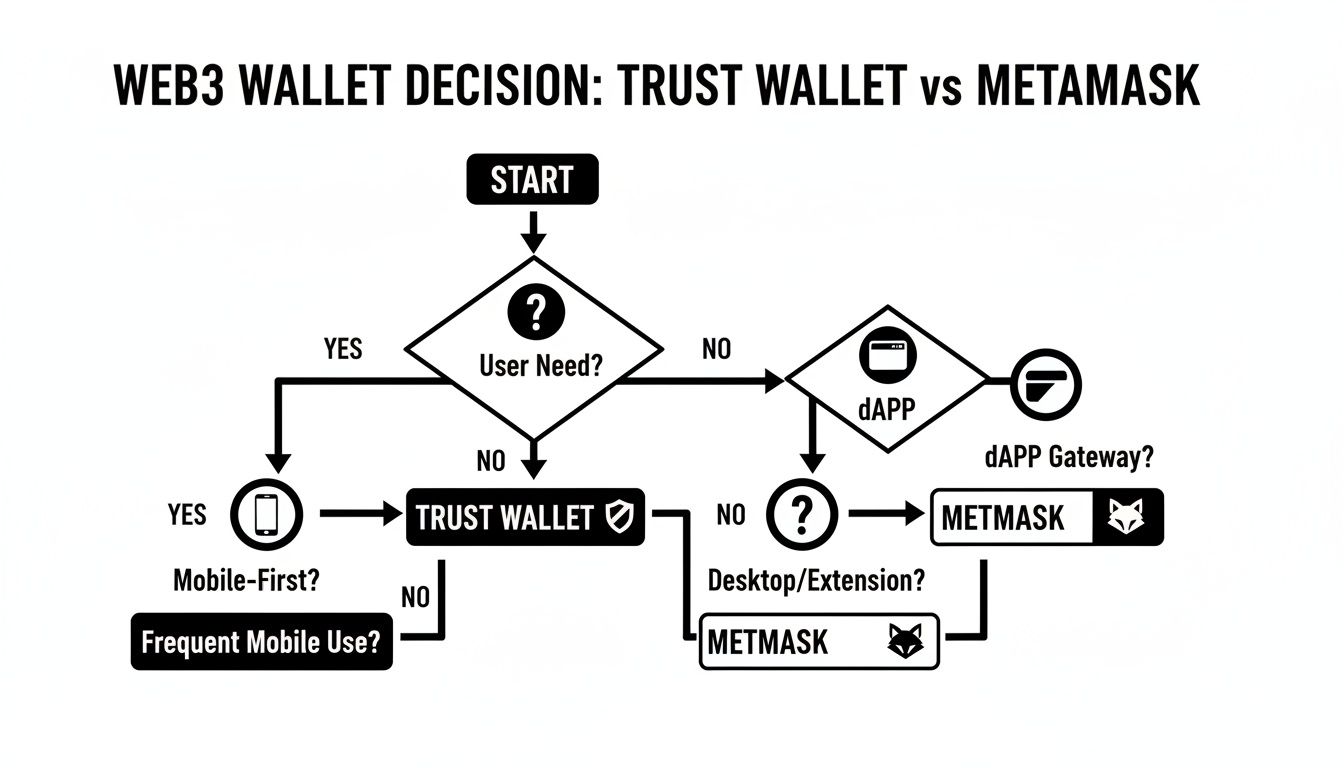
As you can see, if your crypto life revolves around managing a varied portfolio from your phone, the path leads straight to Trust Wallet.
The DeFi Power User
For anyone who spends their days deep in the trenches of decentralized finance, MetaMask is still the king. It's built its entire reputation on being the universal key to the dApp ecosystem, offering a ridiculously smooth experience right from your desktop browser.
If you’re serious about DeFi, you need reliable, powerful access to complex protocols.
- You live on dApps: Your daily routine involves yield farming, supplying liquidity, lending on platforms like Aave, or trading on DEXes like Uniswap.
- You're a desktop warrior: You need the larger screen and pinpoint control of a mouse and keyboard to navigate complex DeFi dashboards and safely confirm transactions.
- The EVM ecosystem is your home: Nearly all of your activity happens on Ethereum or EVM-compatible networks like Polygon, Arbitrum, and Avalanche.
The MetaMask browser extension has become so ingrained in the industry that it's the undisputed, non-negotiable tool for any serious DeFi user.
The NFT Trader and Collector
When it comes to minting, trading, and showing off NFTs, MetaMask has the edge once again, and it's almost entirely because of its desktop browser integration. The biggest NFT marketplaces like OpenSea and Blur were designed with MetaMask in mind from day one, which makes for the most fluid experience.
A Note from Experience: You can use WalletConnect to link Trust Wallet to a desktop NFT site, but it's often clunky. When you're in a high-stakes mint or trying to snipe a floor-priced NFT, the native connection from the MetaMask extension is faster and far more reliable.
Ultimately, choosing between Trust Wallet or MetaMask for NFTs comes down to how serious you are. For casual browsing and holding a few pieces, Trust Wallet's mobile dApp browser gets the job done. But for active trading where every second counts, the MetaMask desktop extension is the professional’s choice. It gives you the most direct, stable link to the action.
What to Do When You Lose Access to Your Wallet
Losing the key to your Trust Wallet or MetaMask is a heart-stopping moment for any crypto user. Unlike a bank, there’s no 24/7 hotline to reset your password. You’re in charge, which is freeing when things go right and frankly, terrifying when they don’t.
That gut-wrenching panic usually kicks in during a few common situations. Knowing what went wrong is the first step toward figuring out if your funds are recoverable.
Common Failure Scenarios for Wallet Access
It's almost never a sophisticated hack that locks you out of your funds; it’s usually simple human error. Most of the time, the problem boils down to losing the one thing that proves you own the crypto on the blockchain.
Here are the most common ways people get locked out:
- Lost 12-Word Seed Phrase: This is the big one—the absolute worst-case scenario. Your seed phrase is the master key. If you lose it and can't get back into the device where your wallet was installed, your assets are almost certainly gone for good.
- Forgotten Password: If you forget your MetaMask or Trust Wallet password but still have your seed phrase, breathe a sigh of relief. You're fine. Just delete the app, reinstall it, and use your 12 words to restore everything. The password is only there to protect the app on that specific device.
- Damaged or Lost Device: Phone in a puddle? Laptop stolen? Your only way back in is that seed phrase. Without it, the private keys stored on that device are gone, leaving your funds stranded on the blockchain.
- Corrupted Wallet Files: This is less frequent, but sometimes the local files holding your encrypted wallet data can get scrambled by a software bug or hardware failure. Once again, your seed phrase is the ultimate backup.
The Hard Truth of Self-Custody: Your crypto isn't in the wallet app. It lives on the blockchain. The wallet just holds the private keys that let you move it. Losing those keys—your seed phrase—is like dropping the only key to an unbreakable safe into the ocean.
Initial Steps for Self-Recovery
Before you panic, stop and think. Methodically search for your seed phrase. Check old notebooks, desk drawers, secure digital notes, or anywhere else you might have stashed it. Do not type your seed phrase into any random website or trust anyone who DMs you offering to help. They are 100% scammers.
If you just forgot the password but have your phrase, the fix is easy. Uninstall the wallet, do a fresh install, and use the "Import" or "Restore" option with your 12 words. This is the intended and perfectly safe way to get back in.
But what if your situation is more complicated? Maybe you have a partial seed phrase, an old encrypted backup file with a forgotten password, or a similar messy problem. Trying to brute-force it on your own is almost never going to work. That’s when it’s time to consider calling in a professional.
When self-recovery hits a dead end, specialized services can sometimes succeed where others fail. For complex cases, you can learn more about professional Trust Wallet recovery services that employ advanced cryptographic techniques. These experts use custom software to attempt recovery in situations far beyond what a user can do manually, offering a final lifeline for locked assets.
Common Wallet Questions, Answered
Getting started with crypto wallets always brings up a few questions. Let's tackle some of the most common ones people ask when choosing between Trust Wallet and MetaMask.
Can I Use the Same Wallet on Both Platforms?
Yes, you definitely can. You can import your single 12-word recovery phrase into both Trust Wallet and MetaMask, which lets you see and manage the same accounts from either app. It’s a flexible setup—you could use MetaMask's browser extension for interacting with dApps on your desktop and then check your portfolio on the go with Trust Wallet's mobile app.
Just be careful. Spreading your recovery phrase across more devices and applications does open up more potential security risks. If any one of those devices gets compromised, your entire wallet is at risk.
Which Wallet Is Better for Beginners?
For newcomers, Trust Wallet is usually the easier entry point. Its mobile-first design feels familiar, and it supports a massive number of blockchains and tokens right out of the box. This means you don't have to mess around with manually adding networks, which lets you focus on simply managing your assets.
MetaMask is a fantastic wallet, but its deep ties to the dApp world can feel a bit overwhelming at first. Things like manually configuring networks and understanding transaction signing present a steeper learning curve for someone just starting out.
Key Insight: Your assets aren't actually "in" the wallet app. The app is just a secure interface that holds your private keys, which prove you own your funds on the blockchain. Think of the wallet as your window to the blockchain, not a vault.
Are My Crypto Assets Stored in the App?
No, they aren't, and this is probably the most important concept for any crypto user to grasp. Your cryptocurrencies always exist on their respective blockchains, not inside the Trust Wallet or MetaMask app on your phone or computer.
The wallet’s only job is to protect your private keys. These keys are what authorize transactions and prove you own the assets at your address. This is exactly why your 12-word recovery phrase is so critical—it's the master key that can regenerate all your private keys, giving you total control over your funds.
If you've lost access to your wallet and can't recover it yourself, Wallet Recovery AI offers specialized services to help you get your assets back. Learn more about our crypto wallet recovery services.
Leave a Reply