

Losing access to your crypto wallet can feel like you've hit a digital brick wall. But what many people don't realize is that crypto assets recovery has moved from a pipe dream to a real, solvable technical challenge. With the right tools and a bit of know-how, that "permanent loss" can often become a successful recovery story. Modern AI-driven solutions are built for exactly this scenario, creating a clear path forward for people who thought their funds were gone for good.
The Reality of Losing Your Crypto Assets
That gut-wrenching feeling when you realize you can't get into your wallet is something we've heard about time and time again. The very things that make crypto so powerful—its decentralization and security—are exactly what make recovery feel so impossible. There's no customer service line to call for a password reset like with your bank.
This is by design. The responsibility for securing your assets is entirely on you. Forgetting a password, misplacing a 12 or 24-word seed phrase, or a simple hardware failure can lock you out. It used to be that this was the end of the story. Thankfully, that's changing.
Why Crypto Asset Loss Is So Prevalent
The ways people lose access are as varied as the assets themselves. It could be a simple typo on a piece of paper where you jotted down your seed phrase. Maybe a system crash corrupted your wallet file, or an old hard drive with your keystore just won't boot up anymore.
These aren't just edge cases; they happen every single day. Think about the long-term holder who set up a wallet years ago, wrote the password on a sticky note, and now it's nowhere to be found. Or the user whose encrypted backup drive fails, taking the only copy of their keystore file with it. These stories highlight the real-world vulnerability of self-custody.
The core challenge isn't a weakness in the blockchain itself. It's the gap between technology and human error—our imperfect memories and the fragility of our storage methods. This is precisely where advanced recovery tools have found their purpose.
To make matters worse, it's not just about accidental loss. In 2024 alone, stolen crypto funds hit around $2.2 billion, and nearly 44% of that came from compromised private keys. As you can read in these cryptocurrency theft statistics, users are fighting a battle on two fronts: protecting against thieves and protecting against their own mistakes. This is what has pushed the demand for solid crypto recovery solutions through the roof.
It's easy to find yourself in a bind. Here’s a quick look at some of the most common situations we see.
Common Scenarios of Lost Crypto Access
| Scenario | Common Cause | Primary Recovery Vector |
|---|---|---|
| Forgotten Password | Human memory lapse, lost notes | AI-powered password guessing, partial clue analysis |
| Lost Seed Phrase | Misplaced physical backup, accidental disposal | Mnemonic brute-forcing, typo correction algorithms |
| Corrupted Wallet File | Software bugs, unexpected shutdowns | File repair tools, data extraction from fragments |
| Hardware Failure | Hard drive crash, water damage, device loss | Digital forensics, data recovery from drive platters |
These are the problems we tackle day-in and day-out. While each case is unique, the underlying challenge is usually a familiar one.
The Rise of AI in Digital Asset Recovery
Where there's a need, innovation follows. As the value of locked-up crypto climbed into the billions, the motivation to build better recovery tools exploded. The first attempts were clunky, manual, and had a pretty low success rate. They mostly relied on basic brute-force attacks that could run for years without getting anywhere.
Today's approach is a world away from that. Modern tools like Wallet Recovery AI use sophisticated algorithms that massively improve the odds. Instead of just guessing randomly, these systems are much smarter.
- They analyze password fragments. If you remember bits and pieces of your password, the AI can use those clues to build a highly targeted list of possibilities.
- They recognize human patterns. The software knows people often use common substitutions (like '@' for 'a') or reuse parts of other passwords.
- They process huge datasets, fast. These tools can blast through billions of potential combinations in a tiny fraction of the time it would take older software.
This shift in technology turns crypto recovery from a lottery ticket into a calculated, strategic process. It provides a real methodology for cracking a problem that once seemed impossible, giving you a fighting chance to get your assets back.
Here is the rewritten section, crafted to sound completely human-written and natural, following all the specified requirements.
Preparing for a Successful Recovery Attempt
Jumping straight into a crypto assets recovery attempt without a solid plan is like trying to navigate a maze blindfolded. I’ve seen it happen time and again: success isn't about luck, it's about preparation. Before you even think about launching a tool like ours, you need to become a digital detective. Your mission is to gather every single scrap of information related to that lost wallet.
Think of your memory as a fragmented hard drive. All the data is still there, it's just scattered. Your first job is to meticulously collect those fragments. You'd be surprised what ends up being the key—sometimes it's the most trivial detail you almost forgot. This process is all about systematically jogging your memory and writing down every possible clue.
This initial info-gathering phase is what fuels any AI-powered recovery tool. The more accurate and detailed your input, the better your chances. Garbage in, garbage out, as they say.
Gathering Your Digital Breadcrumbs
The goal here is simple: create a comprehensive list of every possible piece of your password or access credentials. Don't second-guess yourself or dismiss anything as irrelevant. Just start writing down everything you can recall.
Here are the kinds of clues I always tell people to focus on:
- Password Fragments: Any part of the password you're even halfway sure about. The beginning, the end, maybe a weird phrase you stuck in the middle.
- Your Common Patterns: We all have them. Do you always use a kid's name, a pet's birthday, or your favorite sports team? Do you tend to tack on a "!" or a specific number at the end? Write it all down.
- Related Credentials: Think back to when you created the wallet. What other accounts were you setting up? Old email passwords, social media logins, or even forum credentials from that era can be a goldmine of hints.
- Device Information: What were you using back then? Jot down the names of computers or phones where the wallet was created or accessed. Things like "Johns-MacBook-Pro" or "Desktop-PC-2018" can sometimes be part of a password.
- Important Dates: Try to remember the approximate date you created the wallet, the last time you accessed it, or when you made any big transactions. People often tie passwords to significant dates without realizing it.
Once you have this raw data, get it organized. A simple text file or a spreadsheet is perfect. This isn't just a list; it's the fuel for your recovery attempt.
Your memory is the most powerful tool you have right now. The clues you give an AI don't need to be perfect; they just need to point it in the right direction. A powerful system can test millions of variations based on a single good hint you provide.
Creating a Secure Recovery Environment
Okay, this next part is non-negotiable. It's absolutely critical for protecting your assets. Once you get back in, your wallet's contents will be exposed for a moment. Trust me, scammers and hackers troll forums looking for people who've lost access, just waiting to intercept the funds the second they're recovered.
That's why you have to perform the entire recovery process in a secure, isolated digital space. This means using a computer that you know is clean of any malware, spyware, or keyloggers. Rushing this step could mean you do all the hard work of recovering your funds only to watch them get stolen seconds later.
Here’s how to set up a safe zone for your work:
- Use a Dedicated Machine: The best-case scenario is using a freshly formatted computer that isn't connected to your daily life of browsing and downloading. This drastically cuts down the risk of an existing infection.
- Scan Everything: If a fresh computer isn't an option, run a deep, comprehensive scan with reputable antivirus and anti-malware software before you do anything else. Make sure all its definitions are updated.
- Work Offline: Disconnect from the internet whenever you can. You only need to be online to download the recovery software. An "air gap" is your best friend against remote attacks.
- Prepare a Destination Wallet: Before you even start, set up a brand new, secure wallet on a separate, clean device (like your phone). Have the new wallet's address copied and ready to go. The goal is to transfer your assets out immediately.
Taking these precautions creates a sterile environment where you can safely work on the crypto assets recovery. It ensures that when that wallet finally unlocks, you—and only you—are in control. Skipping this can turn a huge win into a devastating loss.
Now that you have your clues organized, it’s time to bring in the heavy machinery: a modern crypto assets recovery tool. This is where your hard work digging through old memories meets some seriously powerful tech. Instead of taking shots in the dark and guessing passwords—a process that could literally take centuries—this software uses your memory fragments to run a highly targeted, intelligent search.
Think of it like handing a box of puzzle pieces to a master detective. The AI doesn't just look at each clue one by one; it sees the bigger picture. It understands common human behavior, password patterns, and the statistical chances of certain combinations. It’s a smart approach that turns a seemingly impossible task into a solvable problem. The goal is to get the software to think just like you did when you created that lost password.
This is a huge step forward, but it’s important to remember that not every recovery works on the first try. Patience and a methodical approach will be your best friends here.
Configuring The Recovery Software
After installing a trusted tool in your secure, offline environment, the first thing you'll do is feed it all the information you've gathered. This isn't just about dumping a list of words into a program. It's about giving the AI context so it can work its magic efficiently.
Most quality tools will guide you, asking for specific types of information. You'll start by telling it the wallet type (like MetaMask, Ledger, or a specific Bitcoin wallet file) and then provide your clues.
- Base Words & Fragments: These are the core words, names, or phrases you’re pretty sure are in the password.
- Character Sets: Did you have a go-to set of special characters? Let the tool know if you always used
!@#$%or something similar. - Number Patterns: Are you the type to add a year, a birthday, or a lucky number to your passwords?
- Rules & Mutations: This is where the AI really shines. You can tell it to apply common password habits, like capitalizing the first letter, swapping letters for numbers (like 'e' for '3'), or adding standard prefixes and suffixes to your words.
Let's imagine you're trying to get back into a lost MetaMask wallet. You remember the password had "BlueDog" and your birth year "1988" in it, but you have no idea about the capitalization, the order, or what special characters you used. You'd set up the tool with this info, and the AI would then test thousands of relevant variations like BlueDog1988!, bluedog!1988, or Blue1988Dog. It intelligently focuses only on the most likely combinations based on your input.
This infographic breaks down the essential prep work that has to happen before you even think about hitting "start."
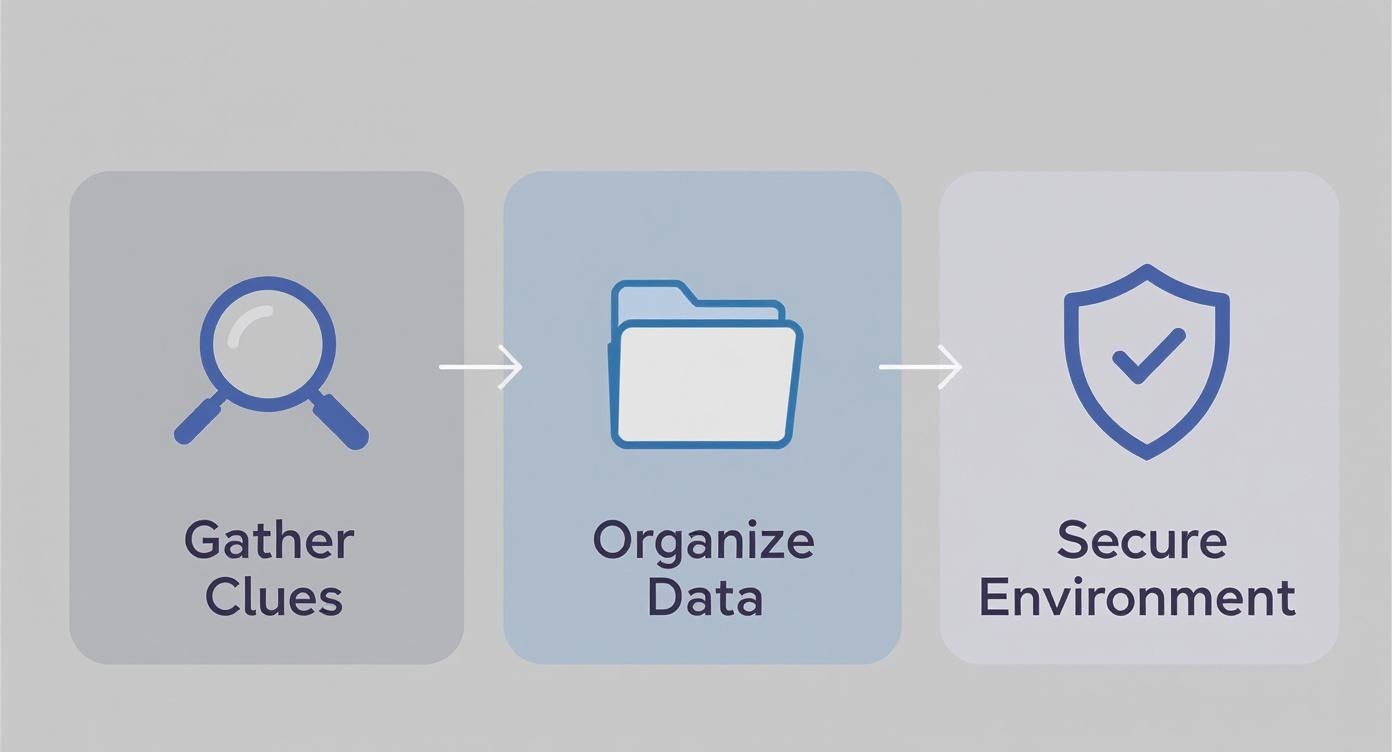
As you can see, a successful recovery is built on a solid foundation of preparation. Get this part right, and you've already won half the battle.
Tailoring Your Attack Vector
The word "attack" might sound aggressive, but in this context, it just means the method the software uses to test combinations. The two most common and effective methods are a dictionary attack and a brute-force attack. The smartest strategy usually blends a bit of both.
A personalized dictionary attack is all about using that custom list of words, names, and phrases you came up with. The AI will mix and match these elements in every possible order, applying the rules you defined. This works so well because, let's be honest, most of us build passwords from things we can remember, not from random strings of characters.
For example, say someone is trying to recover an old Blockchain.com wallet password. They might recall using their university name, a pet's name, and a favorite number. A dictionary attack would focus only on permutations of those clues, which massively shrinks the haystack you're searching for the needle in.
A brute-force attack is less surgical. It systematically tries every single possible combination of characters. A pure brute-force against a long, complex password would take forever and is rarely practical. But when you combine it with your clues, it becomes incredibly powerful. You could tell the software to brute-force just the last two characters of a password if you’re certain about the first part.
The key takeaway is that you are in the driver's seat. You’re not just hitting a button and hoping for a miracle. By carefully refining your inputs and choosing the right attack parameters, you’re actively guiding the AI, steering it straight toward the solution.
This isn’t just about personal funds, either. The scale of inaccessible crypto is staggering. As of mid-2025, balances held by illicit entities climbed to nearly $15 billion. While law enforcement agencies are getting better at seizures, a trend shows criminals are using crypto directly for transactions, making it harder to recover funds without direct wallet access. You can discover more insights on the landscape of seizable crypto assets from Chainalysis. This underscores just how critical direct recovery methods have become.
AI-driven tools offer a tailored approach to different wallet types, as each has its own quirks.
Key AI Recovery Features by Wallet Type
| Wallet Type | Key Recovery Feature | Best For Recovering |
|---|---|---|
| Bitcoin Core (wallet.dat) | File-based password cracking | The main wallet.dat password needed to access funds. |
| MetaMask | Vault decryption with rule-based attacks | The primary password used to unlock the browser extension. |
| Ledger/Trezor | Passphrase dictionary & brute-force | The optional "25th word" or passphrase for hidden wallets. |
| Ethereum Keystore (JSON) | JSON key derivation with password hints | The password protecting the encrypted private key file. |
| Blockchain.com | Wallet ID and password combination | The password for older, non-custodial web wallets. |
This table shows how the AI's power is specifically directed based on the wallet's architecture, whether it's cracking a file, decrypting a browser vault, or brute-forcing a hardware wallet passphrase.
Real-World Application and Best Practices
Let's walk through a common scenario: a hardware wallet like a Ledger or Trezor. The user has forgotten their passphrase (often called the "25th word"). They still have their 24-word seed phrase, but that hidden wallet unlocked by the passphrase is completely inaccessible.
In this situation, you’d configure the recovery tool to treat the 24-word seed phrase as a known constant. The real work is focused on the passphrase field. You would feed the tool all your usual password clues—names, dates, favorite phrases. The software would then blaze through each potential passphrase, testing it against the seed phrase until it finds the one that correctly derives the hidden wallet's private key.
As you get started, keep these best practices in mind:
- Start Small, Then Expand: Begin your search with your strongest password guesses and a simple set of rules. If that doesn't work, gradually widen the net by adding more clues and more complex rules.
- Be Patient: This isn't an instant process. Depending on the complexity of your hints, a recovery can take hours or even days. Just let the software do its thing on your secure machine without interruption.
- Keep Detailed Notes: You'll want to log which combinations and rule sets you've already tried. This stops you from re-running the same searches and helps you brainstorm new angles to try.
Ultimately, using an AI tool for wallet recovery is a team effort between you and the software. Your human memory provides the crucial starting points, and the AI brings the raw computational power needed to explore every possibility with intelligence and speed. For those who want a more guided experience, you might want to explore a dedicated crypto recovery software solution that handles much of this heavy lifting for you.
Of course. Here is the rewritten section, crafted to sound like an experienced human expert in crypto recovery.
Troubleshooting Common Recovery Issues
So you’ve run the recovery tool for hours—maybe even days—and come up empty. It’s a gut-wrenching feeling, but don't panic. This is rarely the end of the road. Hitting a wall is a normal part of the process.
Think of it this way: a failed attempt isn't a failure, it’s just new information. It tells you what didn't work, which helps you narrow down what will. The instinct is to just hit "run" again with the same settings, but that's a waste of time. Instead, we need to take a step back, look at what you told the software to do, and figure out a new angle of attack.
Most problems boil down to one of three things: the search is taking forever, the software can't find your wallet file, or it runs through everything and still doesn't find the password. Let’s tackle each one.
Refining Your Password Hints for Better Results
If the recovery software finishes a complete cycle with no luck, the problem is almost always the clues you gave it. The AI is powerful, but it's not a mind reader. A single wrong assumption on your part can send it down a rabbit hole for days, searching for something that was never there.
Now’s the time to challenge your memory. Were you absolutely certain a word was capitalized? Could you have swapped a letter for a number, like 'o' for '0' or 'i' for '1'? Think about your old password habits from that time.
Try making these adjustments to feed the AI better clues:
- Expand Your Word List: Don't just give it "sunnyday." Add variations like "sun," "day," "sunny," and even common typos you might have made, like "sunyday."
- Question Your Assumptions: Were you positive your pet's name was in it? Maybe not. Try a run without it. Instead, add the name of the street you grew up on or your first car.
- Adjust Character Sets: You might think you used complex symbols like
!@#, but maybe back then you only used a?or*at the end of your passwords. Narrow down the special characters the tool is checking.
I once worked with a client trying to get into an old Bitcoin Core wallet.dat file. He was convinced the password contained "MyBitcoin!". After a dozen failed attempts, he had a breakthrough—he remembered he used to put his university mascot, "Bulldogs," in almost everything. We added "Bulldogs" to the word list, and less than an hour later, the software found it: MyBulldogsBitcoin!. One small tweak was all it took.
Addressing Performance and Speed Issues
Sometimes the clues are right, but the search is just too massive. If the software gives you an estimated completion time of weeks or months, your parameters are way too broad. You need to trim the fat without cutting out the right answer.
Trying to brute-force a 10-character password using uppercase, lowercase, numbers, and symbols is a monumental task. You have to give the software some guardrails.
Your goal is to slash the number of possibilities the software has to check. Every rule you can define—like "the password was between 8 and 12 characters" or "it definitely ended with a number"—cuts the search time exponentially.
Start by tightening the length. If you're pretty sure the password was around 10 characters, don't set the search range from 6 to 16. Just setting it to 9-11 characters will make a massive difference. Also, if you have a decent computer with a good graphics card (GPU), make sure the software is using it. GPU acceleration can be 100x faster than relying on your computer’s main processor (CPU).
When the Wallet File Itself Is the Problem
In some cases, the recovery tool won't even start. It’ll complain that it can't find or read the wallet file. This happens a lot with old backups, especially if they were pulled from a failing hard drive. You might be pointing the software to the right folder, but the file itself is garbage.
Here’s a checklist to run through:
- Search for Alternate Backups: Get methodical. Check every old hard drive, USB stick, and cloud storage account you have (look in Dropbox, Google Drive, old email attachments). People make backups and completely forget about them. Search for common wallet filenames like
wallet.dat,UTC--, or.jsonfiles. - Verify the File Path: It sounds simple, but double-check you’re pointing the software to the exact right directory. MetaMask's vault data, for instance, is buried deep in hidden user profile folders. It’s incredibly easy to select the wrong one.
- Attempt File Repair: If you think the file is corrupted, you may need a different tool first. Use data recovery software to try and repair the file before you give it to the wallet recovery tool.
Troubleshooting is an iterative game. You try something, see what happens, and use that result to plan your next move. By methodically refining your hints and your technical setup, you can turn a stalled attempt into a successful crypto assets recovery.
What To Do The Second You Regain Access
Getting back into your wallet feels like a huge win, but don't celebrate just yet. The few moments after a successful crypto assets recovery are absolutely critical.
From a security standpoint, you have to assume the original wallet is compromised. It doesn't matter how you lost access—that wallet is now a liability.
Leaving your funds there is like finding your stolen house keys and then leaving them in the front door lock overnight. Your very first move, without hesitation, should be to transfer every last asset to a completely new, secure wallet you’ve already set up. This isn't a friendly suggestion; it's a security requirement.
Your Post-Recovery Game Plan
The mission now is pretty simple: make sure this never, ever happens again. This is your chance to start fresh and build a digital fortress around your assets using today's best practices.
Think of it in three parts: a better wallet, stronger credentials, and smarter backups. Nailing these three will put you light-years ahead in terms of security.
Here’s exactly what to do:
- Create a Brand-New Secure Wallet: Your recovered wallet is toxic. Set up a fresh one right away, ideally a hardware wallet from a trusted name like Ledger or Trezor.
- Move Everything, Immediately: Don’t procrastinate. The moment you're in, start sending all your recovered crypto to your new wallet's address.
- Generate a Strong, Unique Password: Use a password manager you trust to create a long, random password for your new setup. Never reuse passwords.
- Protect Your New Seed Phrase: Write down your new phrase on paper or, even better, stamp it into metal. Store copies in different, secure physical locations. We have a detailed guide on how to protect your wallet recovery phrase with some more advanced tactics.
Fortifying Your Long-Term Security
Once your assets are sitting safely in their new home, it's time to zoom out and think about long-term resilience. The crypto world is always changing, and so are the threats against it.
Since 2020, losses from crypto scams in the U.S. have exploded from $0.2 billion to an unbelievable $9.3 billion—that’s a 46x increase. If that pace keeps up, losses could eclipse $66 billion by 2050. As highlighted in this crypto crime report from CoinLedger, the attacks are getting smarter, which means our personal security has to be smarter, too.
A successful recovery is your second chance. It's the perfect moment to move from simply holding crypto to actively securing it with best-in-class tools and habits. Don't waste this opportunity.
Getting a hardware wallet is probably the single biggest security upgrade you can make. These little devices keep your private keys totally offline, where malware and phishing sites can't touch them. They create a physical firewall, forcing you to press a button on the actual device to approve any transaction.
Pair that with a password manager like Bitwarden or 1Password to eliminate the weak link of human memory. It lets you use impossibly complex passwords everywhere without needing to remember a single one.
Finally, get serious about your seed phrase backups. A fireproof safe at home is good. A second copy in a bank's safe deposit box is better. This kind of planning turns a single point of failure into a distributed, robust system that can withstand real-world disasters.
Your Crypto Recovery Questions, Answered
Jumping into crypto recovery can feel like you're trying to crack a code—and in a way, you are. It’s totally normal to have questions, especially when your assets are on the line and the process seems a bit technical.
We've pulled together the most common questions we get day in and day out. Think of this as your go-to guide for clear, straight-up answers to the real-world problems you might be facing.
Can I Get My Crypto Back Without My Seed Phrase?
This is the big one, and the honest answer is: it depends.
If you’ve lost only your seed phrase but you still have your password-protected wallet file (like a wallet.dat or your MetaMask vault), then yes, there's a very good chance. Our tools are built to systematically break that password, unlocking the file and giving you back access to your private keys.
But if you have neither the seed phrase nor a backup of the wallet file, the odds of recovery drop to practically zero. The seed phrase is the ultimate master key. Without it or an encrypted backup, the math just isn't on our side—there's no way to access the funds on the blockchain.
How Long Does a Crypto Recovery Attempt Actually Take?
The timeline can vary wildly. It really boils down to how complex your password was and how good your hints are. If you have a solid idea of the password structure, a recovery could wrap up in a few hours. For a vaguer, more complex password, the search might need to run for several days, or sometimes even longer.
The main things that affect the timeline are:
- Password Length: Every extra character makes the search time grow exponentially.
- Character Mix: A password with uppercase, lowercase, numbers, and symbols is a much tougher nut to crack than one with just lowercase letters.
- Hint Quality: The more accurate and specific your clues are, the faster the process will be.
Think of it as a marathon, not a sprint. The most critical thing is to let the software do its job without interruption on a secure, dedicated computer. Patience isn't just a virtue here; it's a core part of the strategy.
Is It Safe to Use a Recovery Service?
You absolutely have to put safety first. Be incredibly careful, because the crypto world has more than its fair share of scams. Never, ever share your seed phrase or a list of possible passwords with some random service or person you meet online.
A legitimate, secure recovery service will give you software that you run on your own computer. This is non-negotiable. It guarantees that your wallet file, private keys, and all sensitive data never leave your control. The entire recovery process should happen in your own secure space, keeping you in full control from start to finish.
If any service asks you to upload your wallet file or send them your private keys, that's a massive red flag. Walk away.
If you're staring down a locked wallet and need a secure, proven way forward, Wallet Recovery AI gives you the tools to take back control. Our AI-powered software runs entirely on your machine, keeping your data private while giving you the best possible chance of a successful recovery. Learn more about how we can help you regain access to your assets.
Leave a Reply