
A MyEtherWallet paper wallet is one of the oldest and most battle-tested forms of crypto cold storage. At its core, it’s just a physical document—a piece of paper—that holds your private and public keys. Since it’s completely disconnected from the internet, it’s fundamentally immune to the online threats that keep crypto users up at night, like hacking, phishing attacks, and sneaky malware.
This makes it a rock-solid solution for long-term holding or creating an ultra-secure backup of your funds.
Understanding the Value of a Paper Wallet
In a world full of sleek hardware wallets and slick mobile apps, the humble paper wallet can feel a bit old-school. But its power lies in its beautiful simplicity. A MyEtherWallet paper wallet strips away all the complex layers of software and hardware, leaving just the essential cryptographic keys printed right in front of you.
What you get is a perfect "air gap"—a physical separation from any network. This makes it an exceptional choice for specific situations where security is everything.
The Best Scenarios for Using a Paper Wallet
A paper wallet isn't designed for your daily coffee run. It truly shines when you need to lock away assets and leave them untouched for a long, long time.
- Long-Term Holding (HODLing): If you're planning to hold onto your Ethereum or ERC-20 tokens for years, a paper wallet is your best friend. It minimizes your exposure to online risks, so you can stop worrying about a software wallet getting compromised or a hardware device failing.
- Creating a Secure Backup: Think of it as the ultimate failsafe. If your hardware wallet is lost, stolen, or just stops working, a securely stored paper wallet is your key to recovering your funds. It’s a low-tech but incredibly effective redundancy plan.
- Gifting Cryptocurrency: A paper wallet is a tangible, almost nostalgic way to give crypto to someone, especially a newcomer. It provides a physical item they can hold while they get comfortable with managing digital assets.
Key Takeaway: The biggest advantage of a MyEtherWallet paper wallet is its total isolation from online threats. By existing only in the physical world, it eliminates attack vectors like keyloggers, phishing sites, and remote exploits that rely on an internet connection.
MEW’s Foundational Role in Ethereum
MyEtherWallet has a legendary history in the crypto space. It was a true pioneer during Ethereum's explosive growth, especially during the 2017-2018 Initial Coin Offering (ICO) boom. As the ERC-20 token standard became the bedrock for thousands of new projects, MEW offered an accessible, open-source interface for everyday users to dive in.
That legacy built a deep foundation of trust that continues today. The platform was instrumental in empowering non-technical folks to manage their own assets securely. In fact, the Ethereum Wallet market that MEW helped create was valued at around USD 1.3 billion in 2023 and is projected to hit roughly USD 6.1 billion by 2032. You can discover more insights about the Ethereum Wallet market and its incredible growth.
Crypto Wallet Types At a Glance
To really get why a paper wallet is so special, it helps to see how it stacks up against the other options. Each wallet type strikes a different balance between security and convenience, serving a unique purpose.
This quick comparison should clear things up.
| Feature | Paper Wallet (Cold) | Hardware Wallet (Cold) | Software Wallet (Hot) |
|---|---|---|---|
| Security | Highest (offline) | High (offline) | Lower (online) |
| Convenience | Low (requires import) | Medium (needs device) | High (instant access) |
| Cost | Free to create | $50 – $200+ | Usually free |
| Best Use Case | Long-term storage, backup | Regular, secure use | Daily transactions |
Ultimately, a MyEtherWallet paper wallet is a specialized tool. It's not here to replace your hardware or software wallet, but to become a powerful part of a complete security strategy. By understanding its core strength—unbeatable security through total offline isolation—you can decide if it's the right move for protecting your crypto.
Alright, let's get down to business. The whole point of a paper wallet is security, and that security starts long before you ever print anything. It all comes down to creating your wallet in a completely offline, isolated environment.
We call this an "air gap." You're literally creating a physical gap between your computer and any network. This is non-negotiable.
Think of it this way: generating a wallet on a computer that's online is like writing your bank account details on a postcard and dropping it in the mail. Who knows who might see it? Doing it offline is like sealing it in a tamper-proof envelope inside a locked safe.
Setting Up Your Digital “Clean Room”
Before you pull the plug on your internet, you need to get your tools ready. First, you'll need the MyEtherWallet software itself.
Head straight to the official MyEtherWallet GitHub repository and download the latest release package. Do not download it from anywhere else. Unofficial sites are a minefield of compromised code designed to steal your funds the second you create a wallet.
Once it's downloaded, run a deep, thorough antivirus and anti-malware scan on your computer. I'm not talking about a quick 5-minute scan. Use the most comprehensive "deep scan" option your software offers. You're hunting for any hidden keyloggers or spyware that could be silently watching everything you do. A clean bill of health is mandatory before you move forward.
My Two Cents: For the truly paranoid (which is a good thing in crypto), the gold standard is using a brand new computer that's never touched the internet. If that’s not practical, a bootable Linux Live USB is an excellent alternative. It lets you run a fresh, clean operating system right from a USB stick, completely bypassing your regular hard drive and any malware that might be hiding on it.
Going Dark: The Air-Gap Protocol
Okay, you've got the official MEW files and your computer is squeaky clean. Now it's time to go dark. This is the moment that makes or breaks your wallet's security.
Follow this checklist to the letter:
- Kill the Wi-Fi: Don't just disconnect from your network. Go into your system settings and completely disable the Wi-Fi adapter itself.
- Unplug the Ethernet: If you're plugged in with a cable, yank it out. Make sure there is zero physical connection to your router or modem.
- Disable Bluetooth: Shut down Bluetooth too. It's a long shot, but we're not taking any chances with short-range wireless connections.
Once you are 100% certain your machine is offline, you can finally unzip the files you downloaded and open the index.html file to start the generation process.
This strict isolation protocol ensures that when your private key is born, it exists only on that machine. It has never been transmitted, broadcast, or exposed to any network. This is what gives a paper wallet its legendary security. You're not just printing a piece of paper; you're building a fortress from the ground up.
Alright, with your secure, air-gapped computer ready to go, it’s time for the main event: creating your MyEtherWallet paper wallet. This is the moment your private and public keys are born, completely shielded from the internet and any prying eyes.
First things first, open up the MEW files you downloaded and unzipped earlier. You’re looking for a file named index.html—double-click to open it in your browser. Since you're offline, your browser is just acting as a local viewer for the application. No servers, no connections, just pure, offline crypto generation.
The interface will prompt you to create a new wallet. Go ahead and follow the steps. This process generates a completely unique pair of cryptographic keys that belong only to you.
Understanding Your New Wallet Components
MyEtherWallet is about to give you two critical pieces of information. It's absolutely vital you understand the difference between them. Mixing them up is one of the fastest ways to lose your funds for good.
- Public Address: Think of this as your crypto bank account number. It’s the address you’ll share with others (or yourself) to receive Ethereum (ETH) and any ERC-20 tokens. Sharing this is perfectly safe.
- Private Key: This is the master key to your digital vault. It grants complete and total control over all the funds at your public address. You must never, ever share this with anyone, for any reason.
This simple diagram breaks down the core of the offline setup.
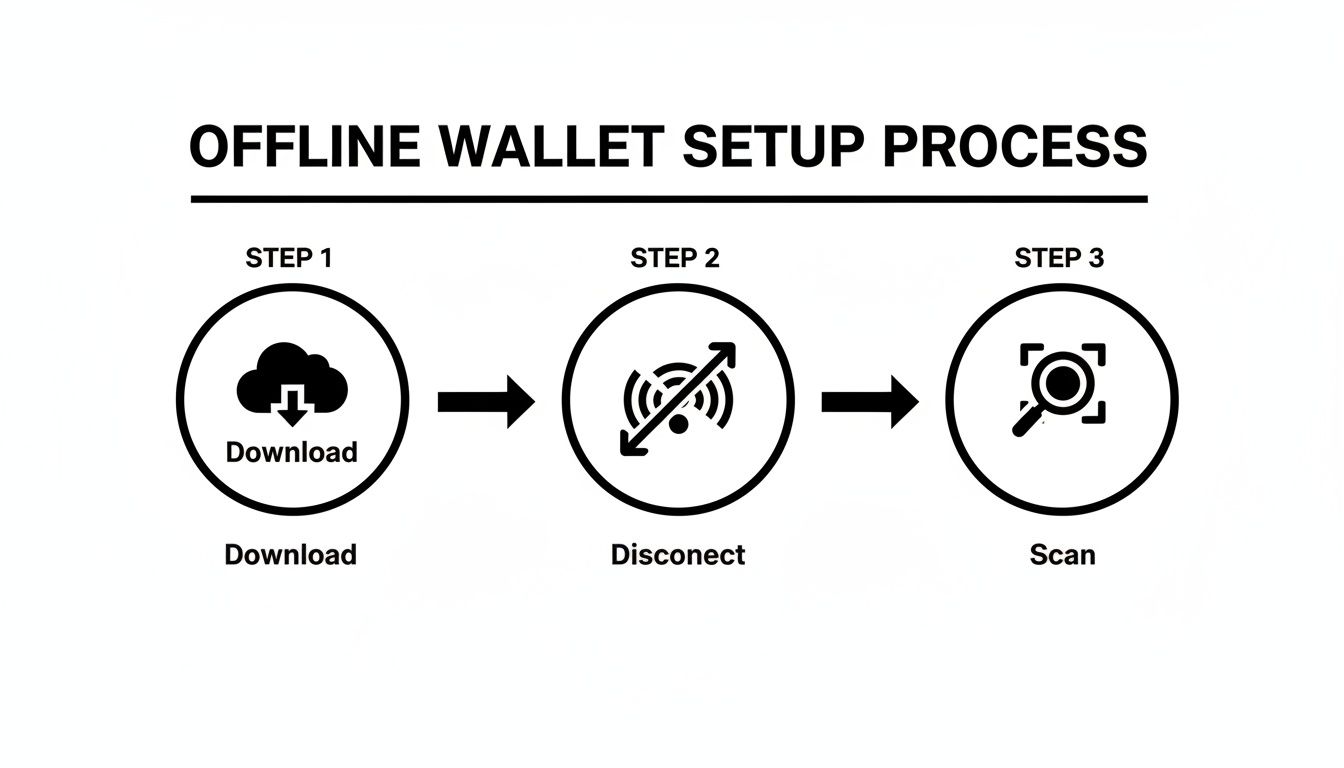
Nailing this sequence—Download, Disconnect, and then generating your wallet—is the bedrock of creating a truly secure cold storage solution.
Creating Your Encrypted Backup
Beyond just the raw private key, MEW gives you another layer of security called the Keystore/JSON file. This is basically an encrypted version of your private key, locked down with a password that you choose.
You'll be asked to set a strong password. Don't gloss over this step. I’m talking a long, complex mix of uppercase letters, lowercase letters, numbers, and symbols. That password is your final line of defense. If someone ever gets their hands on your Keystore file, a weak password is the only thing standing between them and your crypto.
Expert Tip: Write down this password and store it somewhere completely separate from your paper wallet. Never save it on a computer, and definitely not in a cloud service. A lost password is a catastrophic single point of failure.
The Printing Process Best Practices
Now you’re ready to create the physical "paper" part of your wallet. MEW generates a printable version that clearly displays your public address and private key, often with handy QR codes for easy scanning later.
The gold standard here is a printer that has never been connected to a network. It sounds paranoid, but many modern printers have internal memory that can store a history of everything they’ve printed. A networked printer could potentially leak your private key to anyone else on that network.
Here's my personal checklist for secure printing:
- Use a Direct Connection: Hook the printer up to your offline computer with a simple USB cable.
- Print a Test Page: Before printing the real deal, print a random document to make sure the ink is crisp and there are no smudges. A blurry or illegible QR code is completely useless.
- Print Your Wallet: I always print at least two copies on high-quality paper. Redundancy is your friend.
- Clear the Printer's Memory: After you’re done, unplug the printer from the wall for at least a minute. For good measure, print several pages of junk text to overwrite any data that might be lingering in the printer's buffer.
This ensures no digital ghost of your private key is left behind.
What If You Don't Have a Secure Printer?
Look, not everyone has a non-networked printer collecting dust in a closet. If that's you, whatever you do, do not use a public printer at a library, office, or Kinko's. The risk of exposure is just way too high.
Instead, you can go completely old-school. Carefully write down the private key and public address onto a piece of durable paper or a notebook by hand.
- Be Meticulous: Every single character has to be perfect. One mistake—a '0' instead of an 'O' or a lowercase 'l' instead of an uppercase 'I'—and the key is worthless.
- Double-Check Everything: Go over it again and again. If you have someone you trust completely, have them check your work. A single slip-up can lock you out of your funds forever.
- Consider a Converter Tool: As an extra backup, some people convert their private keys into a mnemonic phrase (a string of 12-24 words). Should you ever need to reconstruct your key, a mnemonic code converter can offer a good look into how these formats relate to each other.
By following these offline generation and printing steps, you've essentially built a fortress for your crypto, ensuring your keys have never touched the vulnerable online world.
Protecting Your Physical Paper Wallet
So you've created a squeaky-clean, offline MyEtherWallet paper wallet. That’s a huge win for your security, but don't pop the champagne just yet. You're only halfway there.
What you're holding is now a bearer instrument, just like a stack of cash or a gold bar. The mission now is to protect this physical piece of paper from damage, loss, and theft. This is just as critical as how you generated it in the first place.
Think of it this way: your paper wallet is the literal key to a digital vault. If that key is destroyed or someone else gets their hands on it, your funds are simply gone. The strategies you use to protect it need to be tough, multi-layered, and designed to last.
Fortifying Your Wallet Against Physical Threats
Let's be honest, paper is fragile. It’s an enemy to water, fire, and even just time itself. The first job is to beef it up, turning that flimsy sheet into something that can withstand a little chaos.
Laminating it is a great, simple first step. This gives it a solid shield against spills, moisture, and basic wear and tear. You can grab a cheap home laminator and get this done in a few minutes, instantly boosting its lifespan. Just make sure you do this somewhere private.
Next, think about where it's going to live. A fireproof and waterproof safe in your home is a solid, popular strategy. When you're shopping for one, pay attention to the fire-resistance ratings. You want something that can handle insane temperatures (like over 1500°F for at least an hour) and keep water out. This is your best defense against the two most common household disasters.
The Power of Redundancy and Geographic Separation
In the world of security, a single point of failure is a complete nightmare. If you just have one copy of your wallet stashed in one place, you're taking a massive gamble. A fire, flood, or a well-targeted robbery could wipe out your access for good.
The answer is smart redundancy. Create two or three identical, laminated copies of your wallet. The trick is to store them in secure locations that are geographically separate from each other. If disaster strikes one location, your backups are safe and sound somewhere else.
Here’s a common-sense plan for distributing your copies:
- Primary Copy: Keep this one in your main fireproof safe at home. It's the most convenient to access but still very secure.
- Secondary Copy: A bank's safe deposit box is a fantastic option. It offers institutional-level security against both theft and environmental threats.
- Tertiary Copy: This one could be entrusted to a person you trust with your life—a family member or even a lawyer—to be stored in their own secure location.
This multi-location strategy slashes your risk profile. While paper wallets are a classic crypto tool, it’s worth noting the digital wallet market is exploding, estimated at USD 51,245.5 million in 2024. This growth just underscores how critical solid storage solutions have become.
Crucial Security Rule: Never, ever take a digital photo or make a photocopy of your paper wallet. The second your private key exists as a file on a phone, computer, or cloud drive, you've completely destroyed its "cold storage" status and thrown it to the wolves online.
Operational Security and Discretion
The final piece of the puzzle is operational security—or "opsec," as it's often called. It's the art of keeping quiet and managing information so it doesn't fall into the wrong hands.
Decide who, if anyone, absolutely needs to know that this wallet exists and where it is. The fewer people in the know, the smaller your risk. If you do tell someone, like your spouse or the executor of your will, give them clear, sealed instructions that are only to be opened under very specific circumstances.
Even your storage materials matter. For the ultimate defense against fire and physical damage, some people go a step further and etch their private key onto metal plates. You can check out our guide on the best metal seed phrase storage options, as many of the same principles for protecting a seed phrase apply directly to a written-down private key.
By combining physical hardening, geographic redundancy, and strict opsec, you'll transform your MyEtherWallet paper wallet from a vulnerable piece of paper into a truly resilient, long-term store of value.
Alright, let's get those funds out of deep storage.
A MyEtherWallet paper wallet is fantastic for long-term HODLing, but it’s designed to be a one-way street. Its entire job is keeping your crypto offline and untouchable. So, what’s the game plan when you actually want to sell, trade, or use those assets? You have to bridge the gap from cold storage back to the online world, and you need to do it carefully.
This isn't like dipping into a checking account. Think of it as breaking open a piggy bank. Once you expose that paper wallet's private key to any online device, its cold storage integrity is gone. For good. You need to move 100% of the funds out in a single go and then retire that address forever. It's a fundamental security rule that you just can't skip.
This process is what we call "sweeping" a wallet. You’re literally sweeping every last satoshi from the paper wallet into a new, active "hot" wallet—something like the main MEW interface or MetaMask.
Sweeping a Wallet: The "Break the Seal" Mentality
Imagine your paper wallet is a sealed, tamper-proof security bag full of cash. The second you tear that bag open, you can’t trust its security anymore. You wouldn't just take some cash out and put the rest back into the now-torn bag, right? Of course not. You'd move all of it to a new, secure spot, like your day-to-day billfold or a bank account.
That's the exact logic behind sweeping. The moment you type or scan your private key into an online wallet, you have to assume it's been exposed. The best-case scenario is your computer is clean. The worst-case? A keylogger just nabbed your key.
So, the only safe move is to create one transaction that sends the entire balance to a brand-new, secure address. Once that transaction confirms on the blockchain, consider that paper wallet toast. It did its job, but now it's retired.
Why One-Time Use Is Non-Negotiable: A private key from a paper wallet is "cold" only until it touches a device connected to the internet. After that, it's warm at best, and potentially compromised. Reusing an address after it's been online is like leaving the front door to your house wide open after you leave. You're just inviting trouble.
Your Pre-Flight Security Checklist
Before you even think about bringing that private key online, you have to prep your environment. Your goal is to make the window of exposure as small and as safe as humanly possible. A few minutes of prep here can save you from a world of hurt.
- Check That URL. Then Check It Again. Seriously. This is ground zero for getting scammed. Phishing sites that perfectly clone the real MyEtherWallet or MetaMask are everywhere. Triple-check you're on the official site. Look for the
https://padlock and make sure the domain is spelled perfectly. - Use a Clean Machine. Don't do this on a library computer or your buddy's laptop. Use your own trusted device, and make sure your antivirus and anti-malware software is up to date and has run a recent scan.
- Go Lean on Browser Extensions. Some browser add-ons can be sneaky, interfering with web pages or even logging what you type. I always recommend using a "clean" browser profile with minimal or no extensions installed for any crypto-related tasks.
Once you’re confident your digital workspace is secure, you can move forward. In MEW or another wallet, you'll look for an option like "Access My Wallet" or "Import Account," where you can choose to use a Private Key. From there, you can either type it in or, better yet, scan the QR code to avoid typos.
Executing the Sweep—Slow and Steady
Okay, you’ve imported the key, and you can see your balance. Don't get trigger-happy. Patience is your best friend here.
The very first thing you should do is a small test transaction. Send a tiny amount of crypto—something you absolutely wouldn't cry over losing—to your new target wallet address. Then wait. Wait for it to get fully confirmed on the blockchain.
This simple test confirms three crucial things:
- You didn't fat-finger the destination address.
- You have full control of the new wallet and can see the test funds arrive.
- Everything is working as expected with the network and your connection.
Only after that test transaction lands safely should you go for the main event. When you build the final transaction, you'll need to account for network gas fees. Most modern wallets have a "Send Max" or "Send Entire Balance" button that does the math for you, automatically subtracting the fee to send everything that's left.
By following this methodical process—sweeping the whole balance, retiring the address, and always doing a test send first—you can move your funds from the vault of a paper wallet back into the world, safely and without breaking a sweat.
Common Pitfalls and What to Do When Things Go Wrong
Even the most seasoned crypto users can make a mistake. A MyEtherWallet paper wallet is a fortress when you handle it right, but a few simple slip-ups can bring the walls tumbling down. Knowing where people usually go wrong is the best way to avoid these traps yourself—and to have a plan if the worst happens.
Let's start with a classic blunder: generating your wallet on the wrong computer. Using a machine at a library, an internet cafe, or even a friend's house is just asking for trouble. You have zero idea what kind of spyware or keyloggers might be lurking in the background, ready to snatch your private key the second it's created. Your wallet could be compromised before you even print it.
Another mistake I see all the time is creating a digital copy out of convenience. It's so tempting to snap a quick photo of your paper wallet on your phone, right? But the moment you do, it's no longer "cold storage." That photo can get automatically synced to the cloud, instantly exposing your private key to online threats.
When Your Paper Wallet Vanishes
Losing the physical piece of paper is probably the most gut-wrenching scenario. If you only printed one copy and it gets lost, burned in a fire, or destroyed by a flood, your funds are effectively gone. This is exactly why I always tell people to create multiple copies and store them in different, secure locations. It’s not just a friendly suggestion; it’s a fundamental rule of self-custody.
But what if you lose the paper but remember saving that Keystore/JSON file during setup? That file is your lifeline. The catch? It’s useless if you can't remember the password you used to encrypt it. A forgotten password locking you out of your own Keystore file is an all-too-common headache, leaving you staring at a digital vault you can't open.
The Crypto Catch-22: You have the locked box (your Keystore file), but you've completely blanked on the key (your password). Trying to guess a strong, complex password you created ages ago is almost always a lost cause. With standard computer hardware, a brute-force attack could take months, or more likely, years.
Modern Ways to Get Your Wallet Back
When you're stuck in a situation like a forgotten Keystore password, it's not always game over. This is where specialized recovery services can step in. They use powerful, AI-driven computing power to tear through millions of password combinations at speeds your home PC could only dream of.
These services don't just guess randomly. They take the little bits and pieces you do remember—maybe part of the password, how long it was, or special characters you always use—and build an intelligent, targeted attack. It’s a methodical, high-speed hunt that can often crack passwords that would otherwise be lost forever.
The global crypto wallet market is exploding, valued at USD 10.51 billion in 2024 and projected to reach a massive USD 77.21 billion by 2032. As more people jump into crypto, the need for reliable ways to recover access is becoming absolutely critical. You can learn more about the rapid growth of the crypto wallet market and see just how big this ecosystem is getting.
For anyone holding appreciating assets in a MyEtherWallet account, professional recovery provides a real path back to your funds. Instead of writing off your crypto as a total loss, these services offer a second chance to reclaim what's yours when your own security measures have failed.
If you've lost access to your MyEtherWallet or another crypto wallet, don't give up hope. Wallet Recovery AI specializes in securely restoring access to locked assets using advanced, AI-powered techniques. Learn how we can help you regain control of your funds.
Leave a Reply