
It's a feeling I've seen countless times: that sudden, cold pit in your stomach when you realize you can't get into your crypto wallet. But that moment of panic doesn't have to be the end of the story. With the right approach, moving from panic to a clear plan is the key to getting your funds back.
The Reality of Lost Crypto and Your Path to Recovery
Losing access feels like you've hit a brick wall. One minute your assets are there, and the next, they're trapped behind a forgotten password, a dead hardware device, or a corrupted file. It's a uniquely frustrating experience.
If this is you, you're not alone. The whole "be your own bank" ethos of crypto puts all the responsibility on you. There's no customer service desk to call for a password reset. You are the security, the vault, and the recovery agent, all in one.
This is a massive problem in the space. Just last year in 2025, one leading firm recovered over $2.5 million in previously inaccessible crypto. We're talking about everything from Ledger and Trezor hardware wallets to software like MetaMask. One single recovery was for $1.5 million, and about 70% of the total value recovered was Bitcoin.
These aren't small amounts, and they prove that even when the stakes are high, recovery is often possible. You can read more about some of these successful crypto recovery stories and see what's achievable.
Common Ways You Get Locked Out
Over the years, I've seen the same handful of scenarios pop up again and again. Before you can fix the problem, you need to know what you're dealing with.
Here is a quick look at the most frequent access issues and the first, safe steps you can take.
Common Crypto Access Issues and First Response
| Access Issue | Affected Wallets (Examples) | Recommended First Action |
|---|---|---|
| Forgotten Password | MetaMask, Exodus, Electrum | Gather any notes or password hints. Try variations you commonly use, but do not brute-force it blindly. |
| Corrupted Wallet File | Bitcoin Core (wallet.dat), Geth (keystore) |
Locate any and all backups of the wallet file on other drives, cloud storage, or old computers. Do not attempt to open or edit the corrupt file directly. |
| Hardware Malfunction | Ledger, Trezor, Coldcard | First, check if the issue is with the cable or USB port. Then, immediately locate your 24-word recovery phrase. The device is replaceable; the phrase is not. |
| Lost Recovery Phrase | All non-custodial wallets | Re-trace your steps. Check every possible physical or digital location where you might have stored it. Recovery is extremely difficult without this phrase. |
Knowing which category your problem falls into helps focus your efforts and prevents you from making a bad situation worse.
The single most important thing you can do right now is switch from panic mode to problem-solving mode. Rushing and trying random things almost always ends badly. A calm, methodical approach is your best bet for a successful recovery.
Your First Move: Stop and Think
Before you do anything else, just take a breath.
Seriously. Don't immediately start mashing in every password you've ever used. Many wallets have attempt limits that could lock you out permanently.
Instead, your first job is to become an archeologist. Go find every single scrap of information related to that wallet. This could be an old notebook with password clues, a USB stick in a drawer with a potential backup, or the steel plate you know you stamped your seed phrase on.
Gather your tools before you start the work. Once you have everything in front of you, this guide will show you how to use it, starting with the safest DIY methods first.
Safe DIY Methods for Common Wallet Recovery
Before you panic and assume the worst, let's walk through a few powerful do-it-yourself techniques that can often solve common access problems. In many cases, these simple methods for achieving easy recovery data are all you need, especially when dealing with software wallets.
The most important thing to remember is to work in a completely secure, offline environment whenever you're handling sensitive information. Your seed phrase or private keys should never, ever be typed into a website or shared with anyone online.
Recovering Software Wallets Like MetaMask and Exodus
Software wallets—often called "hot wallets"—are incredibly convenient, but they're also prone to issues. A browser crash, a failed app update, or even a new computer can make it seem like your wallet has vanished into thin air.
I see this all the time. Someone gets a new laptop, installs the MetaMask extension, and is horrified to see an empty wallet. This is completely normal. Your funds are safe on the blockchain, not locked inside your old computer.
To get everything back, all you need is your seed phrase.
Instead of creating a new wallet, look for the option to "Import an existing wallet." You’ll then be prompted to carefully enter your 12 or 24-word seed phrase. The order is critical, so type the words exactly as you wrote them down. After that, you'll set a new password, which simply protects access on that specific device.
This same "Import" or "Restore" function is your best friend on other popular wallets like Exodus, Trust Wallet, and Atomic Wallet. As long as you have that phrase, you can restore your wallet on any device, as many times as you need.
A quick tip from my experience: Almost everyone I’ve helped with this made the same small mistake. They misspelled a word in their seed phrase. A single wrong letter will generate a totally different, empty wallet, so triple-check your spelling.
Restoring Hardware Wallets Like Ledger and Trezor
Hardware wallets provide a fantastic layer of security, but the devices themselves aren't invincible. They can be lost, damaged, or simply stop working. I once had a client whose Ledger Nano S took a trip through the washing machine. The device was completely destroyed, but his crypto was 100% safe.
How? Because the hardware wallet is just a fancy key holder. The real master key is the 24-word recovery phrase you wrote down during setup.
If your device is gone or broken, the process is straightforward:
- Get a New Device: Order a brand-new, factory-sealed wallet directly from the official manufacturer, like Ledger or Trezor. Never, ever buy a used or pre-configured wallet.
- Choose the Restore Option: When you power on the new device, it will ask if you want to create a new wallet or restore from a backup. Select the "Restore" option.
- Enter Your Phrase: This is the tedious part. You'll use the device's physical buttons to input each word of your 24-word phrase. Take your time and get it right.
Once the device confirms the phrase is correct, it will regenerate your private keys. Connect it to the companion app—like Ledger Live or Trezor Suite—and all your accounts and balances will reappear, exactly as they were.
The system for easy recovery data from a hardware wallet is designed to be foolproof, but it hinges entirely on you having that seed phrase. For more complicated scenarios, you might find more detailed guidance in our comprehensive easy data recovery solutions.
What to Avoid During DIY Recovery
What you don't do is just as critical as what you do. One wrong move can turn a recoverable situation into a permanent loss.
Here are the most common mistakes to steer clear of:
- Entering Your Seed Phrase Online: Your seed phrase should only ever be entered directly on your hardware wallet's screen or into the official, verified wallet software on your computer or phone. Never type it into a website, Google Doc, or online form.
- Trusting "Support" on Social Media: Scammers love to hang out on X (Twitter), Discord, and Telegram, posing as official support agents. They’ll offer to help, then ask for your seed phrase. No legitimate company will ever ask for your seed phrase or private keys.
- Using Unverified Recovery Tools: Be extremely wary of random software you find online that claims to "recover" wallets. Most of these are just malware designed to steal your funds the second you give them any information.
Your seed phrase is the absolute master key to your crypto. Guard it with your life. As long as you are the only person who has it, your funds can almost always be recovered.
Running Diagnostics Before You Panic
It’s a heart-stopping moment: your wallet balance reads zero, or the app just won't connect. The immediate assumption is that everything is gone, but I’ve seen this scenario play out hundreds of times. More often than not, it’s a simple technical glitch, not a catastrophe.
Before you spiral, take a breath. Think of it like a car that won't start. You wouldn't junk it without first checking the gas tank or the battery. We’ll apply that same methodical approach here, ruling out the easy stuff first.
Check Your Connection and Sync Status
A huge number of wallet access problems boil down to a bad connection. Your wallet is just a window to the blockchain, and if that window is foggy, you simply can't see your funds.
First, the obvious: is your internet working? A flaky Wi-Fi connection can easily prevent your wallet from syncing with the network, making it appear empty.
Next, look at the wallet's own connection to its network node or server. Wallets like Electrum or Bitcoin Core must be fully synced to display the correct balance and transaction history. If the server they're talking to is lagging, your wallet will show outdated information.
- For Electrum: Check the colored circle in the bottom-right corner. Green is good—you're connected and synced. A red or yellow light means there's a problem. Click it to manually pick a new server from the list.
- For MetaMask: A slow or totally unresponsive interface usually points to an issue with the RPC (Remote Procedure Call) network. A quick fix is to switch networks (e.g., from Ethereum Mainnet to a testnet, then back again). You can also go into your network settings and change the RPC URL to a different public one from a provider like Alchemy or Infura.
These are safe troubleshooting steps. You're not touching your private keys or seed phrase; you're just changing how your wallet communicates with the public blockchain.
Verify Application and Device Issues
If the network isn't the problem, the issue might be with the software or hardware you're using.
Is your wallet app up to date? Developers constantly release patches to fix bugs, including the exact connectivity and display issues that cause panic. An old version of Exodus or Trust Wallet might not communicate properly after a network-wide update.
On the other hand, a new update can sometimes introduce new bugs. If your wallet problems started right after an update, check the developer's official Twitter or blog. They've likely already acknowledged the issue and might have posted a workaround.
Key Takeaway: From my experience, a good 90% of "my funds are gone" panics are resolved by fixing one of these simple issues: a bad internet connection, a wallet server/RPC problem, or an outdated app.
For those using hardware wallets like a Ledger or Trezor, the physical connection is another common point of failure.
- Try a different USB cable. They fail silently all the time.
- Plug it into a different USB port on your computer.
- Ensure the companion software (Ledger Live or Trezor Suite) is the latest version.
Going through these diagnostics helps you methodically isolate the true source of the problem. If you've run through all these checks and things still aren't right, the issue may be more complex than a simple glitch. For issues involving physical device damage, especially with external drives storing wallet files, a different set of skills is needed. You can learn more by reading our guide on recovering data from an external disk.
When to Stop and Call a Professional Wallet Recovery Service
So, you’ve hit a wall. You've run through the common fixes, tried every troubleshooting step you can think of, and your crypto is still locked away. This is the make-or-break moment.
Frankly, this is where most people get into real trouble. Continuing to poke around when you don't know what you're doing can turn a recoverable situation into a permanent loss. Knowing when to put the tools down and call an expert is just as crucial as the initial troubleshooting.
Making one wrong move—like trying a "trick" from some random forum—could corrupt your wallet file for good or, even worse, lead you right into the arms of a scammer.
To help you figure out your next step, we've mapped out the process. Are you dealing with a simple glitch you can fix, or have you reached a dead end that needs an expert?
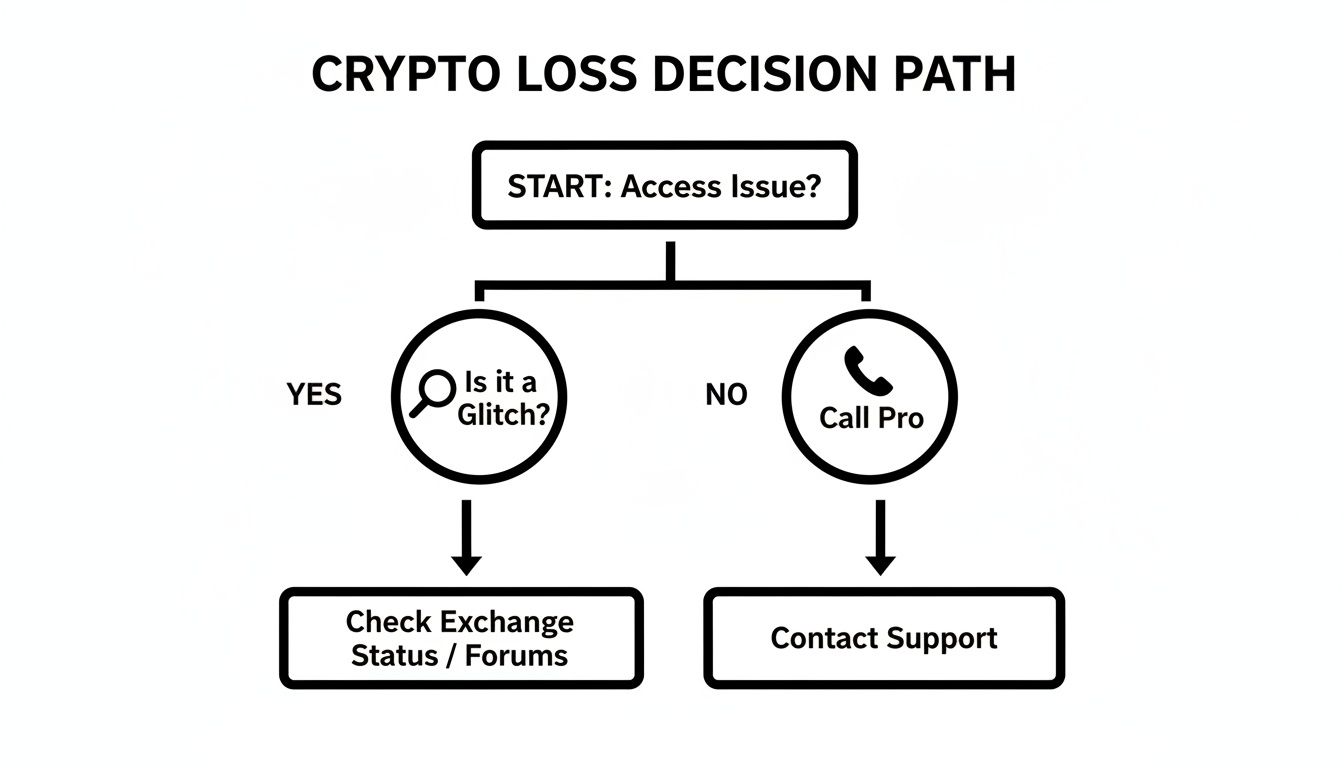
As you can see, if the basic troubleshooting steps don't work, the safest and most logical path forward is to get professional help.
The Red Flags: When to Call for Backup Immediately
Some situations are immediate stop signs. If you run into any of these, stop what you are doing. Don't try another thing. The odds of you fixing it yourself are slim, and the risk of making it worse is incredibly high.
These are the moments to contact a service like Wallet Recovery AI.
Forgotten Password, But No Seed Phrase: This is the classic hard-stop. If you can't remember the password for a software wallet (like an old MyEtherWallet file) or a
wallet.datfile, and you don't have the 12 or 24-word recovery phrase, your only real option is a professional brute-force attack. We use massive computing power to run through billions of potential passwords, guided by any hints you can give us.Physically Damaged Hardware Wallet: A crushed Ledger, a Trezor with a fried chip, or a device that took a swim and won't power on is a case for a specialist. Trying to open or fix it yourself will almost certainly destroy the tiny, fragile chip that holds your keys.
Corrupted Wallet File and No Backup: When a
wallet.dator keystore file gets corrupted, you can't just "fix" it with standard software. It takes advanced data recovery techniques to surgically piece the file's structure back together—something that's far beyond the scope of any DIY guide.
The Danger of Fake "Recovery" Tools
In a moment of desperation, you might search for a quick fix and find sites promising instant recovery. Please, be extremely cautious. The vast majority are scams built to steal what little access you still have.
These fake tools often work by asking for whatever you do have—like a partial seed phrase, a corrupted file, or your public address—and then they just drain any funds they can get their hands on. A legitimate service will never ask you to send them your crypto or compromise your security.
Legitimate recovery, on the other hand, is a real and growing industry. While illicit crypto activities are a known problem—reportedly hitting $158 billion in 2025—reputable services are successfully fighting back against data loss.
Firms like CRC have recovered over $830 million across 10,000 cases with a 98% success rate, and others like Crypto Recovers returned over $2.5 million in 2025 alone. A full 70% of those funds were Bitcoin recovered from hardware and software wallets. Many of these cases, especially simple password recovery, are solved in just days. You can see what to expect from top recovery services to get a better sense of the landscape.
How AI Gives You a Fighting Chance
This is exactly where a service like Wallet Recovery AI shines. Instead of just guessing, we use specialized, AI-driven algorithms to attack the problem systematically.
For a forgotten password, our systems can test trillions of combinations, but they do it intelligently. The AI prioritizes attempts based on the hints you provide about your old password habits, dramatically speeding up the search.
For corrupted files, our AI tools can recognize patterns in the damaged data to reconstruct the file's original structure. This approach works on a huge range of wallets, from Bitcoin and Ethereum to Atomic Wallet and Blockchain.com, giving you a real shot at getting your funds back where a manual attempt would have no hope.
Best Practices to Prevent Future Asset Loss
The best recovery strategy is the one you never have to use. While our expertise lies in helping you regain access when things go wrong, a proactive approach to security is infinitely more powerful.
Moving from a reactive mindset to a preventative one is what separates casual holders from serious investors. This isn't just about jotting down your seed phrase; it’s about building a robust, multi-layered defense for your most critical data. Here’s how the professionals secure their assets for the long haul.
Create Redundant and Resilient Backups
Your seed phrase is the master key to your entire crypto portfolio. A single paper copy is a single point of failure—it can be lost, destroyed in a fire or flood, or simply degrade over time. The professional standard is to create multiple, durable backups stored in physically separate locations.
This principle, known as geographic redundancy, is what data centers use to guarantee uptime. It dramatically reduces your risk, ensuring that no single event can wipe out your access.
- Metal Seed Storage: Forget paper. Engrave or stamp your seed phrase onto a fireproof and corrosion-resistant metal plate. We often see successful recoveries from clients who used products like Cryptosteel or Billfodl. A metal backup can survive disasters that would turn a paper wallet to ash in seconds.
- Geographic Separation: Never, ever keep all your backups in one place. Store one copy in a secure location at home, a second in a trusted family member's safe, and perhaps a third in a bank's safe deposit box. The goal is to make it logistically impossible for one catastrophe to destroy all your recovery options.
- Avoid Digital Copies: This is the #1 way funds are stolen. Never store your seed phrase as a text file, a screenshot, in cloud storage like Google Drive, or in an email draft. Your master key must remain completely offline, always.
By creating multiple physical backups and separating them, you build a system that is resilient by design.
Practice Impeccable Digital Hygiene
Your daily computer habits have a massive impact on your security. You have to treat your crypto activities with a far higher level of caution than you do regular web browsing.
A common-sense, yet often overlooked, practice is to isolate your crypto transactions from your everyday digital life. You wouldn't use your house key to open your public mailbox, so don't use your primary, everyday computer for managing significant assets.
Expert Tip: We strongly advise using a dedicated, clean device—even a cheap laptop or a factory-reset old smartphone—exclusively for crypto transactions. This device should never be used for general web browsing, checking personal email, or downloading files. This simple separation drastically reduces its exposure to malware and sophisticated phishing attacks.
Regularly Verify Your Recovery Process
A backup is completely worthless if it doesn't work when you need it most. A frequent and devastating mistake we see is when a user diligently stores their seed phrase, only to discover years later that they wrote it down incorrectly or it has become illegible.
You absolutely must test your recovery procedure periodically to ensure your backups are accurate and that you remember the process.
Think of it as a fire drill for your assets.
- First, send a very small, trivial amount of crypto (a few dollars is fine) to your primary wallet.
- Next, on a clean, secondary device, wipe the wallet software and restore it using only your seed phrase backup.
- Finally, verify that you can see the small balance and, more importantly, that you can successfully send it back out.
This simple drill confirms two critical things: your backup is 100% correct, and you have the muscle memory to perform a recovery under pressure. Performing this check once a year provides an immense amount of security and peace of mind.
Frequently Asked Questions About Crypto Recovery
When you're locked out of your wallet, you're going to have questions. It's a stressful situation, and you need clear, no-nonsense answers about the recovery process, safety, and your chances of success. We've compiled the most common questions we hear from clients.
How Likely Is It That My Lost Crypto Can Be Recovered?
Your chance of recovery depends entirely on the specifics of your case. There's no single success rate, but we can outline what to expect in common scenarios.
If you’ve forgotten a password but have some ideas—even just partial memories or common patterns you use—the odds are actually quite good. Professional services using brute-force algorithms report success rates between 60-80% for these cases. The more hints you provide, the better.
On the other hand, a lost seed phrase with absolutely no backup is a near-impossible situation. The same goes for wallets on hardware that has been physically obliterated.
For many common access issues, like a forgotten password or a corrupted wallet file, recovery isn't just a long shot. With the right tools and expertise, it's often probable.
What Is the Difference Between Recovering a Seed Phrase and a Password?
This is a critical distinction in crypto security. Think of them as two completely different types of keys.
A seed phrase (or recovery phrase) is your master key. It's a unique list of 12 to 24 words that can regenerate your private keys and give you access to your entire wallet on a new device. If you have your seed phrase, you're safe. Recovery is guaranteed.
A password usually just encrypts the local wallet file on your computer or phone (like a wallet.dat or keystore file). It's a gatekeeper, not the master key. If you forget your password but have the seed phrase, you can just restore the wallet elsewhere and set a new password.
The real problem is losing a password without having the seed phrase. That's when you need professional password recovery services. It's the only way back in.
Is It Safe to Use a Wallet Recovery Service?
Vetting a recovery service is one of the most important decisions you'll make. Your security is paramount, and a legitimate company will always operate with that in mind. They will never, ever ask you to send them your crypto.
Here’s what to look for in a trustworthy service:
- No Direct Key Access: A professional firm will never ask for your seed phrase or private keys. Their work should be done on an encrypted file you provide, combined with your password hints, without them ever needing direct control.
- Confidentiality Guarantees: Look for a non-disclosure agreement (NDA) or a clear privacy policy that legally protects your information.
- A Transparent Process: They should be able to explain their methods, fee structure, and what to expect, without making unrealistic promises.
Be extremely wary of anyone demanding large upfront payments, guaranteeing success before seeing your case, or asking for your seed phrase.
While scams exist, legitimate recovery is a proven field. In 2024 alone, firms and law enforcement successfully reclaimed $2.4 billion in digital assets, a 17% jump from prior years. Specialized password recovery experts can achieve success rates as high as 94-98% in some scenarios. You can read more about these promising crypto recovery statistics to see what's possible.
If you've hit a wall with DIY methods, professional intervention is the next logical step. Wallet Recovery AI uses sophisticated, AI-enhanced techniques to securely and confidentially tackle complex recovery cases.
Submit your case online for a discreet evaluation. Let our experts help you get your assets back.
Leave a Reply