
If you're staring at a locked Guarda wallet, take a deep breath. It's a gut-wrenching feeling, but you likely have the key to get back in. Since Guarda is a non-custodial wallet, you—and only you—hold the keys. Your access comes down to one of two things you saved during setup: your 12 or 24-word seed phrase or an encrypted text file.
Figuring out which one you have is the first and most crucial step.
Starting Your Guarda Wallet Recovery Process
Let's get you back into your wallet. The entire Guarda recovery process hinges on the type of backup you created. You either have a mnemonic seed phrase or a downloadable backup file.
These two methods are fundamentally different, and each has its own recovery path. One is a universal master key for your crypto, while the other is a file specific to your Guarda installation that's useless without your password.
Identifying Your Backup Method
So, which one do you have? Did you diligently write down a list of words on paper, or did you save a file from Guarda's website to your computer? The answer determines everything that comes next.
This flowchart breaks down the two main recovery paths. It’s a simple visual guide to your options.
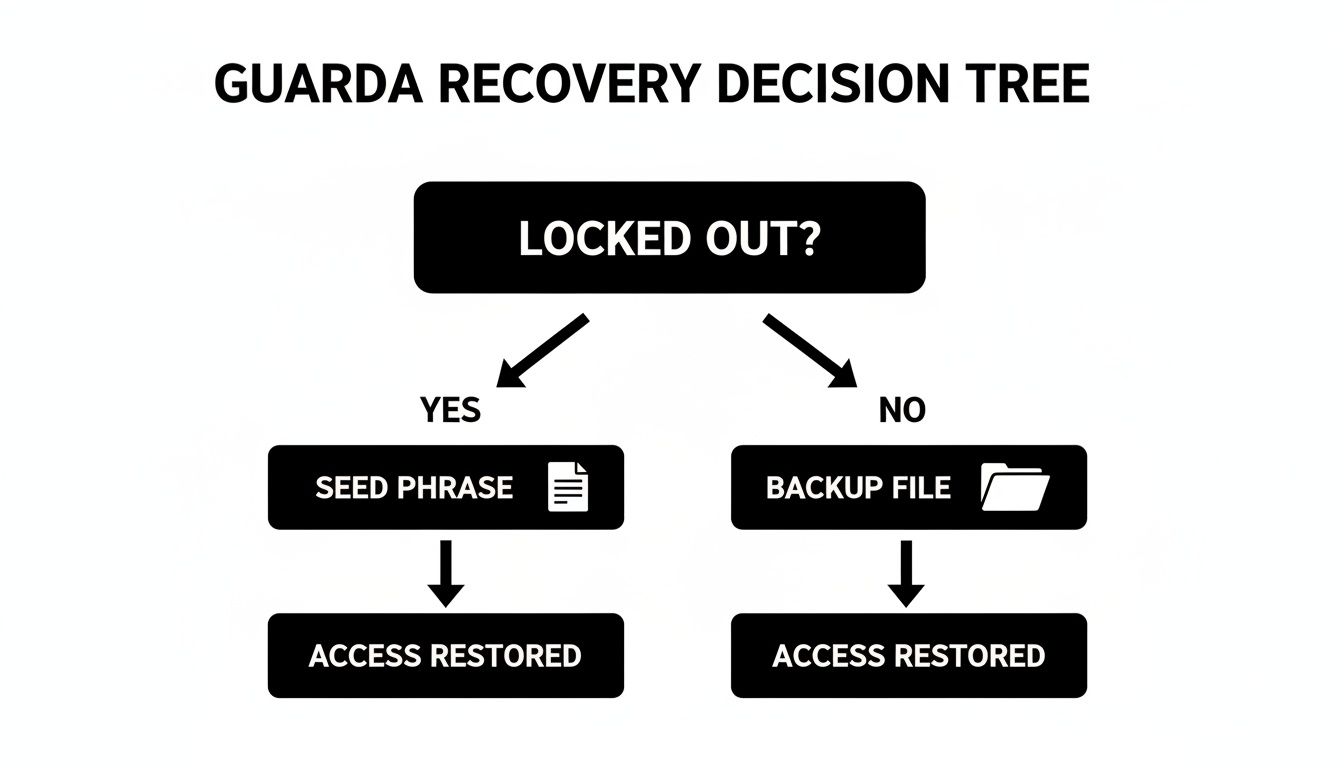
As you can see, both the seed phrase and the backup file are valid ways to restore access. Knowing which path to take right from the start will save you a ton of time and frustration.
Seed Phrase vs. Backup File
Let's put these two methods side-by-side. This should help you quickly identify what you're working with and get on the right track. If you want a more in-depth explanation of how these powerful phrases work, you can learn more about wallet seed phrases in our comprehensive guide.
This table breaks down the key differences to help you figure out what you have and how it works.
Guarda Backup Methods and When to Use Them
| Backup Type | What It Is | Primary Use Case | What It Can't Do |
|---|---|---|---|
| Mnemonic Seed Phrase | A 12-24 word sequence that acts as a master key for all your private keys. | Restoring your wallet on a new device or in another wallet app, often without needing a password. | Help you if you have the words misspelled or in the wrong order. |
| Encrypted .txt File | A file downloaded from Guarda containing your encrypted private keys. | Importing your specific Guarda wallet back into the Guarda app. | Unlock your funds without the password you used to encrypt the file. |
Once you've identified your backup, you know your next move. Got the seed phrase? You're in a good position to restore your wallet anywhere. Have the text file? You'll need that file and the password you created with it.
Why You Are in Control of Your Guarda Keys
Let's get one thing straight before you dive into recovery: Guarda can't just reset your password. It's not that they don't want to; it's that they literally can't. Understanding this is the first and most critical step.
Guarda is a non-custodial wallet. This isn't just a marketing term—it's the core of its security design. It means Guarda never, ever has access to your private keys, seed phrase, or password. All that sensitive data is stored directly on your own device, encrypted and locked away.
This setup offers incredible security. Since Guarda doesn't hold your keys, they can't be stolen in a massive company data breach, a constant threat for funds left on exchanges. You're protected from that entire class of risk.
But here's the trade-off: that security comes with 100% personal responsibility. If you lose your credentials, there's no "Forgot Password" link or customer support agent who can magically grant you access. You are the one and only custodian of your funds.
What’s Actually in Your Guarda Backup File?
Remember that .txt file Guarda prompted you to save? Think of it as a digital safe. Inside that file is an encrypted version of your private keys—the raw data that proves ownership of your crypto on the blockchain.
The only thing that unlocks that safe is the password you created. Without it, the file is just a meaningless jumble of text.
Key Takeaway: Your Guarda password doesn't protect an online account. It's the key that directly decrypts the private key file on your device. This is why a forgotten password is so serious—it's the one thing standing between you and your funds.
Assuming the Guarda team can step in is the most common mistake we see. The wallet is built so they are architecturally blind to your data, which is precisely what makes it so secure in the first place.
The Power of a Non-Custodial Design
This user-first, non-custodial approach has been part of Guarda’s DNA since day one. Launched back in 2017 by the Portuguese company Guardaco, the wallet was designed to give users absolute control from the very beginning. Its cross-platform support on web, desktop, and mobile made this high-security model accessible to everyone. You can even find more details about Guarda's history and token to see how this principle guided its evolution.
This is what truly separates a real wallet like the Guarda crypto wallet from a simple exchange account. You are interacting directly with the blockchain.
To see what this means in the real world, just look at these common situations:
- Scenario A: The Exchange Hack. A major exchange gets hacked, and user funds are drained. If your crypto was stored on that exchange, it’s gone. If it was in your Guarda wallet, it’s completely safe and untouched.
- Scenario B: The Lost Device. Your phone, with the Guarda app, is lost or stolen. No problem. As long as you have your 12-word seed phrase or the backup file and password, you can restore your entire wallet on a new device in minutes.
- Scenario C: The Forgotten Password. You have the encrypted
.txtbackup file but have no idea what the password is. In this case, your funds are locked. The file is secure, but you're locked out. This highlights just how critical that password is.
Grasping this dynamic is essential. You're not trying to reset a web account; you're trying to find the key to a lockbox that only you control.
How to Restore Your Wallet From a Backup
Alright, you’ve located your backup. Now it's time to get back in. Whether you have your mnemonic seed phrase or the encrypted .txt file, the path to regaining access is pretty clear-cut once you know the steps. The real keys here are precision and a secure environment.
First things first: start with a clean slate. Make absolutely sure you're using a fresh, legitimate installation of the Guarda crypto wallet app. If you’re on a new machine or have even the slightest doubt about your current setup, go download the latest version directly from Guarda's official site. This simple step eliminates any risk of a compromised or outdated app sniffing your credentials.
Using Your Mnemonic Seed Phrase
Your mnemonic phrase is the master key to everything. Think of it as the ultimate recovery tool, since it can restore your entire wallet on any device—often without even needing your old password.
Here’s the game plan:
- Open the App: Fire up your newly installed Guarda application, whether on your browser, desktop, or phone.
- Find the Restore Option: The welcome screen gives you two choices: "Create a New Wallet" or "Restore or Import." You're going to pick "Restore or Import."
- Select Mnemonic Phrase: The app will then ask what kind of backup you have. Choose the option for restoring from a mnemonic, seed, or private key.
- Enter Your Phrase: This is where you need to be meticulous. Carefully type your 12 or 24 words into the text field. Pay close attention to the spelling and make sure every single word is in the exact original order.
A simple typo is a common pitfall. I've seen it happen—a word like "brain" typed as "drain" will technically work, but it will generate a completely different, empty wallet. Always double-check each word against your physical backup before you hit continue. Also, watch out for extra spaces before the first word or after the last one.
Once the phrase is accepted, Guarda will prompt you to create a new password for this specific device. This password secures the local installation of your wallet and doesn't have to be the same one you used before.
Using Your Encrypted Backup File
If you're working with the .txt backup file instead of the seed phrase, the process is just as simple. However, it comes with one non-negotiable requirement: you must know the password you created when you first saved that file.
To restore using this file, follow these steps:
- Launch the Guarda app and select "Restore or Import."
- This time, pick the option to "Restore from a Backup."
- The app will ask you to upload your
.txtfile. You can either drag it into the window or browse your computer's files to select it. - After uploading, you'll be prompted to enter the password that encrypts that specific backup file.
This is the moment of truth. If the password is correct, Guarda decrypts the file, loads your private keys, and your funds appear. If it’s wrong, the restoration fails. There are no "forgot password" links or security questions to fall back on here.
Crucial Tip: Perform all recovery operations offline. Disconnect from the internet before you type in your seed phrase or upload your backup file. This simple action completely neutralizes the risk of malware intercepting your credentials during the process.
This degree of user control is exactly what makes the Guarda crypto wallet so popular. As a fully non-custodial wallet, it gives you sole authority over your private keys, enabling secure storage, swaps, staking, and even loans across web, desktop, and mobile platforms. The wallet supports over 50 core coins like BTC, ETH, and privacy-centric Zcash, with many advanced features debuting on its Android app. This comprehensive support has helped it grab a huge piece of the market, from North America's 30.9% wallet revenue share in 2024 to the booming Asia-Pacific region. You can explore more facts about Guarda's extensive features to see everything it's capable of.
Cross-Platform Restoration Examples
While the process is the same everywhere, the exact button placement can vary slightly across platforms. Here’s a quick look at what to expect in different environments.
On the Web Wallet:
When you land on Guarda's web wallet page, the "Restore or Import" button is right there next to "Create a New Wallet." Clicking it takes you straight to the screen where you can type your mnemonic or upload the backup file.
On the Mobile App (iOS/Android):
The first screen you see when opening the app presents the same two choices. Tapping "Restore or Import" moves you to a new screen to select your backup type. The mobile interface makes it simple to either type your phrase or use your phone's file browser to find the .txt backup.
On the Desktop App (Windows/macOS/Linux):
The desktop client is a near-perfect mirror of the web experience. You'll be greeted by the same "Restore or Import" button on the main screen. Since you're already on a computer, finding and uploading your backup file is often the quickest method.
By methodically following these steps for either your seed phrase or backup file, you can systematically restore access to your assets. Just remember to work carefully, check your inputs, and prioritize a secure, offline environment.
Troubleshooting Common Recovery Issues
Even with the right backup and a clear head, restoring your Guarda crypto wallet can sometimes hit a frustrating snag. You type in your password, absolutely sure it's correct, only to get an error. Or worse, you restore the wallet successfully and see a terrifying zero balance.
These moments are incredibly stressful, but they almost never mean your funds are gone for good. More often than not, the fix is much simpler than you'd imagine. Let's walk through the most common recovery roadblocks and figure out how to get past them.
When Your Password Fails
You're staring at the password prompt, convinced you know the right one, but Guarda keeps saying no. Before panic sets in, let's run a quick diagnostic checklist. The culprit is almost always a tiny, overlooked detail.
- Caps Lock Is On: It’s the oldest one in the book for a reason. Give that key a quick check.
- Keyboard Language Mismatch: This is a big one. Did you create your password on a computer with a different keyboard layout, like US vs. UK? Special characters like @, #, or £ can be in different places, causing you to type the wrong password without even realizing it. Try switching your system’s keyboard language to match the one you originally used.
- Number Pad Issues: If your password has numbers, make sure Num Lock is on if you're using the number pad on the side of your keyboard.
- Common Substitutions: Think about your personal habits. Do you ever swap an "o" for a "0," an "i" for a "1," or an "S" for a "$"? Your muscle memory might be kicking in with a variation you've since forgotten.
If you’ve gone through these checks and you're still locked out, it's time to stop trying in the app. Grab a notepad and start writing down every possible variation you can think of. This list will be your best friend if you need to move on to more advanced recovery methods later.
Solving the Zero Balance Problem
There’s no bigger shock than restoring a wallet and seeing it completely empty. Your heart drops, but take a deep breath—your crypto is almost certainly safe. A zero-balance screen is usually a sync issue, not a sign of theft.
A zero balance after restoring a Guarda crypto wallet is typically caused by a network synchronization delay or a missing token address. Your funds are still on the blockchain; the wallet just needs a little help to "see" them again.
Here’s how to nudge it in the right direction.
First, give it some time and make sure you have a solid internet connection. The wallet has to reach out to multiple blockchains to pull in your balances. A weak or spotty connection can stop this process in its tracks. Just let it sit for a good 10-15 minutes to fully sync up.
Next, double-check that you're looking at the right currency. The wallet might default to your Bitcoin (BTC) or Ethereum (ETH) balance. Use the dropdown menu to manually select the specific crypto you’re expecting to find.
Finally, for many tokens on Ethereum (ERC-20) or other networks, you might need to add them manually. Find the token's contract address on a block explorer like Etherscan, copy it, and then use Guarda’s "Add Custom Token" feature. Once you plug that in, your balance should pop right up.
Handling a Corrupted or Unrecognized Backup File
Sometimes the problem isn’t your password but the backup file itself. You try to import the .txt keystore file, and Guarda hits you with an "invalid file" or "unrecognized format" error. This can happen for a couple of reasons.
The file might have been accidentally changed. For instance, if you opened and re-saved it in a program like Microsoft Word, it might have added hidden formatting that corrupted the file's structure. It's also possible the original download was incomplete.
If this happens, your first move should be to look for another copy. Did you save one to a different cloud drive, a USB stick, or an external hard drive? An untouched version is your easiest path forward. If you have no other copies, the data inside might still be salvageable, but it often requires specialized tools to parse the damaged file. At this point, it’s best to stop and consider getting professional help to avoid making things worse.
When You've Tried Everything and Still Can't Get In
So, you’ve hit a wall. You've gone through every troubleshooting step, triple-checked your seed phrase for typos, and scoured your devices for that backup file. But your Guarda crypto wallet remains locked. It's one of the most sinking feelings a crypto holder can experience.
Let’s be honest: if you’ve lost both your password and your seed phrase, the situation is tough. Guarda’s non-custodial model means only you have the keys. There’s no support desk with a magic "reset password" button. Your funds are locked on your device, and without the key, they’re stuck.
But don't give up just yet. There are still a few advanced paths forward, but they require a very careful approach. What you do next is critical.
The Reality of Brute-Forcing a Password
If you still have your encrypted .txt backup file but the password is a blank, your only real option is to try and crack it. This method is called brute-forcing, which is just a technical way of saying you’re going to systematically try every password you can think of.
You can try this yourself, but you need a strategy. Don't just hammer away with random guesses. Think of it as an organized memory-jogging session. Your own habits are the biggest clues.
Start building a list of potential passwords based on your personal patterns:
- Key Dates: Anniversaries, birthdays, or other significant dates. Remember to try different formats like
MMDDYYYYorDD-Month-YY. - Names: Think of family members, current or past pets, and even favorite characters. Try combining them with numbers or symbols you often use (e.g.,
Buddy!2020). - Password Habits: Do you have a go-to formula? Maybe you always start with a capital letter and end with a number, or you recycle parts of old passwords.
- Keyboard Patterns: It's more common than you think. People often use patterns based on keyboard layouts, like
qazwsx123or something similar.
Jot down every possibility in a simple text file. Working through them one by one is tedious, but it’s the safest way to tackle this on your own.
A Critical Warning: Stay away from random online tools or scripts that promise to brute-force your password for you. The vast majority are scams designed to trick you into uploading your encrypted wallet file. Once they have it, they can use their own powerful systems to crack your password and drain your funds.
When to Bring in a Professional
Manual guessing will only get you so far. If your password was strong—a random mix of characters, numbers, and symbols—a regular computer could take centuries to crack it. If your own memory-jogging attempts come up empty, it’s time to call in the experts.
This is precisely why services like Wallet Recovery AI exist. We provide a completely secure, confidential way to attempt a password recovery without ever putting your crypto at risk. You can see how our wallet recovery service works and learn about our commitment to security.
Instead of random guessing, we use specialized, AI-powered hardware to run through millions or billions of potential combinations. We work with you to create a highly personalized dictionary based on all those memory joggers and personal habits, which drastically narrows down the possibilities and boosts the chance of success.
The crypto wallet market is exploding, with projections showing it could surpass $77 billion by 2033. But this growth comes with a massive hidden risk: billions in assets are lost each year due to forgotten passwords and lost keys. Guarda users aren't immune. That's where we come in—helping investors reclaim their stake in this market without compromising their security. You can read the full report on crypto wallet market growth to grasp just how big this problem is.
How a Professional Service Keeps You Safe
Choosing a professional service isn't just about a higher success rate; it's about making sure you don't fall victim to a scam in a moment of desperation. Here’s how a reputable service like ours protects you:
- Total Confidentiality: The process is 100% private. We never ask for your seed phrase, and all our communication is encrypted.
- No Direct Fund Access: We only need the encrypted
.txtbackup file. Your actual private keys are never exposed or transmitted at any point. - Airtight Security: All recovery attempts run on isolated, offline systems. This completely eliminates the risk of online threats.
When you've exhausted every other option for your Guarda crypto wallet, turning to a professional isn't giving up. It's making a smart, strategic move to use specialized expertise for a problem that's often too complex to solve alone. It’s your best shot at safely getting your funds back.
Here are some of the most common questions we field from Guarda users who are trying to get back into their wallets. These are the things that often cause the most confusion, so let's clear them up.
Can Guarda Support Help Me Recover My Password or Funds?
Let's get this one out of the way first: no, they can’t. This is a feature, not a bug.
Guarda is a non-custodial wallet. That means their support team has absolutely zero access to your password, your private keys, or your seed phrase. All that critical information is stored in an encrypted file right on your computer or phone. While that's fantastic for security, it puts the responsibility for recovery squarely on your shoulders.
If you lose your password and your backup (the seed phrase or the encrypted .txt file), Guarda's team is technically powerless to help you.
Is It Safe to Use a Recovery Service?
This really comes down to who you choose to work with. The crypto space has its share of bad actors, so you have to be careful. A legitimate, professional service will prioritize your security and be completely transparent about their process.
A key sign of a trustworthy provider is that they will never ask for your seed phrase. Their goal should be to crack the password for your encrypted backup file, not to gain direct access to your private keys. This critical difference keeps your funds safe while they work. Always do your research and steer clear of anyone making wild promises or demanding sensitive data right away.
My Restored Guarda Wallet Shows a Zero Balance. Are My Funds Gone?
Don't panic just yet. We see this all the time, and it's almost never a case of lost funds. It’s usually a simple sync or display issue.
Before you assume the worst, run through this checklist:
- Check your connection. Make sure you have a stable internet connection and give the wallet a few solid minutes to sync up with the blockchains. Sometimes it just needs time to catch up.
- Are you on the right tab? The wallet might open to BTC or ETH by default. You may need to manually switch over to the asset you’re looking for.
- Add the token manually. For many ERC-20 tokens or assets on other networks, you have to add the token's contract address yourself for the balance to show up.
If you’ve tried all that and still see zero, there might be a more technical problem, like a derivation path mismatch. That's something a professional recovery service can help you diagnose and fix.
What Is the Difference Between a Password and a Private Key in Guarda?
Getting this right is fundamental to understanding your wallet's security. It's simpler than it sounds.
- Your Password: Think of this as the key to a safe. You create it to lock and unlock the Guarda wallet app on your device. It's what encrypts the file holding your private keys.
- Your Private Keys: These are the actual contents of the safe. They are the long cryptographic codes that prove you own your crypto on the blockchain and are what you need to spend your funds.
So, your password protects the file, and your private keys (represented by your 12 or 24-word seed phrase) are what give you control over the coins themselves.
If you've tried everything and are still locked out of your Guarda wallet, don't give up or risk your funds with sketchy tools. At Wallet Recovery AI, we use advanced, secure methods to help people regain access to their crypto. Submit your case online for a fast, confidential assessment.
Leave a Reply