
The BitBox hardware wallet is a device built for one purpose: to keep your private keys completely offline and your cryptocurrency safe from harm. Think of it as a physical vault for your digital assets, making them untouchable by online threats like hackers and malware.
Why Your Crypto Needs the BitBox Hardware Wallet
If you're holding crypto, you've probably used a "hot wallet"—a software app on your phone or an exchange account. They're convenient, but because they're always connected to the internet, your funds are constantly exposed. It’s a bit like carrying your life savings as cash in a busy public square. It’s easy to get to, but it’s also a prime target for thieves.
A BitBox hardware wallet changes the game entirely by using a strategy called "cold storage." It generates and holds your private keys—the secret codes that prove you own your crypto—entirely offline. This simple separation is what creates real security.
By never allowing your private keys to touch an internet-connected computer, a hardware wallet builds a physical wall against remote attacks. It's the digital equivalent of moving your cash from that public square into a personal, offline bank vault that only you can access.
With a hardware wallet, every single transaction has to be physically confirmed on the device itself. This puts you, and only you, in complete control, neutralizing the most common threats like phishing scams, spyware, and massive exchange hacks.
The Shift Toward Cold Storage
The crypto world is waking up to the dangers of hot wallets. By the end of 2024, more than 5.8 million hardware wallets were shipped globally, showing a major move toward secure cold storage. That’s a 31% year-over-year sales growth from 2023.
Still, hot wallets held a staggering 78% market share in 2025. This tells a critical story: while many are upgrading their security, the vast majority of crypto users remain vulnerable. The BitBox is built to close that gap, offering top-tier security without overwhelming complexity. If you're new to the concept, our guide on what a hardware wallet is is a great place to start.
Simplicity and Swiss Security
What really makes the BitBox hardware wallet stand out is its minimalist Swiss design and a deep focus on security through simplicity. It intentionally avoids flashy, complex features that could create new security holes. Instead, it does one job and does it perfectly: protect your private keys.
This philosophy is clear in its core features:
- Offline Key Storage: Your private keys are born on the device and never leave it. They never touch your computer or the internet.
- Secure Chip: A dedicated microcontroller acts as an armored guard, protecting against physical tampering and advanced digital attacks.
- Open-Source Firmware: The device's code is public. This allows security experts everywhere to constantly check it for flaws, building a powerful foundation of trust.
The table below breaks down exactly how these features protect you from real-world dangers.
BitBox Security Features vs Common Crypto Threats
This table summarizes how key features of the BitBox hardware wallet directly counter prevalent security risks in the cryptocurrency space.
| Security Threat | How BitBox Protects You | Risk Level with Hot Wallets |
|---|---|---|
| Malware & Spyware | Transactions are signed offline and must be physically confirmed on the device screen. Malware on your PC can't steal your keys. | High |
| Phishing & Scam Websites | You verify the transaction details (address, amount) on the BitBox's trusted screen, not on a potentially fake website. | High |
| Exchange Hacks & Collapses | You hold your own keys. Your assets are not held by a third-party custodian, making you immune to their failures. | Very High |
| Physical Tampering | The secure chip is designed to resist physical extraction attempts. Any tampering is immediately evident. | N/A |
| "Evil Maid" Attacks (Physical access to device) | The device is protected by a password, and the secure chip prevents an attacker from easily extracting keys even with the device. | Moderate |
Ultimately, choosing a BitBox is a statement. It means you are serious about taking full control and ownership of your digital wealth, protecting it from the constant threats of the online world.
Inside the BitBox Security Architecture
To get a real handle on the BitBox hardware wallet, you have to look past the minimalist case and understand its security design. This isn't just a plastic box for your crypto; it’s a layered defense system built with one goal in mind: protecting your private keys.
Think of it less like a safe and more like a specialized security guard. It handles and approves transactions without ever revealing the secrets it's protecting.
The entire system is built on a single, non-negotiable rule: your private keys are born on the device, used on the device, and never, ever leave it. That physical separation is the key. Your computer or phone, which is always connected to the internet and exposed to threats, is never trusted with your keys. The BitBox serves as a hardened, offline specialist.
This creates what we call a functional "air gap" between your crypto and the messy online world. Even if your main computer is riddled with malware, an attacker has no way to sign a transaction and drain your funds.
The Secure Chip: Your Digital Bodyguard
At the core of the BitBox is a secure chip, often called a secure element. This isn't a generic processor. It's a purpose-built microcontroller designed to be a tiny digital fortress, specifically to withstand both software and physical attacks.
This chip gives the BitBox several critical defenses:
- Physical Tamper Resistance: The chip is built to make physically extracting the private keys nearly impossible without completely destroying it.
- Cryptographic Acceleration: It handles the heavy-duty math needed for signing transactions quickly and securely, all without the keys ever leaving the chip.
- Monotonic Counter: A crucial feature that stops "rollback" attacks, where someone might try to trick your device into running older, more vulnerable firmware.
Basically, the secure chip means that even if a thief gets their hands on your BitBox, they still have a massive fight ahead of them to get the keys out. It's a level of protection that software-only wallets just can't offer.
A secure chip is like a vault inside a bank. It’s designed to protect its contents—your private keys—even if the building around it is compromised. It’s the final line of defense against both digital and physical break-in attempts.
This specialized hardware is the bedrock of the wallet's security, making the BitBox a tough nut to crack for even determined attackers.
Trust Through Transparency: Open-Source Code
While the secure chip provides the muscle, you still need to trust that it's doing its job correctly. That's where the BitBox's dedication to open-source firmware comes in. The code running the entire device is public, allowing anyone to read, inspect, and audit it.
This level of transparency is vital in the security world. It means that experts, researchers, and hobbyists everywhere can constantly check the code for flaws. Instead of just asking you to trust them, Shift Crypto invites the community to verify everything for themselves. It’s a powerful way to build real, provable trust.
This open-source approach also applies to the BitBoxApp, the software you use on your computer or phone to manage your accounts. The app talks to your hardware wallet over a secure, encrypted connection, but all the important work happens on the BitBox itself.
When you make a transaction, the app just prepares the data and sends it to the device. You then verify the details—the amount, the address—on the BitBox's own screen before approving. This protects you from clever phishing attacks, ensuring that what you see on the device's trusted display is exactly what you are signing.
Setting Up and Backing Up Your BitBox Wallet
Alright, you’ve got your new BitBox. Getting it set up the right way is the single most important thing you’ll do to secure your crypto. This isn't just a formality—it's the foundation of your entire self-custody setup.
We're going to walk through initializing the device and, more importantly, creating bulletproof backups. Remember, your crypto isn't in the BitBox; the device just protects the keys. Your backups are the only way to get your funds back if the device is lost, broken, or stolen.
Your First Steps with the BitBox
First things first: head to the official Shift Crypto website and download the BitBoxApp. It's absolutely crucial you get it from the source and nowhere else to avoid malicious fakes.
Once the app is installed, it will walk you through the initial setup. You'll be asked to create a strong device password. This password is only for unlocking the physical device itself. Think of it as the PIN for your ATM card—it protects the card, but it's not the money itself. Your real master key comes next.
Understanding the Dual Backup System
This is where the BitBox really stands out. It gives you a powerful dual backup: an instant digital copy and the industry-standard recovery phrase.
- MicroSD Card Backup: The moment your wallet is created, the BitBox saves an encrypted backup file onto the included microSD card. This is incredibly handy for a quick and easy restoration if you ever need to wipe or reset your device.
- 24-Word Recovery Phrase (BIP39): This is the master key to everything. These 24 words can bring your entire wallet back to life on any other compatible hardware or software wallet, not just a new BitBox.
The app will force you to verify your backup. Don't even think about skipping this. It's how you confirm your backups actually work before you've sent any real money to the wallet.
This diagram shows how all the security features work together to protect your keys.
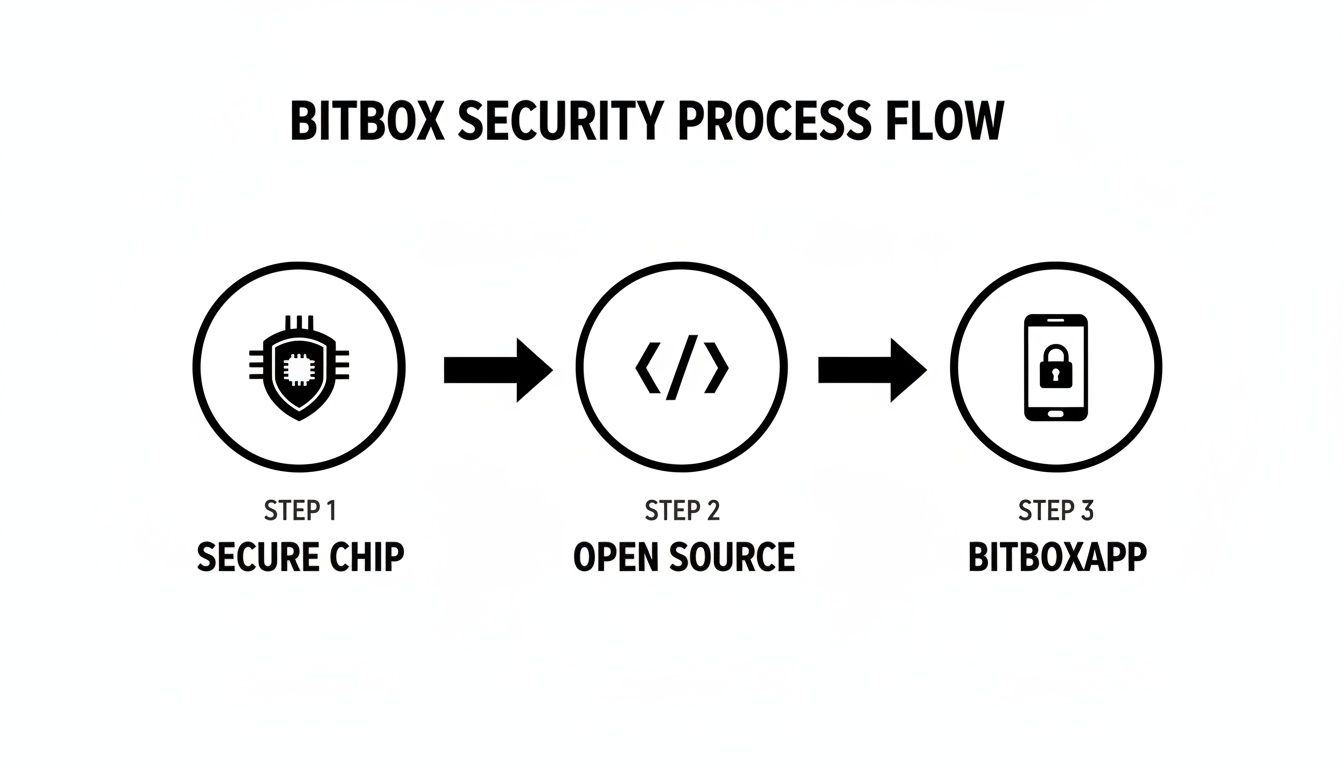
The combination of the dedicated secure chip, open-source firmware, and the BitBoxApp creates multiple layers of defense, isolating your keys from online threats.
Best Practices for Your 24-Word Backup
Your 24-word recovery phrase is your financial lifeline. I can't stress this enough. If you lose it, your crypto is gone forever. If someone else finds it, they can take everything.
Your 24-word recovery phrase is the true ownership of your assets on the blockchain. The BitBox device could get run over by a truck, but as long as you have these words, you have your money. Treat it with the seriousness of a bearer bond or the deed to your house.
These aren't suggestions; they are hard-and-fast rules for handling your seed phrase:
- Write It Down By Hand: Never, ever type your recovery phrase into a computer, phone, or printer. Any device that touches the internet is a potential risk.
- No Digital Copies. Period: Do not take a photo of your words. Don't save them in a password manager, email draft, or cloud service like Google Drive or Dropbox. A digital copy is a sitting duck for hackers.
- Store It Securely and Offline: Put your written phrase in a safe, hidden, and private place. Use the same logic you'd apply to storing gold or other irreplaceable documents.
- Consider Redundancy: Make a second or even third physical copy and store them in entirely different, secure locations (e.g., a trusted family member's safe). This protects you from a single point of failure like a house fire or flood.
If this is your first time dealing with self-custody, it's worth taking a few minutes to learn more about a proper Bitcoin wallet backup strategy.
Upgrading Your Backup Security
The paper card that comes in the box is a great start, but it's just paper. It's easily destroyed by water, fire, or just fading over time. For anyone serious about long-term security, it’s time to upgrade.
Metal storage plates are the gold standard. These kits let you stamp or engrave your 24 words into solid steel, making them virtually immune to fire, water damage, and corrosion. It ensures your master key can survive nearly any catastrophe you can imagine.
Think of it this way: investing in a metal backup is a tiny one-time cost to protect your entire crypto portfolio for decades to come. It’s one of the smartest security investments you can make.
Preparing for When Things Go Wrong
Taking control of your crypto with a BitBox hardware wallet is a huge step toward financial sovereignty. But that control comes with real responsibility. While your BitBox is an incredible fortress against hackers, the real world has a knack for throwing curveballs—a dropped device, a corrupted file, a moment of forgetfulness.
Thinking about these "what-if" moments isn't about fear-mongering. It's about smart planning. A secure wallet is just one piece of the puzzle; how you manage your backups and prepare for mishaps is what truly secures your wealth for the long haul. Let's walk through the most common failure points and how to handle them.
Scenario 1: Your BitBox is Lost, Stolen, or Damaged
You drop your BitBox into a puddle. It gets crushed in your bag. Or maybe it just vanishes. That initial jolt of panic is real, but here's the good news: this is a problem hardware wallets were built to solve.
Your crypto never actually lives on the BitBox. It's always on the blockchain. The wallet is just the key to your digital vault. As long as you have your backup—either the microSD card or, more importantly, your 24-word recovery phrase—your funds are 100% safe. You can simply get a new BitBox (or any wallet that supports the BIP39 standard) and restore full access. This is exactly why we stress the backup process so much.
Scenario 2: The MicroSD Card Backup Fails
The BitBox's microSD backup is a brilliantly simple feature for a quick restore. But digital media is fragile. Cards get corrupted, lost, or damaged. What happens if your microSD backup is the only thing you have, and it suddenly becomes unreadable?
This is a genuinely tough spot. If the microSD was your one and only backup, your options become extremely limited. It's a stark reminder of the hierarchy of backups.
The microSD card is your tool for convenience. Your 24-word recovery phrase is your guarantee of resilience. Never, ever rely solely on a digital backup.
Your handwritten or metal-stamped 24 words are the ultimate offline safety net. They are immune to digital corruption and are your last line of defense. This is why having a second copy of your words stored in a separate, safe location is non-negotiable. It protects you from a single point of failure, like a fire or flood, that could wipe out your device and primary backup at the same time.
Scenario 3: You Forget Your Device Password
It happens. You draw a blank on your password, and now you're locked out from sending funds. While stressful, this is a completely solvable problem, as long as your backups are in order.
The BitBox is designed to wipe itself after 10 incorrect password attempts. This is a crucial security feature to thwart a thief, but you can also use it to your advantage. If you've forgotten the password, you can intentionally enter it incorrectly 10 times to trigger a full device reset. Once it's wiped, you just restore your wallet from your microSD card or 24-word phrase, set a new password, and you're back in business.
Scenario 4: Your 24-Word Recovery Phrase is Lost
This is the big one. This is the scenario you must avoid at all costs.
If you lose your BitBox and you've lost your 24-word recovery phrase (and any other backups), you have lost the master key to your funds. Without those words, there is no standard recovery procedure. No one—not the BitBox team, not a recovery service—can magically get them back for you. Your crypto is, for all practical purposes, gone.
The global crypto hardware wallet market was valued at USD 450.7 million in 2024 and is on track to hit USD 1,896.96 million by 2032. You can read the full analysis on the global hardware wallet market growth. Yet, despite this growth, a staggering number of people are unprepared for basic failures. Even though only about 2.5% of crypto owners use a hardware wallet, many of those users still find themselves in a bind with lost PINs, passphrases, or incomplete backups.
It’s in these complex situations—beyond a simple device restore—that specialized recovery services can sometimes provide a last-resort option. Each of these scenarios hammers home the same point: your security isn't just in the device you buy, but in the simple, careful preparations you make today.
How to Safely Recover Your BitBox Wallet
Running into an issue with your BitBox hardware wallet is a heart-stopping moment, but it’s rarely the disaster it feels like. If you've prepared correctly, getting back on your feet after losing your device or forgetting a password is a surprisingly smooth process. Let's walk through exactly how to restore access to your funds safely.
The first thing to get straight is that your crypto isn't in the BitBox. Your coins and tokens live on the blockchain; the wallet is just the key that unlocks them. This is a critical distinction. As long as you have your backup, you can always regain control, even if the physical device itself is gone for good.
Recovering from a Lost or Damaged BitBox
So, the worst has happened—your BitBox is lost, stolen, or broken. Take a breath. Your funds are not gone. This is the exact situation a BitBox hardware wallet was built to handle, provided you followed the backup steps during setup.
Your lifeline here is your 24-word recovery phrase. Think of this phrase as the master key to your entire crypto portfolio. With it, you can restore your wallet, its full transaction history, and all of your assets onto a brand new device.
The recovery process itself is very straightforward:
- Get a New Wallet: You'll need a new BitBox or another hardware wallet that supports the BIP39 standard (which is almost all of them).
- Start the Recovery: When setting up the new device, look for an option like "Restore from backup" or "Recover from seed phrase" instead of creating a new wallet from scratch.
- Enter Your 24 Words: One by one, you'll carefully type in your recovery phrase. The new device will use these words to regenerate your private keys, putting you back in complete control of your crypto.
This ability to restore your wallet on any compatible device is the core of true self-custody. It makes your funds resilient and independent of any single piece of hardware. The physical wallet is disposable; your 24-word backup is not.
This entire process underscores why guarding that 24-word phrase is the single most important part of securing your wealth.
Handling a Forgotten Device Password
Forgetting your device password feels like being locked out of your own bank vault. Fortunately, the BitBox has a secure, built-in fail-safe for this very problem. The device is designed to factory reset itself after 10 incorrect password attempts, a security feature that stops a thief from trying to guess their way in.
If you've forgotten your password, you can simply trigger this reset on purpose. After the tenth wrong entry, the device wipes itself clean, returning it to its original state. From there, you just restore your wallet using one of your backups.
- MicroSD Card Backup: This is the quickest way back in. When the BitBoxApp prompts you, just insert the microSD card, and your wallet will be restored in moments.
- 24-Word Phrase: If you can't access your microSD card, you can always fall back on your written recovery phrase to complete the same restoration.
Once restored, you’ll set a new device password and regain full access to all your funds.
The Limits of Self-Recovery
While these standard procedures cover the vast majority of issues, they all hinge on one thing: you must have a working backup. If your 24-word recovery phrase is lost, incomplete, or you made a mistake writing it down, you can't perform a self-recovery.
This is the hard reality of self-custody. Without that master key, there's no standard way to get it back. This is where what you can do on your own ends and where you might need to bring in a professional. If you're stuck with a partial seed phrase or a more complex password issue that a simple reset won't fix, it might be time to look into a specialist service.
You’ve done everything right with your BitBox hardware wallet. You’ve made backups, studied the failure modes, and feel prepared. But sometimes, even the best-laid plans go sideways. There's a definite line in the sand where trying to recover your funds on your own goes from being a challenge to being downright dangerous.
Knowing where that line is can mean the difference between getting your crypto back and losing it forever. Pushing forward with DIY recovery attempts in certain situations can actually make things worse, potentially bricking a device or creating new security holes.
High-Stakes Scenarios Requiring an Expert
Your standard BitBox recovery process is smooth and reliable—if you have your complete backup. But what if you don't? If you find yourself in one of these tight spots, it’s time to stop what you're doing and call in a professional.
- Lost or Partial 24-Word Phrase: Maybe you can only find 23 of the 24 words. Perhaps a few are smudged and unreadable, or you suspect you wrote them down in the wrong order.
- Failed Backups: This is the nightmare scenario. Your microSD card is corrupted or lost, and you realize the paper backup of your 24 words you thought was safe is gone, too.
- Complex Password or Passphrase Issues: You might have protected your wallet with an optional BIP39 passphrase (often called the "25th word") and now can't remember it. Or, you're locked out by a complex device password you can no longer recall.
Once your master key—that critical 24-word phrase—is incomplete, scrambled, or locked behind a forgotten passphrase, you've exhausted your self-recovery options. This is where you need specialized tools to put the pieces of the puzzle back together safely.
The Role of a Specialist Service
This is precisely where a dedicated service like Wallet Recovery AI becomes your best and only option. They don't just run the standard restore functions you can do yourself. Instead, they deploy proprietary, AI-powered methods to solve problems that are mathematically impossible for an individual to crack. They can systematically work through millions of potential combinations to reconstruct a partial seed phrase or find a forgotten password based on hints you remember.
Most importantly, a legitimate recovery service builds its process around your security. They operate on a completely non-custodial basis. This is key. It means they never ask for your funds or gain direct access to your complete private keys. Their software does the heavy lifting, but you always remain in control of your assets.
Calling in an expert isn't throwing in the towel. It's making a calculated, strategic move when the stakes are simply too high to risk going it alone.
BitBox Wallet and Recovery FAQ
Even with the best preparation, you're bound to have some questions. Here are a few common ones we hear about the BitBox hardware wallet and what to do when things don't go as planned.
Can Shift Crypto Access My Funds?
No, absolutely not. The entire BitBox ecosystem is designed so that no one but you can ever access your crypto. Your private keys and the 24-word recovery phrase are created and encrypted directly on the device itself.
Shift Crypto, the company that makes the wallet, has no master key or backdoor. They can't see your balance, and they certainly can't touch your funds. That's the whole point of self-custody—the security and the responsibility are entirely yours.
What if My MicroSD Backup Fails?
If your microSD card gets lost or corrupted, your 24-word recovery phrase is your only way back in. This is exactly why we stress the importance of having a physical, offline copy of those words. Think of the microSD card as a convenient backup, but never your only backup.
The microSD card is for convenience, but your 24-word phrase is your ultimate lifeline. It's what protects you from digital failures like data corruption or a dead device.
If the card was your sole backup and it fails, you might have to look into professional data recovery, but there’s never a guarantee of success.
Is Using a Wallet Recovery Service Safe?
Working with a reputable wallet recovery service can be perfectly safe, but you need to do your research. A legitimate professional will never ask for your full seed phrase. They should operate on a non-custodial basis.
This means they provide you with specialized tools to test password guesses or help piece together a partial seed phrase based on your memory—all while you remain in full control of your assets. Before you engage anyone, verify their reputation, understand their security process, and read their privacy policy.
If you're dealing with a partial seed phrase, a forgotten password, or a corrupted backup that you can't restore on your own, Wallet Recovery AI offers a secure, non-custodial path forward. Our specialized techniques can help you regain access to your funds when other options have run out. Learn more about our secure recovery process at https://walletrecovery.ai.
Leave a Reply