
Think of your Coinbase Wallet backup as the master key to your digital vault. It's a unique 12-word recovery phrase, and it is the only thing that can get you back into your wallet if you lose your phone, your computer dies, or you forget your password. Without this phrase, your crypto is gone for good.
Why Your Coinbase Wallet Backup Is Non-Negotiable
In the world of self-custody crypto, you've probably heard the saying, "you are the bank." This isn't just a clever line—it's the core principle that makes a self-custody wallet like Coinbase Wallet different from the standard Coinbase.com platform. On the main Coinbase app, the company holds your assets for you, managing all the security behind the scenes.
With Coinbase Wallet, that responsibility is all yours. The wallet gives you a secret 12-word recovery phrase (sometimes called a seed phrase) that is the ultimate key to your funds. This phrase can be used to restore your wallet and private keys on any compatible device, giving you absolute control. You can get a deeper look at the nuts and bolts in our guide explaining how Coinbase Wallets work.
This kind of control is powerful, but it comes with a catch. There's no "forgot password" link to click and no customer support team that can reset your account. If you leave your phone in a cab or your laptop's hard drive gives up the ghost, that 12-word phrase is the only way back in.
The Real-World Risks of Neglecting Your Backup
Treating your Coinbase Wallet backup as something you'll "get to later" is a huge gamble. The risks aren't just theoretical; they're everyday problems that can result in a complete and permanent loss of your assets.
Just think about these all-too-common situations:
- Device Loss or Theft: Your phone gets stolen or simply disappears. Even if the thief can't unlock it, it doesn't matter. You've lost your only way into your wallet unless you have that recovery phrase written down somewhere safe.
- Hardware Failure: Laptops die without warning, and phones take unexpected swims. When the device holding your wallet is gone, so is your access to every single asset inside it.
- Forgetting Your Password: Your wallet password is for daily convenience, but the recovery phrase is for disaster recovery. If you forget your password and don't have the phrase backed up, you are permanently locked out.
Here’s the bottom line: your crypto is only as secure as the piece of paper or metal plate your recovery phrase is written on. Losing that phrase is the digital equivalent of setting a pile of cash on fire. Once it’s gone, it’s gone forever.
The numbers tell a sobering story. By mid-2025, Coinbase Wallet had around 3.2 million monthly active users, yet there's a huge difference between having a wallet and actually securing it. Security reports reveal that a mere 22% of crypto users store their keys on ultra-secure hardware wallets. Many others rely on flimsy cloud backups or, even more frighteningly, have no backup at all. This is a massive vulnerability for millions of people. This reality should be the push you need to go from, "I should probably back this up," to, "I'm doing this right now."
Securing Your Recovery Phrase Step by Step
Alright, let's get down to brass tacks. Creating a solid Coinbase Wallet backup is the single most important thing you'll do on your self-custody journey. The steps are simple, but how you do them makes all the difference. Your environment and your attention to detail are what truly count.
First things first: find a completely private space. This isn't something you do at a coffee shop on public Wi-Fi or with family peeking over your shoulder. Turn off any nearby webcams. I'm serious—treat this process like you're handling a briefcase full of cash, because in the crypto world, that's exactly what your recovery phrase represents.
Locating Your Phrase on the Mobile App
If you're using the mobile app, your phrase is just a few taps away in the settings. The trick is to be ready before you reveal it. Have your pen and paper (or better yet, a metal plate) on hand so the phrase is exposed for the absolute minimum amount of time.
- Open your Coinbase Wallet and tap the Settings icon (the little gear symbol).
- Head into the Security section.
- Look for an option called Recovery Phrase or Secret Phrase. You'll need to enter your password or use your fingerprint/Face ID to confirm it's really you.
Once you’re in, you'll see your 12-word phrase. Pay close attention to the order; it's numbered for a reason, and that sequence is absolutely critical for ever needing to recover your wallet.
My Personal Tip: Don't rush this. Write down each word, numbering it from 1 to 12. Once you have all 12, go back and meticulously check every single letter against your screen. A tiny mistake—like writing "brain" instead of "drain"—will make the entire backup worthless.
This whole process is the core of self-custody. You're taking direct control from a platform like Coinbase and becoming your own bank.
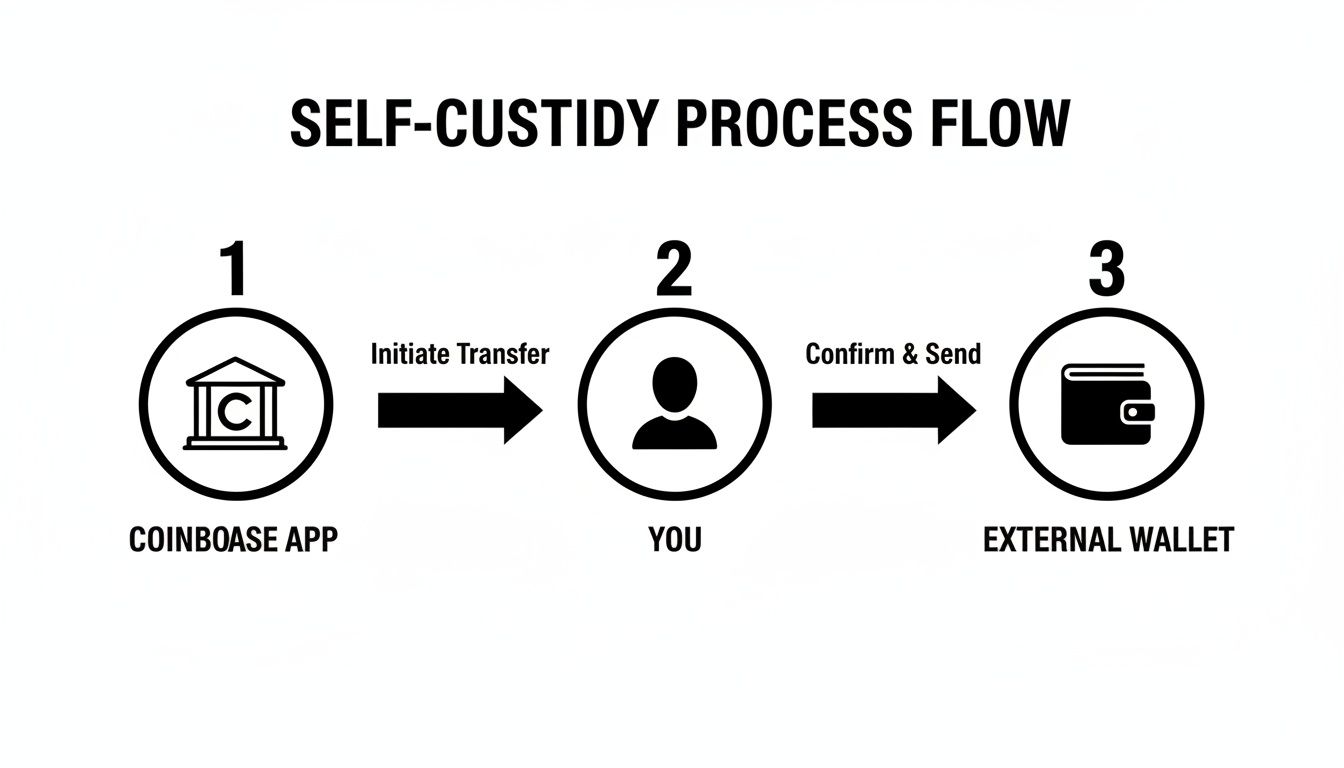
As you can see, you are the bridge between the exchange and your decentralized wallet. That's why getting this backup right is non-negotiable.
Accessing the Phrase on the Browser Extension
Using the browser extension? The process is virtually the same, which is a nice touch. And just like with the mobile app, make sure your surroundings are secure before you start clicking.
- Fire up the Coinbase Wallet browser extension.
- Click the Settings icon.
- Go to the Security & privacy menu.
- Select Show recovery phrase and pop in your password to view it.
Once again, write it down immediately and then double- or triple-check your work. Don't move on until you are 100% certain your physical copy is a perfect, letter-for-letter match of what you see on the screen.
Understanding the Cloud Backup Option
Coinbase Wallet also gives you an encrypted cloud backup option, syncing to Google Drive or iCloud. This can be a real lifesaver, but it's a double-edged sword when it comes to security.
When you turn it on, the wallet encrypts your phrase with a password that only you know and then saves that file to your cloud storage. Crucially, Coinbase can't see this password or your unencrypted phrase.
The trade-off? Your crypto security is now tied to your Google or Apple account security. If a hacker gets into your cloud account and figures out your backup password, it’s game over.
Here’s a quick rundown of how to manage it:
- Enabling it: In the same security menu, you'll find the Cloud Backup toggle. Turn it on, and you'll be asked to create a strong, unique password for the encryption.
- Disabling it: You can go back to that setting anytime to turn it off. This deletes the encrypted file from your cloud, leaving your offline, physical copy as your one and only backup.
So, should you use it? It really comes down to your personal risk tolerance. If you're confident in your cloud security—using a strong, unique password and a hardware security key for two-factor authentication—it can be a great convenience. But if you're a purist, nothing beats the peace of mind that comes from a fully offline, physical backup.
Smart Ways to Store Your Recovery Phrase
You've found your 12-word recovery phrase and written it down. That's the first step, but what comes next is what truly matters for your Coinbase Wallet backup strategy: securing that phrase so it’s there when you need it. Just scribbling it on a sticky note and shoving it in a drawer is asking for trouble. Think of this phrase as the master key to your digital vault—it needs a storage plan that can survive theft, fire, floods, and even your own forgetfulness.
Here's the one rule you absolutely cannot break: never store your phrase digitally. Don't take a screenshot. Don't save it in a notes app. And definitely don't email it to yourself. Each of these actions creates a copy that's vulnerable to hackers and data leaks. Your only truly safe bet is a physical, offline backup. The goal is simple: make it nearly impossible for an attacker to find, but easy for you to access.
Basic Yet Effective Physical Storage
For most people, a solid physical storage solution is all you'll ever need. The name of the game is durability and security. A flimsy piece of paper is a weak link; it’s easily destroyed by water, fire, or just fading over time.
Consider these simple upgrades to boost its resilience:
- Laminated Card: Laminating the paper protects it from moisture and smudging. It’s a small step that makes your backup much more durable for long-term storage in a secure place.
- Fireproof Safe or Document Bag: This is a classic for a reason. Keeping your backup in a home safe or a fire-resistant bag adds a critical layer of protection against the most common household disasters.
- Bank Safe Deposit Box: If you want protection against theft or a home invasion, a bank's safe deposit box is a time-tested option. The trade-off is that you're relying on a third party and can only access your key during their business hours.
A layered approach is always your best bet. For instance, keep one laminated copy in a fireproof bag at home and a second one in a safe deposit box. This redundancy protects you from a single point of failure, like misplacing the key to your safe.
Choosing where to store your recovery phrase is a balancing act between security and accessibility. Let's break down the common methods.
Recovery Phrase Storage Options Pros and Cons
| Storage Method | Pros | Cons | Security Risk Level |
|---|---|---|---|
| Paper in a Drawer | Simple, free, and quick. | Easily lost, damaged by water/fire, or found by others. | Very High |
| Laminated Paper | Protects against moisture and wear. | Still vulnerable to fire, theft, and being misplaced. | High |
| Fireproof Safe (Home) | Protects from fire and casual theft. Good accessibility. | A determined thief could steal the entire safe. | Medium |
| Bank Safe Deposit Box | Highly secure against theft, fire, and flood. | Access is limited to bank hours. Relies on a third party. | Low |
| Metal Seed Storage | Virtually indestructible (fire, water, crush-proof). | Higher upfront cost. Requires tools to record the phrase. | Very Low |
| Splitting the Phrase | A single compromised location doesn't expose the full phrase. | Complex to manage. Losing one part means losing everything. | Low to High (Depends on execution) |
As you can see, no single solution is perfect. The best strategy often involves combining methods to create redundancy.
Upgrading to Metal Seed Storage
If you're looking for the absolute peak of physical durability, metal seed storage devices are the gold standard. These things are engineered to be practically indestructible, keeping your recovery phrase safe from extreme conditions that would turn paper to ash in seconds.
These devices are usually metal plates where you stamp, etch, or arrange letter tiles for each word. They are built to be:
- Fire-Resistant: Many can handle temperatures over 2000°F (1093°C), which is hotter than a typical house fire.
- Waterproof and Corrosion-Resistant: Usually made from stainless steel or titanium, they won't degrade from rust or moisture.
- Crush-Proof: They're designed to survive the immense pressure of a building collapse.
An investment in one of these provides serious peace of mind. For a complete look at the options, check out our guide on the best metal seed phrase storage solutions on the market. It's a small price to pay to protect assets that could be worth thousands or even millions.
Advanced Strategy: Splitting Your Phrase
Worried about a single backup being discovered? An advanced technique you can use is called "sharding," which just means splitting your phrase into parts. You divide your 12-word phrase and store each piece in a different, highly secure location.
For example, you could break your phrase into three chunks:
- Part A: Words 1-4, kept in your safe at home.
- Part B: Words 5-8, stored in a bank's safe deposit box.
- Part C: Words 9-12, given to a family member you trust implicitly.
With this setup, a thief would need to compromise all three locations to get your full phrase. The obvious downside is the added complexity—if you lose just one of those parts, your wallet is gone forever. This strategy is really only for the most organized and cautious users who are comfortable with the increased operational risk.
The Hidden Dangers of Cloud Backups and Phishing Scams
That encrypted cloud backup feature for your Coinbase Wallet? It’s undeniably handy. Linking it to Google Drive or iCloud creates a quick safety net for your recovery phrase, and for many people, that's a huge relief. But that convenience comes at a price—it introduces a new way for clever scammers to target you.
The security of that cloud-backed phrase is now tied directly to the security of the cloud account it's stored in. If a hacker gets into your Google or Apple account, they've just jumped the biggest hurdle. Yes, your phrase is still encrypted with your password, but the attacker now has the encrypted file and a direct line to manipulate you into giving up that final piece of the puzzle. This is where the real danger begins.
The Anatomy of a Modern Phishing Attack
Forget about the old-school, poorly spelled phishing emails. Today's attackers build sophisticated, convincing messages that are nearly identical to official communications from Coinbase, Google, or Apple. They almost always create a sense of panic, warning you about a fake security breach or an urgent account update you "must" perform.
Here’s how it plays out: You get an email that looks completely legit. It claims your Coinbase Wallet cloud backup has been flagged for suspicious activity and directs you to a link to "verify your account" and protect your crypto. Clicking that link sends you to a pixel-perfect clone of the real login page. The moment you enter your cloud account details and the password for your encrypted backup, you’ve handed the keys to your entire wallet directly to a thief.
These social engineering attacks are brutally effective and remain one of the top reasons people lose funds from their self-custody wallets. Investigators have estimated that by late 2024 and early 2025, scammers were stealing over $300 million every year using these tactics. Threat reports even document entire campaigns specifically designed to exploit the cloud backup process. You can dig deeper into how these attacks affect crypto security by reading the full research about the safety of popular exchanges.
The fundamental risk here is that cloud backups connect your offline crypto security to your very online daily life. An attacker doesn't need to find your hidden piece of paper; they just need to trick you into clicking the wrong link at the wrong time.
Going Beyond Phishing: SIM Swaps and Data Leaks
The threats don't just stop with fake emails. Scammers also rely on more advanced techniques like SIM swapping. This is where they convince your mobile phone provider to transfer your phone number to a SIM card they control. Once they have your number, they can intercept password reset links and any two-factor authentication (2FA) codes sent by text, effectively locking you out of your own accounts.
Even if you have SMS-based 2FA enabled on your Google or Apple account, a successful SIM swap renders it useless. This is exactly why security experts constantly warn against using SMS for authentication whenever possible.
Data leaks from other services also feed into this ecosystem. If you reuse your Google or Apple password on other websites and one of them gets hacked, attackers will immediately try that leaked password on your cloud account. They know that a successful login could lead them to a massive prize: your encrypted Coinbase Wallet backup file.
Hardening Your Cloud Account Defenses
Choosing between convenience and maximum security means you have to get proactive about locking down your cloud accounts. If you decide the cloud backup feature is right for you, you absolutely must treat your Google or Apple account with the same level of paranoia as your crypto itself.
Here are a few powerful steps you can take right now to slash your risk:
- Upgrade to a Hardware Security Key: This is the single best thing you can do. A physical key like a YubiKey requires you to be present and touch a button to approve any login. A remote attacker simply can't bypass it, even if they have your password.
- Use a Unique, Strong Password: Your cloud account password needs to be long, complex, and used nowhere else—period. Get a good password manager to generate and store these for you so you don't even have to remember them.
- Learn to Spot Red Flags: Always be skeptical of unsolicited emails or texts that create urgency. Never click links directly from an email. Instead, open a new browser tab and manually type the website address (like
google.com) to log in and check for alerts yourself.
Ultimately, the choice to use cloud backups is a personal one. It provides a valuable path to recovery, but it demands that you maintain diligent security practices. By truly understanding the risks and putting strong defenses in place, you can make an informed decision that aligns with your own comfort level.
What to Do If Your Wallet Backup is Lost or Compromised
This is the part of the guide everyone hopes to skip. But facing the worst-case scenario head-on is a core part of taking control of your own crypto. If you think you've lost your backup, the first step is to stay calm and figure out exactly what you still have.
Let's get the hardest truth out of the way first. If your physical, offline 12-word recovery phrase is truly gone—lost in a fire, stolen, or just vanished—and you have no other backup, your funds are almost certainly lost forever. That phrase is the one and only master key to your wallet. Without it, there’s no way to regenerate the private keys that prove you own your assets.
The security of your wallet hinges on the sheer mathematical complexity of that phrase. There are 2048^12 possible combinations, a number so mind-bogglingly huge that trying to guess it is like trying to pick one specific atom out of the entire universe. It’s statistically impossible with today's technology. This isn't a flaw in Coinbase Wallet; it's the very foundation that makes self-custody secure.
When You Might Still Have a Chance
Losing your main paper backup doesn't always have to be the end of the road. Don't give up hope just yet, especially if you fall into one of these specific situations.
Your ability to get back in depends entirely on what pieces of the puzzle you still hold:
- You still have access on your original device. This is the best-case scenario. If your wallet is still working on your phone or in your browser, you can just navigate into the settings and view the recovery phrase again. Problem solved.
- You have a cloud backup but forgot the password. You smartly enabled the encrypted Google Drive or iCloud backup, but now the password is a blank. This is a password recovery problem, not a lost seed phrase problem—a crucial difference.
- Your phrase is damaged or incomplete. Maybe your paper backup got wet and a few words are smeared, or you have a nagging feeling you wrote one down wrong. If you have most of the words, you're not guessing from scratch, which makes recovery possible.
The most important thing is to identify what, precisely, is missing. Is it the 12-word phrase itself? Or is it the password that protects an encrypted copy of that phrase? The answer completely changes your next steps.
Realistically Looking at Your Options
When disaster strikes, the pros and cons of different backup methods become crystal clear. That convenient cloud backup suddenly becomes your lifeline, but only if your cloud account itself is still secure.
Recent security analyses from 2024–2025 drive this point home. Encrypted cloud backups can boost your odds of regaining access after losing your device to nearly 100%, as long as your cloud account and backup password weren't also compromised. On the other hand, the loss of a single, poorly stored paper recovery phrase is treated as a final, irreversible event in most cases. You can dive deeper into these security trade-offs in various detailed wallet security guides.
If you’re stuck with a forgotten password for your cloud backup, this is where a specialized service can come in. At Wallet Recovery AI, we focus on these complex cases. Our tools are designed to intelligently test millions of password variations based on hints you remember, giving you a real shot at unlocking that encrypted file and getting your 12-word phrase back.
Do You Need to Call in a Professional?
Knowing when to ask for help is key. If you just misplaced your paper backup but can still open the wallet on your phone, you don't need anyone. Just go into the settings, find your phrase, and write it down again securely.
However, if you're dealing with a forgotten cloud backup password or a corrupted wallet file, bringing in an expert might be your only move. A professional service can give you a straightforward assessment of your chances without putting your remaining data at risk. This is the moment you shift from panic to a structured recovery plan, turning a potential disaster into a solvable problem.
Common Questions About Wallet Security
Let's dig into some of the most common questions that pop up when talking about securing your Coinbase Wallet. My goal here is to give you straight, clear answers that will clear up any confusion and help you feel more confident about keeping your crypto safe.
Is My Password the Same as My Recovery Phrase?
This is a big one, and it's easy to get them mixed up. The answer is a hard no, and the difference is absolutely critical.
Think of your password as the key to your apartment door. You use it every day to get in and out of the wallet on your phone or computer. It's for convenient, daily access.
Your 12-word recovery phrase, on the other hand, is the master deed to the entire building. If your apartment (your device) is lost, stolen, or destroyed, that recovery phrase is the only thing that can rebuild your wallet and give you access to all your assets on a brand-new device.
The password only works on your current device. The recovery phrase is the universal key that can bring your wallet back to life anywhere, anytime. That's why protecting it is everything.
Can Coinbase Help Me If I Lose My Phrase?
I get this question a lot, and it's probably the most important thing to understand about self-custody. The answer is an unambiguous no.
Because Coinbase Wallet is a self-custody wallet, Coinbase has absolutely zero access to your 12-word recovery phrase. They don't see it, they don't store it, and they can't recover it for you. This isn't a flaw; it's a core feature designed to give you total control.
If you lose your phrase and don't have another backup (like the encrypted cloud file), your funds are gone. They are inaccessible to you, to Coinbase, to everyone. The responsibility rests entirely on your shoulders.
You've probably heard the saying, "Not your keys, not your coins." With a self-custody wallet, they are your keys. Losing them is the digital equivalent of losing the coins themselves.
This is the trade-off. You get ultimate power over your assets, but with that comes the ultimate responsibility for securing them. Unlike a bank, there’s no customer service line to call if you misplace the master key.
How Safe is the Encrypted Cloud Backup?
The encrypted cloud backup to Google Drive or iCloud is a genuinely useful feature, but its security really comes down to you. The backup file itself is locked with a password only you know, making it a powerful recovery option if your device fails.
The risk, however, moves from your device to your cloud account. If a hacker gets into your Google or Apple account through a phishing attack or SIM swap, they could access that encrypted file. They'd still need your password to unlock it, but it gets them dangerously close.
So, how should you think about it?
- For convenience and resilience, it's a great safety net. It dramatically increases your odds of recovery if you lose your phone.
- For maximum, airtight security, a completely offline, physical backup—like a steel plate in a safe—is unbeatable because it removes online threats entirely.
For most people, the best strategy is a layered one. Use the cloud backup for everyday peace of mind, but maintain a primary, offline backup as your ultimate fail-safe.
What If Someone Finds My Written-Down Phrase?
If you even suspect that someone has seen, copied, or stolen your 12-word recovery phrase, you have to treat it as a five-alarm fire. That person has total control of your wallet and can drain it at any moment.
This is a critical security emergency. Act immediately.
- Get a New Wallet: On a secure device, install a fresh instance of Coinbase Wallet and create a brand new one. This will give you a completely different, uncompromised recovery phrase.
- Move Everything. Fast. Send all of your crypto and NFTs from the compromised wallet to the address of your new, secure wallet. Do it as quickly as you can.
- Burn the Old Wallet: Once it's empty, abandon the compromised wallet forever. Never use it again.
You are literally in a race against the thief. The second they have your phrase, the clock is ticking. Speed is your only friend here, so don't wait. This scenario is precisely why keeping your phrase physically hidden and secure is the cornerstone of your entire crypto plan.
If you've lost your cloud backup password or are struggling with a corrupted file, all hope might not be lost. At Wallet Recovery AI, we specialize in helping people get back into their digital wallets. Our secure, confidential process uses advanced AI-driven methods to recover funds when standard options have been exhausted. Find out if we can help you at https://walletrecovery.ai.
Leave a Reply