
You open the wallet, type the password you are sure is correct, and get rejected. You try a variation. Then another. Very quickly, this stops feeling like a routine login problem and starts feeling like a threat to your savings.
Crypto wallet password recovery is not like resetting an email password. In many cases, there is no support desk with a reset link, no bank branch to visit, and no central administrator who can verify your identity and restore access. The system protects you by removing intermediaries. It also leaves you exposed when your own access trail breaks.
That Sinking Feeling You Are Locked Out of Your Crypto
The first thing to know is that your situation is not unusual. It is painful, but it is not rare.
A large share of lost crypto comes down to exactly this problem. Between 3 to 4 million Bitcoin, valued at hundreds of billions of dollars, are estimated to be permanently lost, largely because people forgot passwords or lost recovery seeds, and because Bitcoin has no reset button built into its design (Professional Crypto Recovery on lost Bitcoin).
Why this feels worse than a normal password problem
In a traditional account, the password is just one layer around a provider-managed system.
In a non-custodial wallet, the password often protects access to keys or a keystore that no company can reissue for you. If the underlying recovery phrase is gone, and the password is wrong, there may be no second chance except the clues you still have.
That is why panic causes so much damage. People start trying random combinations, installing questionable tools, or wiping devices they think are “broken.” Those actions can make a recoverable case much harder.
The right mindset is triage, not guessing
Crypto wallet password recovery works best when you treat the problem like an investigation.
You need to answer a few questions in the right order:
- Is this a password problem: Or is the wallet file corrupted, the app outdated, the device wrong, or the account type misunderstood?
- Do you have a recovery phrase somewhere: On paper, in a safe, in a notebook, in an exported file, or in a setup photo you forgot existed?
- Is this wallet enforcing attempt limits: Some setups punish repeated wrong entries.
- Do you remember patterns instead of the exact password: Fragments, years, symbols, habits, language, keyboard layout, and the life period when you created it all matter.
The people who recover access most often are not the ones who guess fastest. They are the ones who preserve evidence, slow down, and test the right possibilities first.
Some cases are straightforward. Some are highly technical. Some are not about the password at all.
Your First 24 Hours A Calm and Methodical Triage
Do not make your next move from the login screen.
The first day matters because this is when people either preserve a recoverable situation or accidentally narrow their own options. Slow is safer.
What to stop doing immediately
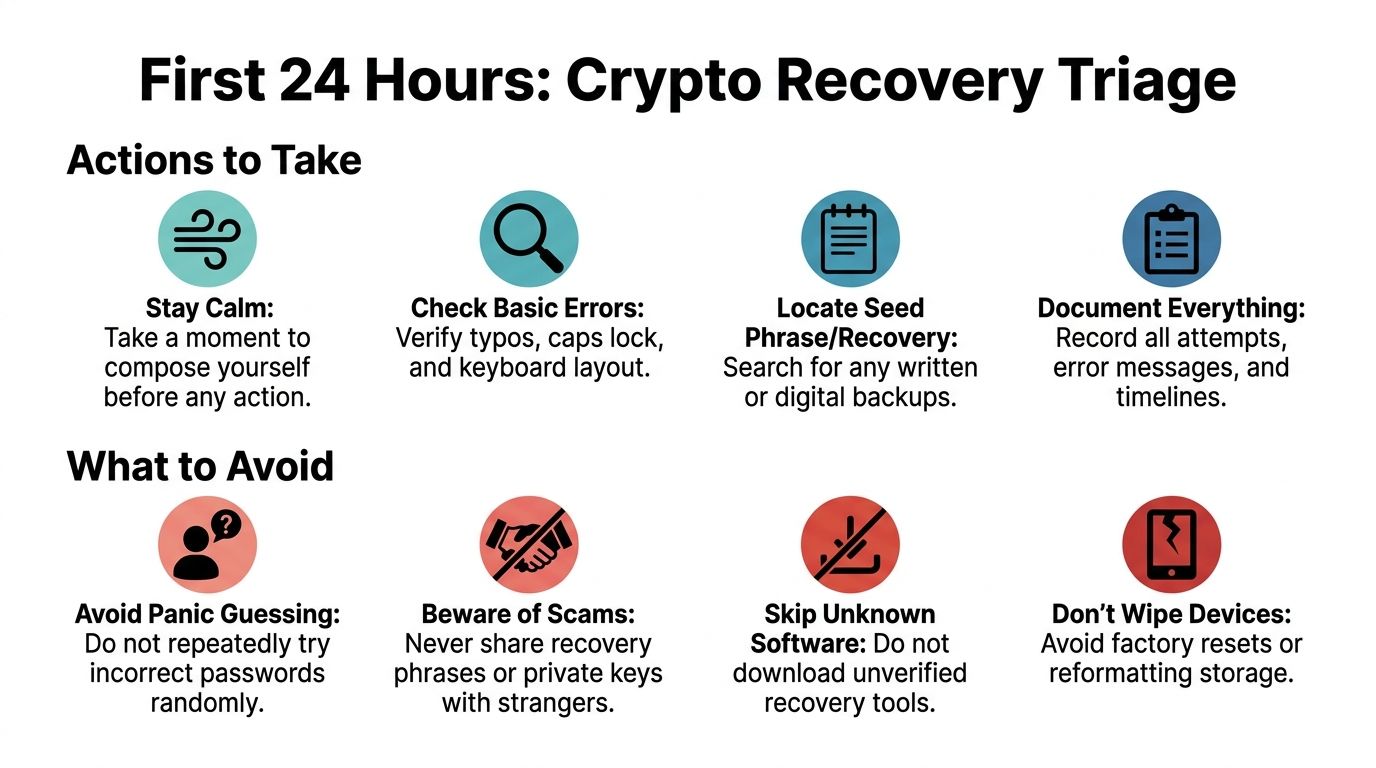
Random retries are the first problem.
Some wallets, devices, and services react badly to repeated failed attempts. A secure wallet can slow down attempts, lock you out temporarily, or create a serious risk if you keep entering guesses without a plan. The public case of Stefan Thomas is a reminder of how dangerous blind retries can become when a wallet enforces limited attempts.
Avoid these mistakes right away:
- Stop panic guessing: If you are entering variations without recording them, you are creating noise, not progress.
- Do not update everything at once: A wallet app update can help, but it can also complicate diagnosis if the issue is compatibility or file handling.
- Do not factory reset devices: Phones, laptops, hardware wallets, and removable drives may contain the exact artifact you need.
- Do not send files or seed phrases to strangers: Recovery scammers target urgency.
- Do not download the first recovery tool you see: Unverified tools can steal wallet data or overwrite useful files.
Build a recovery case file
Professionals start by documenting before testing. You should too.
Create one plain text document or notebook page and write down everything you know:
Wallet type
MetaMask, Electrum, Exodus, Ledger, Trezor, Blockchain.com wallet, or something else.Asset and chain
Bitcoin, Ethereum, tokens on Ethereum, another network, or multiple wallets.Current symptom
Wrong password message, app crash, corrupted file, device not recognized, empty wallet after restore, or missing account path.Last known access
The life period when you used it, the device you used, the room you were in, the job you had, the email account you used, the operating system, and whether you were traveling.Recovery materials you may still have
Seed phrase card, old notebook, exported JSON or keystore, wallet.dat file, password manager entry, screenshots, setup emails, encrypted backups, or cloud-synced folders.Every password clue
Words you used a lot then, favorite symbols, capitalization habits, years, old usernames, language choice, common substitutions, and whether you tended to reuse a base password.
Use cognitive memory reconstruction
This is one of the most underrated parts of crypto wallet password recovery.
Professional services report that cognitive interviews, including timeline reconstruction, environmental context, and even collaboration with family, can achieve up to a 73% success rate in jogging memory for passwords or seed phrases when technical methods failed (Datarecovery.com on brute forcing and memory recovery).
That sounds abstract until you do it correctly.
Ask yourself context questions, not just password questions
Instead of asking “What was my password?” ask:
- When did I create this wallet: During a bull market, a job change, a move, a relationship, or a major purchase?
- Which device did I use: A Windows laptop, Mac, Android phone, iPhone, an office machine?
- What else was I doing then: Buying a specific coin, setting up a hardware wallet, using a password manager, creating exchange accounts?
- What naming habits did I have: Pet names, song titles, gamer tags, sports teams, years, mixed languages?
- Was I trying to make the password memorable or strong: People often remember the intention before they remember the string.
Expand fragments into candidates
Once you have fragments, build candidate lists carefully.
Good examples include:
- A remembered base word plus likely endings
- A date range tied to wallet creation
- Your common symbol substitutions
- Variants with capitalization changes
- Keyboard layout mistakes if you used multiple languages
If you think you “remember nothing,” write down the time period and devices first. Memory often comes back through context, not force.
Preserve the environment
Keep originals untouched when possible.
If the wallet is on a laptop, clone or back up the drive before experimenting. If the wallet is in a browser extension, note the browser profile and machine. If it is on an old phone, keep the device charged and isolated until you know what data it contains.
The goal in the first day is simple. Convert panic into evidence.
Understanding Recovery Paths for Major Wallet Types
The recovery path depends less on the coin and more on the wallet architecture. People often waste time on the wrong tactic because they confuse a login password, a device PIN, a recovery phrase, and a passphrase as if they were interchangeable.
They are not.
Wallet Recovery Mechanisms at a Glance
| Wallet Type | Primary Recovery Method | Key Thing to Know |
|---|---|---|
| MetaMask | Secret Recovery Phrase | If you have the phrase, you usually restore the wallet and set a new local password. |
| Ledger | Recovery seed, sometimes plus BIP39 passphrase | The device PIN is not the same as a passphrase. Losing one is a different problem from losing the other. |
| Trezor | Recovery seed, sometimes plus passphrase | A remembered seed with the wrong passphrase still leads to the wrong wallet view. |
| Electrum | Seed phrase or wallet file plus password | Wallet files and derivation details matter. Some cases are password-related, others are file-related. |
| Exodus | Backup phrase, wallet data, or local installation artifacts | Users often focus on the password when the better path is a proper restore workflow. |
| Blockchain.com non-custodial wallet | Recovery phrase | A support reset may help a custodial account, but not restore a non-custodial wallet without the correct recovery material. |
MetaMask and similar browser wallets
With MetaMask, the main question is usually simple. Do you have the Secret Recovery Phrase?
If yes, the practical route is typically restoration, then setting a new local password on the restored installation. If no, then recovery shifts toward device artifacts, exported vault data, browser profile remnants, or password reconstruction.
There is a newer social login model in some MetaMask setups, but users should be careful not to assume every MetaMask wallet was created that way. Older installs and standard non-custodial setups still live or die by the recovery phrase and local credentials.
A common mistake is thinking the browser password prompt protects the blockchain account itself. Usually it protects the local encrypted vault. That distinction matters because it tells you whether to search for phrase backups or attack the encrypted local data.
Hardware wallets such as Ledger and Trezor
Hardware wallets create a lot of confusion because users bundle every secret together under “password.”
There are usually separate elements:
- The device PIN: Used to unlock the physical device.
- The recovery seed: The core recovery method if the device is lost, reset, or replaced.
- An optional passphrase: Sometimes called the hidden wallet feature or extra word, though technically it is not the same thing as adding a normal word to the seed in casual conversation.
If you know the seed but forgot the passphrase, the wallet can appear empty or wrong even though your seed is correct. If you know only the PIN but lost the seed and the device fails, your position is far more fragile.
Desktop wallets such as Electrum and Exodus
Desktop wallets tend to create two very different recovery scenarios.
The first is a straightforward password-protected local wallet where you still possess the file or installation data. The second is a file integrity problem where the password is fine but the wallet data is damaged, incomplete, or incompatible with the current app version.
With Electrum, wallet files, seed phrases, and derivation details all matter. With Exodus, the recovery path may rely more on the application’s backup phrase flow or local wallet artifacts than on trying endless password guesses.
The question to ask before anything else
Ask this before you spend hours guessing:
What exact thing am I missing?
- The wallet password
- The seed phrase
- The hardware wallet PIN
- The passphrase attached to the seed
- The wallet file itself
- The correct software environment
- The right account path after restoring
That single question often cuts days off a recovery attempt.
Advanced DIY Recovery Password Cracking and Its Limits
If your recovery phrase is gone and the only remaining route is the encrypted wallet itself, then you are in password-cracking territory. Many guides at this stage become either too simplistic or too dramatic. In practice, DIY crypto wallet password recovery can work, but only when the attack is targeted.
What works
The most useful tool in many legitimate recovery cases is BTCRecover.
It is designed for owner-led recovery work where you already possess the wallet data and need to test likely password candidates, seed variations, or passphrase patterns. It supports scenarios involving wallets such as Electrum, MetaMask, Ledger, and Trezor.
The productive approach looks like this:
- Build a candidate list from memory fragments
- Add rules for substitutions, years, suffixes, and capitalization
- Use wallet-specific attack modes instead of blind full search
- Run tests on a system that can use GPU acceleration where supported
- Keep a strict log of what was tested
For this kind of work, GPU use can provide 10 to 100 times speedups, and weak passwords can sometimes be recovered, while stronger ones rapidly become unrealistic. The verified benchmark here is clear: success rates are 20% to 40% for weak passwords, but drop below 1% for high-entropy passwords over 14 characters (Professional Crypto Recovery on wallet password and passphrase recovery).
What does not work
Full brute force against a strong unknown password is usually a fantasy for home users.
If you have no hints, no pattern memory, no likely length, and no known formatting habits, the search space becomes the primary enemy. More hardware helps, but only to a point. The effective lever is not “more guessing.” It is better priors.
A practical DIY workflow
Export your clues into a list
Put remembered words, dates, nicknames, separators, and keyboard habits into a clean text file or spreadsheet.Group by likelihood
Start with the passwords you would have chosen when trying to be memorable, not the ones you could theoretically have chosen.Create masks and rule sets
If you remember a structure like word + year + symbol, attack that structure first.Match the wallet type
Electrum, MetaMask vault data, hardware wallet passphrases, and other formats behave differently.Use offline copies where possible
Test against copied wallet data, not your only original environment.
For users evaluating tools and workflows, this overview of crypto recovery software is one way to compare what belongs in a real recovery process versus generic “password cracker” claims.
The best DIY attacks are narrow and informed. The worst ones are broad, noisy, and based on hope.
The Stefan Thomas lesson
The Stefan Thomas case remains the clearest public warning. He was locked out of a wallet holding 7,002 Bitcoin, and by early 2021 had already used eight of his ten attempts, leaving only two remaining before permanent lockout (Bitbo lost wallets tracker).
That case matters for one reason above all others. Every attempt can carry a cost.
If your wallet, device, or service has retry consequences, careless testing is not neutral. It changes the case. Before you launch any DIY attack, you need to know whether you are working on a copied encrypted artifact that allows safe testing, or on a live environment that can punish failure.
When DIY is still reasonable
DIY recovery is still a fair option when:
- You have strong memory fragments
- The password was probably personal and patterned
- You control the wallet file or vault data safely
- There is no destructive attempt limit in play
- The issue is not obviously a damaged file
If those conditions are missing, effort shifts from technical persistence to risk management.
When to Hire Professional Crypto Wallet Recovery Services
Some cases stop being a software problem and become a forensic problem.
This is the point where experienced users step back and ask whether every additional DIY attempt improves their odds or just increases the chance of making the case worse.

Clear signs you should stop DIY attempts
Professional help makes sense when any of these are true:
- The wallet may be corrupted: Crashes, malformed files, partial backups, or post-upgrade failures point away from password guessing.
- You suspect a keystore problem: The app opens but cannot read the vault or imported file correctly.
- The password was long and intentionally strong: Not just memorable, but built to resist guessing.
- You are dealing with a hardware wallet passphrase issue: Especially when the wallet restores but shows the wrong accounts.
- The value at risk changes your tolerance for trial and error: A small technical mistake can become expensive.
- You no longer know whether the issue is password, path, file, or software mismatch: Mixed cases need diagnosis first.
File corruption is its own category
This is the underserved part of the topic.
Recovery feasibility for corrupted wallet files or inaccessible keystores is a specialized field, and post-upgrade corruption in wallets like MetaMask or Electrum may require file-specific diagnostics and forensic methods, not brute-force password testing (CryptoPotato on inaccessible cryptocurrency asset recovery).
That distinction matters because the wrong strategy wastes time. If the file structure is broken, then password cracking can run forever against unusable input.
What professionals usually do differently
A professional service typically separates the case into layers:
| Layer | What gets checked |
|---|---|
| Environment | Original device, software version, browser profile, export source |
| Artifact integrity | Whether the wallet file, keystore, or vault data is readable and complete |
| Credential pathway | Password, PIN, passphrase, seed, and derivation confusion |
| Safe testing method | Whether copies can be tested offline without risking originals |
This process sounds less dramatic than brute force, but it solves a lot of real cases because many lockouts are misdiagnosed.
What to expect from a legitimate service
A credible recovery service will usually ask for details before making claims.
Expect questions about wallet type, symptoms, what backups exist, whether there were upgrades or reinstalls, and whether you have partial password memory. You should also expect caution around secrets. For many cases, a service needs encrypted artifacts or controlled testing data, not your seed phrase handed over casually.
One option in this space is Wallet Recovery AI’s crypto recovery expert service, which is focused on lost passwords, inaccessible keystores, and damaged wallet data across multiple wallet types. That kind of service is most relevant when the case needs diagnosis, pattern analysis, or forensic handling rather than simple wallet restoration.
If a recovery provider claims guaranteed success before diagnosing the wallet type and failure mode, that is a warning sign, not a comfort.
The trade-off
DIY saves fees and keeps everything in your hands.
Professional help can reduce the chance of wasted attempts, identify non-password failures, and bring more disciplined testing to complex cases. The trade-off is trust, process, and cost. For many people, the right line is simple: once the case involves corrupted files, high-value holdings, or limited-attempt environments, amateur experimentation stops being prudent.
Avoiding Scams and Future-Proofing Your Crypto Access
You regain access, adrenaline drops, and then a different risk appears. Someone offers a fast fix, asks for your seed phrase, and speaks with total confidence before they have even identified whether your problem was a bad password, a damaged wallet file, or a sync issue.
That is how many second losses happen.
Crypto wallet recovery attracts careful technicians and opportunists who know exactly how panic sounds. A legitimate specialist starts by narrowing the failure mode. A scammer starts by steering you toward irreversible disclosure, payment, or device access.
Scam signals that should end the conversation
End the discussion if a “recovery expert” does any of the following:
- Asks for your seed phrase at the start: Recovery work usually begins with diagnosis, wallet type, encrypted artifacts, version history, and symptom review. Handing over a seed phrase too early turns a lockout into theft risk.
- Claims guaranteed success: Real recovery has constraints. Password uncertainty, limited-attempt environments, unsupported wallet formats, and corruption all affect what is possible.
- Pushes urgent payment before basic triage: Pressure is part of the scam. A credible provider explains what they need to examine and what they can assess before charging for extensive work.
- Requests remote access without a clear reason: Sometimes controlled remote sessions are used for observation, but casual AnyDesk or TeamViewer requests are a major warning sign.
- Cannot explain the recovery path in plain language: You do not need their full methodology, but you should hear a coherent process with real trade-offs and risks.
- Relies only on screenshots, testimonials, or vague success stories: Evidence of process matters more than marketing.
The Stefan Thomas case is useful here for one final reason. It shows how final limited-attempt situations can become, and why stressed owners are easy targets once they feel they are one mistake away from permanent loss.
Scammers sell certainty. Honest recovery work starts with uncertainty and reduces it step by step.
Build a setup that survives stress, travel, and time
If you recover the wallet, treat that as a rebuild point, not just a relief point.
The goal is not only to store secrets. The goal is to leave behind enough accurate context that you, or a trusted person years later, can tell the difference between a seed phrase, a wallet password, a passphrase, a PIN, a keystore file, and a corrupted backup. Many lockouts happen because the owner saved something, but not enough of the surrounding details to use it correctly.
Use a checklist like this:
- Record the seed phrase accurately: Write it clearly, in order, and verify every word against the wallet standard.
- Separate each credential by role: Seed phrase, password, hardware wallet PIN, and optional passphrase should be labeled and stored as different items.
- Store non-seed credentials in a password manager: Wallet passwords, email accounts tied to exchange alerts, and notes about file locations belong there.
- Keep wallet context with the backup: Include wallet name, version if known, chain, approximate creation date, device used, and whether an extra passphrase was enabled.
- Maintain more than one secure offline backup location: Fire, theft, water damage, and routine house moves cause more losses than people expect.
- Document inheritance access carefully: A trusted person should know where instructions are and what exists, without having unrestricted access by default.
One habit prevents a surprising number of future cases.
After setting up a wallet, run a controlled recovery drill on a separate device or test environment. Confirm that the backup restores, the notes make sense, and the credentials match the wallet you think they match. That small check reveals the underlying problem early: an incomplete backup, a mislabeled passphrase, or a damaged export file.
Self-custody means preserving access under stress, not just creating a wallet on a calm day.
If you are locked out and need a second set of experienced eyes, Wallet Recovery AI helps individuals and organizations assess lost-password, keystore, and wallet access problems with a privacy-focused process. The right first step is simple. Document what you still have, stop risky retries, and submit the case details so the recovery path can be evaluated before more damage is done.
Leave a Reply