
Before you can even think about decrypting a file, you have to play detective. The very first step—and honestly, the most important one—is figuring out why the file is locked in the first place.
Did you lock it yourself and just forget the password? Or did something more sinister happen?
Getting this wrong from the start can send you down a rabbit hole of wasted effort, and in a worst-case scenario, it could lead to losing your data for good or making a bad security situation even worse.
Self-Inflicted vs. Malicious Encryption
Let's break it down. There are really only two main scenarios you'll run into.
-
You did it yourself. This is the most common reason people get locked out. You might have password-protected a ZIP file full of sensitive tax documents, encrypted a hard drive with BitLocker for security, or saved a client proposal as a password-protected PDF. The encryption here is your friend; you just misplaced the key.
-
Someone else did it to you. This is the ransomware nightmare. Your files suddenly have weird extensions, and a scary-looking note on your desktop is demanding payment. In this case, the encryption is a weapon, and your approach needs to be completely different, focusing on security and careful recovery.
Identifying the Encryption Type
Knowing who locked the file tells you exactly what to do next.
If you're staring at a ZIP or RAR archive you created and the password just isn't working, that's a straightforward password recovery problem. It can be a tough nut to crack, but it's a known challenge. We actually have a detailed guide on how to handle that specific situation in our article on encrypted archive recovery.
But if you see those strange file names and a ransom note, stop. You're dealing with a cyberattack. Ransomware often uses military-grade encryption like AES-256, and trying to "brute-force" it yourself is a complete waste of time. Worse, it could alert the malware and cause even more damage.
The Bottom Line: Your entire game plan depends on one thing: correctly identifying whether this is a simple case of a forgotten password or a full-blown ransomware attack.
The growing need for data protection highlights this reality. The market for end-to-end encrypted communication is expected to surge from USD 6.12 billion to nearly USD 19.97 billion by 2032, according to IntelMarketResearch. This massive growth is fueled by both people wanting to protect their own data and the ever-present threat of cyberattacks.
To help you figure out your situation, this decision tree lays out the thought process.
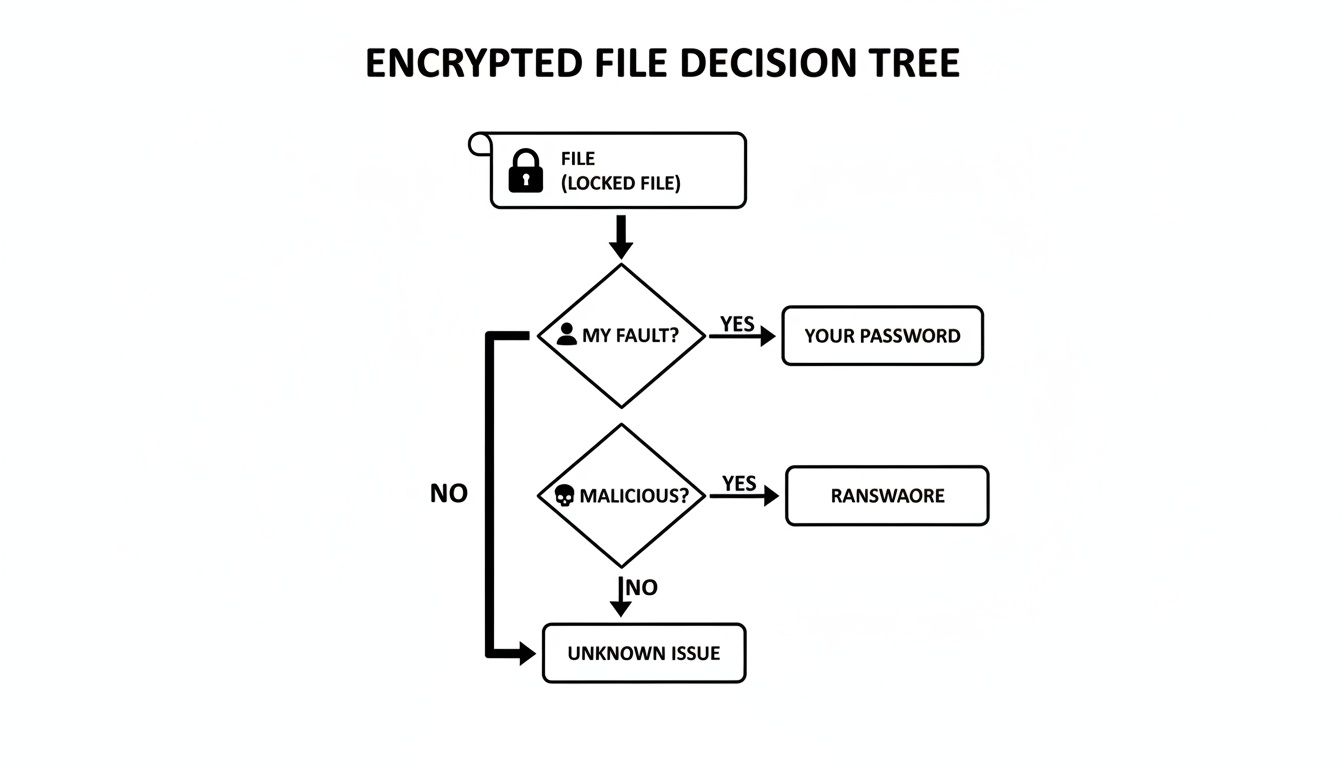
As the chart shows, identifying the source splits your path immediately. One road leads to password recovery techniques, while the other leads to a careful ransomware response.
To make it even clearer, here’s a quick-reference table to help you diagnose the problem and decide on your first move.
Encryption Origin and Your First Move
| Scenario | Common Encryption Type | Recommended First Step |
|---|---|---|
| Can't open a ZIP/RAR file you created. | Archive Encryption (AES-256) | Use password recovery tools or techniques. |
| A hard drive is asking for a key you don't have. | Full-Disk Encryption (BitLocker, FileVault) | Try to find the backup recovery key. |
| A PDF or Office doc is asking for a password. | File-Level Encryption | Attempt to remember common passwords you use. |
| Files have new, strange extensions. | Ransomware (Varies) | Disconnect from the internet immediately. |
| A pop-up note on your screen demands payment. | Ransomware (Varies) | Do not pay the ransom. Isolate the device. |
Once you know what you’re up against, you can move forward with the right methods—without accidentally making things worse.
It's one of those uniquely frustrating moments: realizing you're locked out of a file you encrypted yourself. The good news? Unlike a malicious ransomware attack, the keys to the kingdom are probably closer than you think. This isn't a lost cause; it's a puzzle. And solving it just requires a calm, methodical approach, starting with the tools and information you already have.
The very first place to look is for built-in recovery mechanisms. A lot of systems and apps that offer encryption also provide a safety net for exactly this kind of situation. You just need to know where to find it.
Start with Built-in Recovery Features
Before you even think about downloading third-party software, dig into the native options within your operating system or the program that created the file. These are always your safest and most direct routes back in.
Think of it this way: you wouldn't try to pick the lock on your front door before checking your pockets for the spare key.
Here are the most common places to start your search:
- Windows BitLocker: If you encrypted a whole drive with BitLocker, Microsoft forced you to save a recovery key. This is a 48-digit numerical password generated during setup. Check your Microsoft account online, look through your papers for a printout you might have saved, or check any USB drives you might have designated for recovery.
- macOS FileVault: Apple's FileVault works in a similar way, giving you recovery options when you first set it up. You might have linked it to your Apple ID to allow for a password reset, or maybe you generated a separate recovery key. If you can't remember your login password, the system should prompt you to use one of these backups.
- Application-Specific Recovery: Many programs have their own safeguards. For instance, password managers or secure note apps often have you save a recovery phrase or an "emergency kit" when you create your account. Now's the time to find it.
The most successful recovery jobs start by exhausting the simplest options first. A surprising number of lockouts are solved simply by finding a recovery key the user completely forgot they had saved.
Using Reputable Password Recovery Tools
Okay, so you've looked everywhere for a recovery key and come up empty. The next logical step is to use specialized software designed for password recovery. And I can't stress this enough: you have to choose a reputable tool. The internet is littered with scam programs that are useless at best and loaded with malware at worst.
These tools work by trying to guess your password using a few different methods, but their success hinges almost entirely on the information you can provide.
Supplying Information for a Targeted Attack
A pure "brute-force" attack—where a tool tries every single possible combination of characters—is practically useless against modern encryption. Just for context, trying to crack a strong password this way could take longer than the age of the universe.
But you can slash that time and dramatically boost your chances by giving the software clues. This turns a wild goose chase into a targeted search.
This is all about creating a wordlist or setting specific rules based on what you remember about the password. The more details you can recall, the faster the software can work.
Think about your own password habits:
- Core Words: Did you use a pet's name? A favorite city? A significant person's name?
- Common Substitutions: Do you often swap letters for numbers or symbols (like 'e' for '3' or 'a' for '@')?
- Patterns: Did you always add a specific number or symbol at the beginning or end?
- Length: Can you remember roughly how long the password was?
Here's a real-world example:
Let's say you locked a ZIP archive with a password you came up with during a vacation to Paris back in 2019.
Instead of a random, brute-force attack, you’d tell the recovery tool to focus on combinations like:
- Base Words: Paris, France, Eiffel, Louvre
- Numbers: 2019, 19
- Special Characters: !, #, $
- Combinations: The tool would then intelligently test variations like
Paris2019!,France19#, orEiffel!2019.
This focused strategy shrinks the possibilities from trillions down to a far more manageable number, making the whole process of decrypting the file actually feasible.
Choosing the right software is vital. For more technical folks, a tool like John the Ripper is a powerful option. Otherwise, there are great commercial tools with user-friendly interfaces built for specific file types, like ZIP, RAR, or PDF documents. Whatever you choose, always download it directly from the official website to stay safe.
Responding to a Ransomware Attack
That gut-wrenching moment when you realize your files are locked by ransomware feels like a digital home invasion. The first instinct is usually pure panic, but a clear head and a methodical response will give you the best shot at containing the damage.
The absolute first thing you must do is isolate the infected device.
Don't hesitate. Pull the ethernet cable out. Kill the Wi-Fi. Disconnecting the machine from any network is like applying a tourniquet; it stops the infection from spreading to other computers, shared network drives, or any cloud accounts synced to your system. Every second you stay connected, the risk of a wider outbreak grows.
Why Paying the Ransom Is a Bad Idea
Once the device is offline, your mind might jump to the ransom demand. It can feel like the quickest, simplest way to get your life back, but cybersecurity experts are unanimous on this one: it's a terrible gamble.
For starters, there is zero guarantee you'll get a working decryption key. You're dealing with criminals, not a legitimate business with a customer support team. Many victims pay up only to receive nothing, or worse, get a faulty tool that completely corrupts their data.
Paying the ransom also directly bankrolls these criminal operations, fueling more attacks against more people. The scale of this problem is massive—ransomware played a role in about 44% of global data breaches, where the average cost soared to $4.44 million. Despite this, a growing majority of victims (64%) are refusing to pay, a trend that’s forcing attackers to rethink their tactics. You can dig into more data breach statistics over at DeepStrike.io.
By refusing to pay, you not only protect yourself from further extortion but also help disrupt the ransomware business model. It's a tough decision, but it's the right one for the broader digital ecosystem.
To help you stay organized during a high-stress event like this, here's a quick checklist of what to do.
Ransomware Emergency Checklist
Follow these steps immediately after a suspected ransomware attack to minimize damage and maximize recovery chances.
| Immediate Action | Why It's Critical | Important Considerations |
|---|---|---|
| Isolate the Device | Prevents the ransomware from spreading to other computers or network storage. | Disconnect from both Wi-Fi and wired networks immediately. |
| Document Everything | Crucial for identifying the ransomware strain and for any potential law enforcement report. | Take photos of the ransom note and note any new file extensions. |
| Do Not Pay the Ransom | Paying funds criminal activity and provides no guarantee of file recovery. | Cybercriminals may mark you as a willing payer for future attacks. |
| Identify the Strain | Knowing the specific ransomware is key to finding a legitimate decryption tool. | Use clues from the ransom note or file extensions to search online. |
| Look for Decryptors | Free tools are sometimes available from security firms or projects like "No More Ransom." | Only download decryptors from official, trusted sources to avoid more malware. |
| Restore from Backups | If you have clean, offline backups, this is your safest and most reliable recovery path. | Test your backups regularly before an incident occurs. |
| Report the Incident | Reporting helps law enforcement track and combat cybercrime syndicates. | Contact local authorities and national agencies like the FBI's IC3. |
Following a structured plan like this can turn a moment of panic into a manageable recovery process.
Identifying the Ransomware Strain
Before you can even think about decrypting your files, you need to know exactly what you're up against. Different ransomware families use unique encryption, so identifying the specific strain is the first step toward finding a solution.
You can usually find some tell-tale clues:
- The Ransom Note: This is the message the attackers leave behind, often in a
.txtor.htmlfile. It might name the ransomware directly or give you a contact email you can look up. - File Extensions: Attackers love to leave their mark. They'll append a unique extension to all your encrypted files, like
.locked,.crypt, or.thor. A quick online search for that extension will almost always point you to the ransomware's name.
With a name in hand, you can start hunting for a fix.
Finding a Legitimate Decryptor
Your best hope for a safe, free recovery is a public decryption tool released by a cybersecurity firm or law enforcement. The entire goal is to find a tool built specifically for the strain of ransomware that hit you.
An incredible resource for this is the "No More Ransom" project. It's a joint initiative between law enforcement and major IT security companies. Their website features a "Crypto Sheriff" tool where you can upload one of your encrypted files and the ransom note. The system will analyze them, try to identify the strain, and see if a free decryptor exists.
I'll be honest, it's a bit of a long shot. Decryptors only exist for a small fraction of ransomware variants—usually older ones, or those where the criminals made a coding mistake or had their servers seized. But it costs nothing to check, and if a tool is available, it’s a safe and legitimate way forward.
Just remember to only download decryptors from trusted sources like No More Ransom or the official websites of well-known cybersecurity companies. Scammers love to prey on victims by offering fake tools that just install more malware. This careful, step-by-step approach is the only way to tackle a ransomware attack without making things worse.
Common Mistakes That Lead to Data Loss
When you're staring at a locked file, the rush to find a solution is intense. It's in that moment of panic that it's alarmingly easy to make a critical error—one that turns a recoverable problem into permanent data loss. I've seen it happen time and again; urgency leads to skipped steps and bad decisions.
Honestly, avoiding a few common but devastating mistakes is just as important as knowing the right recovery steps.
The single most dangerous pitfall? Downloading sketchy "decryption" tools from untrusted sources. When you're desperate, a random website promising a quick fix can seem like a godsend. But these programs are often Trojan horses, packed with malware designed to make a bad situation infinitely worse.
Forgetting the Golden Rule: Back Up First
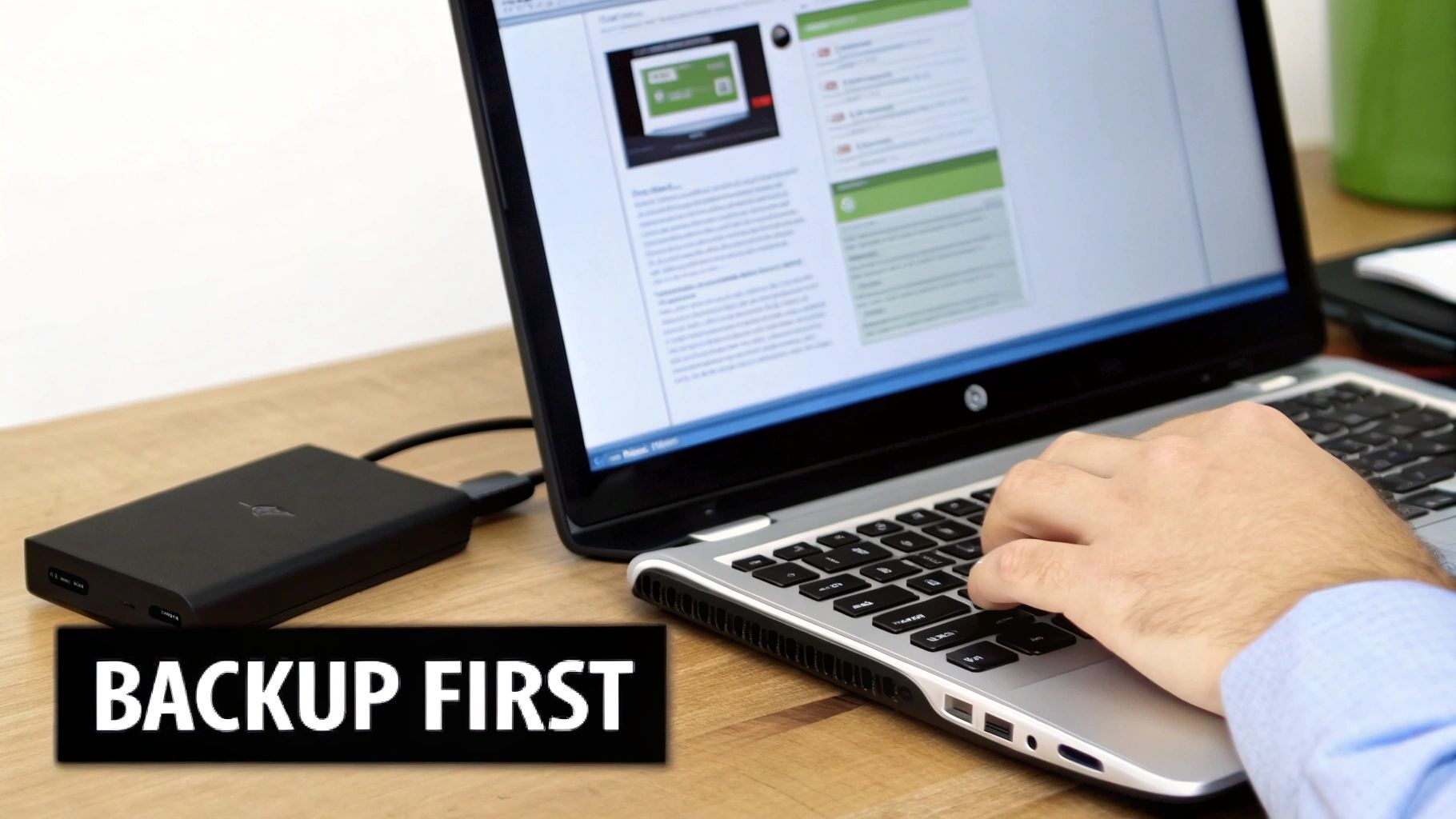
Before you even think about running a recovery tool or trying any decryption method, you absolutely must work on a copy of the encrypted file. Never, ever touch the original. This is the most important rule in data recovery, period.
Create a duplicate of the locked file and stash it on a completely separate drive. If your recovery attempt fails—or worse, the tool corrupts the file—you still have the untouched original to try a different approach. Skipping this step is like performing surgery without a safety net. One slip, and it's game over.
Key Takeaway: Always back up the encrypted file before you do anything else. This simple action provides an essential safety net, ensuring that a failed recovery attempt doesn't result in the permanent loss of your data.
Falling for Social Engineering and Scams
Technical mistakes aren't the only threat; human error is just as potent. Cybercriminals are masters of manipulation, and they love to target people when they're most vulnerable.
This threat is growing. Security researchers have seen a massive spike in attacks, detecting around 500,000 new malicious files daily. That includes a 59% jump in password stealers and a 51% increase in spyware, as attackers focus on swiping decryption keys directly from users. You can dig into the numbers yourself in Kaspersky’s threat report.
Keep an eye out for these classic scams:
- Phishing Emails: Attackers will send emails pretending to be a legit recovery service, asking for your password or key to "help" you.
- Fake Support Calls: An unsolicited call from "tech support" offering to decrypt your files for a fee is always a scam. Always.
- Malicious Downloads: As I mentioned, those websites offering "free universal decryptors" are almost always traps to get more malware onto your system.
The Problem of Modifying Original Timestamps
Here's a less obvious mistake that can be just as damaging: altering the file's metadata, especially its modification timestamp. For certain advanced recovery methods, particularly in ransomware cases, the exact time a file was encrypted is a crucial piece of the puzzle.
Just opening and re-saving the encrypted file can do it. Even moving it between some types of file systems can update this timestamp. It seems like a harmless action, but it can erase vital clues that a professional recovery service might need to reconstruct the encryption key.
So, handle the encrypted files with care. When you make your backup, use a tool that preserves the original metadata. Think of the file and its data like a crime scene—the less you disturb it, the better the odds of a successful recovery.
When It's Time to Call in the Pros
You've tried everything. You’ve dug through old drives for recovery keys, you've run the reputable software, and you've steered clear of the obvious scams. Yet, your files are still locked up tight. It's a maddening situation, but it's not the end of the road.
Sometimes, the encryption you're up against or the sheer value of the data demands a level of expertise and raw power that goes way beyond what you can do at home. Knowing when to stop is just as important as knowing what to try. Pushing forward with the wrong tools can turn a recoverable situation into permanent data loss.
This is that moment. It's time to escalate to a professional.
High-Stakes and Seriously Complex Scenarios
Some situations are just built different. These aren't your run-of-the-mill "I forgot my password" problems; they involve specialized tech, high-value assets, and encryption that was designed to be unbreakable by normal means. If your problem looks like one of these, don't hesitate to get an expert on the line.
Here are the dead giveaways that you need professional help:
- Encrypted Cryptocurrency Wallets: This is the big one. Crypto wallets are locked down with incredibly strong encryption. Losing a password or seed phrase could mean watching a small (or large) fortune vanish forever. This is exactly what specialized services are for.
- Complex Enterprise-Level Systems: We're talking encrypted servers, RAID arrays, or virtual machines. A single mistake here doesn’t just risk one file—it could take down an entire business operation. The stakes are too high to DIY.
- Damaged or Corrupted Encrypted Drives: If your hard drive is making weird noises and it’s encrypted, you've got two huge problems at once. This job requires a cleanroom, forensic data recovery gear, and deep encryption knowledge.
- The Data Is Just Too Damn Important: Sometimes, it’s not about the technical challenge. It's about what's at stake. If those files are the only photos of your kids, critical legal documents, or your company's secret sauce, the risk of accidentally wiping them out is simply too great.
How the Professionals Actually Do It
Professional recovery services aren’t just running the same software you can download, only better. They're playing a completely different game. They mix deep forensic knowledge with massive computational power to crack problems that are otherwise impossible.
A big part of this involves building custom hardware and software rigs designed for one thing: breaking tough encryption with brute force.
For example, when facing a particularly nasty ransomware variant, a service might actually reverse-engineer the malware's code to find a weak spot. As a case study on the Akira ransomware shows, experts will sometimes build their own GPU clusters just to brute-force a single key. We're talking about testing quadrillions of combinations—a task that would take your home PC centuries to finish.
The Inside Scoop: Professionals win by turning an impossible puzzle into a massive—but solvable—math problem. They throw specialized hardware and proprietary software at it on a scale an individual could never hope to match.
Finding a Legitimate Recovery Service
Let's be real: the data recovery industry has its fair share of shady operators. Choosing the right partner is absolutely critical. A good service will be transparent, secure, and upfront about their process and pricing from the start.
Here's what to look for when you're vetting a service:
- A Clear, Secure Process: They should be able to walk you through exactly how they'll handle your data, their security protocols, and what to expect.
- No-Data, No-Fee Policy: This is a big one. Legitimate services almost always work on a "no recovery, no fee" basis. If a company demands a huge, non-refundable payment upfront, run.
- Specialization: Look for a team that lives and breathes your specific problem. If you're trying to get into a crypto wallet, you want a specialist. For that, exploring dedicated cryptocurrency password recovery services is the way to go.
- Confidentiality: Make sure they have a rock-solid privacy policy and are willing to sign a non-disclosure agreement (NDA) to protect your sensitive info.
Deciding to call a professional isn't giving up. It's making a smart, strategic move to protect your data by putting it in the most capable hands possible.
Decrypting Files: Your Questions Answered
Diving into file encryption can feel a little intimidating, especially when you're just trying to get your own data back. It's totally normal to have a ton of questions about what's possible, what's legal, and where the real risks are.
Let's walk through some of the most common questions people have. This isn't just about the tech—it's about understanding the practical and legal lines you're working within. Getting this right from the start helps you make smarter, safer choices, whether you've just forgotten a password or you're up against something more serious.
Is It Legal to Decrypt Files?
This is usually the first thing people ask, and thankfully, the answer is pretty straightforward. It all comes down to ownership and permission.
Yes, it is perfectly legal to decrypt files that you own or have been given explicit permission to access. If you're running a password recovery tool on your own encrypted ZIP file full of tax documents, you're completely in the clear. The law doesn't really care what tools you use on your own stuff; it cares about your intent and who the files belong to.
Where you run into trouble is trying to access files that aren't yours. Attempting to decrypt files belonging to another person, a business, or any other group without their consent is definitely illegal. That kind of activity falls squarely under cybercrime laws and comes with serious consequences.
The bottom line is simple: authorization is everything.
Can All Encrypted Files Be Decrypted?
In a word: no. This is a tough but important reality to get your head around. Whether or not a file can be decrypted depends almost entirely on how strong the original encryption was.
Modern encryption standards like AES-256 are, for all practical purposes, unbreakable. Trying to "brute-force" a file encrypted this way—meaning, trying every single possible key—is impossible with today's technology. We're talking about a number of combinations so massive that even the most powerful supercomputers in the world would need billions of years to get through them.
So how does anyone ever successfully decrypt a file? It’s almost never about "breaking" the encryption itself. Success comes from finding a weak link somewhere else in the process.
Most successful decryption efforts boil down to one of these things:
- A Weak Password: The password was short, predictable, or used common words, making it much easier for a targeted attack to guess.
- A Software Flaw: The program that did the encrypting had a bug or a vulnerability in how it was implemented.
- Key Recovery: You find the original encryption key somewhere else, like in an old backup you forgot about.
- Public Decryptors: In some ransomware cases, law enforcement might seize a criminal's servers and release the master keys. Security companies then use these to build free decryption tools for victims.
If a file was locked down with a strong, unique password using a modern algorithm, the odds of getting in without that password are virtually zero.
How Do I Protect My Files from Ransomware?
When it comes to malicious encryption, prevention is your best and only real defense. Once ransomware gets its hooks into your system, trying to recover is an uphill, often impossible, battle. It's far better to build a strong defense now than to deal with a crisis later.
A solid backup strategy is the absolute cornerstone of that defense.
The gold standard in the industry is the 3-2-1 rule. It's a simple concept but incredibly effective:
- Keep three copies of your critical data.
- Store them on two different types of media (like an external hard drive and a cloud service).
- Make sure one of those copies is kept off-site (in a different physical location).
Beyond just having backups, you need a layered approach to stop the infection from ever happening in the first place.
Essential Security Practices
| Security Measure | Why It's Important | Actionable Tip |
|---|---|---|
| Software Updates | Patches close security gaps that ransomware loves to exploit to get in. | Set your operating system and all your main applications to update automatically. |
| Antivirus Software | Good antivirus software provides real-time protection, scanning files and blocking known threats. | Use a reputable program and make sure its threat definitions are always current. |
| Email Vigilance | Phishing emails are still the number one way ransomware gets delivered. | Be skeptical of unexpected attachments and links, even if they look like they're from someone you know. |
| Strong Passwords | Weak passwords are an open door for attackers to access your accounts and network. | Get a password manager to create and store long, unique passwords for every single account. |
| MFA | Multi-factor authentication adds a powerful security layer, making it much tougher for someone to log in. | Turn on MFA for every important account—especially email, banking, and cloud storage. |
Keeping your files safe isn't a one-and-done task; it's an ongoing habit. By making these practices a normal part of your digital routine, you drastically cut down your chances of ever facing the nightmare of a ransomware attack.
If you're dealing with a locked cryptocurrency wallet, DIY methods might not cut it. For specialized and secure help, Wallet Recovery AI uses advanced techniques to help you regain access to your digital assets. Learn how our AI-enhanced recovery process can help you today.
Leave a Reply