
Think of the Exodus wallet as your personal digital vault. It’s a place on your computer or phone where you hold the keys to your own crypto, putting you squarely in charge. Unlike a traditional bank or a centralized exchange like Coinbase, Exodus is non-custodial. This means no one but you can access your funds.
This is the core promise of decentralized finance: true ownership. But it comes with a catch. Being your own bank means you're also your own head of security.
What Is the Exodus Cryptocurrency Wallet?
At its heart, Exodus is a software application that lets you securely store, manage, and swap a huge range of cryptocurrencies. It’s designed to cut out the middleman. Instead of a company holding your assets for you, the wallet runs directly on your device, giving you final say over every transaction.
This is what people mean when they say, "be your own bank." It’s incredibly empowering. But it also means there’s no 1-800 number to call if you forget your password. If you lose your credentials, your funds are locked away, and only you have the power to get them back. That’s why getting a handle on its security model isn’t just a good idea—it’s absolutely critical.
Why Is Exodus So Popular?
Launched back in 2015, Exodus quickly won over both crypto newcomers and seasoned veterans. The reason was simple: it made managing crypto feel easy, even elegant. The interface is clean, intuitive, and strips away a lot of the technical jargon that can make crypto feel intimidating.
To give you a quick snapshot, here’s what makes Exodus a go-to choice for so many people.
Exodus Wallet at a Glance
| Feature | Description |
|---|---|
| Multi-Asset Support | Manages thousands of cryptocurrencies and tokens across multiple blockchains from one app. |
| User-Friendly Design | Known for its beautiful and intuitive interface, making it perfect for beginners. |
| Built-in Exchange | Allows you to swap one asset for another right inside the wallet, no external exchange needed. |
| Staking & Rewards | Lets you earn passive income by staking certain proof-of-stake cryptocurrencies. |
This powerful combination of simplicity and function has attracted a massive user base. By the end of 2025, the wallet had been downloaded over 19.2 million times. That’s a huge number of people managing their own digital wealth, and it underscores just how devastating losing access can be.
The Self-Custody Trade-Off
So, how does Exodus actually keep your funds safe? The entire security model is built on local encryption. When you set up your wallet, your private keys—the secret codes that prove you own your crypto—are generated and encrypted directly on your computer or phone.
Crucially, these keys are never sent to Exodus’s servers. They never see them, and they can’t access them. This is a massive security win.
But it also creates the ultimate high-stakes situation. If you lose both your password and your 12-word secret recovery phrase, your crypto is locked in a digital vault with no key. For all practical purposes, it's gone. This is a tough reality, but it’s a fundamental part of the self-custody world and the main reason why knowing your recovery options is so important.
If you’re using the mobile version, you’ll want to check out our complete guide on using the Exodus wallet on mobile devices.
Understanding Your 12-Word Secret Recovery Phrase
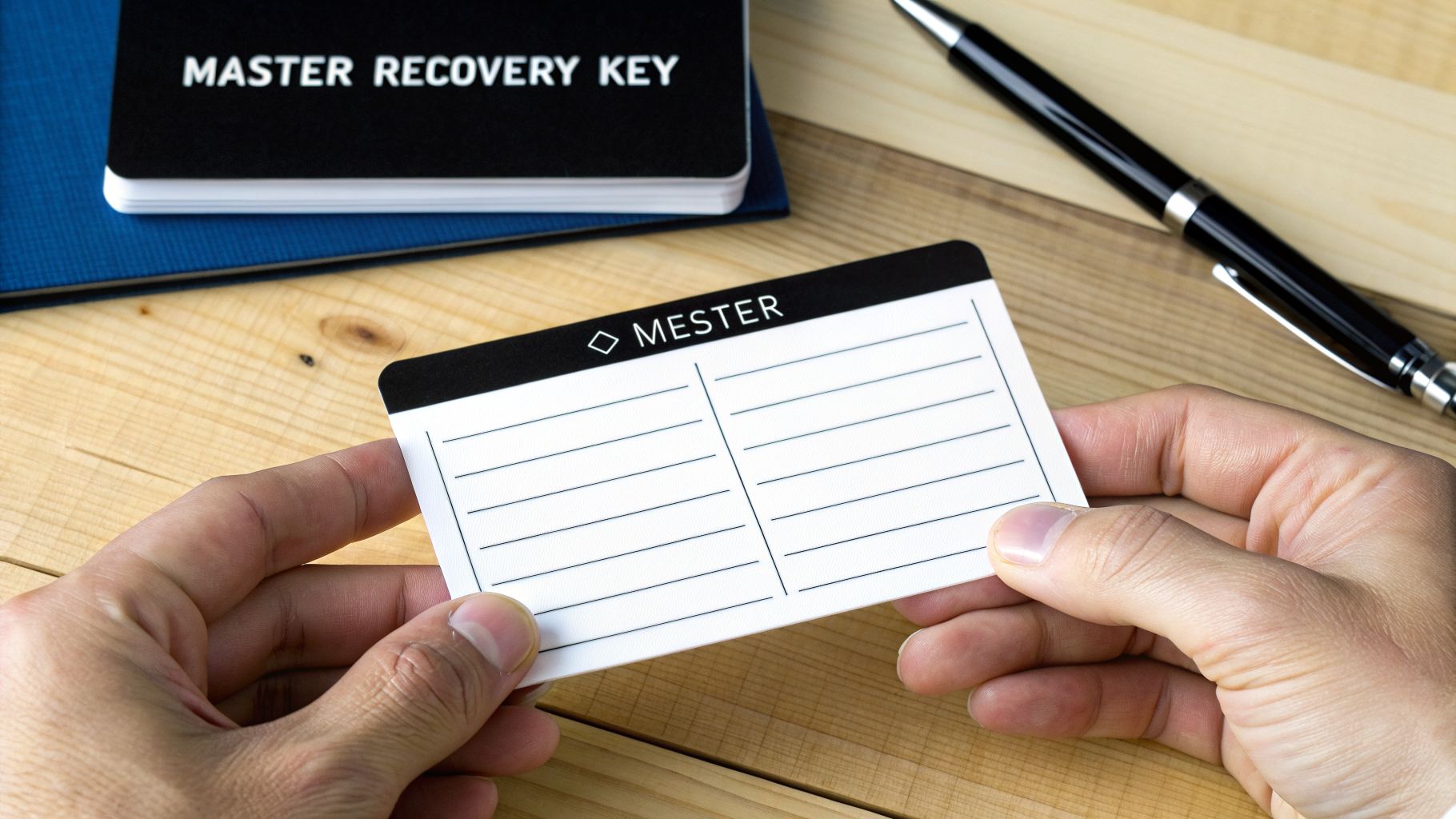
When you first create an Exodus wallet, you're given a 12-word secret recovery phrase. This is the single most important piece of information you own for your crypto. It's the master key to everything.
Think of it this way: your wallet's password is like the key to your front door. It’s for daily use and keeps casual snoopers out. Your 12-word recovery phrase, on the other hand, is the deed to the property and a master key that can rebuild your entire house, exactly as it was, from anywhere in the world.
You Hold the Keys
The entire point of a self-custody wallet like Exodus is that you—and only you—are in control. That 12-word phrase is simply a human-friendly version of the complex private keys that secure your funds.
Exodus generates this phrase directly on your device and has zero access to it. It's never sent to their servers or stored anywhere but with you. This is a core security principle. It means no employee, hacker, or government can get to your funds through Exodus. But it also means the responsibility for keeping that phrase safe is 100% on you. If you lose it, it's gone forever.
Your 12-word phrase is the ultimate escape hatch. If your computer dies, your phone gets stolen, or you forget your password, this phrase is the only way to get your funds back on a new device.
Don't Get Confused
It's a common mistake, but your password and your secret recovery phrase are two totally different things. Mixing them up can be a costly error.
- Password: This is for convenience. It unlocks the Exodus app on your current device. You can change it anytime, as long as you're already in the wallet.
- Recovery Phrase: This is for disaster recovery. It restores your entire wallet and all your private keys on any new device. You should almost never need it.
This design is a powerful security feature, but scammers know how to exploit it. They often create fake websites or support chats that ask for your 12-word phrase to "sync" or "verify" your wallet. Never, ever type your recovery phrase into a website or send it to anyone.
The Sacred Rule of Offline Storage
Your 12-word phrase should be treated like treasure. The only truly safe place for it is offline, completely disconnected from the internet. Write it down on paper and store it somewhere secure that only you know about.
For those who want to protect against physical threats like fire or floods, you can go a step further. Etching your words into metal is the gold standard for durability. You can learn more by reading our guide on using a crypto steel plate for ultimate seed phrase protection.
Remember, the moment your 12-word phrase touches the internet—in a screenshot, a text file, an email, or a phishing site—your wallet is compromised. You must act fast: create a brand new wallet, get a new recovery phrase, and transfer your funds immediately before a thief beats you to it.
How to Protect Your Assets with Exodus Security Features
Alright, let's move from theory to practice and get your Exodus wallet locked down. Protecting your crypto isn't about some arcane technical skill—it comes down to disciplined habits. The most critical security layers are the ones you directly control.
It all starts with your password. A strong, unique password is your first line of defense, encrypting the wallet file right on your device. Think of it as the deadbolt on your front door; if someone gets ahold of your phone or computer, this is what stops them cold.
But the real strength of Exodus is how it handles your data. Everything, including your private keys, is encrypted and stored locally on your machine. Exodus never has access to your funds or your 12-word secret recovery phrase. This is the core of self-custody: you, and only you, are in control.
Building Your Digital Fortress
A solid password is a great start, but true security is built in layers. If you're serious about protecting your exodus cryptocurrency wallet, integrating a hardware wallet is the undisputed gold standard.
A hardware wallet, like a Trezor or Ledger device, is a small piece of physical hardware that keeps your private keys completely offline. When you pair it with Exodus, every single transaction must be physically approved on the device itself. This setup creates a nearly impenetrable barrier.
What this means is that even if your computer was riddled with malware, a thief couldn't touch your funds. They'd need to physically have your hardware wallet and know its PIN to authorize anything. It effectively neutralizes the threat of remote hacks.
Think of a hardware wallet as the bank vault for your digital assets. Your Exodus interface is the friendly teller who helps you manage everything, but only the physical key (your hardware device) can actually move the money.
Best Practices for Everyday Security
Beyond the tech, your daily habits are a huge part of staying safe. Scammers are always finding new angles to trick people into handing over their credentials.
As a top-tier wallet, Exodus processes billions in transactions and has a massive global user base. With Bitcoin and stablecoins dominating that volume, a lost or compromised wallet is a major financial blow. You can see more on Exodus user trends and platform activity on nemo.money.
This popularity makes it a prime target for bad actors. Follow this security checklist every day:
- Watch for Phishing: Scammers build fake websites, emails, and social media profiles that look exactly like Exodus. Their goal is to get you to enter your 12-word phrase to "fix" a problem. Never share your secret phrase with anyone, for any reason.
- Verify Your Downloads: Only download or update the Exodus wallet from its official website, exodus.com. Hackers frequently distribute fake versions of the app that are designed to drain your funds instantly.
- Use a Secure Network: Don't manage your crypto on public Wi-Fi. These networks can be easily monitored. Stick to trusted, private internet connections you control.
By combining a strong password, offline backups of your recovery phrase, and these vigilant habits, you create a robust defense system for your digital assets.
So, you’ve got a new computer or phone and need to get your Exodus wallet up and running again. That little moment of anxiety when you wonder, "Where's my crypto?" is exactly why your 12-word secret recovery phrase exists.
Think of it less like a simple backup and more like a universal master key. It's the tool that lets you resurrect your entire wallet—and all the assets inside—on any new device, proving that you truly are in control of your funds.
Let's get right into how it’s done.
How to Restore on Desktop
Restoring your wallet on a new installation of Exodus for Mac, Windows, or Linux is refreshingly simple. The one crucial thing to remember is that you must start from a completely clean slate.
If you've already tinkered with the new installation and set up a temporary, empty wallet, you'll need to log out of it first to see the restore option.
Here’s the process step-by-step:
- Launch the Fresh App: Open the Exodus application you just installed. It will be an empty wallet, waiting for instructions.
- Find the Restore Option: On the welcome screen, you’ll see choices like "Create New Wallet" and "Restore from Backup." You want to click "Restore from Backup" or a similar option like "I Have A Wallet."
- Enter Your Recovery Phrase: Exodus will show you 12 empty fields. This is where you'll carefully type in your 12-word secret recovery phrase, making sure every word is in the correct order and spelled perfectly.
- Rescan the Blockchain: After you submit the phrase, Exodus gets to work. It will prompt you to restart, and once it reopens, it will automatically begin rescanning the blockchains to find your funds. This part might take a few minutes, so just let it do its thing.
Once the scan is finished, you’ll see your portfolio, transaction history, and settings appear exactly as you left them.
How to Restore on Mobile
The process of restoring your Exodus wallet on a new iPhone or Android device is just as straightforward. The steps are nearly identical to the desktop experience, so you'll feel right at home.
Before You Start:
- Make sure you've downloaded the official Exodus app from the Apple App Store or Google Play Store.
- Have your physical, written-down 12-word recovery phrase in hand.
Crucial Tip: Never, ever store your recovery phrase as a screenshot, a photo, or a plain text file on your device. Keep it offline and physical to shield it from hackers and digital mishaps.
Ready? Open the app and follow these steps:
- Open the newly downloaded Exodus app on your phone.
- On the main screen, tap the option that says "I Have a Wallet" or "Restore."
- You’ll be asked to input your 12-word secret recovery phrase. Type each word in the correct sequence.
- Once you confirm the phrase, the app starts importing your keys and syncing with the networks. Your assets will begin to appear as the wallet updates.
The sheer volume of assets managed through Exodus is staggering. By the end of 2025, users had swapped a cumulative $24.9 billion in digital assets on the platform, with stablecoins making up a huge chunk of that activity. For the countless people using Exodus, losing access to a wallet isn't just an inconvenience—it can be a financial disaster, which is why understanding recovery is so critical. You can explore more of these Exodus platform statistics on coinlaw.io.
It’s a feeling every crypto owner hopes they’ll never experience. You fire up your Exodus wallet, type in the password you know is right, and… access denied. You try again. And again. The cold realization starts to creep in: you’re locked out.
In the world of self-custody crypto, there's no "Forgot Password?" link to save you. You are the bank. And when the vault keeper forgets the combination, there's no one to call for a spare key. This isn't a rare mishap; it's the most common way people lose access to their funds for good.
Common Ways People Get Locked Out
Losing access to your Exodus wallet almost always comes down to a few all-too-human mistakes. Knowing the common pitfalls is the best way to avoid them, but it’s also the first step in figuring out what to do if the worst has already happened.
Here are the stories we hear all the time:
- The Vanishing Password: This is the big one. You create a strong, complex password (as you should!), but you fail to store it somewhere safe. Weeks or months later, it’s just gone from your memory.
- The Lost or Damaged Seed Phrase: That piece of paper with your 12-word recovery phrase? It got thrown out, destroyed in a flood, or maybe you never even wrote it down, thinking you'd get to it later.
- Device Catastrophe: Your phone takes a swim, your laptop’s hard drive gives up the ghost, or your device gets stolen. If that was the only place your wallet was installed, it's gone.
- The "Almost-Right" Phrase: This one is especially painful. You find your backup, but you only wrote down 11 words, or you misspelled a word. An almost-perfect phrase is a completely useless one.
In every one of these situations, the result is the same. Your crypto is sitting in a digital vault, and you've misplaced the only keys that can open it.
The Hard Truth of Self-Custody
This brings us to a tough, non-negotiable reality of how Exodus works. Because it's a non-custodial wallet, the company has zero ability to access your funds or reset your password.
If you have lost both your password and your 12-word secret recovery phrase, Exodus support cannot help you recover your funds. They don't have your keys. They can't magically unlock your wallet.
This isn't a flaw; it's a core security feature that gives you full control. But that control comes with total responsibility. When your own recovery methods fail, you're at a dead end. This is the point where you have to stop trying DIY fixes and start thinking about a different kind of solution.
With your 12-word phrase gone, the only thing left to do is crack the password itself. This is where a professional recovery service becomes your last resort.
When Is It Time to Call in a Professional?
Let’s be clear: if you have your 12-word phrase, you don't need anyone's help. You hold the master key and can restore your wallet on your own in minutes.
But if that phrase is lost forever and only the password stands between you and your funds, a specialized service might be your only shot. You should consider professional help if:
- You have a vague memory or a general idea of the password (e.g., patterns you often use, a core word you always include).
- You think you know parts of the password, like its length or specific characters.
- You have a list of old or possible passwords that might be close.
With these clues, a recovery service can use powerful computers to test millions or even billions of password variations. It’s not a guarantee, but it’s a powerful numbers game that can succeed where your own memory fails.
To make it simple, here’s a quick breakdown of when to DIY and when to get help.
DIY Recovery vs Professional Service
The path you take depends entirely on which keys you still have. This table breaks down your options.
| Scenario | DIY Recovery (Using Seed Phrase) | Professional Service (e.g., Wallet Recovery AI) |
|---|---|---|
| Lost Password, Have Phrase | The Correct Path. Use your 12-word phrase to restore your wallet on a new device. | Not necessary. The phrase is the master key. |
| Have Password, Lost Phrase | Not applicable. Access your wallet, send funds to a new, secure wallet, and back up the new phrase. | Not needed. You have full access to your crypto. |
| Lost Password AND Phrase | Impossible. There is no way for you to access the wallet or prove ownership. | Your Only Hope. Can attempt to brute-force the password if you provide clues and the wallet file. |
Ultimately, turning to a service like Wallet Recovery AI is a decision made when all other doors have closed. It’s for those desperate situations where the hard limits of self-custody meet the last-ditch possibility of high-powered computational recovery.
How Wallet Recovery AI Restores Locked Exodus Wallets
So, you’ve tried everything, but your 12-word recovery phrase is gone and you’re locked out. This is the exact moment a professional recovery service becomes your last and best option. When DIY methods hit a dead end because the seed phrase is missing, our process provides a structured, secure way to tackle a forgotten password and get you back into your Exodus cryptocurrency wallet.
Think of it this way: you know the lock, but you’ve forgotten the combination. You'd never hand over the contents of your safe to a locksmith. Instead, you'd give them clues about the combination you set. We work on the same principle. You provide the clues, and we provide the computational muscle to test the combinations, all without ever touching your assets.
The Confidential Recovery Process
Our entire process is built from the ground up to protect your privacy and keep you in command. Here’s how it works.
No-Risk Consultation: Everything starts with a secure, confidential chat. You tell us what happened—how you lost access, which wallet you're using, and any details you have about your password. This first step is free and helps us figure out if recovery is possible.
Secure Clue Gathering: If we believe we can help, you'll provide any password hints you can recall. This can be anything: common words you use, important dates, the approximate length, or even just character types you remember. Crucially, you never share your private keys or full seed phrase with us or anyone else.
AI-Powered Brute-Force Attack: Using the clues you provided, our systems get to work. They run through millions (or even billions) of password variations against an encrypted copy of your wallet file. This is all done on secure, offline hardware, ensuring your wallet file remains completely private.
This flowchart maps out the decision. If you have the recovery phrase, you can restore the wallet yourself. If not, that's where we come in.
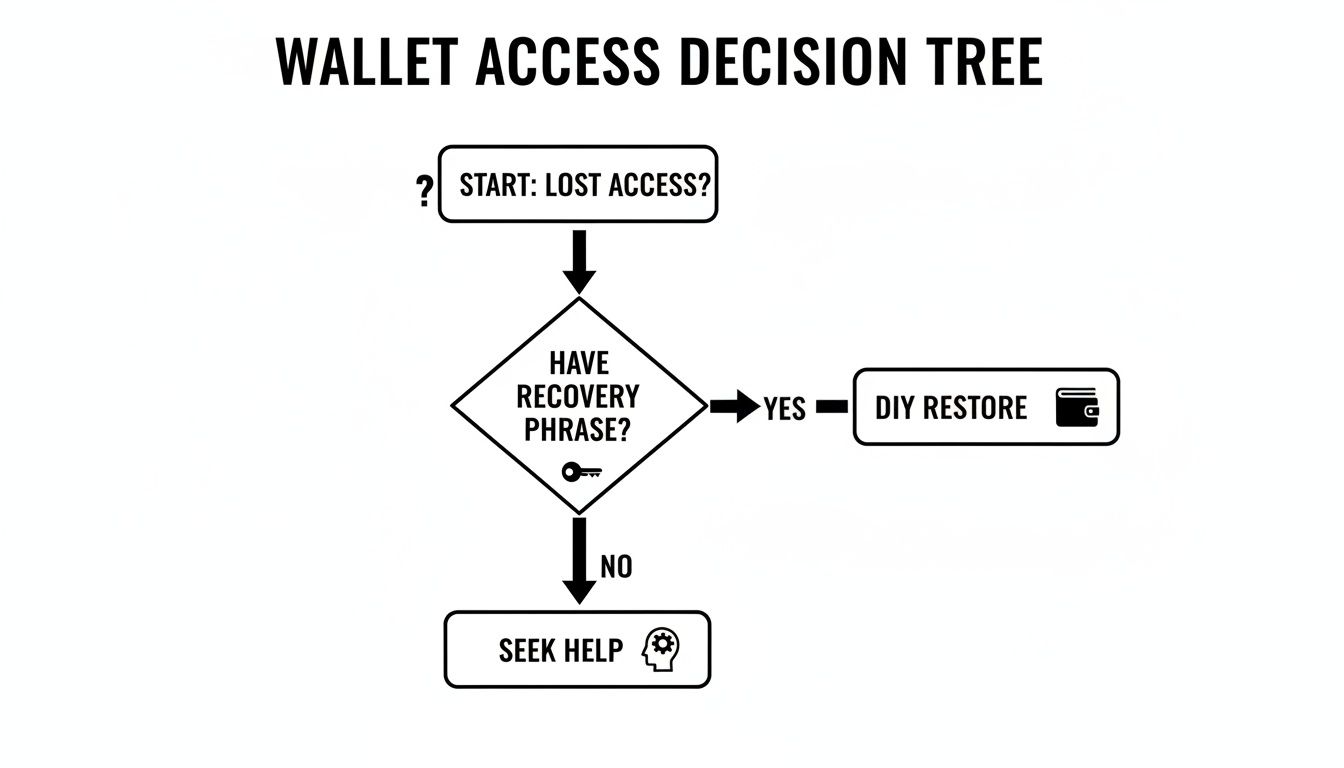
As you can see, the secret recovery phrase is the fork in the road. Losing it is what makes professional help the next logical step.
You Always Remain in Control
The most critical part of our service is that you never, ever lose custody of your crypto. We work to find one thing: your password. That's it. Once we find the correct one, we deliver it securely to you.
You are the only one who uses the recovered password to unlock your wallet. We provide the key, but you open the door. This ensures you maintain 100% control of your funds from start to finish.
This method honors the very reason you probably chose a self-custody wallet like Exodus in the first place. We offer a specialized solution for a tough problem—a forgotten password without a seed phrase—without ever asking you to compromise on your security or ownership. It's the final backstop when your digital vault feels permanently locked.
Got Questions About Exodus Wallet Recovery? We Have Answers.
It's completely normal to have questions when you're in charge of your own crypto. When it comes to getting back into your Exodus wallet, a little clarity goes a long way. Let's tackle some of the most common things people ask.
I Forgot My Exodus Password, but I Have My 12-Word Phrase. What Now?
This is exactly what the recovery phrase is for. Think of your password as a key to the front door of your house, but your 12-word phrase is the master key that can rebuild the entire house anywhere you want.
If you have your phrase, just download a fresh copy of Exodus. Instead of logging in, you'll choose the option to "Restore from Backup" and enter your 12 words. You'll be back in control in minutes.
Can't Exodus Support Just Reset My Password for Me?
No, they can't—and that’s a good thing. Exodus is a self-custody wallet, which means they are physically incapable of accessing your funds or your private information. They never see your password or your recovery phrase.
This puts you in complete control, but it also means the responsibility is 100% yours.
Be on high alert for scammers. If anyone claiming to be from Exodus support asks for your 12-word phrase, they are trying to steal your funds. Exodus will NEVER ask you for your secret phrase. Period.
My Phone Broke (or Was Stolen)! Is My Crypto Gone?
Not if you have your 12-word secret recovery phrase safely backed up. This is one of the most important concepts to grasp: your crypto isn't actually on your phone or computer. Your assets exist on the blockchain network.
Your wallet is just a secure window to view and manage them. With your recovery phrase, you can simply open that window on a new device and see your entire portfolio, safe and sound.
What if I Only Have a Few of the Words from My Recovery Phrase?
Unfortunately, a partial or misspelled recovery phrase is the same as having no phrase at all.
For the restoration to work, you need all 12 words typed perfectly and in the exact original order. There is no "close enough." Even a single wrong or misplaced word will prevent the wallet from generating the correct keys, and the process will fail. This is why it's so critical to write down your phrase carefully when you first set up your wallet.
If you've lost your password and don't have your 12-word phrase, your options are limited, but not always zero. Specialized services may be able to help. Wallet Recovery AI offers a secure, confidential last resort for these exact situations. Learn how our AI-driven process can help you regain access by visiting https://walletrecovery.ai.
Leave a Reply