
Think of your Coinbase Wallet as the digital passport to your crypto life. It’s what gives you direct, personal control over your assets.
This is a world away from a standard Coinbase account, where the company holds your crypto for you. It's the difference between owning your car and just having permission to drive someone else's. With the wallet, you hold the keys.
Understanding Your Digital Passport to Crypto
To really get how Coinbase Wallet works, you have to understand self-custody.
Your regular Coinbase.com account is what we call custodial. Picture it like a bank. The bank holds your money, secures it, and lets you access it through their app. They are the custodian of your funds.
The Coinbase Wallet, on the other hand, is non-custodial. This is like having cash in a safe at home. You hold the only key. You are 100% responsible for it, and nobody else can touch it without your say-so.
This single distinction is the most critical concept to grasp. If you want to go deeper, you can explore the full breakdown of custodial vs non-custodial wallets and see why it matters so much for your security.
Coinbase App vs Coinbase Wallet At a Glance
To make it even clearer, here's a quick comparison highlighting the fundamental differences between using the main Coinbase platform and the separate Coinbase Wallet app.
| Feature | Coinbase App (Exchange Account) | Coinbase Wallet (Self-Custody) |
|---|---|---|
| Asset Control | Coinbase holds your keys and crypto. | You hold your own keys and crypto. |
| Primary Use | Buying, selling, and trading on the exchange. | Storing assets, exploring DeFi, NFTs, and dApps. |
| Security | You trust Coinbase's security infrastructure. | You are responsible for your own security. |
| Recovery | Password reset via email/ID verification. | You must use your 12-word recovery phrase. |
Ultimately, the Coinbase app is for interacting with the Coinbase exchange, while the Wallet is your personal gateway to the broader world of Web3.
The Power of Public and Private Keys
Every self-custody wallet, including Coinbase Wallet, runs on a pair of cryptographic keys: a public key and a private key. They’re a team, but they have very different jobs.
- Public Key: Think of this like your bank account number. You can share it freely with anyone who wants to send you crypto. It's public and used to generate your wallet address.
- Private Key: This is your PIN and password all in one. It’s the secret code that proves you own your crypto and gives you the power to spend or move it. Never, ever share your private key with anyone.
Your private key is the ultimate proof of ownership. Whoever holds the private key controls the crypto associated with it. This is the foundation of the popular crypto mantra: "Not your keys, not your coins."
When you first set up a Coinbase Wallet, it generates this private key and stores it securely right on your phone or browser extension. The app then creates a 12-word recovery phrase (also called a seed phrase) from that key.
This phrase is simply a human-readable backup of your private key. It's what allows you to restore your wallet and get your funds back if you lose your phone or switch to a new computer.
The growing demand for self-custody is clear, with Coinbase Wallet reaching 3.2 million monthly active users. While that's just a fraction of the 120 million total users on the Coinbase platform, it shows a serious trend toward personal asset control.
Keeping that 12-word recovery phrase safe is entirely on you. It’s a small price to pay for having complete, sovereign control over your digital wealth.
Right off the bat, when you set up a new Coinbase Wallet, you have to make a choice that fundamentally changes how you'll manage your security. Coinbase gives you two options: the classic Standard Wallet or the newer MPC (Multi-Party Computation) Wallet. Knowing the difference is crucial for picking the one that fits you best.
The Standard Wallet is what most people think of when they hear "self-custody." When you create one, it gives you a 12-word secret recovery phrase. This phrase is everything—it's the master key to your digital vault. It's on you, and only you, to keep it safe. If you get a new phone, that phrase is how you get your wallet back.
But that absolute control comes with absolute responsibility. If you lose that phrase or someone else gets their hands on it, your crypto is gone. Period.
The Rise of MPC Technology
Coinbase knows that managing a recovery phrase is a huge source of stress. That's why they introduced their MPC Wallet. Instead of one all-powerful 12-word phrase, MPC technology breaks your private key into multiple pieces, often called "shares."
Think of it like a bank vault that needs two different keys to open. One share stays on your device, and Coinbase secures the other. To do anything, you need both pieces to come together.
This setup gets rid of the single point of failure. A thief would have to hack both your phone and Coinbase's secure servers at the same time to get to your funds—a much taller order.
It also makes recovery a lot less nerve-wracking. If you lose your phone, you can use your cloud backup (like iCloud or Google Drive) along with your Coinbase login to put the pieces back together and restore your wallet.
Security and Convenience: The Big Trade-Off
So, which one should you choose? It really comes down to a trade-off. The Standard Wallet gives you pure, unadulterated sovereignty. No one but you can touch your funds, which is exactly what crypto purists are looking for. The MPC wallet, on the other hand, offers a much friendlier user experience and a safety net for the most common—and devastating—mistake: losing your recovery phrase.
Data shows that most self-custody losses aren't due to brilliant hacks but simple human error, like poor phrase management or falling for phishing scams. In fact, early analysis of MPC adoption has shown a preliminary 60% reduction in user-reported losses from lost phrases. Why? Because the technology itself removes that single, fatal point of failure. You can dive deeper into the benefits of MPC technology with this guide from Fireblocks.
Ultimately, the right wallet depends on how comfortable you are with shouldering all the responsibility yourself versus trusting a shared security model. Both are secure; they just get there in very different ways.
How Your Private Keys and Security Are Managed
The real magic of Coinbase Wallet isn't the app itself—it's how it handles your private keys. These keys are the master secret that proves you own your crypto, and unlike a bank, Coinbase Wallet generates and stores them right on your phone or computer. This puts you, and only you, in charge.
Think of it this way: your private key is like the original deed to your house. You wouldn't just leave it lying around; you’d lock it in a personal safe that only you can open. That’s exactly what the wallet does, reinforcing the most important rule in crypto: "not your keys, not your coins."
It’s a crucial concept to grasp. Your assets don't actually live "in" the wallet app. They're on the blockchain. The app is just the secure window that holds the keys to access and manage them.
Your Device's Built-In Digital Vault
To keep your keys safe, the Coinbase Wallet app doesn't just save them like a regular file on your phone. It goes a step further, locking them away inside a highly fortified, hardware-based security chip that's already built into modern devices. On Apple products, this is called the Secure Enclave.
The Secure Enclave is basically a separate, isolated mini-computer living inside your device's main processor. Its entire job is to handle sensitive cryptographic operations, like managing your private keys. When your wallet creates your key, it happens inside this digital fortress, and it never leaves. The key never touches your phone's main operating system or memory, where it could be exposed to malware or hackers.
According to Apple's own security documentation, keys protected by the Secure Enclave are never exposed to the rest of the system. Every time you sign a transaction, the approval happens entirely within this protected chip. It's a security architecture that’s on par with many dedicated hardware wallets.
This is what makes modern self-custody wallets so incredibly powerful. They turn the device you already carry into a hardware-level vault.
Layers of Security You Control
On top of the hardware-level protection from the Secure Enclave, Coinbase Wallet gives you several layers of security that you personally manage. These features make sure that even if someone gets their hands on your device, they can't do anything with your funds.
Here are the main security layers you'll set up and use:
- Password or PIN: This is your first line of defense. You create a password or PIN when you set up the wallet, and you'll need it to open the app.
- Biometric Authentication: You can (and should) enable Face ID, Touch ID, or the Android equivalent. This adds a physical "you" check, making it nearly impossible for anyone else to approve a transaction or send funds.
Key Takeaway: True wallet security is a partnership. Coinbase Wallet provides the advanced tech, like the Secure Enclave. But you are responsible for setting a strong password, turning on biometrics, and—most importantly—keeping your recovery phrase safe.
These features work together to build a powerful defense. For a deeper dive into protecting your assets, check out our complete guide on maximizing your Coinbase Wallet security. By combining the wallet’s hardware isolation with your own careful habits, you get security that’s both rock-solid and easy to use day-to-day.
Alright, let's break down what actually happens when you send crypto. Theory is one thing, but seeing a transaction through from start to finish is where the lightbulb really goes on.
Let’s walk through the entire journey, from the moment you hit "send" to seeing your crypto safely arrive.
Signing Your Transaction: The Digital Handshake
Imagine you want to send some ETH to a friend. You pop open your Coinbase Wallet, choose Ethereum, tap "Send," and plug in your friend's wallet address and the amount. The second you confirm, the wallet gets to work on its most important job.
It grabs your private key—the one stored securely inside your phone's Secure Enclave—and uses it to create a digital signature for that specific transaction. Think of this signature as an unbreakable, cryptographic seal of approval. It proves to the entire world that you authorized this payment, all without ever showing anyone your actual private key.
Broadcasting and Getting Confirmed
With the signature attached, your transaction is broadcast out to the Ethereum network. This is kind of like shouting your order across a massive, decentralized room full of accountants (we call them "nodes").
These nodes all take a look at your signed transaction. They check your signature to make sure it’s legit and confirm you have enough ETH to cover it. Once enough of them agree it’s valid, they bundle it into the next "block" of transactions to be permanently etched into the blockchain.
This is where network fees, or "gas fees," come in. You're basically paying a small fee to the network validators to get your transaction included in the next block.
Key Takeaway: Sending crypto isn't like an instant bank transfer. It's a request that you cryptographically sign and broadcast to a network of verifiers. They confirm it, and how fast that happens often depends on the fee you’re willing to pay.
Picking the Right Network Fee
The entire process hinges on public-key cryptography: your private key signs a request, and the public network verifies it. On a busy network like Ethereum, the time it takes to get that confirmation can vary wildly—anywhere from 13 seconds to over 5 minutes, depending on how congested the network is and how much you paid in gas fees.
Coinbase Wallet makes this part easy. It gives you real-time fee estimates—Slow, Average, or Fast—by pulling data from network analysis tools. This helps you get your transaction processed without overpaying. You can get a much deeper dive into how Ethereum transactions are structured on ethereum.org.
Here’s a quick rundown of what those options mean for you:
- Slow: The cheapest option. Great if you're not in a hurry, but your transaction might get stuck in line during busy periods.
- Average: The go-to choice for most people. It's a solid balance between cost and speed, usually getting confirmed in a reasonable amount of time.
- Fast: The "priority shipping" option. It costs the most but tells the network to push your transaction to the front of the line. Perfect for when time is critical.
By handling the signing, broadcasting, and fee estimates, your Coinbase Wallet acts as your trusted agent, turning a simple tap of a button into a secure, confirmed transaction on the blockchain.
Using Your Wallet to Explore dApps and DeFi
Your Coinbase Wallet is more than just a place to stash your crypto. Think of it as your passport to the entire world of Web3—it’s less of a digital safe and more of a powerful portal to the decentralized internet.
Inside the wallet, you’ll find a built-in dApp browser. This isn't just another web browser; it’s a specialized tool with a secure, integrated login system. Instead of juggling dozens of usernames and passwords for different sites, you just connect your wallet. That one click securely proves who you are and what you own, all without ever revealing your private keys.
This seamless access is your ticket to the rapidly growing on-chain economy. It lets you dive into thousands of decentralized applications (dApps) right from your wallet, opening up a whole new world of possibilities.
Connecting to the On-Chain Economy
The real "aha!" moment comes when you start using the wallet for its main purpose: getting involved. The dApp browser is the bridge that connects you to the most interesting parts of the crypto space.
- Decentralized Finance (DeFi): You can link up with platforms like Uniswap or Aave to trade tokens, earn interest on your crypto, or even take out a loan, all without needing a bank.
- NFT Marketplaces: Ready to browse, buy, or sell digital art and collectibles? Just connect your wallet to marketplaces like OpenSea, where your NFTs are stored right alongside your coins.
- Web3 Gaming: Log into play-to-earn games where the items you collect are actually NFTs that you own. You can trade them, sell them, or use them however you want.
The explosion of this dApp ecosystem is exactly why self-custody wallets have become so popular. The DeFi world alone has seen over $120 billion in Total Value Locked (TVL), and exchanges like Uniswap are processing $50 billion in monthly volume. In the NFT space, a recent quarter saw over 2.5 million unique wallets interacting with NFT contracts. This data, which you can explore further in reports on the on-chain economy from dappradar.com, makes one thing clear: a modern wallet is for active participation, not just passive storage.
This infographic breaks down the simple, secure process that happens behind the scenes every time you interact with a dApp.
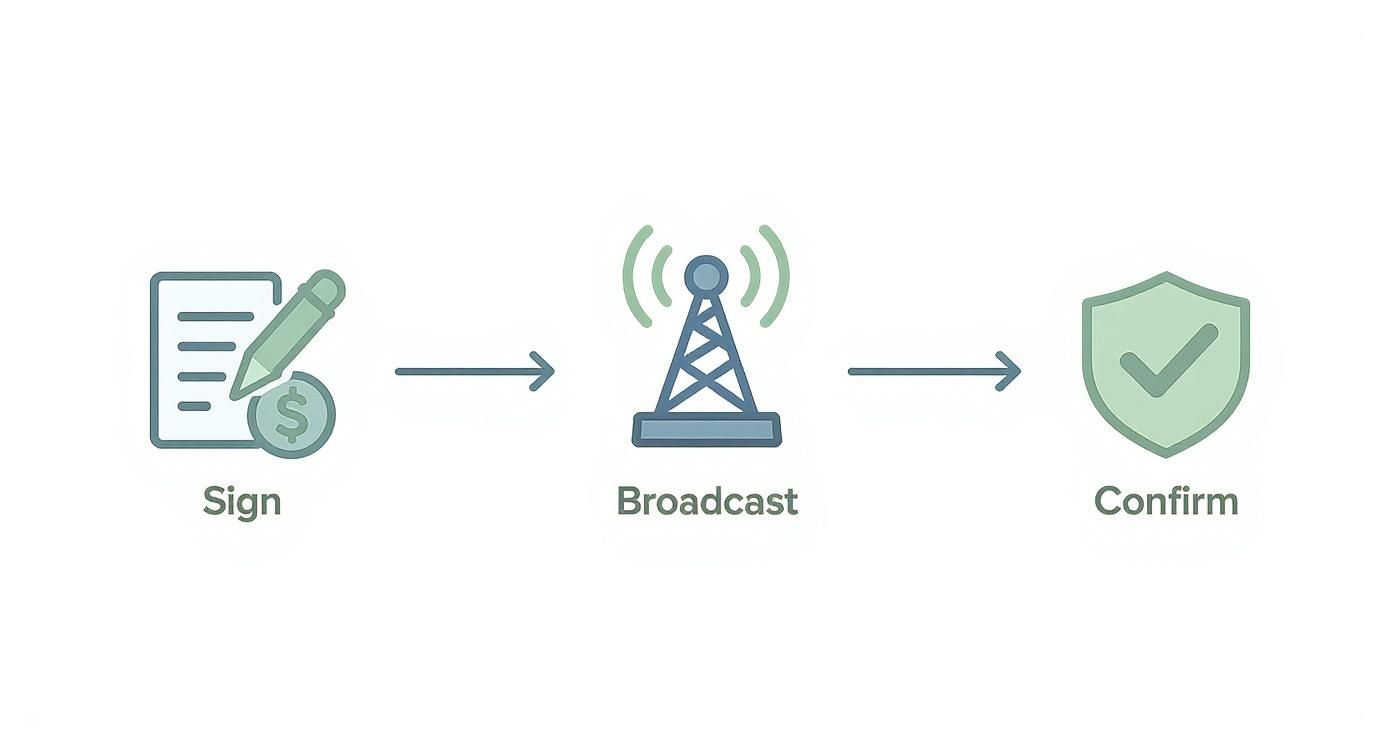
Each step—signing, broadcasting, and confirming—is managed by your wallet to make sure every transaction is both authorized by you and securely executed.
Your Secure Digital Identity
Ultimately, your Coinbase Wallet becomes your sovereign digital identity. It's the key that holds your assets, your collectibles, and your access credentials for the new, decentralized web.
When you connect to a dApp, you are not handing over your personal data. You are simply proving ownership of your wallet address, giving you control over how you interact online while maintaining your privacy.
This model completely flips the old internet on its head. Instead of big tech companies owning your data, you are in full control of your identity and your assets. Whether you're swapping tokens on a DEX or buying your first NFT, your wallet is the key that unlocks it all—securely and directly.
Got Questions About Coinbase Wallets? We've Got Answers.
Jumping into the world of self-custody wallets always stirs up a few questions. Even when you get the basics down, those "what if" scenarios can still pop up. Let's tackle the most common ones head-on so you can feel confident managing your own crypto.
Think of this as the straightforward FAQ you've been looking for.
Which Is Safer: My Coinbase Wallet or My Exchange Account?
This is probably the biggest question people have, and the answer really boils down to one thing: control versus convenience.
Think of your account on the Coinbase exchange like a bank account. Coinbase acts as the custodian, holding your assets for you. They use world-class security, which is super convenient, but you're ultimately trusting them to keep your crypto safe.
With your Coinbase Wallet, you are the bank. Your private keys are yours and yours alone. This insulates you from risks like an exchange getting hacked, but it also means the responsibility is 100% on you to protect your recovery phrase. If you lose that phrase, nobody—not even Coinbase—can get your funds back.
What Happens If I Lose My Phone?
Losing your phone is a nightmare, but it doesn't mean your crypto is gone forever. Your assets aren't actually on your device; they live on the blockchain. Your phone just holds the keys that let you access them.
As long as you've backed up your 12-word recovery phrase, you're completely fine. Just grab a new phone, install the Coinbase Wallet app, and choose the "I already have a wallet" option. Punch in your recovery phrase, and you'll get full access back to all your crypto.
The Golden Rule: Your recovery phrase is the master key to your wallet. Keeping it safe is far more important than protecting the phone it's on. Write it down and store it somewhere offline and secure where no one else can find it.
Do I Need a Coinbase.com Account to Use the Wallet?
Nope, not at all. The Coinbase Wallet is a completely separate, non-custodial product. It works entirely on its own, independent of the Coinbase exchange.
You can download the app, create a brand-new wallet, and start sending and receiving crypto from anywhere without ever signing up for a Coinbase.com account.
The option to link your exchange account is just there for convenience. It makes it a bit easier to move funds back and forth or buy crypto with cash, but it's totally optional.
How Is a Coinbase Wallet Different from a Hardware Wallet?
This is all about "hot" vs. "cold" storage.
- Coinbase Wallet (A Hot Wallet): This is a software wallet that runs on a device connected to the internet, like your phone or computer. While it's secured with powerful tech like the Secure Enclave, its online nature means there's always a tiny, theoretical risk of online attacks.
- Hardware Wallet (A Cold Wallet): A device from a company like Ledger or Trezor is a physical gadget that keeps your private keys completely offline. To sign a transaction, you have to physically approve it on the device itself, which makes it virtually immune to malware, phishing, and other online threats.
For everyday spending and interacting with dApps, a hot wallet like Coinbase Wallet offers a great blend of security and convenience. But for stashing away large amounts of crypto for the long haul, a hardware wallet is the undisputed king of security.
If you've lost access to your crypto wallet due to a forgotten password or a lost recovery phrase, don't give up hope. At Wallet Recovery AI, we specialize in helping individuals regain access to their locked digital assets. Our secure and confidential process is designed to restore control over your funds quickly and safely. Find out if we can help you recover your wallet today.
Leave a Reply