
That gut-wrenching moment you realize you can't get into your crypto wallet feels like a digital heart attack. It's a unique kind of panic. But before you spiral, take a deep breath. Recovering a wallet password isn't about frantic guessing; it’s a methodical process, like a detective piecing together digital clues. Your funds aren't gone—they're just behind a lock. This guide will show you how to find the key.
The Reality of a Lost Crypto Password
Let's be clear: with self-custody wallets, there's no "forgot password" link to click. This isn't a design flaw; it's the core security feature that keeps your crypto safe.
These wallets are built to be impenetrable fortresses. They give you—and only you—total control. The powerful encryption that shields your assets from hackers is the very same thing that’s locking you out right now. It's the double-edged sword of decentralization. The power is yours, but so is the responsibility.
Shifting from Panic to a Plan
Even though the situation feels dire, a lost password isn't a death sentence for your funds. The difference between success and failure often comes down to one thing: trading that initial wave of anxiety for a structured, logical plan. Randomly trying every old password you can think of is a recipe for frustration. What you need is a system.
This guide is that system. We're going to move past the stress and focus on real, actionable solutions that can turn a hopeless situation into a solvable puzzle. We'll walk through a few practical strategies:
- Systematic Information Gathering: I'll show you how to methodically dredge up every possible password fragment and clue from your memory, old notes, and digital history.
- Targeted Tool Selection: We’ll cover how to choose safe, effective software for your specific wallet, and just as importantly, how to spot and avoid dangerous scams.
- Smart Recovery Techniques: You'll learn how to apply those clues using specialized attack methods that dramatically stack the odds in your favor.
The key takeaway is this: your own memory is the most powerful tool in this process. Recovery software is only as good as the clues you feed it. Without your input, even the most advanced programs are just shooting in the dark.
By staying calm and following a methodical plan, you can give yourself the best possible shot at getting back into your wallet and recovering your assets.
Gathering Your Digital Breadcrumbs
Before you even think about firing up any fancy recovery software, we need to do some groundwork. This is the most important part of the entire process, so don't skip it. You need to become a digital detective and start piecing together every clue you can remember about that lost password.
Our brains aren't exactly perfect storage devices. In fact, they're pretty terrible at remembering complex, unique passwords, which is why you're here in the first place. Research backs this up—a recent study found that 59% of people in the United States rely solely on memory for their credentials. This leads to a lot of headaches, with 47% of Americans admitting they forget passwords a few times a month. You can dive into the numbers yourself in the full Bitwarden report.
Let's bridge those memory gaps with a structured approach.
Creating Your Personal Password Inventory
Grab a text editor and get ready to dump everything you can think of. Seriously, don't filter anything out. The most random, seemingly insignificant detail could be the key that unlocks your funds. This document is going to be your master list of password ingredients.
Here’s a checklist to get your memory firing on all cylinders:
- Core Words & Phrases: Did you have a favorite quote, a common saying you use, lyrics from a song you had on repeat, or a book title?
- Personal Names: Jot down names of family, pets (even childhood ones), close friends, or maybe a favorite video game character.
- Significant Dates: Think birthdays, anniversaries, or graduation years. Write them in every format you can imagine (e.g.,
04152018,150418,April15). - Locations: Old street names, cities you've lived in, that one vacation spot you can't forget, or even the name of your elementary school.
- Hobbies & Interests: Any terms related to your hobbies? Think "guitar," "hiking," "bitcoin," or the name of a character you played in an online game.
- Common Substitutions: Are you the type to swap letters for numbers or symbols? For example,
efor3,afor@,sfor$, orifor!. - Special Characters: What are your go-to symbols? Are you a
!or#person? Do you usually stick them at the beginning, the end, or somewhere in the middle?
The goal here isn't to magically guess the password on the first try. It's to build a rich, personalized dictionary of your own habits. This custom wordlist is the fuel that recovery tools use to make intelligent guesses, dramatically cutting down the time it takes to find the right combination.
Locating Your Wallet File
Okay, next up: we need the actual wallet file. For most desktop wallets like Bitcoin Core or Electrum, this file is named wallet.dat. It’s the digital safe that holds your encrypted private keys. Without this file, there’s nothing to recover.
Finding it can be a bit of a treasure hunt depending on your operating system:
- Windows: Head to
C:UsersYOUR_USERNAMEAppDataRoamingand then look for a folder with your wallet's name (e.g.,Bitcoin). - macOS: You’ll want to navigate to
~/Library/Application Support/and find the wallet’s directory there. - Linux: It’s usually tucked away in your home directory at a path like
~/.bitcoin/.
Once you've located the wallet.dat file, the very next thing you do is create a backup copy. Put it on a USB drive or another secure device and store it somewhere safe. Never, ever work with the original file during the recovery process. This is your safety net. If a tool messes up, your original encrypted data is still safe and sound.
Password vs. Seed Phrase: A Crucial Distinction
It’s really important we’re all on the same page about what you're trying to recover. A lot of people mix up a wallet password and a seed phrase, but they do two completely different jobs.
A password (or passphrase) is what encrypts your local wallet.dat file. It’s the key you use to unlock the wallet on your computer. This is what you’ve forgotten, and this is what we're trying to brute-force.
A seed phrase (also called a recovery phrase) is a list of 12 to 24 words. Think of it as the master key to your entire crypto fortune. It can regenerate all of your private keys on any device, anywhere. If you have your seed phrase, you can forget about the old password entirely—just restore your wallet from the seed and set a new password.
So, before you go any further, tear apart your old notebooks, check your safe, and look through any encrypted digital notes. Finding that seed phrase is the ultimate get-out-of-jail-free card. If you're 100% sure you don't have it, then buckle up—recovering the wallet.dat password is your only way forward.
Picking the Right Password Recovery Toolkit
Alright, you’ve gathered all your digital breadcrumbs. Now for the hard part: choosing the right tool to put the pieces together. Diving into password recovery software can feel like walking through a minefield. Some tools are incredibly powerful but demand a serious learning curve. Others are easy to use but might not have the horsepower you need.
And then there are the outright scams, just waiting for you to upload your precious wallet file.
The trick is to match the tool to your specific situation. Think about your technical comfort level, the kind of wallet you’re trying to crack, and the hardware you have on hand. A beefy graphics card (GPU) can chew through password combinations exponentially faster than a standard computer processor (CPU), so what's under your hood really matters.
This choice is a big deal. The password recovery software market is booming—it's on track to become a $1.5 billion industry by 2025, according to this password recovery software market report. That growth has fueled a lot of innovation, but it's also attracted some shady operators.
Open-Source Powerhouses vs. Commercial Solutions
Your first big decision is whether to go with an open-source tool or a paid commercial one. Each has its own set of trade-offs when it comes to power, usability, and—most importantly—security.
- Open-Source Tools (like Hashcat or John the Ripper): These are the gold standard for security pros, and for good reason. They’re free, endlessly customizable, and completely transparent. Because their code is open for anyone to inspect, you know there’s no hidden malware. They are also absolute beasts, especially if you have a decent GPU to throw at the problem. The downside? They’re command-line based. No friendly buttons to click. You’ll need some technical confidence to get them running correctly.
- Commercial Tools (Various Paid Software): The biggest draw here is a graphical user interface (GUI), which makes them far more approachable for most people. They often come with customer support and pre-built settings for specific wallets. The catch is they cost money, and you’re trusting a closed-source program. It’s impossible to verify what the software is doing behind the scenes, which can be a huge security risk if you pick the wrong one. Our guide on selecting the right crypto recovery software can help you navigate these waters safely.
For anyone with a bit of a technical appetite, starting with an open-source tool like Hashcat is almost always the most secure and powerful option.
Here’s a glimpse of what working with a command-line tool like Hashcat looks like.
This image really shows you the raw power—and the complexity. You're not clicking buttons; you're writing specific commands to launch different recovery strategies.
To help you get a clearer picture, let's break down some of the most popular options.
Comparison of Popular Wallet Recovery Tools
Choosing the right software can feel overwhelming, so here’s a quick comparison of the leading tools. This table should help you figure out which one aligns best with your needs and technical skill level.
| Tool Name | Best For | Technical Skill Required | Key Feature |
|---|---|---|---|
| Hashcat | Users with powerful GPUs and technical experience. | High | World's fastest password cracker; highly versatile. |
| John the Ripper | CPU-based recovery and broad file-type support. | Medium to High | Extremely flexible and runs on almost any OS. |
| Dave's Wallet Recovery | Specifically cracking wallet.dat files. |
Medium | Open-source tool tailored for Bitcoin wallets. |
| Elcomsoft | Beginners needing a user-friendly interface. | Low | Polished GUI and dedicated support. |
Ultimately, the best tool is the one that fits your situation. If you're comfortable in the command line, Hashcat is hard to beat. If you need something more straightforward, a reputable commercial tool might be the better path.
How to Know if a Tool Is Legit
No matter which route you take, never, ever download recovery software from a random forum link or an unverified website. This is the oldest trick in the book for scammers looking to distribute malware that will steal your wallet.dat file and clean you out.
Critical Safety Tip: Always download software directly from its official source. For Hashcat, go to their official website. For John the Ripper, use their official GitHub repository. If you opt for a commercial tool, research the company, read reviews, and make sure they have a legitimate, long-standing reputation.
Understanding the Different Attack Methods
Once you've picked your tool, you need to tell it how to guess your password. Knowing the lingo will make the process much more efficient. There are really only three main approaches:
-
Dictionary Attack: This is where your homework pays off. The software takes a wordlist—a simple text file with one potential password per line—and tries every single one against your wallet. Your custom wordlist, built from the personal info you gathered earlier, is your most powerful weapon here.
-
Brute-Force Attack: This is the "sledgehammer" approach. The software tries every possible combination of characters (
a,b,c…aa,ab,ac). While it’s guaranteed to work eventually, it's incredibly slow. For any password longer than eight characters, a pure brute-force attack is basically a waste of time. -
Mask Attack: This is a much smarter, more surgical version of brute-force. Let's say you remember your password started with
MyWalletand ended with a four-digit year, but the middle is fuzzy. You can create a "mask" that tells the tool to only try combinations fitting that pattern. This cuts down the guesswork enormously and can save you days, or even weeks, of processing time.
Choosing the right tool and attack method is a strategic game. By carefully weighing your options and putting security first, you give yourself the best possible shot at getting your funds back.
Alright, you’ve done the prep work. You've dug through old notebooks, racked your brain for clues, and picked a recovery tool. Now it's time to put all that effort to work.
This is where the rubber meets the road. We're moving from theory to the hands-on process of actually getting that password back. The goal isn't just to blindly run some software; it's to guide it with the intelligence you’ve gathered. A powerful recovery tool without good direction is just spinning its wheels. By feeding it your personal "digital breadcrumbs," we can focus its power exactly where it matters most.
This graphic gives you a quick visual on how to choose the right recovery path based on what you're working with—your tech skills, wallet type, and the hardware you have on hand.
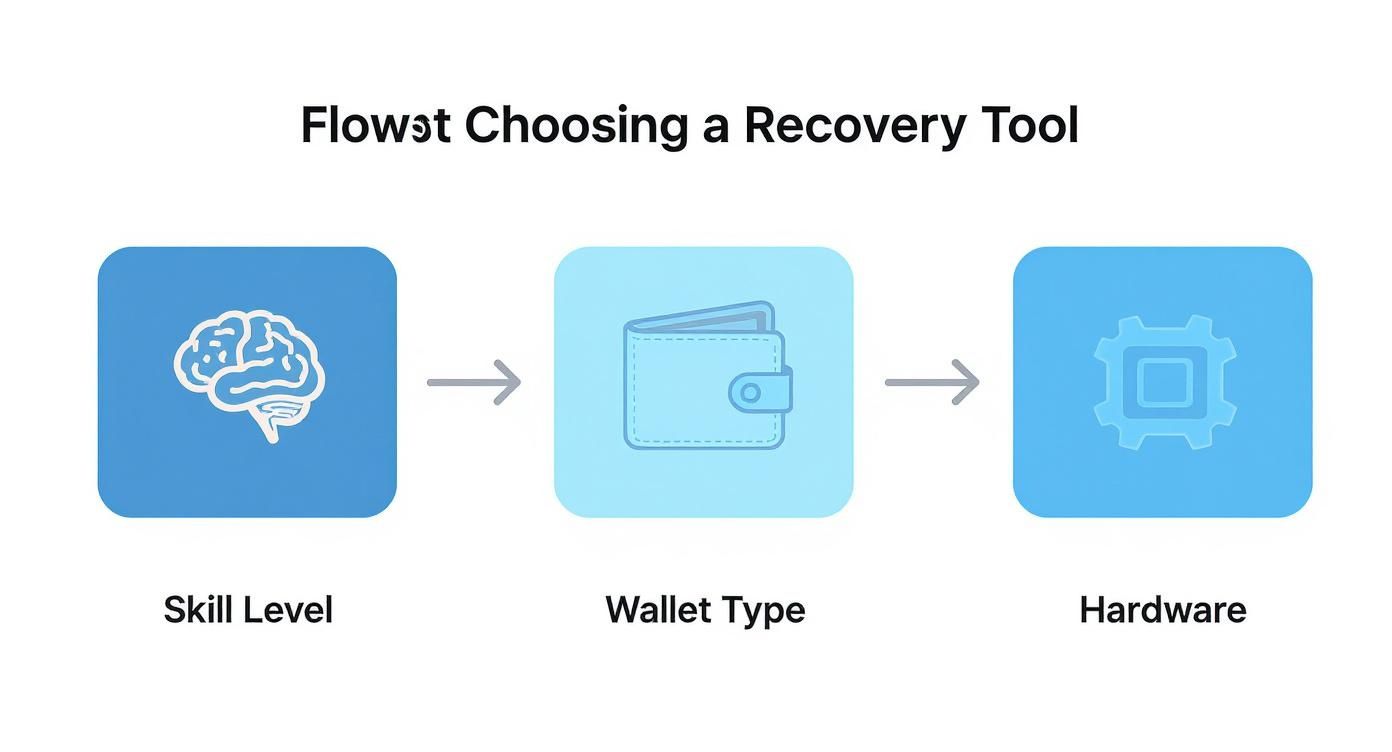
As you can see, it all starts with an honest look at your own technical comfort level. That initial self-assessment points you toward the software and hardware combo that gives you the best shot at a successful recovery.
Building Your Custom Wordlist
The first—and often most effective—strategy is the dictionary attack. But we’re not talking about a generic list of common passwords you'd find online. Your best ammunition is a wordlist built exclusively from the clues you gathered.
Just open a plain text file (Notepad on Windows or TextEdit on Mac works perfectly) and start listing every single clue you came up with. Put each potential password or fragment on its own line.
- Every name, date, pet, hobby, or favorite phrase goes in.
- Toss in common variations you might have used. If
MyDogMaxis a possibility, addMyD0gM@xandmydogmaxtoo. - Combine different elements. If "Max" and "2019" are on your list, try
Max2019,max2019,2019Max, andMax_2019.
This custom dictionary is a direct reflection of your own password habits. It focuses the software's efforts on combinations that are uniquely you, giving it a much, much higher chance of hitting the mark than any generic list ever could.
Launching a Targeted Mask Attack
What if you remember bits and pieces of the password, but not the whole thing? This is an incredibly common situation, and it’s exactly what a mask attack was made for. Think of it as a super-smart brute-force attack that drastically cuts down the search time.
Let's say you're trying to crack a Bitcoin wallet.dat file. You feel certain it started with "Bitcoin," was followed by four numbers you can't remember, and ended with an exclamation mark.
In a tool like Hashcat, you’d define this pattern as a "mask." For this scenario, the mask would look like this: Bitcoin?d?d?d?d!
Here's what that means:
Bitcoin: The part of the password you know for sure.?d: This is a placeholder telling Hashcat to cycle through all digits (0-9) in this spot. You use it four times for the four numbers you forgot.!: The final character you remember at the end.
Instead of trying every possible character combination under the sun, the tool will now only test passwords that fit that precise structure—like Bitcoin1234! or Bitcoin9876!. This surgical approach can turn a recovery attempt that might take centuries into one that could be over in minutes or hours, especially with a decent GPU.
A well-designed mask is one of the most powerful tools in your arsenal. It uses the fragments you do remember to systematically figure out the parts you've forgotten, making it a cornerstone of any serious recovery attempt.
Leveraging AI for Pattern Recognition
The next level of sophistication is bringing in AI-powered analysis to make even smarter guesses. No, you won't be building a neural network from the ground up, but you can use services that apply machine learning principles to spot your subconscious password patterns.
Think about it—we're all creatures of habit. You probably reuse certain structures, character types, or lengths across your passwords without even thinking about it. AI-driven tools can analyze a list of your known past passwords to identify these hidden tendencies.
For example, an AI might find that 75% of your old passwords were between 8-12 characters long, always began with a capital letter, and usually had a year tucked in the middle.
This kind of insight is gold. It can be used to generate a hyper-targeted wordlist or a series of incredibly specific mask attacks that follow your personal "password fingerprint." This method essentially automates your own intuition, running through the most likely combinations first. While this is definitely an advanced technique, services like Wallet Recovery AI use these principles to give their clients the best possible odds.
Combining Techniques for Maximum Impact
The most successful recoveries rarely come from a single method. The real magic happens when you layer these techniques into a cohesive strategy.
Here’s a workflow that has proven to be effective time and time again:
- Start with Your Custom Dictionary: Always run this first. It’s the fastest check and has the highest probability of containing the exact password.
- Move to Rule-Based Attacks: If the dictionary comes up empty, apply rules to it. A tool can take your wordlist and automatically add numbers, symbols, or capitalization to each word (e.g., turning "password" into "Password123!").
- Deploy Mask Attacks: Based on any structural clues you remember, run a series of targeted mask attacks. Start with your strongest memories first.
- Finish with a Limited Brute-Force: As a last resort, you can try a tightly constrained brute-force attack (e.g., all 8-character lowercase passwords). This is only practical for shorter, simpler passwords.
By working through these techniques methodically, you stop guessing wildly and start a logical, structured hunt. It's the best way to dramatically improve your odds of getting back into your wallet.
Avoiding Scams and Future Lockouts
Getting your password back feels incredible, but the real victory is making sure you never end up in this mess again. Before we dive into building a fortress for your digital assets, we need to talk about a clear and present danger: fraudulent "recovery services."
When you're desperate, a site promising an instant fix is all too tempting. These operations often tell you to upload your wallet.dat file, claiming their "specialized hardware" can crack it. This is almost always a scam.
Handing over your encrypted wallet file is like giving a locked safe to a professional thief. They can take their sweet time trying to crack it, and if they succeed, your funds are gone for good.
Never upload your wallet file to an untrusted third-party website or send it to some random person online promising a miracle. Legitimate assistance will guide you through the process on your own computer.
This is why it pays to understand how professional help really works. When you engage with legitimate, transparent cryptocurrency recovery services, the entire process is about giving you the right tools and expertise—not about taking control of your assets.
Building Your Bulletproof Security System
To dodge future lockouts, you need to stop relying on memory and start relying on a system. Our memories fail, but a solid security protocol won’t. The cornerstone of that protocol? A dedicated password manager.
Tools like 1Password or Bitwarden are essentially digital vaults. They create incredibly long, complex, and unique passwords for every single account you have and lock them all behind one strong master password.
This immediately breaks the dangerous habit of reusing passwords—a massive problem that makes recovering a specific forgotten password even harder. In fact, a staggering nearly 78% of people admit to reusing passwords across different sites. That’s a huge security risk.
By using a password manager, you only have one job: remember that single master password. Everything else is stored, encrypted, and ready when you need it.
The Sacred Rule of Offline Storage
A password manager is fantastic for your everyday accounts, but your crypto seed phrase and private keys need an even higher level of protection. These are your ultimate master keys. They should never be stored digitally on any connected device or in a cloud service. Ever.
Think of it this way: your password manager is a bank vault, but your seed phrase is the deed to the entire bank. It belongs offline.
Here’s how to do it right:
- Physical Copies Only: Write down your seed phrase on paper. Better yet, etch it onto a metal plate to make it resistant to fire and water damage.
- Multiple Secure Locations: Don't stash all your copies in one place. Keep them in geographically separate, secure spots, like a safe at home and another at a trusted family member's house or in a bank's safe deposit box.
- No Digital Photos: It’s tempting, but never, ever take a picture of your seed phrase with your phone. If your phone or cloud account gets hacked, so do your keys.
This multi-location, offline strategy builds redundancy. If one copy is lost or destroyed, you have backups ready to restore your wallet and secure your funds. Adopting these habits is what separates someone who hopes they remember their password from someone who has a robust system in place, ensuring they always stay in control.
Common Questions About Wallet Recovery
When you're staring at a locked wallet, a million questions probably run through your head. It's a stressful spot to be in, but getting clear answers can make all the difference. Let's tackle some of the most common questions people have when they're trying to get their crypto back.
How Long Does This Actually Take?
Honestly, there's no single answer. I've seen recoveries take a few minutes, and I've seen others that are practically impossible. It all boils down to three things: your password's complexity, how good your memory clues are, and the sheer power of your computer (specifically, its GPU).
If you remember that your password was a variation of your dog's name and a special date, you might get lucky very quickly. But if you're trying to crack a long, completely random string of characters? With today's tech, that's a non-starter. Your success really depends on how much you can narrow down the search.
Are Online Recovery Services a Good Idea?
In a word: no. Steer clear of them. Most of these services operate on a model that should set off major alarm bells—they ask you to upload your encrypted wallet file.
Think about what that means. You're handing over the digital equivalent of a locked safe to a complete stranger on the internet. Many of these sites are just scams, waiting to drain your funds the second they crack the password. Stick to reputable, open-source software that runs on your own machine, where you stay in control.
The golden rule of self-custody is to never share your wallet file or private keys with anyone. A legitimate recovery process puts the tools in your hands; it doesn't ask you to hand over your most sensitive data.
What’s the Difference Between a Password and a Seed Phrase?
This is a big one, and the confusion is understandable. They're both keys, but they unlock different doors.
- A wallet password encrypts the wallet file on your computer or phone (like a
wallet.datfile). You use it to open the wallet for everyday things like sending transactions. This is what we're focused on recovering. - A seed phrase (or recovery phrase) is your master key. It's a list of 12 to 24 words that can restore your entire wallet—all your keys and funds—on a brand new device.
If you find your seed phrase, you've hit the jackpot. You can forget about the old password entirely. Just import the seed phrase into a new wallet, set a new password, and you're back in business.
Can I Get My Password Back if I Have No Clues?
If you genuinely have zero idea what the password could be—no inkling of its length, the types of characters you used, or any personal words—the outlook is grim. Your only option is a pure brute-force attack, which means trying every possible combination.
For any password that isn't ridiculously simple, this would take centuries, if not millennia, on even high-end consumer hardware. That's why recovery is almost always built on having some clues to work with. Those clues are what let you run a targeted attack that can actually succeed in a reasonable timeframe.
Feeling overwhelmed by the recovery process? The team at Wallet Recovery AI uses advanced, AI-driven techniques to help you securely regain access to your assets. We guide you through every step without ever taking control of your funds. Learn more and get professional help at https://walletrecovery.ai.
Leave a Reply