
External drive failure is inconvenient for media files. It can be catastrophic for crypto wallet backups.
A Seagate external hard drive can be a sound choice, but the right answer depends on what you are asking it to protect. For movies, game installs, or a second copy of old photos, Seagate often offers good value per terabyte. For encrypted wallet exports, wallet.dat files, seed phrase archives, or hardware wallet backup material, the standard is much higher. I care less about shelf appeal and more about how the drive behaves under stress, how often it fails in real use, and what happens after something goes wrong.
That difference gets missed in a lot of consumer reviews. They focus on capacity, price, and burst transfer speed. Sensitive storage has different failure modes. A portable drive can survive normal file copies for years, then fail after a drop, a bad USB cable, a controller issue in the enclosure, or a write interruption during an update. With crypto backups, a single corrupted file can matter more than the loss of the drive itself.
Seagate has models that perform well, and it has models I would reserve for lower-stakes archive use. The brand is neither an automatic yes nor an automatic no. The practical question is whether a specific Seagate drive fits a storage process built around redundancy, verification, and recovery. If you keep only one copy of wallet backup data on one portable HDD, the weak point is not just Seagate. It is the whole setup.
That is the standard I use in this guide. A good external hard drive for general backup is not automatically a good choice for high-stakes wallet storage. For that job, reliability history, enclosure quality, write consistency, warranty terms, and your own backup discipline matter more than marketing claims.
Why Asking About Seagate Drives Matters in 2026
Many people ask, “is seagate a good external hard drive,” when they are comparing brands at a retail page. That is too shallow for sensitive storage.
If the drive will hold tax records, family photos, or project files, failure is painful. If the drive will hold wallet.dat files, encrypted keystores, recovery exports, or hardware wallet backup material, failure can be permanent. In crypto storage, you do not always get a second chance.
A drive decision also sits inside a bigger risk chain. The hard disk itself can fail. The USB bridge can misbehave. A sudden disconnect can corrupt a write in progress. A portable unit can take a drop in transit. A user can keep only one copy and not realize the mistake until restore day.
What matters more than brand loyalty
I evaluate Seagate externals on four practical criteria:
- Reliability in the field: Not review-site sentiment, but large pool behavior over time.
- Performance in real transfers: Large backups need predictable throughput.
- Support after failure: Warranty terms and recovery services matter more than many buyers think.
- Fit for the job: A portable HDD may be fine for an archive shelf, but the wrong choice for travel-heavy wallet storage.
For crypto backups, the safest answer is rarely “pick one drive.” It is “pick a drive, then build a process around it.”
That is why the right verdict on Seagate is nuanced. Some Seagate drives look very good in fleet reliability data. Some Seagate portable models are perfectly adequate for bulk backup. But for high-stakes wallet storage, the mechanical realities of hard drives never disappear. You can work with that risk. You should not ignore it.
The Verdict on Seagate Reliability and Failure Rates
Reliability is the deciding factor if an external drive may end up holding a wallet backup that cannot be recreated. In that use case, brand reputation matters less than failure behavior over time, under sustained use, and after the drive has aged past the honeymoon period.
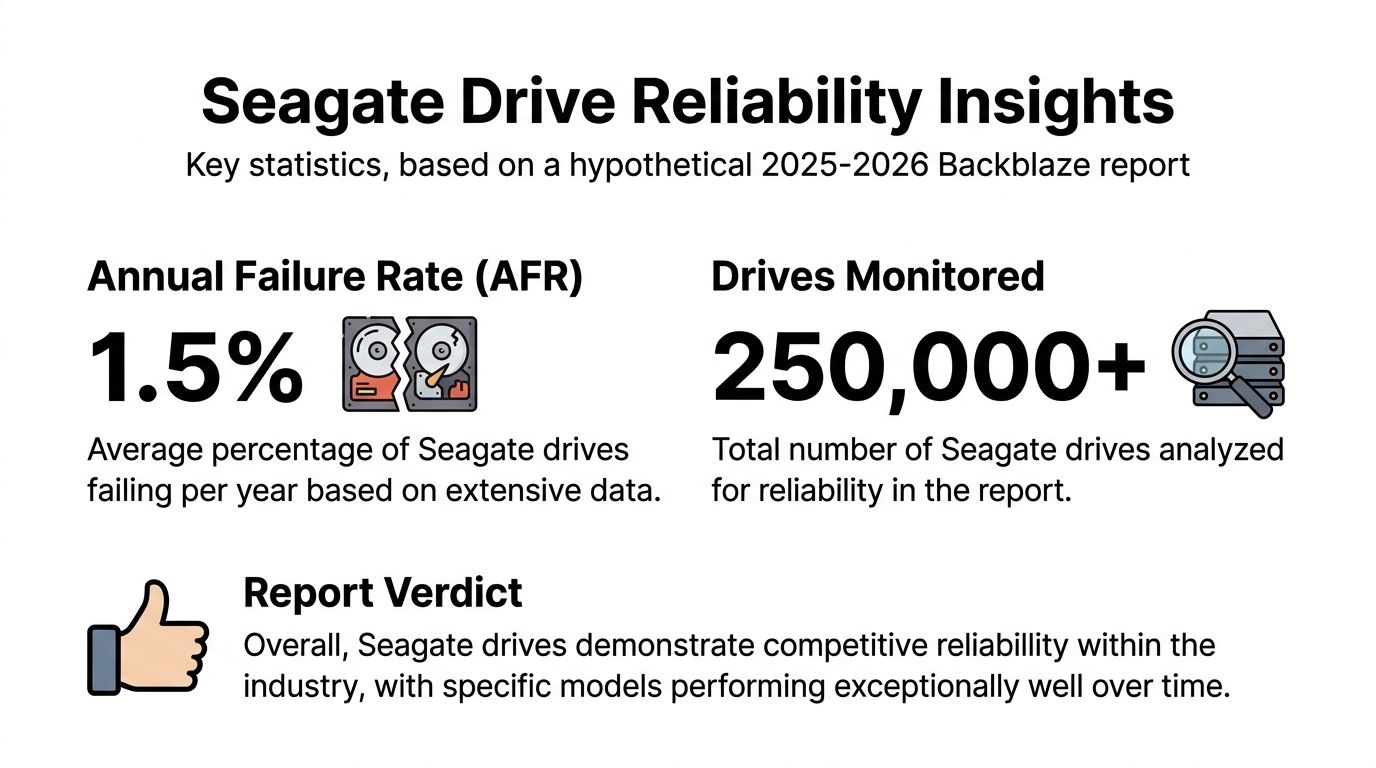
Backblaze coverage summarized by TechRadar reported a strong showing for one Seagate model, the ST16000NM002J 16TB, with one failure across the year from a pool of 344,196 drives, contributing to an overall Annualized Failure Rate of 1.36% and marking Seagate’s best result since 2022 (TechRadar summary of the 2025 Backblaze report). That does not prove every Seagate external is low risk. It does show that newer Seagate mechanisms, especially higher-capacity enterprise-class units, deserve a more serious evaluation than old forum arguments would suggest.
Why AFR matters more than MTBF
For purchase decisions, AFR is more useful than vendor marketing around MTBF. AFR answers the practical question. How often do drives in a real population fail over a year? MTBF can still be useful, but it is easier to misread because it reflects modeled operating conditions that may not match a USB-powered external drive sitting in a warm drawer or getting unplugged mid-write.
That distinction matters for crypto backups. A drive can post acceptable long-run reliability figures and still be a poor single point of storage if your process is weak. I have seen failures blamed on a brand when the underlying problem was bus power instability, a damaged USB cable, an enclosure controller issue, or silent corruption after unsafe removal. If the files involved are wallet.dat copies, seed exports, or encrypted keystores, the right standard is not “probably fine.” The standard is recoverable after a bad day.
What the long-term pattern suggests
A separate historical analysis tied to large SMART-data sets and Backblaze-related findings found that several Seagate 12TB, 14TB, and 16TB models held sub-1% AFR for roughly 3.5 years before age-related risk increased (YouTube analysis summarizing Backblaze-related findings). That is the kind of mid-life stability I want to see in archive hardware. Early survival is useful. Predictable behavior after years of service is more important.
The trade-off is straightforward. Seagate’s stronger reliability story is clearest in larger enterprise or NAS-class mechanisms, not automatically in every low-cost portable external sold for casual home use. Portable HDDs still face the same mechanical risks as any spinning disk. Drops, vibration, abrupt disconnects, weak power delivery, and bad sectors during a write can all turn a healthy-looking backup into a restore failure.
If you plan to use a Seagate external drive for cryptocurrency wallet backups, use it as one layer, not the only layer. Keep a second verified copy on separate media. Check hashes or open test restores on a schedule. Encrypt the backup, then confirm the encrypted file reads back cleanly. If a current drive is already dropping offline or showing read errors, this guide on a WD hard drive not working is still relevant because the same first-response triage applies across external HDD brands.
Seagate is a credible choice for external HDD storage. It is not a substitute for redundancy, verification, and a backup process designed for files you cannot afford to lose.
Analyzing Performance for Demanding Tasks
Performance matters more with wallet backups than many buyers expect. A drive that copies a large encrypted archive at a decent pace can still be the wrong tool if your backup set changes constantly, writes thousands of small files, or gets unplugged while sync activity is still flushing to disk.
Seagate external HDDs are built for capacity and sequential transfer work. That makes them suitable for large VeraCrypt containers, full disk images, exported node data, and other archive-style backup jobs where the file set is written in big blocks instead of scattered fragments.
Where Seagate HDDs perform well
For demanding tasks, the right question is not whether a Seagate HDD is fast in general. The question is whether its performance matches the write pattern.
These drives make sense for:
- Large encrypted backup containers: Strong fit for periodic writes and verification reads.
- System images and full-device backups: Good fit because the data is usually written sequentially.
- Wallet exports, node snapshots, and bulk archive folders: Good fit if you batch updates instead of editing files constantly.
- Cold or semi-cold archive storage: Good fit when the drive stays stationary and is used on a schedule, not all day.
In practice, that means a Seagate external HDD can handle the kind of backup job many crypto holders require. Write the archive, verify it, disconnect it cleanly, and return it to storage. That workflow plays to HDD strengths.
Where hard drives create more risk
The weakness shows up with small, fragmented, random writes. Crypto backup sets often drift into that pattern over time. A user starts with one encrypted file, then adds seed phrase PDFs, screenshots, log exports, transaction records, password manager exports, and app data folders. The drive still works, but write performance becomes less predictable and recovery risk rises if power drops or the cable gets bumped during activity.
That trade-off matters for sensitive files. Slow random write behavior is not just an annoyance. It increases the odds that a user disconnects too early, interrupts a sync, or assumes a backup finished cleanly when the file system was still busy.
I do not recommend a portable HDD as the primary active destination for wallet data that changes throughout the week. Use an SSD for active sync and frequent revision work. Use the Seagate HDD for scheduled archive copies, versioned snapshots, and offline retention.
For crypto wallet backups, a Seagate external hard drive is a good archive device. It is a weaker choice for constant write activity, travel-heavy use, and any workflow built around lots of small file changes.
That is the practical performance verdict. Seagate external HDDs are strong enough for bulk backup and long-retention storage, but they need a disciplined workflow if the files on the drive would be costly or impossible to recreate.
Top Recommended Seagate External Drives for 2026
A good Seagate external drive for family photos is not automatically a good Seagate external drive for crypto wallet backups. The stakes are different. If a media library goes missing, it hurts. If the only readable copy of a wallet export, passphrase file, or encrypted seed backup goes missing, the loss can be permanent.
I recommend choosing by failure exposure first. Portability, capacity, and price matter, but an important question is what happens if the drive is dropped, unplugged mid-write, or starts corrupting data without warning.
Best portable choice for light backup rotation
Seagate Ultra Touch fits users who want a small external HDD for documents, exports, and periodic encrypted backup copies. It remains a reasonable mainstream option because it includes Seagate Rescue services and is built for low-power portable use, as noted earlier.
Its limit is straightforward. I would not make it the only place holding wallet backups that you cannot recreate. Portable 2.5-inch HDDs are easy to carry, but they are also easier to knock, misplace, and disconnect during a write.
Best fit:
- Periodic backup of encrypted wallet export files
- Secondary copy for documents, recovery notes, and transaction records
- Users who want a simple portable drive with recovery support
Poor fit:
- Daily write-heavy wallet workflows
- Travel bags, shared drawers, and other shock-prone handling
- Sole storage for seed-related material or passphrase archives
Best desktop choice for stationary archive storage
Seagate Expansion Desktop is the better Seagate pick for large, stationary archives. A desktop external drive is less likely to be thrown into a backpack, run off weak bus power, or suffer cable movement during active writes. For archive storage, that matters.
This is the model class I prefer for home backup stations holding multiple encrypted copies of wallet-related files, old node data, signed transaction archives, and versioned recovery packages. Keep it on a stable surface, connect it to reliable power, and use it for scheduled backup windows rather than constant access.
For anyone building a recovery plan around hard-drive storage, review this guide on recovering data after hard disk failure before you trust a single-device setup.
Best Seagate-based option for serious wallet archiving
For high-consequence storage, the strongest Seagate-based setup is often an IronWolf or Exos drive installed in a quality external enclosure.
That is less convenient than buying a ready-made portable unit, but it gives you more control over the parts that affect long-term reliability. You can choose a better enclosure chipset, better cooling, a more stable power path, and a drive class designed for heavier duty cycles. If a case fails, you can often move the drive to another enclosure without replacing the disk itself.
I use this approach for clients who want offline wallet archives with multiple historical versions and a cleaner replacement path if hardware fails.
Seagate External HDD Recommendations for 2026
| Model | Capacity Range | Best For | Key Feature |
|---|---|---|---|
| Seagate Ultra Touch | Portable capacities | Light backup rotation and secondary copies | Portable design with bundled Rescue support |
| Seagate Expansion Desktop | High-capacity desktop storage | Stationary archive storage | Better fit for stable, shelf-based backup use |
| Seagate IronWolf or Exos in external enclosure | Higher-capacity internal drive used externally | High-stakes crypto wallet archiving | Better control over enclosure quality, thermals, and replacement options |
The short answer to is seagate a good external hard drive is yes, if you match the model to the risk. Ultra Touch works for secondary portable backups. Expansion Desktop is the better archive unit for one-location use. For wallet backups that would be costly or impossible to reconstruct, a Seagate drive in a quality enclosure is the safer choice.
Understanding Seagate Warranty and Data Recovery
A Seagate warranty covers the drive hardware. It does not cover the value of the data on it, and that distinction matters a lot more for crypto wallet backups than for movies, photos, or general file storage.
If the failed drive held your only seed phrase export, encrypted wallet file, or recovery notes, a replacement unit solves almost nothing.
What the warranty gives you
Seagate commonly pairs external drives with a limited hardware warranty, and some models also include Rescue Data Recovery Services. That support has real value, but it is easy to misread what you are buying.
The warranty usually helps with three things:
- replacement if the device fails during the coverage period
- an official support path for diagnostics and claims
- potential access to bundled recovery services if your model qualifies
That is useful. It is not a backup strategy.
For high-stakes storage, I advise clients to treat the warranty as a cost-control feature, not a safety feature. A good warranty reduces the expense of hardware failure. It does not restore overwritten files, repair a corrupted encrypted container, or recreate wallet data you never copied anywhere else.
Why data recovery support matters more
For this use case, Rescue matters more than the box warranty because the primary loss is rarely the drive itself. The significant loss is access to the wallet backup stored on it.
Mechanical failure is one risk. File-system corruption, interrupted writes, bad USB bridge behavior, and accidental formatting are also common failure paths with external drives. Those problems do not always leave the disk fully dead. Sometimes the hardware still spins up, but the backup set is unreadable or incomplete. That is a dangerous scenario for crypto storage because a wallet file that looks present can still be useless if the last write failed or the recovery notes are missing.
Read the recovery terms before you buy the drive. Check whether your exact model includes Rescue, how long coverage lasts, what shipping or service steps are required, and whether opening the enclosure could complicate support. If the drive starts clicking, disconnecting, or throwing repeated I/O errors, stop writing to it and switch to triage mode. Continued use often turns a recoverable case into a much harder one.
If you are already facing an unreadable backup, this guide on recovering data after hard disk failure is a good first response plan.
The practical limit
Recovery services improve your odds. They do not make one-drive storage safe.
That is the key trade-off with Seagate external drives. Models that include warranty coverage and Rescue support are better than bare drives with no recovery path, especially for secondary or tertiary wallet backup copies. But if the data would be financially catastrophic to lose, the only defensible setup is redundancy across separate devices and locations.
Essential Maintenance to Prevent Data Loss
The best Seagate drive can still fail early if the storage routine is sloppy. Most data loss I see around externals comes from handling, power, and process mistakes.
Key habits for data safety
Start with the basics and treat them as non-optional.
- Eject properly: Do not unplug during active writes. Wallet exports and encrypted containers are especially vulnerable to incomplete writes.
- Keep the drive still while in use: Portable HDDs do not like motion during activity.
- Watch SMART health: Use a drive health tool and look for changes, not just failure flags.
- Test restores: A backup is not real until you open it successfully on another system.
These are boring habits. They prevent expensive problems.
Special caution in unstable power environments
The verified data includes an overlooked but important warning. In regions with unstable grids, external HDDs are vulnerable to corruption from sudden power loss during write operations, and some user fleets suggest Seagate portable drive bridges can be more susceptible to firmware-related write errors during interruptions, making a UPS or stronger power-loss protection important for unattended crypto backups (YouTube discussion cited in the verified data).
That does not mean every Seagate portable is unsafe. It means your environment matters.
If you live or work where power drops are common, do this:
- Use a UPS for desktop backup jobs.
- Avoid unattended writes to a bus-powered portable HDD.
- Finish writes, verify files, then disconnect.
- Keep a second copy on a different device class if the data is critical.
For wallet backups, I prefer one offline archive copy and one separate redundant copy. The two copies should not depend on the same power event, cable, or enclosure.
Firmware updates and cable quality also matter, but they are secondary to the bigger issue. Do not let a cheap portable HDD become the only place where your critical wallet material exists.
Frequently Asked Questions About Seagate Drives
Is Seagate a good external hard drive overall
Usually, yes. Seagate external drives are a reasonable fit for backup and archive storage, especially if capacity matters more than speed or drop resistance.
For sensitive data, including crypto wallet backups, the better question is whether the specific Seagate drive matches the job. A drive that works well for shelf storage can still be the wrong choice for frequent travel, daily rewrites, or use in unstable power conditions.
Is Seagate good enough for crypto wallet backups
Yes, if you treat it as one layer of storage rather than the whole plan.
I am comfortable using a Seagate HDD for encrypted wallet archives that stay in a controlled location and are written infrequently. I am less comfortable using one portable HDD as the only place holding seed records, keystore files, recovery notes, or exported wallet data. Mechanical drives fail in ways that are hard to predict, and corruption risk matters just as much as outright failure when the files are small but irreplaceable.
Should I buy a Seagate HDD or an SSD for sensitive files
Choose based on handling conditions.
An HDD makes sense for lower-cost archive capacity in a calm environment. An SSD is the safer pick for a backup that will travel, get plugged in often, or face any real risk of drops and vibration. For wallet backups, physical resilience often matters more than raw capacity because the files themselves are usually small.
Are Seagate portable drives safe for one-copy backup
No.
A single external drive is one failure point, not a backup system. If the contents could determine access to funds, keep at least one separate copy on different media and store it in a different place.
Is the Ultra Touch a good Seagate model
It is a reasonable consumer portable drive, but I would judge it by use case, not branding.
For wallet backups, the deciding factors are how often you write to it, whether it stays stationary, and whether you verify the files after each update. A decent portable drive can still be a poor choice if it lives in a bag, shares power with unreliable USB ports, or becomes the only copy.
What about Seagate Expansion drives
They make more sense as capacity-focused backup devices than as high-handling transport drives.
That matters if you are storing encrypted archive sets, old wallet exports, or periodic system snapshots tied to your crypto records. The strength is low-cost space. The weakness is that an external desktop HDD still needs careful power handling, verification, and a second copy elsewhere.
Are Seagate failures overblown online
Online complaints skew negative because failed drives generate posts and healthy drives do not.
Seagate has produced both weaker and stronger product generations. I would not reject the brand outright, and I would not trust it blindly either. For high-stakes storage, model history, enclosure quality, workload, and backup discipline matter more than logo debates.
What is the safest way to use a Seagate drive for wallet backups
Use it for encrypted backups, keep another copy on different media, and verify that both copies open.
That is the practical standard. The drive brand matters less than avoiding single-device dependence, write interruption, unnoticed corruption, and physical mishandling.
If you have a damaged external drive, a corrupted wallet backup, or lost access to a keystore, Wallet Recovery AI helps individuals and organizations recover access to crypto wallets securely and discreetly. Their team handles problems such as corrupted files, inaccessible backups, and forgotten credentials across wallets including Bitcoin, Ethereum, MetaMask, Ledger, Trezor, Electrum, Exodus, and more.
Leave a Reply