
A private key paper wallet is one of the original, old-school ways to secure your crypto. It's nothing more than a physical document—a piece of paper—that holds all the cryptographic info you need to access and control your funds. This is a classic example of cold storage, which just means your keys are kept completely offline, far away from the prying eyes of hackers and malware.
What Is a Private Key Paper Wallet
Think of it like a personal vault. To get into a physical vault, you need two things: the location (the vault number) and the key. A paper wallet works exactly the same way, but for your crypto. It’s a tangible piece of paper with two critical pieces of information printed right on it.
This super low-tech approach is actually its biggest advantage. When you take your keys off a computer or phone, you create what's called an "air gap"—a physical separation from the internet. This simple act makes your funds virtually immune to online theft. You, and only you, have full control.
The Two Core Components
Every paper wallet has two main parts, usually printed as both a long string of characters and a QR code you can easily scan.
- Public Address: This is like your crypto bank account number. You can share it freely with anyone who wants to send you coins. There's no risk in giving this out.
- Private Key: This is the master key to your digital vault. It proves you own the crypto at the public address and gives you the power to spend it. This key must be protected at all costs and never shared with anyone.
To help you picture it, here’s a quick breakdown of what you'll find on a typical paper wallet.
Paper Wallet Components at a Glance
| Component | Function | Analogy |
|---|---|---|
| Public Address | Receives cryptocurrency from others. | Your bank account number |
| Private Key | Authorizes spending or moving the funds. | The key to your safe deposit box |
| QR Codes | Scannable versions of the address and key. | A barcode for easy scanning |
These components work together: one to receive funds publicly, and the other to access them privately.
Why Do People Still Use Paper Wallets?
With fancy hardware wallets on the market, you might wonder if paper wallets are still a thing. Absolutely. They remain a go-to for simple, long-term cold storage.
The crypto wallet market is booming, with a projected 32.2% compound annual growth rate. As more people jump into crypto, the need for secure, offline storage is greater than ever. It turns out that individual investors, who make up about 70% of the market, often rely on paper wallets to "deep freeze" a portion of their holdings away from online dangers. You can read more about crypto wallet market trends in the full research.
A private key paper wallet strips crypto security down to its most essential elements. By taking your keys offline, you eliminate the single largest attack vector for crypto theft—internet connectivity. Your security becomes a matter of physical protection, not digital defense.
The Magic Link Between Keys and Addresses
At the heart of every private key paper wallet is a bit of cryptographic genius. It's a clever system that lets you safely receive crypto without ever showing the secret key that controls your funds. Think of it as a one-way street: everything starts with your private key, but no one can ever trace the path back to it.
Let's use an analogy. Imagine your private key is the one-and-only master key to a special, unpickable lock. It's a secret you guard with your life. Using some fancy math, you can forge the lock itself—this is your public key. Then, you attach that lock to a public drop-box; the location of that drop-box is your public address.
Anyone in the world can find your public drop-box and slip crypto inside. But only the person holding the master key—the private key—can ever open it up and get what's inside. This is why you can share your public address freely without worrying about the safety of your funds.
An Unbreakable, One-Way Chain
This relationship is specifically designed to be irreversible. The math behind it, a combination of elliptic curve cryptography and hashing, makes it a breeze to go from a private key to a public address. But going the other way? It's practically impossible.
- Private Key to Public Key: Your private key is really just a massive, randomly generated number. A complex mathematical function is run on this number to create its matching public key.
- Public Key to Public Address: That public key is then put through another round of one-way "hashing" to create the final, shorter, and more user-friendly public address you see on your wallet.
This is the very foundation of cryptocurrency security. It doesn’t matter how powerful a computer is; it can't reverse-engineer your private key just by looking at your public address. If you want to go a bit deeper into this, check out our guide on the differences between public and private keys.
The golden rule is simple: your public address is for receiving crypto, and your private key is for spending it. The cryptographic link ensures you can never use one to discover the other.
WIF: Making Your Private Key Usable
When you actually look at a paper wallet, you'll notice the private key doesn't look like a raw string of gibberish. That’s because it's usually shown in Wallet Import Format (WIF). A raw private key is just a long hexadecimal number—a nightmare to type out by hand and incredibly easy to mess up.
WIF was invented to fix that. It takes the raw key and neatly packages it into a shorter, more reliable format.
Here’s why WIF is so important:
- Built-in Error Checking: WIF has a checksum baked right in. This little feature helps your wallet software confirm that you’ve typed or scanned the key correctly, saving you from losing everything to a simple typo.
- Easy Identification: The format itself signals to software, "Hey, I'm a private key!" This helps avoid mix-ups with other kinds of crypto data.
- Space-Saving (Optional): Some WIF keys also signal that they should create compressed public keys. This helps save a tiny bit of space on the blockchain and can lower your transaction fees.
Basically, WIF is a secure and user-friendly wrapper for your raw private key. It adds a crucial layer of convenience and safety without compromising security, making paper wallets practical for real-world use.
The entire crypto wallet market, which is projected to balloon to $100.77 billion by 2033, is built on these exact security principles. Paper wallets have stuck around because they take this secure, offline-first mindset to the extreme, completely removing digital threats from the picture. You can see more insights on the crypto wallet market's growth from Grand View Research.
How To Securely Create Your Paper Wallet
Let's be clear: creating a private key paper wallet isn't as simple as hitting "print." The entire point is to follow a strict, security-obsessed process to make sure your private key never touches a device connected to the internet. We're aiming to create what's called an "air-gapped" environment—a digital fortress where the computer generating your keys is completely isolated from the outside world.
It might sound a little over the top, but every single step is there for a reason. If you skip even one, you could blow a hole in your security, completely defeating the purpose of using this ultra-secure cold storage method in the first place.
The Foundation: Your Offline Environment
Before a key is ever generated, you have to build a sterile digital workspace. Honestly, this is the most important part of the entire operation.
- Get a Wallet Generator: On a trusted, internet-connected computer, find a reputable open-source wallet generator. A classic, time-tested option for Bitcoin is BitAddress.org. Download the complete webpage as a single HTML file and save it to a brand-new, clean USB drive.
- Prep a Secure OS: The safest way to do this is by using a live operating system, like Tails or Ubuntu. These run directly from a separate USB stick or a DVD, which means you're starting with a fresh, malware-free system that forgets everything the moment you shut it down.
- Go Dark: Take the computer you're going to use for this process and physically disconnect it from the internet. Unplug the ethernet cable. Turn off the Wi-Fi. This machine is now officially air-gapped.
The whole idea behind an air-gapped system is beautifully simple: if a computer has zero connection to the internet, there's no way for malware to phone home and send your private key to a hacker. This physical separation is the absolute bedrock of secure paper wallet generation.
This process is a one-way street, and it has to happen in your secure, offline environment.
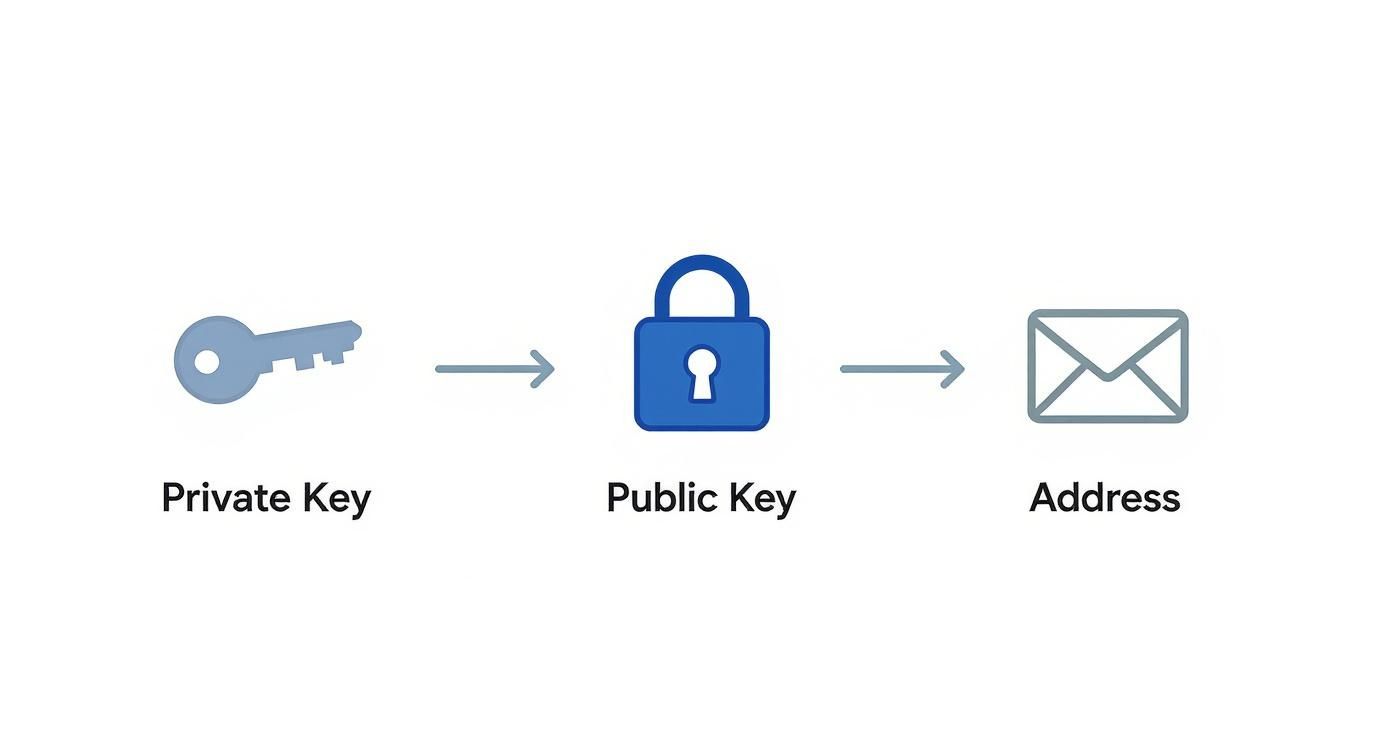
As you can see, the private key creates the public key, which creates the address. It's designed to be cryptographically impossible to work backward from your public address to find your secret key.
To make this process foolproof, here’s a simple checklist to follow.
Secure Paper Wallet Creation Checklist
Following these steps methodically will ensure your keys are generated with the highest level of security, free from any digital threats.
| Step | Action Required | Security Rationale |
|---|---|---|
| 1. Preparation | Download a wallet generator (e.g., BitAddress.org) onto a clean USB. | Prevents the need for an internet connection on the secure machine. |
| 2. Isolation | Boot a computer from a live OS (like Tails) and physically disconnect it from all networks. | Creates an "air-gapped" environment, isolating it from malware and remote access. |
| 3. Generation | Open the wallet generator HTML file from the USB and create your keys. | Ensures the entire process happens offline, with no digital footprint left behind. |
| 4. Printing | Connect to a "dumb" (non-networked) printer and print your wallet. | Avoids smart printers with internal memory that could store a copy of your keys. |
| 5. Cleanup | Power cycle the printer and shut down the computer. | Clears the printer's memory and erases all traces of the key from the live OS. |
By sticking to this checklist, you can be confident that your private key has never been exposed online.
Generating and Printing Your Keys
Now that your offline sanctuary is ready, you can safely create your keys.
Boot up the air-gapped machine using your live OS. Plug in the USB drive with the wallet generator HTML file and open it in a browser. Because the entire application is self-contained in that one file, it will run perfectly without any internet.
You’ll likely be prompted to move your mouse around randomly or mash on the keyboard. This action creates entropy—true, unpredictable randomness—which is the secret sauce for generating a cryptographically secure private key paper wallet.
Once the generator has enough random input, it will spit out your new public and private keys, usually with their matching QR codes.
The final step is printing. For maximum security, use an old, "dumb" printer that has never, ever been connected to a network. Why? Modern printers are basically computers; they have internal memory that can store copies of your documents, creating a massive security hole. After you’ve printed your wallet, a good final paranoid step is to unplug the printer and plug it back in to fully clear its memory.
Securing the Final Product
Okay, your wallet is printed. But your job is far from over. That piece of paper is now one of your most valuable possessions, and you need to protect it from real-world threats.
- Protect From Damage: Don't just use cheap copy paper. Go for high-quality, acid-free paper and think about laminating it to shield it from water damage and tears.
- Create Redundancies: Make a couple of identical copies. Store them in completely separate, secure locations. Think a fireproof safe at home and a safe deposit box at a bank.
- Think About Durability: Paper is classic, but it's also fragile. Fire, floods, and simple decay are real risks. For the ultimate peace of mind, you might want to look into the best metal seed phrase storage options. These let you stamp or etch your private key into steel or titanium, making it virtually indestructible.
Once your printed wallets are tucked away safely, shut down the air-gapped computer. If you used a live OS, every trace of your private key will vanish with it. Your crypto is now officially in deep cold storage.
Common Security Risks and How to Avoid Them
When you create a private-key paper wallet, you're essentially swapping one set of risks for another. You’ve sidestepped digital threats like hackers and malware, which is a huge win. But now, you're dealing with the physical world. A piece of paper, after all, has its own unique vulnerabilities.
Your new enemies aren't sophisticated lines of code; they're fire, water, theft, and the simple fact that paper degrades over time. Protecting your crypto now means thinking less like a software engineer and more like a vault security expert. It’s all about anticipating real-world dangers and layering your defenses.
Mitigating Physical Threats to Your Paper Wallet
Let's talk about the obvious dangers first: physical damage and outright loss. A house fire, a burst pipe, or even just a spilled coffee could easily make your private key unreadable. And just like that, your funds are gone forever. A burglar might not even realize what they’ve stolen, but for you, losing that one piece of paper is a total disaster.
The key to fighting back is to build resilience and redundancy into your storage plan.
- Improve Durability: Forget standard printer paper. Go for high-quality, acid-free synthetic paper. It's naturally waterproof and tear-resistant. For an extra layer of defense against moisture and smudged ink, get it laminated.
- Create Multiple Copies: Never, ever rely on a single copy. Make at least two or three identical copies while you're still in your secure, offline environment.
- Geographic Separation: This is crucial. Store your copies in completely different, secure locations. A classic strategy is to keep one in a fireproof safe at home and another in a bank's safe deposit box. This way, a single disaster—like a fire or theft at your house—won't wipe out your access.
A single point of failure is the greatest weakness of any security system. By creating multiple, geographically distributed copies of your paper wallet, you eliminate that weakness and build a robust defense against physical loss or damage.
Avoiding Digital-Adjacent Dangers
Even though your paper wallet lives offline, digital risks can still creep in during its creation. The whole point is to make sure your private key is never, ever exposed to a compromised device or network.
This is why the secure generation process is so important. Using a computer with malware—or even one that's simply connected to the internet—completely defeats the purpose. A keylogger could silently record your private key as it’s generated, or spyware could snap a screenshot. Game over.
Another threat people often forget is physical surveillance. Don't generate your keys in a public place or even in a room with an unsecured webcam. Treat the entire process with the same level of seriousness as if you were handling a briefcase full of cash.
The appeal of cold storage solutions like the private key paper wallet is growing fast, and not just for individuals. Big institutions are getting on board too. The cold storage market shows strong adoption by commercial users, which tells you that serious investors understand the need for ultimate security. They know that taking keys completely offline is the only way to eliminate the risks that come with trusting a third-party custodian. You can discover more insights about hardware wallet market trends on coherentmarketinsights.com.
How to Safely Access Funds From Your Paper Wallet
Sooner or later, you're going to want to move your crypto out of deep cold storage. But getting those funds off your paper wallet isn't just a simple copy-paste job. The way you move them is just as critical as how you created the wallet in the first place—get it wrong, and you could expose your entire stash.
The single most important thing to get right is the difference between "importing" and "sweeping" a private key. They sound similar, but in the world of crypto security, they are universes apart. Honestly, misunderstanding this concept is probably the most common—and most costly—mistake people make with paper wallets.
Importing vs. Sweeping: A Crucial Distinction
Imagine your paper wallet is a glass piggy bank, sealed shut. You have two options to get the money out. You could try to drill a small hole in the glass to fish out a few coins, or you could smash the whole thing and move all the coins to a brand-new, secure vault.
- Importing a Private Key: This is like drilling that tiny hole. When you import a key into a software wallet (a "hot" wallet connected to the internet), you're essentially giving that hot wallet a copy of the key. The key now lives online, and your paper wallet is no longer truly "cold." It's a huge security risk.
- Sweeping a Private Key: This is smashing the piggy bank—the right way to do it. Sweeping creates a single transaction that sends the entire balance from your paper wallet's address to a fresh, secure address in your main wallet. The old address is emptied, and the paper wallet is retired.
Always, always sweep your private key. Never import it. The moment a private key from a paper wallet touches a device connected to the internet, you have to consider it compromised. Sweeping is the only method that respects this rule, as it completely empties the old address, making the paper wallet obsolete.
How to Sweep Your Paper Wallet with a Software Wallet
Using a well-established software wallet is a very common way to pull funds from a paper wallet. We'll use Electrum for this walkthrough—it's a trusted Bitcoin wallet with all the features we need. The general steps are pretty similar for other good wallets, too.
First things first, make sure you have a secure, up-to-date software wallet installed on your computer.
This screenshot shows the official download page for Electrum, a popular choice for managing Bitcoin.
It’s absolutely critical that you only download software from the official source. Fake, malicious versions are out there, designed to steal your crypto.
Once your wallet is installed and ready, it's time to sweep.
- Open Your Wallet: Fire up the Electrum app.
- Find the Sweep Function: In the top menu bar, go to Wallet > Private keys > Sweep. They hide it a little, but this is the tool you're looking for.
- Enter Your Private Key: A box will pop up asking for the private key from your paper wallet. You can either type that long string of characters in by hand (check it three times!) or, far better, use your webcam to scan the QR code. Scanning is faster and avoids typos.
- Set the Destination Address: Electrum will need to know where to send the funds. It should automatically suggest a brand-new address from inside your Electrum wallet. This is perfect—use it.
- Broadcast the Transaction: After you confirm the details, Electrum uses the private key you provided to create and sign the transaction. Then, it sends it out to the Bitcoin network.
Once the transaction gets its confirmations on the blockchain, the entire balance from your paper wallet will be safe and sound in your Electrum wallet. Your old paper wallet is now just an empty piece of paper and should be securely destroyed.
Sweeping Your Funds to a Hardware Wallet
If you want the Fort Knox of security, you can sweep your paper wallet’s funds directly to a hardware wallet like a Ledger or Trezor. This approach moves your funds from one form of cold storage straight into another, minimizing any online exposure.
The process is a little different here, as you'll often need a "bridge" software wallet that can talk to your hardware device.
- Connect Your Hardware Wallet: Plug your device into your computer and unlock it with your PIN.
- Use a Bridge Wallet: Most hardware wallets' native apps (like Ledger Live or Trezor Suite) don't have a direct "sweep" feature. No problem. You just use a compatible wallet like Electrum, which is designed to work seamlessly with both Ledger and Trezor devices.
- Follow the Software Wallet Steps: With your hardware wallet connected and recognized by Electrum, the process is exactly the same as above. You'll navigate to Wallet > Private keys > Sweep. The only difference is when you choose a destination address, you’ll select a "Receive" address generated by your connected hardware wallet.
- Confirm on Device: This is the most important part. The final transaction details will appear on the tiny screen of your hardware wallet. You must physically press the buttons on the device to approve and sign the transaction.
This method really is the best of both worlds. You're taking funds from offline paper storage and moving them directly into a highly secure, offline hardware vault. The old private key is only exposed for the split second it takes to sign the transaction, and then it's gone for good.
Here's the rewritten section, designed to sound like an experienced human expert.
Troubleshooting Common Paper Wallet Issues
Even if you did everything right when creating and storing your paper wallet, real life happens. Paper is fragile. A bit of water damage, a bad fold, or even just ink fading over time can turn a simple recovery process into a real headache. This section is your first-aid kit for when things go wrong.
The most common issue by far? A QR code that just won't scan. It could be smudged, creased, or partially torn. Before you panic, try the simple stuff. Get better lighting, carefully flatten the paper, or even try a different scanning app on your phone. Sometimes, a fresh set of digital "eyes" is all it takes to read a stubborn code.
When Manual Entry Is Your Only Option
If the QR code is a total loss, you're left with the printed string of characters—your private key. This is where you need to be surgical. Manually typing that long, jumbled key is a minefield for typos, and even one wrong character means the import will fail.
Here are a few tips I've learned from experience:
- Watch for look-alikes: Fonts can be tricky. Is that a 0 or an O? A number 1 or a lowercase l? These are the usual suspects for failed imports, so check them with a magnifying glass if you have to.
- Use a basic text editor: Don't type the key directly into your wallet software. Open up Notepad or a similar plain text editor first. This lets you easily review what you've typed, and you can switch to a monospaced font like Courier, where every character has the same width, making mistakes easier to spot.
- Break it down: Don't try to tackle the whole string at once. Work in small, manageable chunks of 4-6 characters. Type a chunk, check it twice, then move on to the next one.
Your private key is unforgiving; it has to be perfect. The good news is that the Wallet Import Format (WIF) has a built-in checksum. This is your safety net—it won't let you accidentally send your crypto to a mistyped, non-existent address, but it won’t fix the typo for you.
When to Call in the Pros
Sometimes, the damage is just too much to handle on your own. What if the paper is ripped, and a whole chunk of your private key is gone? Or what if a coffee spill has made several characters completely unreadable? In these cases, your funds are at serious risk of being lost forever.
This is the point where guessing is no longer an option. Trying to brute-force multiple missing characters could literally take centuries with today's computers. For these seemingly hopeless situations, advanced recovery services are really the only viable way forward.
If you're staring at a damaged or incomplete private key paper wallet, it might be time to contact a specialist. At Wallet Recovery AI, we use specialized techniques and heavy-duty computational analysis to reconstruct damaged keys, giving you a real chance to get back assets that would otherwise be gone for good. When DIY just isn't cutting it, professional help can be the difference between recovery and total loss.
Still Have Questions? Let's Clear Things Up
Even with all the fancy hardware wallets out there today, a lot of folks still have questions about old-school paper wallets. Let's tackle some of the most common ones so you can decide if they're right for your cold storage plan.
Are Paper Wallets Actually Safe Anymore?
Yes, they can be—but you have to be extremely careful. The beauty of a paper wallet is its simplicity. Since it's just a piece of paper, it lives completely offline, making it totally immune to hackers, malware, or any kind of remote attack.
The catch? Its safety is 100% on you. You're now the sole guardian of that physical document. That means protecting it from everyday disasters like fire, floods, theft, or even just the ink fading over time. Creating it securely and storing it properly (with backups!) isn't just a suggestion; it's a requirement.
Can I Just Send a Little Crypto and Keep Using the Same Paper Wallet?
Absolutely not. Think of a paper wallet as a single-use tool. The moment you sweep that private key—by scanning the QR code or typing it into any device connected to the internet—you have to assume it's been exposed.
It's like breaking the tamper-proof seal on a bottle of medicine. Once that seal is broken, you can't trust what's inside anymore. Always, always sweep the entire balance to a new, secure wallet. Then, shred or burn the old paper wallet and start fresh if you need another one.
I Lost the Private Key, but I Still Have the Public Address. What Now?
Unfortunately, having the public address doesn't help you get your funds back. All it does is let you (and anyone else) look up the wallet's balance on a block explorer or send more crypto to it. It gives you zero power to spend or move what's already there.
Without the private key, your crypto is gone for good. This is the core rule of self-custody: your private key is the only thing that proves you own the funds and the only key that can unlock them.
If you're stuck with a private key paper wallet that's been damaged or is only partially readable, don't give up hope. Getting professional help might be your last and best shot. At Wallet Recovery AI, we have specialized techniques for reconstructing damaged keys to help you get your crypto back. Find out more about our secure recovery services.
Leave a Reply