
The only way to get back into a Coinbase Wallet is with your unique 12-word recovery phrase. Think of it as the master key to your crypto—it's everything. This is a completely different ballgame from recovering a standard Coinbase.com account, which just needs a password reset through your email.
One crucial warning right up front: Never, ever share your recovery phrase with anyone. Not with a support agent, not with a helpful stranger on Discord, not with anyone. Giving that phrase away is like handing over the keys to your entire crypto vault.
Understanding Your Coinbase Account Type
Before you can even think about recovery, you have to know exactly which "Coinbase" you're dealing with. This is easily the most common mistake I see, and it’s why so many people get stuck. The two platforms seem similar, but their security models are worlds apart.
One is a custodial exchange, where Coinbase acts like a bank and holds your keys. The other is a self-custody wallet, where you are the bank.
The Coinbase.com Custodial Account
This is the main platform you access on the Coinbase website or through the primary blue Coinbase app. If you signed up to buy your first Bitcoin with a credit card, this is probably what you're using. It’s set up just like a typical online account.
- How you log in: You use an email address and a password.
- How you recover: If you're locked out, you'll use a "Forgot Password" link, verify through your email, and likely complete a two-factor authentication (2FA) step.
- Who’s in control: Coinbase secures your private keys for you. If you lose your password, their support team can help you get back in after you prove you're you.
The Coinbase Wallet App (Self-Custody)
This is a totally separate, standalone app—the one with the white logo. It’s designed to give you complete control and ownership of your crypto. It's what we call a non-custodial wallet, which means you, and only you, are responsible for its security.
- How you log in: On your device, you probably use a PIN or biometrics like Face ID.
- How you recover: The only way to restore this wallet on a new phone or computer is by importing the 12-word recovery phrase you were given at setup.
- Who’s in control: You are. You hold the keys. Coinbase has zero access to your recovery phrase and cannot help you if you lose it.
Getting this distinction right is absolutely non-negotiable. Trying to reset a password for the self-custody Wallet will go nowhere, and that 12-word phrase is completely useless for your main Coinbase.com account. If you're still fuzzy on this, I strongly recommend you learn more about the differences between Coinbase and Coinbase Wallet to make sure you're heading down the right path.
Coinbase.com vs. Coinbase Wallet Recovery Methods
I put together this simple table to help you quickly identify which account you have and what recovery path you need to follow.
| Feature | Coinbase.com Account | Coinbase Wallet App (Self-Custody) |
|---|---|---|
| Primary Access | Email and Password | 12-Word Recovery Phrase |
| Who Holds Keys? | Coinbase (Custodial) | You (Self-Custody) |
| Recovery Method | Password Reset & 2FA | Import Recovery Phrase |
| Support Can Help? | Yes, with ID verification. | No, they have no access. |
Figuring this out is the first and most critical hurdle. Once you're certain whether you're dealing with a custodial account or a self-custody wallet, you can move on to the specific recovery steps that will actually work.
How to Use Your Recovery Phrase
If you've landed here, you likely have a self-custody Coinbase Wallet and, more importantly, its 12-word recovery phrase. This isn't just a backup password; for all intents and purposes, it is your wallet. Think of it as the master key or the cryptographic DNA that can bring your private keys back to life on any compatible device, anywhere in the world.
Let's get one thing straight: the Coinbase Wallet app on your phone is just a window. Your funds aren't stored in the app. They live on the blockchain, and that recovery phrase is the only thing that proves you own them and gives you the power to move them.
This is a critical distinction. It means your phone could get lost, stolen, or dropped in a lake, and your crypto would still be perfectly safe—as long as you have those 12 words. Our goal now is simple: use that phrase to open a new "window" to your funds by restoring the wallet on a new device.
The Initial Restoration Process
When you first open a fresh install of the Coinbase Wallet app, you’ll see a couple of big, bold options. Most people are there to create a new wallet, but that's not your path. You need to look for the option that says something like “I already have a wallet.”
That’s your entry point. Tapping it signals to the app that you’re not starting from scratch; you're importing a pre-existing wallet using its seed phrase.
The next screen is where the magic happens. You’ll be prompted to enter your 12-word recovery phrase. This is the moment of truth. You have to type the words in exactly as you wrote them down, in the correct order, with just a single space between each one.
- Order is everything: The sequence of the words is non-negotiable. "Apple banana car" is a completely different wallet from "car banana apple."
- Spelling must be perfect: Every word comes from a specific list of 2,048 words (called the BIP39 wordlist). There are no plurals and zero room for typos.
- No capital letters: The entire phrase should be entered in lowercase.
Once you’ve carefully typed it all in, the app will work its magic. If the phrase is correct, it will regenerate your private keys, and voilà—your wallet will be restored, complete with your balance and transaction history, just as you left it.
Avoiding Common Recovery Phrase Mistakes
This is where so many people get tripped up. The stress of the situation often leads to simple, yet fatal, errors. A single mistake won't just fail; it can sometimes generate a completely different, totally empty wallet, which is a truly gut-wrenching experience.
An incorrect recovery phrase doesn't always show an error. It can generate a new, valid-but-empty wallet. This sends people into a panic, thinking their funds were stolen when they simply unlocked the wrong digital door. Precision is your only defense here.
Here are the most common slip-ups I see all the time:
- Wrong Word Order: This is the #1 culprit. Always, always double-check your physical backup to make sure the sequence is perfect.
- Similar-Sounding Words: Did you write "wait" or "weight"? "Sea" or "see"? These little mix-ups will absolutely block a successful recovery.
- Using Synonyms: This isn't a password you can paraphrase. If the word is "begin," you can't substitute "start." You have to use the exact word.
- Extra Spaces: Make sure there's only one space between each word. No extra spaces at the beginning or end of the phrase, either.
If your first attempt fails, take a deep breath. Don't panic. Just calmly and methodically re-enter the phrase, checking each word against your physical backup. For a deeper dive into why these phrases are so particular, our guide on the fundamentals of a crypto seed phrase is a great resource.
Verifying Your Phrase Securely
Once you get back in, it's the perfect time to do a little housekeeping. Go into the Coinbase Wallet app’s security settings and find the option to view your recovery phrase again.
This lets you compare what the app has on record against the physical copy you just used. It’s a crucial step to confirm your backup is 100% accurate and readable for any future emergencies. And please, do this in a completely private and secure place. Don't ever type it into a digital note, take a screenshot, or save it in an email. Treat it like a bar of gold, because in the crypto world, that's exactly what it is.
When Your Recovery Phrase Is Lost or Compromised
Losing the 12-word recovery phrase for a self-custody wallet like Coinbase Wallet is a gut-wrenching experience. Let's be blunt: in the world of self-custody, that phrase is your wallet. Without it, the front door is locked, and there’s no central authority to hand you a new key.
But a lost phrase doesn't always mean your crypto is gone for good. Before you throw in the towel, there are a couple of potential lifelines to explore, starting with a feature many users set up and then completely forget about.
This simple decision tree lays out the most common recovery paths.
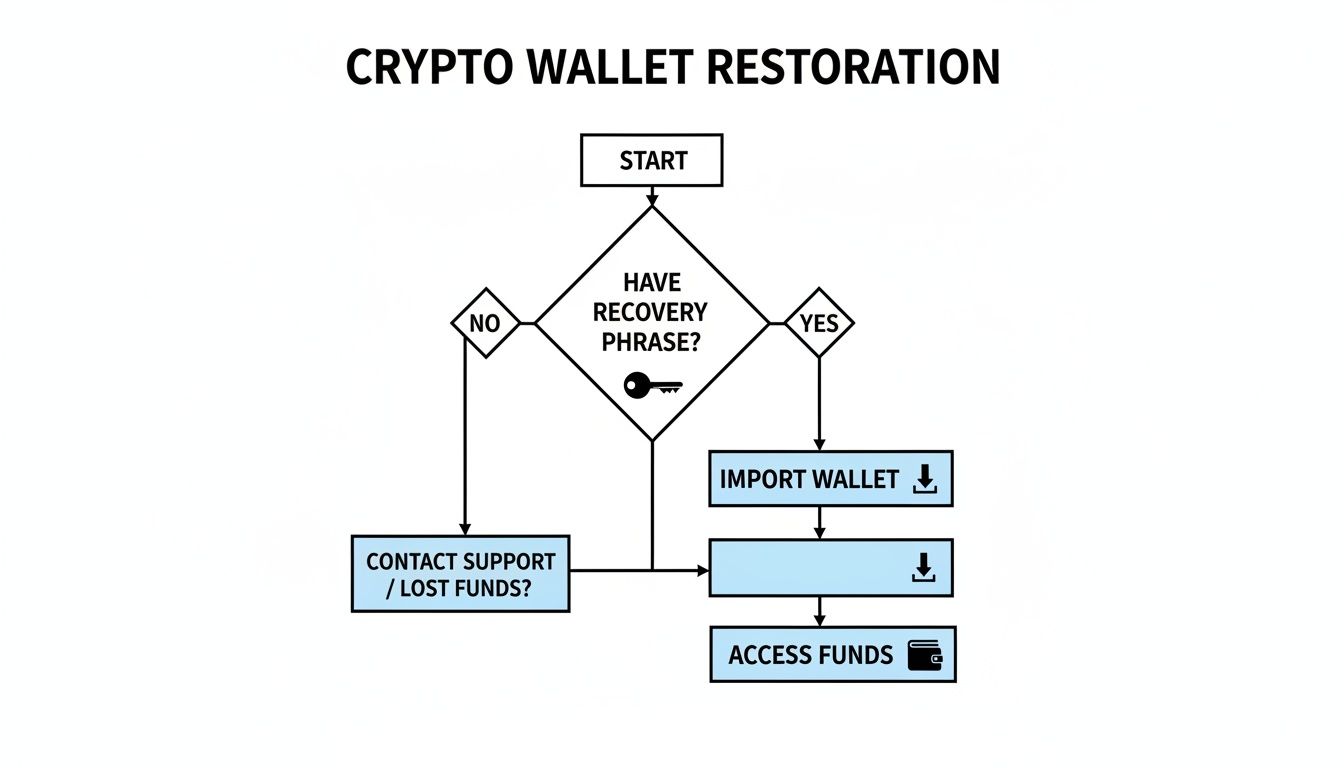
As you can see, having that recovery phrase is your golden ticket. It's the most direct route to getting back into your wallet on a new phone or computer.
Exploring Coinbase Wallet's Cloud Backup Feature
Coinbase Wallet has a fantastic, optional cloud backup feature that can be a real lifesaver. When you first set up your wallet, you may have chosen to encrypt and store your phrase on Google Drive or Apple's iCloud.
Now, this isn't just a plain text file sitting in your cloud storage. It’s heavily encrypted with a separate password you created specifically for it. This means even if a hacker got into your Google Drive, they'd still hit a brick wall without that decryption password. It's a smart, essential second layer of security.
To check if you have a backup:
- Install the Coinbase Wallet app on a new device.
- During setup, tap the "I already have a wallet" option.
- Look for the prompt to restore from a Google Drive or iCloud backup.
- If it finds one, it will ask for the password you created for that backup.
If you remember that password, the app will decrypt the file and restore your wallet automatically. For many people who've misplaced their paper copy, this is the last, best hope.
When Your Wallet Is Compromised
A compromised wallet is a whole different beast—and a much more urgent one. This is what happens when someone else gets their hands on your recovery phrase, usually through a phishing scam, malware on your device, or by finding where you carelessly wrote it down.
If you start seeing unauthorized transactions draining your funds, it's a race against the clock.
A compromised wallet is an active security breach. The second you suspect someone else has your phrase, you have to assume every single asset in that wallet is at immediate risk of being stolen.
Your only real move here is to try and outrun the thief. You must immediately create a brand new, secure wallet with a totally new recovery phrase. Next, you have to fund that new wallet with a bit of the native token (like ETH for Ethereum-based assets) to cover transaction fees. Then, you attempt to transfer whatever is left in the compromised wallet to your new, safe one before the attacker gets it.
It's a high-stress, high-speed maneuver that, unfortunately, doesn't always succeed.
The Problem of a Partially Remembered Phrase
What if you haven't lost the entire phrase, but you only have a piece of it? Maybe you have 11 of the 12 words, or you've got them all but aren't sure of the order. This is an incredibly common and frustrating spot to be in.
Manually guessing the missing word or the right sequence is practically impossible. With a standard wordlist of 2,048 possibilities for each position, the number of combinations is astronomical. This is where DIY recovery attempts slam into a brick wall.
The scale of wallet compromises is a massive problem. The crypto ecosystem has seen a staggering surge in these incidents, with 158,000 compromises affecting 80,000 unique victims and leading to $713 million stolen. These alarming crypto hacking trends highlight a desperate need for solutions beyond what a typical user can do.
When you've exhausted options like the cloud backup and are staring at a partial or compromised phrase, it’s time to stop guessing. This is the moment to call in the professionals. Services like Wallet Recovery AI are built for these exact scenarios, using specialized software and massive computational power to brute-force millions of combinations that would take a human a lifetime to try.
Alright, let's get you back into your Coinbase account.
If your crypto is sitting on the main Coinbase platform—the one you use on their website or through the blue Coinbase app—you can take a deep breath. Getting back in is a lot more like dealing with a regular online bank than it is trying to resurrect a lost 12-word seed phrase.
Because Coinbase.com is a custodial service, they're holding the crypto for you. This is one of the few times that's a good thing. It means they have real, established procedures to help you prove you're you and get back control. It might take some patience, but it’s a path many have walked before.
Start with the Obvious: The Password Reset
More often than not, the problem is simple: a forgotten password. So, that's where we'll start.
Head over to the Coinbase login page and find the "Forgot Password?" link. This kicks off a standard, secure reset process. You'll pop in your email, and they'll send a verification link. You absolutely must have access to this email account. It's the first line of defense and the primary way Coinbase knows it's really you.
Click the link, create a new, strong password, and you're golden. This simple fix solves the vast majority of lockout situations. But things get a little stickier when two-factor authentication gets in the way.
What to Do When Two-Factor Authentication (2FA) Goes Wrong
Coinbase requires 2FA for a very good reason—it’s a massive security upgrade for your account. But what happens when you lose your phone, or get a new one and forget to transfer your Google Authenticator setup? It's a surprisingly common headache.
If you can't get your 2FA code, a simple password reset won't cut it. You're going to have to go through a more serious identity check.
When you're trying to log in, right after you enter your password, look for an option on the 2FA screen like "Try another way" or "Need help?". Clicking this will launch Coinbase’s official account recovery workflow.
Be warned: this is not a quick fix. Coinbase is extremely careful here to prevent someone from hijacking your account. You should expect the process to take 48-72 hours, or even longer. They build in these delays on purpose to give the real owner (you) time to stop a fraudulent attempt.
The Last Resort: The Full Account Recovery Process
When you've lost both your password and your 2FA device, it's time for the full account recovery. Think of this as Coinbase's ultimate safety net, designed to get you back in when all else has failed.
You’ll have to prove your identity beyond any doubt. Get ready for a few steps:
- Secure Your Device: They’ll likely ask you to start from a computer or phone you've used with Coinbase before. If that's not possible, use a new, clean device you know is secure.
- Upload Your ID: You’ll need to take crystal-clear photos of your government-issued ID, like a driver's license or passport. The name has to match what's on your Coinbase account. No exceptions.
- The "Selfie" Check: To prove you’re the person in the ID photo, you'll have to take a live picture of yourself with your device's camera. This is a critical step that stops most imposters in their tracks.
Once you’ve submitted everything, you play the waiting game. A real human on Coinbase's security team will review your case, and this can take several days. Your account will be frozen for trading and withdrawals during this time to keep your funds safe. Whatever you do, be patient. Don't submit another request—it can knock you to the back of the line and make the whole process take even longer.
When to Call in Professional Recovery Experts

Sometimes, you just hit a wall. You've tried every standard option, but your cloud backup is empty, the recovery phrase you wrote down just isn't working, and that sinking feeling in your gut says the funds are gone for good.
This is the point where you have to stop. Pushing forward with DIY attempts goes from being productive to being actively risky. When the normal procedures have failed, it's time to switch from simple restoration to advanced recovery. This is exactly why a specialized service like Wallet Recovery AI exists—for the complex cases that a basic seed phrase import was never designed to handle.
Scenarios That Demand Expert Help
It's one thing to mistype a word in your seed phrase. It's something else entirely when you're facing a cryptographic puzzle with missing pieces. Standard wallet software has zero room for error; it won't help you with "almost right." This is where advanced tools and expertise really shine.
If you're stuck in any of these situations, it’s time to call in a professional:
- You have a partial phrase: Maybe you have 10 or 11 of the 12 words, but the rest are a complete blank. Or you’re pretty sure you have all the words, but you have no clue what order they go in. Trying to guess the right combination manually is, to be blunt, mathematically impossible for a human.
- Your wallet file or keystore is corrupted: With some older wallet setups, the actual file holding your private keys can get corrupted and become unreadable. Without the technical skill to parse or repair that data, your funds are stuck.
- You’ve forgotten the wallet password: Many wallets add a password on top of the seed phrase for an extra layer of security. If you have the phrase but can't remember that password, you're locked out. Brute-forcing a strong password requires a staggering amount of computational power.
These problems are far beyond what a user guide or a support forum can solve. They demand a potent mix of deep cryptographic knowledge, high-powered hardware, and custom algorithms built to test millions (or even billions) of combinations methodically.
How Professional Recovery Services Actually Work
At Wallet Recovery AI, we don't just punch in your phrase a few times and hope for the best. We break the problem down to its core components.
If you're missing a word from your phrase, our systems can run through the entire BIP39 wordlist to find the missing piece and its correct place. If the word order is scrambled, our algorithms test every possible sequence until they find the one that unlocks the wallet.
For a forgotten password, we deploy targeted brute-force attacks that are worlds beyond a simple guessing game. We use any clues you can provide—like parts of the password you remember, common patterns you use, or its likely length—to narrow the search and drastically increase the odds of success.
Think of it like this: a standard wallet app is like a key that only fits one specific lock. Our service is like a master locksmith with a set of highly specialized tools that can analyze the lock itself and craft a new key from scratch.
This entire process is secure and completely confidential. We know how sensitive this data is, and our entire system is built to protect your privacy while giving you the best possible shot at getting your funds back.
There's a reason this field has grown so rapidly. The crypto recovery sector is now a multi-billion dollar industry, a direct response to thefts that have exceeded $3.4 billion in a single year. These huge numbers show a clear and massive demand for secure asset recovery—a need that innovators like Wallet Recovery AI were built to fill. You can read more about the emergence of this critical crypto asset class to see the market forces behind it.
Choosing a professional service isn't giving up; it's making a smart, strategic decision. When you need to recover a Coinbase Wallet and you've already tried everything else, bringing in a team with the right tools and experience is your best bet for turning a potential loss into a successful recovery.
Common Questions We Hear About Wallet Recovery
You're trying to get your funds back, and you've hit a wall. It's stressful, and a million questions are probably running through your mind. Let's tackle some of the most common issues people bring to us when they're stuck.
"I Only Have 11 of My 12 Words. What Now?"
This one is a gut punch. You're so close, yet so far. You can't just guess the final word—the standard BIP39 list has 2,048 words, making manual trial-and-error a practical impossibility. A normal wallet import function will simply reject an 11-word phrase.
Your only real path forward here is using specialized software. We're talking about tools that can systematically run through every possible word in every possible position to find the one that completes your phrase and unlocks your wallet. This is exactly the kind of complex, computational problem that professional recovery services are built to handle.
"Can't Coinbase Support Just Help Me Recover My Wallet?"
This is a huge point of confusion, and the answer depends entirely on which "Coinbase" you're talking about.
For the self-custody Coinbase Wallet app, the answer is a hard no. By design, Coinbase has zero access to your 12-word recovery phrase. They don't see it, they don't store it, and they can't recover it for you. That power—and that responsibility—is entirely yours.
Now, if you're locked out of your Coinbase.com account (the exchange), that's a different story. Their support team can help you with that. Because they act as the custodian for those accounts, they have processes for password resets and identity verification to get you back in.
"My Recovery Phrase Is Correct, but It Opens an Empty Wallet. What Gives?"
That moment of seeing a zero balance after you know you entered the phrase correctly is terrifying. But don't assume your crypto has been stolen just yet. This almost always comes down to one of two things:
- A Tiny, Almost Invisible Error: You might have made a mistake so small you didn't even notice. Think "wait" instead of "weight," or maybe you swapped the order of two words. Even a tiny change will generate a completely different—but still valid—empty wallet.
- A "Wrong Turn" on the Blockchain (Derivation Path): This is a more technical issue. Sometimes, especially with older wallets or funds moved between different brands, the wallet app needs a specific "map" to find your funds on the blockchain. If it uses the wrong map (a different derivation path), it looks in the wrong place and sees nothing.
Before you panic, meticulously re-enter your phrase. Compare every single word to your physical backup. If it still comes up empty, the problem is likely more complex and might need an expert to diagnose the derivation path or spot the subtle error in your phrase.
Takeaway: The number one reason for an "empty" wallet recovery is a small, overlooked mistake in the seed phrase. Double-checking spelling and word order is the first, most critical step you can take.
"Is It Really Safe to Give My Recovery Phrase to a Service?"
Let's be crystal clear: you should NEVER share your recovery phrase with a random person on social media or anyone claiming to be "support" in a DM. Those are almost always scammers.
However, legitimate, professional recovery services are a different matter. A reputable company operates under strict security and confidentiality agreements. They use encrypted, offline systems and have established, audited processes for handling sensitive data. Their entire business model is built on trust and security, with the sole goal of restoring your access safely.
Always do your homework. Look for a service with a long, proven track record and a public commitment to privacy and security.
When you've tried everything and are staring down a partial phrase, a forgotten password, or a technical issue you can't solve, it's time to call in the experts. Wallet Recovery AI uses advanced, secure methods to solve the problems that standard tools can't touch, giving you the best possible chance of getting your crypto back. Get a confidential assessment of your situation today.
Leave a Reply