
You pull the card out, look down, and your stomach drops. The plastic shell has a visible split, or the corner is snapped, or the contacts are bent just enough that you know something is wrong. If that card holds family photos, drone footage, or a project archive, the stress is immediate. If it holds a crypto wallet backup, seed phrase photo, encrypted keystore, or export from a hardware wallet workflow, the pressure is on a different level.
A damaged SD card creates two problems at once. First, you may have a storage failure. Second, if wallet material is involved, every recovery step now carries a security risk. The wrong move can make the data harder to recover, and it can also expose the files you are trying to protect.
I have seen people make the same mistake in the first five minutes. They keep reinserting the card, try a second reader, press the shell back together, or let the operating system “fix” it. That impulse is understandable. It is also how a recoverable case turns into a chip-level case.
A cracked SD card is not always a dead SD card. But the path forward depends entirely on what kind of damage you are dealing with. A card that is physically intact but unreadable can sometimes be handled with a careful software workflow. A card with a body crack, fractured PCB, heat damage, or electrical short belongs in a different category.
The Moment Your SD Card Cracks What Now
The first minutes matter more than many realize.
A common scenario looks like this. Someone uses a microSD card in a camera, phone adapter, or hardware wallet workflow. They remove it in a hurry, drop it, step on it, or flex it while pulling it out of a reader. The shell cracks. The card still “looks mostly fine,” so they try it once more. Then again. Then on another machine. By the time they ask for help, the card has gone from unstable to electrically compromised.
If your card contains wallet files, the emotional response is stronger because the loss does not feel theoretical. You are not thinking about generic data. You are thinking about access. A keystore file, a text backup, an export, or an image containing a seed phrase may be the only route back into funds you control.
What matters right now
You need to answer one question before doing anything else.
Is this physical damage, or is this logical corruption?
If the card has a visible crack, bent contacts, delamination, burn smell, water contamination, or obvious shell damage, treat it as physical damage. Do not test it further.
If the card looks normal but the computer says it must be formatted, shows the wrong capacity, mounts intermittently, or throws read errors, you may be dealing with logical corruption or controller instability.
Key takeaway: The safest first action is often no action. Stop using the card until you know which failure class you are dealing with.
Why crypto files change the stakes
Generic recovery guides focus on photos and documents. They rarely address what happens when the card stores private wallet material.
That gap matters. Crypto recovery is not only about getting bytes back. It is about doing it in a way that preserves confidentiality, avoids accidental exposure, and keeps the original evidence unchanged when possible. That is a different standard from “can I get some files off this card.”
First Response Assessing the Damage Without Causing More
Before you plug the card into anything, pause. That single decision can preserve your options.
Independent testing cited by Fstoppers reported up to 35% failure in consumer photography use, compared with Backblaze’s 1.2% annual failure rate for enterprise hard drives, which is one reason flash media makes a poor single home for critical backups like wallet files (Fstoppers on SD card failure rates).
Start with a silent inspection
Do not insert the card. Do not clean it with liquids. Do not tape it and “see if it works.”
Check these points under good light:
Shell condition
Look for splits, snapped corners, bowed plastic, or separation along the seam. A shell crack can mean the PCB inside is also cracked.Contact damage
Examine the gold contacts for scoring, missing plating, black marks, or lifted pads.Signs of impact
If the card was stepped on, run over, crushed in a laptop slot, or bent in an adapter, assume internal damage even if the outside looks modest.Heat or smell
Burnt electronics smell is a stop sign. So is any unusual warmth after a recent insertion attempt.
Separate physical failure from logical failure
The next distinction drives the entire recovery plan.
| Symptom | More likely issue | Safe first move |
|---|---|---|
| Visible crack or snapped body | Physical failure | Stop power attempts |
| Card asks to be formatted | Logical corruption or controller issue | Image the card if it is physically intact |
| Wrong capacity shown | Translation or controller problem | Read-only handling if possible |
| Card not detected after impact | Physical or electrical failure | Do not keep retrying |
| Intermittent mounting | Early failure or contact issue | One careful imaging attempt only if no physical damage is visible |
The hard no list
People lose recoverable cards by trying folk remedies.
Do not tape the card together
Pressure can shift broken traces and create a short when power is applied.Do not keep swapping readers
Repeated insertion scrapes contacts and can make intermittent faults permanent.Do not run repair tools first
Filesystem repair writes to the card. That is the opposite of what you want on unstable flash.Do not glue, clamp, or squeeze the shell
On a cracked SD card, external pressure can crush the controller or NAND package.
Wallet-specific triage
If there is any chance the card contains wallet material, treat it as sensitive evidence.
That means:
- Stop all casual handling.
- Do not send screenshots of filenames or directory listings to random forums.
- Do not upload image contents to generic “recovery” sites.
- Write down exactly what might be on the card. Seed image, text file, wallet.dat, JSON keystore, exported backup, app data.
Tip: If you cannot clearly say whether the card is physically damaged or only logically corrupted, act as if it is physically damaged until proven otherwise.
DIY Recovery for Logically Corrupted SD Cards
This section applies only if the card is physically intact. No crack. No snapped shell. No bent board. No heat damage.
If the card is physically damaged, skip software tools. They do not fix broken electrical paths.
One reason careful handling matters is that flash media has been a forensic target for a long time. In 2009, ManTech developed the Crowbar, a tool built to crack password-protected SD cards and read data without leaving traces, which is a useful reminder that sensitive wallet material on removable media should be handled with a security mindset, not just a recovery mindset (Route Fifty on the Crowbar forensic SD card tool).
Rule one image first
Never work directly on the original card if you can avoid it. Your first goal is a bit-for-bit image.
That gives you a static copy to analyze while leaving the original untouched. It also limits wear on a failing card.
On Linux or macOS
Use dd carefully:
diskutil list
Identify the SD card device first on macOS.
Then unmount it and image it:
sudo diskutil unmountDisk /dev/diskX
sudo dd if=/dev/rdiskX of=sdcard.img bs=4m conv=noerror,sync
On Linux:
lsblk
sudo dd if=/dev/sdX of=sdcard.img bs=4M conv=noerror,sync status=progress
What this does:
if=points to the source cardof=writes to an image fileconv=noerror,synckeeps reading past bad sectors and pads unreadable areas
Be sure you have the right source device. A wrong if= or of= can overwrite the wrong disk.
On Windows
A straightforward option is HDD Raw Copy Tool. Select the SD card as source, save to an image file, and leave the original card alone after that.
Then inspect the image
Once you have sdcard.img, work on the image, not the card.
Try TestDisk
TestDisk is good when the partition table or boot sector is damaged.
Typical workflow:
- Launch
testdisk - Select the image file
- Choose the correct partition table type if prompted
- Run Analyse
- Inspect found partitions
- Write the recovered partition table only if the findings are clearly correct
TestDisk can recover directory structure when the card’s logical layout is damaged but data blocks still exist.
Use PhotoRec when the filesystem is wrecked
If the filesystem is heavily damaged, PhotoRec can carve files by signature.
It ignores the damaged filesystem and scans raw blocks for known file types. That can recover photos, documents, archives, and some wallet-related files if signatures are recognizable.
The trade-off is organization. Carved files often lose original names and folder structure.
When chkdsk helps and when it hurts
On Windows, chkdsk is tempting because it is built in.
Use it only when all of these are true:
- The card is physically intact
- You already created an image
- The card mounts as a volume letter
- The data is not so sensitive that you need to avoid automated writes to the source
Command example:
chkdsk X: /f
The risk is simple. chkdsk modifies filesystem structures. Sometimes that restores access. Sometimes it discards damaged entries you would rather carve later from an image.
For wallet files, I prefer imaging first and trying non-destructive analysis on the image before allowing any repair action on the original media.
Crypto-specific file hunting
When the card belonged to a wallet workflow, search with intent.
Look for:
- JSON keystore files
- wallet.dat
- Seed phrase photos or scans
- Encrypted backup exports
- Plain text notes with wallet names or addresses
- App folders from wallet software
A generic recovery pass can miss what matters if you only search by file extension. Many users save seed material in images, PDFs, notes apps, or exported archives with generic filenames.
If your issue is not a crack but an unreadable or unmounted card, a focused guide on an SD card unmounted problem can help you think through safer next steps before escalating.
Tip: Recover to a different drive. Never restore files back onto the same SD card image target or original card.
What usually works and what wastes time
Often worth trying
- Imaging first
- TestDisk for partition loss
- PhotoRec for raw carving
- Manual review of recovered files for wallet artifacts
Usually a waste
- Running multiple “one-click repair” apps in sequence
- Formatting and hoping undelete software brings it back cleanly
- Repeatedly mounting an unstable card
- Letting a phone or camera “repair” the card automatically
A logically corrupted card can still produce a good result. But the workflow has to stay controlled. The moment you start improvising, your odds usually drop.
Recovering a Physically Cracked SD Card
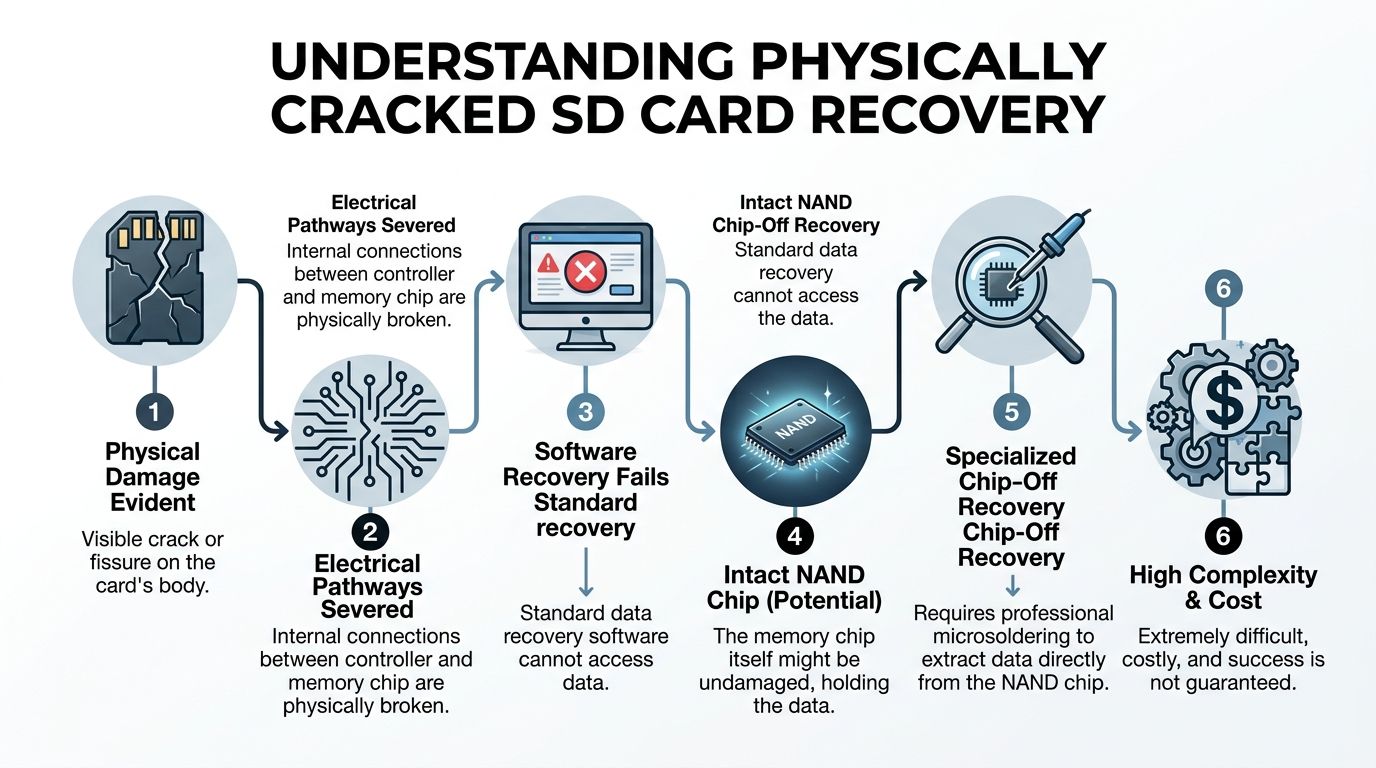
A sd card crack changes the job completely. At that point, software is no longer your primary tool because the computer may not be able to electrically talk to the memory at all.
Why software cannot bridge a broken circuit
An SD card is not just plastic storage. Inside, you have a controller and flash memory, often on a small board. A visible crack can sever traces between those components. If the controller cannot negotiate reads from the NAND, no recovery app can pull data through that break.
That is why physically cracked cards move into chip-off recovery territory.
According to DiskTuna, professional chip-off recovery for a cracked SD card involves de-soldering the NAND at 350-400°C, reading it with specialized hardware, and reconstructing the data. Recovery can reach 70-90% when the NAND itself is intact, while DIY board-swapping attempts can drop below 20% (DiskTuna on physically broken SD card recovery).
What a professional lab does
This is not a matter of opening the shell and plugging something in.
X-ray comes first
A competent lab often starts with X-ray inspection.
That answers the most important physical questions:
- Is the NAND package intact?
- Did the crack cut through the memory package itself?
- Are the internal solder joints broken?
- Is the failure mainly in the PCB or controller area?
If the NAND is cracked, the case may be unrecoverable. If the NAND is intact and the damage is isolated elsewhere, recovery remains possible.
Then comes micro-soldering
The next stage is controlled removal of the NAND chip.
This requires:
- A hot air rework station
- Stable temperature control
- Proper shielding of nearby components
- Clean handling to avoid thermal and electrostatic damage
The NAND is then attached to a specialized flash reader. At that point, the job is still not “done.” Raw dumps from flash are often not immediately usable because controllers handle wear leveling, bad block management, and logical translation.
Reconstruction is its own discipline
Once raw data is dumped, the lab has to reconstruct a logical image.
That means dealing with:
- Controller translation layers
- ECC issues
- Interleaving
- Page order
- Metadata interpretation
For ordinary files, reconstruction aims at folders and recoverable content. For wallet data, the demand is stricter. You need complete, uncorrupted structures. A partly damaged photo can still be “good enough.” A partly damaged keystore often is not.
Monolith cards are worse
Some microSD cards are monolithic. The controller and flash are embedded in one sealed package.
These are harder because there is no neat chip to remove and read. Access often requires exposing microscopic contact points directly on the package. That is specialist bench work, not hobby soldering.
Crypto recovery adds another layer
A lab may be able to recover “files,” but crypto-sensitive media needs additional caution.
A wallet-related case should be handled with:
- Minimal exposure of file contents
- Controlled offline review
- Clear chain of custody
- No casual browsing through recovered folders just to “see what is there”
Practical point: The technical recovery and the security handling should be treated as two separate disciplines. You need both.
What people try at home that backfires
I see the same failed attempts over and over:
Board swaps from “similar” cards
Similar is not enough. The controller, firmware behavior, and board revision matter.Heating the card with generic tools
Too much heat can lift pads or damage the NAND package.Breaking the shell open with force
The shell is cheap. The structures inside are not.Powering it repeatedly after impact
If a short exists, each attempt can worsen the internal damage.
Once a physically cracked card has crossed into chip-level recovery, restraint matters more than creativity.
Knowing When to Stop DIY and Call a Professional
A lot of DIY recovery advice is harmless when the failure is logical. It becomes dangerous when the card is physically damaged, especially if the data includes wallet files.
The line is not subtle. If any of the red flags below are present, stop.
Immediate stop signs
- Visible crack in the card body
- The card gets hot
- You smell burnt electronics
- No device detects the card after a physical incident
- The card was bent, stepped on, or snapped in an adapter
- The card contains seed material or irreplaceable wallet backups
The risk calculation changes fast when the contents are high value. Saving money on recovery does not help if the experiment destroys the only recoverable copy.
A simple comparison
The available numbers on cracked-card recovery point in one direction. DIY attempts are risky.
A source summarized on YouTube reports that DIY fixes for cracked SD cards have a failure rate exceeding 70%, while professional labs report 60-80% success for cards with intact internal chips. The same source notes that X-ray diagnostics show 40% of cracked cards still have recoverable chips if they are not powered on after the damage occurs (video discussion of cracked SD recovery outcomes).
| Factor | DIY Recovery | Professional Recovery |
|---|---|---|
| Handling of cracked shell | Usually improvised | Controlled diagnostic workflow |
| Risk of electrical short | High | Managed during intake and testing |
| Access to NAND directly | Rare | Standard in qualified labs |
| Success on intact internal chips | Lower and unpredictable | Better when internals are sound |
| Impact of mistakes | Can make recovery impossible | Errors are less likely because tools and process fit the problem |
| Security handling for wallet files | Often poor | Can be planned and contained |
When the asset value makes the decision easy
If the card holds low-value duplicates, a careful DIY attempt on a logically corrupted card can be reasonable.
If the card holds wallet access material, the equation is different. A single keystore, export, or seed image can represent far more value than the recovery bill. That is why the right question is not “Can I try one more thing?” It is “What action best preserves the recoverable state of this media?”
For physically damaged cards, that answer is usually professional intervention.
If you need a benchmark for what that level of handling looks like, this overview of clean room data recovery is a useful reference point for understanding why environment and process matter.
Key takeaway: Calling a professional is not giving up. It is often the only move that keeps the case recoverable.
The best moment to escalate
The best time is early.
Not after glue. Not after heat. Not after ten insertion attempts. Not after an operating system writes repair metadata to unstable flash.
Early escalation preserves the original state, which is what professionals need most.
Prevention Best Practices for Safeguarding Your Data
The best recovery job is the one you never need.
That matters even more in crypto because many users still treat removable flash as if it were a safe place for a sole backup. It is not. A source discussing cracked microSD recovery notes a major gap in the field: guides rarely address crypto-specific recovery at all, despite over 420 million crypto users globally who may need secure extraction from damaged media (Zero Alpha on the gap in crypto-focused cracked SD guidance).
Build a safer storage habit
Do not let an SD card become the only place your recovery path exists.
Use the card for transport or temporary export if needed. Do not treat it as the master copy of wallet access material.
Practical habits that prevent trouble
Use reputable media
Buy from trusted sellers and avoid no-name cards for anything important.Eject properly
Use the operating system’s safe removal function before pulling the card.Reduce physical stress
Keep cards in hard cases. Do not leave them loose in bags, pockets, or adapter slots.Avoid write-heavy use for sensitive backups
Wallet exports and backups should not be rewritten casually on the same flash card again and again.
Protect wallet material differently from normal files
Photos can be duplicated after the fact. Seed phrases cannot.
A safer pattern looks like this:
- Keep your seed phrase offline.
- Store copies in separate secure locations.
- Treat any SD-stored wallet file as a convenience layer, not the root of trust.
- If you must store encrypted wallet files digitally, verify that you can open them before you need them.
The backup mindset that works
Use multiple copies across different media types. Keep one copy away from your primary location. For crypto, separate the knowledge backup from the device backup. The card can fail. The wallet software can change. The recovery phrase should still survive both.
Tip: Test your backup process before an emergency. A backup you have never verified is only a guess.
Frequently Asked Questions About SD Card Recovery
Can a cracked SD card still be read normally
Sometimes, but that does not make it safe to try. A cracked shell can hide broken traces or an intermittent short. If the card has visible physical damage, assume normal reading attempts may worsen it.
Is freezing, taping, or cleaning a cracked card worth trying
No. Those tricks circulate because they are easy, not because they are reliable. For a physically damaged card, they often add stress or contamination without addressing the underlying fault.
If my computer asks to format the card should I click yes
No. Not until you understand the failure type and have secured an image if the card is physically intact. Formatting changes metadata and can complicate later recovery.
What if the card only contains one wallet-related file
That one file may be the whole case. A single keystore, backup export, or image of a seed phrase can matter more than thousands of ordinary documents. Treat it accordingly.
Are recovered wallet files always usable
Not always. Recovery means getting data back from media. It does not guarantee the file itself is complete, uncorrupted, or still decryptable. Wallet data needs verification after recovery, ideally in a controlled offline environment.
Should I tell a recovery service that the card contains crypto material
Yes. That affects handling, confidentiality expectations, and how recovered data should be reviewed. It is better to state that clearly at intake than after the fact.
What is the biggest mistake people make
They keep trying “just one more read.” With physical damage, repeated power attempts are one of the fastest ways to turn a salvageable case into a permanent loss.
If the card is not cracked but will not mount should I still worry
Yes, but in a different way. That is often the point where careful imaging and software-based recovery are appropriate. The key is to work methodically and avoid writes to the original media.
If your SD card may contain wallet backups, keystores, or seed-related files, Wallet Recovery AI offers specialized help for secure crypto access restoration. The team focuses on discreet handling, sensitive file recovery, and practical guidance for locked, corrupted, or inaccessible wallet data when the stakes are too high for trial and error.
Leave a Reply