
Your Trezor recovery seed is, without a doubt, the single most important piece of information you own when it comes to your crypto. It's a unique sequence of 12 or 24 words that acts as the master key to your entire wallet. If your device gets lost, breaks, or is stolen, this phrase is your only way back in.
Think of it this way: your Trezor device is just a secure tool for accessing your funds. The recovery seed is your funds, just in a human-readable format. Lose the device, and you can buy a new one. Lose the seed, and your crypto is gone forever.
Why This String of Words is Your Ultimate Lifeline
Let's use an analogy. Your Trezor hardware wallet is like a high-tech safe, and your PIN is the key you use every day. Simple enough. But what if that safe is completely destroyed in a flood or carried off by a thief?
That's where the Trezor recovery seed comes in. It’s the original blueprint for the safe. With that blueprint, you can build an identical safe—with all its contents perfectly intact—anywhere, anytime. It’s not just another password; it’s the very DNA of your crypto wallet.
This whole system works because of a widely-accepted industry standard called BIP39. This standard defines a specific list of 2048 words from which your unique phrase is generated. Because it's a universal standard, you could even use your Trezor seed on another compatible hardware wallet if you had to. It’s designed for resilience.
The Heart of Self-Custody
The idea of a recovery seed isn't new; it's been the bedrock of hardware wallet security from the start. Since Trezor’s first device launched back in July 2014, this has been the go-to method for securing and recovering user funds. It's a decade-old, battle-tested process that keeps your private keys safe.
This is what "self-custody" really means. You are your own bank. There’s no one to call for a password reset. That power comes with a heavy dose of responsibility to guard that phrase with your life.
Before we go further, let's nail down the essentials with a quick reference table.
Recovery Seed Key Concepts
This table breaks down what your Trezor recovery seed is and why it's so critical to your security.
| Concept | What It Is | Why It Matters for You |
|---|---|---|
| Recovery Seed | A unique list of 12, 18, or 24 words generated by your wallet. | This is the master backup for all your private keys and crypto assets. |
| BIP39 Standard | A specific list of 2048 English words used to create the seed. | It ensures your seed is compatible with many other wallets, not just Trezor. |
| Private Keys | The cryptographic data that proves ownership of your crypto. | Your recovery seed is a direct, human-readable representation of your private keys. |
| Self-Custody | The principle of you, and only you, controlling your crypto assets. | Protecting your seed is the core responsibility of self-custody. |
Simply put, the hardware is replaceable, but the seed is not. Understanding these concepts is the first step toward true financial sovereignty.
Think Beyond Pen and Paper
Just jotting your seed down on a piece of paper and shoving it in a desk drawer is asking for trouble. I've seen far too many horror stories that start this way.
Let’s get real for a moment. Here are a few scenarios that happen all the time:
- Accidental Damage: A simple burst pipe, a small house fire, or even a spilled drink can turn your paper backup into a useless, smudged mess.
- Physical Theft: A burglar might not have a clue what those words mean, but they might grab the notebook it's written in. Or worse, a nosy visitor could snap a quick photo.
- Simple Decay: Over the years, ink fades. Paper crumbles. It’s not built to last forever.
This is precisely why serious crypto owners invest in more robust solutions. Storing your Trezor recovery seed on a purpose-built metal plate protects it from fire, water, and corrosion. Think of it as upgrading from a sticky note to an engraved titanium plaque. It’s a small price to pay to secure assets that could be life-changing.
Properly securing your seed phrase isn’t just a friendly tip—it’s an absolute necessity for anyone serious about crypto.
A Practical Walkthrough of Wallet Recovery
There comes a time when you need to restore your crypto wallet. Maybe you bought a shiny new Trezor, or the old one met an unfortunate end. Whatever the reason, the situation can be stressful. Let's walk through the recovery process calmly and clearly, using your Trezor recovery seed.
First, an unbreakable rule: your recovery seed only ever gets entered directly on the Trezor device. Never, ever type it into a computer, phone, or a random website. Any app or site asking for your seed phrase is malware, plain and simple. It's designed to drain your wallet. The entire security model of the Trezor hinges on keeping that seed offline, and you need to respect that boundary.
This simple diagram breaks down the logic of a secure backup—the very foundation you're relying on right now.
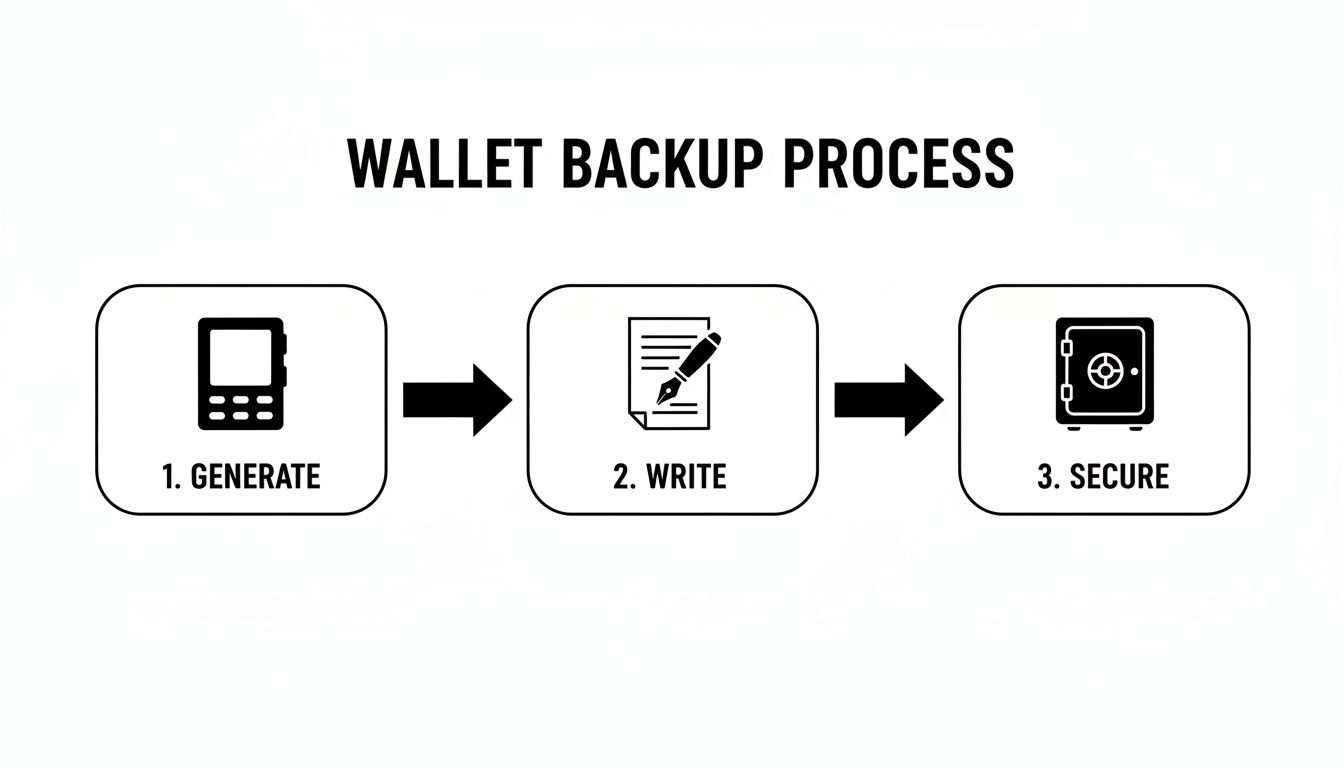
As you can see, the process starts and ends offline. You generate the seed on the device, write it down on paper, and store it securely. That offline paper copy is your key.
Getting Ready to Recover
Before you plug anything in, get your tools together. You’ll need the Trezor device (new or wiped), its USB cable, and your written-down recovery seed. I also highly recommend finding a quiet, private space where you won't be interrupted. Rushing this is a recipe for mistakes.
Go ahead and connect your Trezor to your computer and launch the Trezor Suite app. Because the device is fresh, it will ask what you want to do. You'll see options to create a new wallet or recover an old one. Choose "Recover Wallet" to get started.
Crucial Tip: I can't stress this enough—make absolutely sure you're using the official Trezor Suite application from Trezor's website. Scammers are brilliant at creating fake software that looks identical but is designed to steal your seed the moment you type it in.
The software will then ask you to confirm how many words are in your seed phrase. It's almost always 12, 18, or 24 words. Pick the right number and continue.
Standard vs. Advanced Recovery: Which to Choose?
Trezor gives you two ways to enter your seed: Standard and Advanced. The right choice really comes down to your personal threat model and where you're performing the recovery.
- Standard Recovery: This is the default and is pretty straightforward. The Trezor’s screen will show a scrambled 3×3 grid of letters. On your computer, you'll click the corresponding letters to spell out each word of your seed. The words are entered in order (word 1, word 2, etc.), but the letter grid is randomized to throw off keyloggers.
- Advanced Recovery: Think of this as the high-security option, perfect if you're even slightly worried your computer might be compromised. Here, the device itself dictates the order of the words, asking for them randomly (e.g., "Enter word #7," then "Enter word #19"). You input the words directly on the Trezor using its physical buttons, so nothing ever touches the computer.
For most people recovering on a trusted home computer, Standard Recovery is perfectly fine. But if you're using a public, shared, or untrusted machine, always use the Advanced Recovery method. It’s designed to defeat screen-recording malware or anyone peeking over your shoulder.
The BIP39 Passphrase Stumbling Block
Once your seed is successfully entered, Trezor will ask if you want to use a BIP39 passphrase. This is an optional, but very powerful, security feature sometimes called the "25th word." It acts as a second password that, when combined with your seed, creates an entirely new set of hidden wallets.
This is where so many people get tripped up during recovery.
If you used a passphrase on your original wallet, you must enter that exact same passphrase again. It's case-sensitive, and even a single misplaced character will generate a completely different (and empty) wallet. This isn't a bug; it's a security feature.
I see this all the time: someone enters their 24 words perfectly, forgets their passphrase, and panics when they see a zero balance. They think their funds are gone. If this happens, take a deep breath. Your crypto is almost certainly safe. You just need to remember that exact passphrase.
If you know for a fact you never set up a passphrase, you can just skip this step and move on. Your original funds will appear. For anyone stuck with a forgotten passphrase or an incomplete seed, you might want to review our broader guide on how to recover a crypto wallet.
After that, Trezor Suite will sync up, and you should see your balances restored. The final step is to set a new PIN for your device, and you're back in business.
Next-Level Security for Managing Your Seed Phrase
Just scribbling your Trezor recovery seed on a piece of paper is a start, but it’s far from the finish line if you're serious about security. To truly safeguard your crypto, you need to think like someone trying to take it and build defenses against real-world threats. It's time to move beyond the basics and layer in some resilience.
The first step is figuring out your personal threat model. Are you a casual holder, or are your assets substantial enough to make you a specific target? Your answer will determine just how paranoid—and prepared—you need to be.
Splitting Your Seed for Decentralized Security
One of the most robust techniques out there is Shamir's Secret Sharing Scheme (SSSS). Instead of one seed phrase creating a single point of failure, Shamir lets you break it into multiple "shares."
Think of it like this: you could set up a "3-of-5" scheme. This creates five unique shares from your seed, but you only need any three of them to get your wallet back. Now you can stash these shares in completely separate, geographically distant locations.
- One share goes into a safe deposit box.
- Another goes to a trusted family member in another state.
- A third is kept in a secure spot at home.
Now, a thief who finds one share has nothing but a useless piece of metal or paper. A fire that destroys your house is a tragedy, but it doesn't take your crypto with it because you have four other shares safe and sound. This method dramatically lowers your risk from any single disaster.
Geographically Distributing Your Backups
Even if you don't go the Shamir route, the core logic of spreading out your backups is non-negotiable. Don't keep all your eggs in one basket. If your only backup is in your house, a single flood, fire, or burglary could wipe you out.
Make two or three copies of your recovery seed. Keep one in a fireproof safe at home, sure. But put the second in a bank's safe deposit box and maybe give the third to a lawyer or a relative who lives across the country.
Expert Takeaway: Real security isn't about building an unbreakable vault; it's about creating a resilient system. A geographically distributed backup plan ensures no single point of failure—be it a hurricane or a home invasion—can lock you out of your funds forever.
This simple strategy protects you from a whole host of personal disasters that could otherwise be financially catastrophic.
Reinforcing Against Digital and Physical Threats
Clever attackers don't just stick to one method; they'll use a mix of digital and physical tactics. Phishing scams, keylogging malware, and social engineering are on the digital side. On the physical side, you've got home invasions or just plain old opportunistic theft.
A solid security plan for your Trezor recovery seed has to counter both.
- Digital Threats: Your seed should never, ever touch a digital device. Don't photograph it. Don't type it into a password manager. Don't email it to yourself. Keeping it strictly offline is your number one defense against hackers.
- Physical Threats: This is where durable storage comes in. Paper burns and turns to mush in water. Investing in one of the best metal seed phrase storage solutions ensures your seed can survive a fire or flood. Check out our guide on the top options available at https://walletrecovery.ai/best-metal-seed-phrase-storage/ to see what fits your needs.
The importance of this can't be overstated. Industry reports from mid-2025 revealed that roughly $2.17 billion was stolen from crypto services in just the first six months of the year. Wallet compromises, which directly involve private key and seed phrase theft, were responsible for a whopping 69% of those losses. That’s a powerful reminder of how critical your offline backup is.
Considering Multi-Signature Wallets
For those with serious holdings, a multi-signature (multisig) wallet provides a fortress-like level of security. A multisig wallet demands more than one private key to approve a transaction. For example, in a "2-of-3" multisig setup, you'd have three different private keys (and three recovery seeds), and any two are required to move funds.
This makes it incredibly difficult for an attacker to succeed. They'd have to compromise multiple devices and multiple seed backups, likely stored in different locations. It's more complex to set up, but for a high-value portfolio, it creates a nearly impenetrable defense where no single person—not even you—is a single point of failure.
Solving Common Recovery Seed Problems
Staring at a zero balance after entering your Trezor recovery seed is a heart-stopping moment. I’ve been there. But before you let the panic set in, take a deep breath. In almost every case I've seen, the crypto is perfectly safe—the problem is usually a tiny, fixable mistake in the recovery process itself.
Think of it like dialing a phone number. Get one digit wrong, and you're calling a stranger. Your recovery seed is the same; every single word and its position has to be perfect. Let's walk through how to diagnose the common slip-ups and get you back into your wallet.
The Forgotten Passphrase Dilemma
By far, the number one reason for the "empty wallet" scare is a forgotten or mistyped BIP39 passphrase. This is that optional "25th word" you might have added for extra security. It's not part of your main 12 or 24-word seed, but it acts as a critical second password.
If you used a passphrase during your initial setup, you have to enter it exactly the same way during recovery. Even a single character difference—like "Hunter1" instead of "hunter1"—will create a completely new, empty wallet. This isn't a bug; it's a powerful security feature.
So, if you're seeing a zero balance, the very first thing to do is try the recovery again. This time, when the device asks for a passphrase, slow down and carefully type in what you think it is. If you're not 100% sure, try common variations you might have used.
Your Essential Troubleshooting Checklist
If you're certain the passphrase isn't the issue, it’s time to move on to other common mistakes. Grab your physical seed phrase backup and let's go through the list methodically.
- Check Word Order: Are you positive the words are in the correct sequence? The order is just as important as the words themselves. I've seen people write their seed in two columns (1-12 on the left, 13-24 on the right) and then accidentally read them straight across, scrambling the order.
- Look for Typos: Every single word has to be from the official BIP39 wordlist. Go over each word, letter by letter. It's surprisingly easy to mix up similar-looking words like "woman" and "women" or "wait" and "waist," especially when you're stressed.
- Verify the Word Count: Did you restore using the right seed length? Double-check that you selected the correct option—12, 18, or 24 words—to match your original backup.
A Note on Human Error: I once helped someone who was convinced their seed was right. After hours of frustration, we realized they had written "loan" but were reading it as "loan" every time. It was their own handwriting tripping them up. Sometimes, the best thing you can do is step away for an hour, come back with fresh eyes, and check every single letter again.
Dealing with a Partial or Incomplete Seed
What happens if your seed phrase backup is physically damaged? Maybe a word is smudged beyond recognition, or the corner of the paper with the last few words is torn off. This is a much tougher spot to be in, but it’s not always a lost cause.
If you're only missing one or two words, or maybe you're just unsure about a couple, it's often still possible to recover the wallet. The process involves brute-forcing the missing words by trying every possibility from the BIP39 list. Since the last word of any seed contains a checksum, software can quickly cycle through combinations to find the one that works.
The challenge, however, grows exponentially with every word you're missing.
| Missing Words | Possible Combinations | Feasibility |
|---|---|---|
| 1 Word | 2,048 | Very feasible with software |
| 2 Words | ~4.2 Million | Difficult but possible |
| 3 Words | ~8.5 Billion | Requires significant computational power |
If you're in this boat, trying to guess manually is a non-starter. This is where a professional service becomes a real option. At Wallet Recovery AI, we run specialized algorithms that can test these millions of permutations systematically and securely, turning what seems like a hopeless situation into a successful recovery.
The main thing is to stay calm and work through the simple fixes first. More often than not, the problem is a small oversight, not a total loss.
What Happens When Your Seed Is Truly Lost
That gut-wrenching moment when you realize your Trezor recovery seed is actually gone is something no one wants to experience. It’s a feeling of pure panic. But before you spiral, it's critical to understand what this means from a technical standpoint. The entire security model of crypto is built on the fact that you, and only you, have this master key. It's impossible to just "look up" or regenerate a lost seed from your device or the network.
Your seed phrase was never stored by Trezor, and it was never broadcast anywhere. That’s the whole point of self-custody. So, if the seed is truly gone—no copies, no partial notes, nothing—the funds tied to it are permanently out of reach. They're still on the blockchain, but they're frozen in time. Without the key, the door can never be opened.
When a Glimmer of Hope Remains
Now, here's where we need to draw a sharp line. A flawed seed is not the same as a lost seed. This is where most people find themselves, and it’s where a small chance of recovery exists. It just takes a serious amount of computational muscle to pull it off.
Think about these common scenarios. We see them all the time:
- A few missing words: Your paper backup got torn or smudged, and a word or two is unreadable.
- Wrong word order: You’re pretty sure you have all the right words, but you might have written them down in the wrong sequence.
- A possible typo: One of your written words isn't on the official BIP39 list, which almost always means it’s a simple misspelling.
In situations like these, your wallet isn't gone for good. It's just locked behind a massive puzzle. Trying to guess the right combination by hand is a fool's errand. This is where professional help becomes essential.
How Advanced Recovery Services Bridge the Gap
This is exactly what we do at Wallet Recovery AI. We don't have a magic wand to find lost seeds. Instead, we use highly specialized algorithms and a whole lot of processing power to brute-force the puzzle you give us. We systematically test every possible combination based on the partial information you have.
A Note on Realistic Expectations: Your chances of success are directly tied to how much information you can provide. If you're missing just one word, the success rate is incredibly high. If you're missing three or four, the difficulty skyrockets, but it's not always impossible.
Our process runs millions of potential seed phrases against the blockchain's checksum requirements until we find the one valid combination that unlocks your crypto. And, critically, this is all done in a secure, offline environment. Your information never touches the open internet.
The industry has seen the devastating cost of these small user errors. It's why, by 2025, you saw hardware wallet makers shifting to more robust backup solutions. Trezor’s 2024–2025 product updates, for example, heavily pushed durable metal backups to prevent seeds from being damaged or lost in the first place. You can read more about these industry shifts and their impact on Trezor's strategy.
If you’re sitting there with a partial or jumbled seed, please be wary of scam services promising guaranteed results or demanding money upfront. A legitimate recovery expert will give you an honest assessment and typically work on a success-fee basis. You only pay if we get your funds back.
Frequently Asked Questions About Your Recovery Seed
Even with the best guides, you're bound to have some nagging questions about your Trezor recovery seed. It's a critical piece of your setup, so let's clear up a few of the most common things people ask.
Can I Store My Recovery Seed Digitally?
The short answer is an emphatic no. Never, ever store your recovery seed on any device that has an internet connection. Don't take a photo of it, don't save it in a password manager, and don't type it into a notes app on your phone or computer.
The whole point of a hardware wallet is to keep your keys completely isolated from the online world where hackers live. Storing your seed digitally blows a massive hole in that security. Malware is designed to sniff out exactly these kinds of files, and if it finds yours, an attacker gets full access to your funds. The only safe place is physical and offline—on paper or, even better, a durable metal plate.
Is My Seed Safe If My Trezor Device Breaks?
Yes, absolutely. This is precisely why the recovery seed exists. Your seed phrase is the master key to your crypto, which lives on the blockchain, not on the device itself.
Think of your Trezor like the key to your car. If you snap the key, you haven't lost the car. You just need the blueprint—your seed—to create a brand new key that works perfectly. If your device gets lost, stolen, or simply stops working, you just grab a new Trezor, run the recovery process with your seed, and you're right back in control.
Key Takeaway: Your crypto isn't in your Trezor. It's on the blockchain. The Trezor just holds the private keys that let you access it, and your recovery seed is the ultimate backup of those keys.
Can I Use My Trezor Seed on Another Wallet?
You bet. The Trezor recovery seed uses the BIP39 standard, which is an open protocol that most reputable hardware and software wallets have adopted. This kind of interoperability is one of the best things about the crypto ecosystem.
So, if you ever wanted to switch to a Ledger or another brand that supports BIP39, you could use your existing Trezor seed phrase to restore your entire wallet on that new device. This means you're never locked into a single company's hardware. It’s the power of open standards giving you control.
What Happens If Someone Finds My Seed?
If someone gets their hands on your complete recovery seed, they have total control. They can restore your wallet on their own device and drain every last satoshi. This is why you have to guard your physical seed backup just as fiercely as you guard the Trezor itself.
This is also where a strong BIP39 passphrase (often called the "25th word") becomes your best friend. It adds a powerful extra layer of security. Even if a thief finds your 24-word seed, they still need your secret passphrase to unlock the real wallet. Without it, the 24 words just point to an empty, decoy wallet, making the stolen seed totally useless. It's your ultimate defense against physical theft.
If you're stuck with a more complex problem—a partial seed, a forgotten passphrase, or a jumbled word order—don't panic. Wallet Recovery AI uses specialized, secure methods to solve these puzzles and get your funds back. Reach out for a confidential assessment of your situation.
Leave a Reply