
That gut-wrenching moment when you realize your Trezor is gone, broken, or wiped clean is a feeling I hope you never have to experience. But if you do, your ability to perform a successful Trezor seed recovery comes down to one thing: that list of words you scribbled down when you first set up the device. It's the absolute master key to your crypto, allowing you to bring your private keys back to life on a brand-new device and restore access to your funds.
Understanding Your Trezor Recovery Seed
Before you even think about starting the recovery process, it’s critical to understand what that seed phrase actually is. Don't think of it as just another password. It's more like the DNA of your wallet. This sequence of words isn't stored on Trezor's servers, and it's not even kept on the device itself after you've set it up. It only exists in the physical place you wrote it down.
That list of words is your one and only backup. If your device gets crushed or stolen, this seed is the only path back to your wallet. Really letting that sink in is the first step toward a calm, methodical, and successful recovery.
Differentiating Between Seed Types
It's also important to know that not all recovery seeds work the same way. The type of seed you have determines the exact method you'll need to use for recovery. Trezor devices generally use two different standards to create these master keys.
- BIP39 Standard Recovery: This is the one you’ll see most often. It's a mnemonic phrase made up of 12 or 24 words chosen from a specific list of 2048 English words. The great thing about this standard is its wide adoption across the crypto world, making it compatible with a ton of other hardware and software wallets.
- SLIP-39 Shamir Backup: This is a more advanced security feature found on the Trezor Model T and Trezor Safe 3. Instead of giving you a single seed phrase, it splits your master key into several unique "shares." You can then decide how many shares are needed to recover the wallet—say, 3 out of 5. This brilliantly reduces the risk of a single point of failure.
Here’s a quick breakdown to help you identify what you’re working with.
Trezor Recovery Seed Types at a Glance
This table offers a quick comparison of the different recovery seed standards you might encounter with a Trezor device.
| Recovery Type | Word Count | Supported Trezor Model | Security Level |
|---|---|---|---|
| BIP39 Standard | 12 or 24 words | All Trezor Models | High (single point of failure) |
| SLIP-39 Shamir | 20 words per share | Trezor Model T, Trezor Safe 3 | Very High (distributed risk, no single failure point) |
Knowing which type you have is crucial before you begin. Most recovery issues I’ve seen aren't from a faulty device; they're from simple human mistakes. Ink fading on a piece of paper, words written in the wrong order, or a simple typo. Trezor itself points out that a single BIP39 seed can be a vulnerability, which is exactly why they introduced the Shamir backup option—to spread that risk out.
The bottom line is this: your recovery seed is your crypto. If you lose it, your funds are gone. You have to protect it with the same level of paranoia you'd apply to the assets themselves.
The Critical Role of the Passphrase
Just to add another layer of security (and potential complexity), there's the optional passphrase. People often call it the "25th word." This is a word or phrase you create yourself, and it's never part of the written-down seed.
When you use a passphrase, it combines with your 12 or 24-word seed to create an entirely separate, hidden wallet. This is a powerful feature. Even if a thief got ahold of your seed phrase, they wouldn't be able to access the funds in your passphrase-protected wallet without also knowing that secret 25th word.
It is absolutely vital to remember if you used a passphrase. During recovery, if you enter your 24-word seed but forget the passphrase, you'll restore a wallet—but it will be an empty one, not the one holding your assets. You can dig deeper into how this all works in our detailed guide on wallet seed phrases. Precision is everything here.
Figuring out which seed type you have and whether a passphrase is involved will make the actual Trezor seed recovery a whole lot smoother.
Setting Up a Secure Recovery Environment
Before you even think about starting your Trezor seed recovery, let’s talk about setting the stage. This is, without a doubt, the most critical step. Think of it like a surgeon prepping an operating room—you want a sterile, isolated environment to ensure nothing goes wrong. Your goal here is to completely cut off any possibility of malware, prying eyes, or fake software getting a look at your seed phrase when it's most vulnerable.
Your first point of contact is the Trezor Suite software itself. You have to be incredibly careful here because scammers are masters at creating clone apps that look exactly like the real deal. They’re designed for one thing: to snatch your seed phrase the second you type it in.
Always, and I mean always, download Trezor Suite directly from the official trezor.io website. Don't click links from emails, social media, or even search engine ads. Once it's downloaded, do yourself a favor and verify its digital signature. This is a quick cryptographic check that proves the software you have is the genuine article from SatoshiLabs (Trezor's creators) and hasn't been secretly modified.
Create Your Quarantine Zone
Okay, with verified software in hand, it's time to go dark. Disconnect your computer from the internet completely. Turn off the Wi-Fi. Unplug the ethernet cable. A recovery doesn't need an internet connection until the final moments, and staying offline ensures that any sneaky keyloggers or spyware on your machine can't phone home with your precious seed words.
This idea of isolation also applies to the computer you choose.
- The Gold Standard: Use a computer that's been freshly wiped with a brand-new OS installation. This nukes any chance of pre-existing malware.
- A Solid Plan B: A trusted personal computer that you know is clean and running good antivirus software is a decent alternative.
- What to Avoid: Never, ever use a public computer at a library, hotel, or even a friend’s house. You have no idea what’s running under the hood.
Let me be blunt: your recovery seed should never, ever be digitized. The moment you type those words into a compromised, online computer, you've essentially handed over the keys to your crypto.
Physical Security and a Healthy Dose of Paranoia
Digital threats are only half the story. You also have to worry about the real world. A simple "shoulder surf"—someone literally looking over your shoulder as you type—is a low-tech but brutally effective way to steal a seed phrase.
Find a private room where you can't be seen or recorded. Lock the door, close the blinds, and be mindful of any cameras in the room. That includes the webcam on your laptop—a small piece of tape over the lens is a simple but smart move.
The game has changed a bit over the years. We now know that with physical access, a sophisticated attacker could potentially pull a seed right off a device. This is why Trezor encourages multi-layered security like passphrases and even Shamir backups to protect against physical theft or seizure. You can read up on the research and evolving threats yourself.
Ultimately, you need to adopt a paranoid-but-practical mindset. Treat your seed phrase like it’s a stack of cash, because it is. And once you've successfully recovered your funds, think about upgrading your backup. Our guide on the best metal seed phrase storage solutions can walk you through finding a fireproof, waterproof, and nearly indestructible way to protect your master key for good.
Alright, you've prepped your secure space, and now it's time for the main event: the actual Trezor seed recovery. This is where your careful planning pays off. The whole process is guided by the official Trezor Suite, and while it's designed to be user-friendly, it demands your full attention. Every single click and button press counts.
This guide will walk you through restoring your crypto onto a brand-new or freshly wiped Trezor. We'll cover the standard BIP39 recovery that most people use, as well as the more advanced Shamir backup, making sure to point out exactly how the steps differ.
Think of this as your co-pilot, here to make sure you don't take a wrong turn.
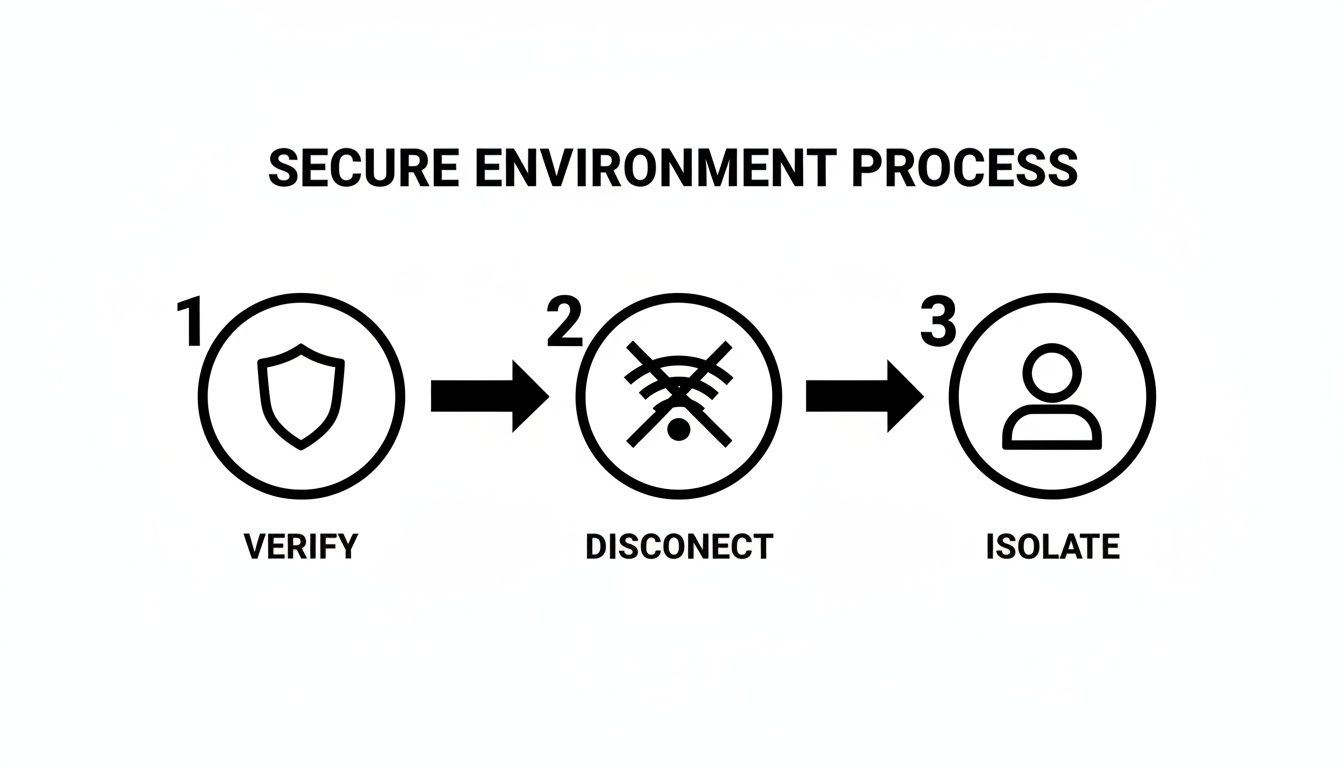
This simple flow is a great reminder that real security isn't just one action, but a sequence of deliberate steps. Each one builds on the last, creating a solid wall around your precious seed phrase.
Kicking Off the Recovery in Trezor Suite
Go ahead and connect your new (or wiped) Trezor to your computer and launch the Trezor Suite app you verified earlier. Since the device is a clean slate, the software will immediately spot this and give you a couple of setup options. You're going to ignore "Create new wallet" and select "Recover wallet".
This is your starting line. Clicking this tells the software you're not starting from scratch; you have a recovery seed ready to bring an existing wallet back to life on this new piece of hardware.
Choosing Your Recovery Type
The next screen is a critical fork in the road. You have to tell Trezor Suite exactly what kind of backup you're restoring from. It'll ask you to choose between a "Standard recovery seed" and a "Shamir backup."
- Standard Recovery (BIP39): This is for a single list of 12, 18, or 24 words. It's by far the most common backup type.
- Shamir Backup (SLIP-39): This is for those who split their seed into multiple "shares." Each share is usually a list of 20 words.
Getting this right is non-negotiable. The steps that follow are completely different for each method. If you pick the wrong one, the recovery will fail right away, and you'll just have to start over.
Pro Tip: Take a second to look at your physical backup. Is it one list of words? Or is it several lists, each one labeled as a "share"? A quick check here can save you a ton of frustration.
Entering the Seed Words (On the Device Only!)
After you've selected your recovery type, it's time to enter the words. Crucially, you will not be typing these on your computer's keyboard. For maximum security against malware like keyloggers, every single word is entered directly on your Trezor device using its screen and physical buttons.
The Trezor will prompt you for each word, one by one. For a standard recovery, you'll enter all 12, 18, or 24 words in the exact order you wrote them down. The device even has a handy predictive text feature that suggests words from the official BIP39 wordlist as you type, which helps you avoid typos. Your focus should be entirely on the device's screen and your paper backup.
If you're restoring a Shamir backup, the process is similar but repeated. You'll enter all the words for the first share. Once that's done, the device will ask for the next share. You'll keep doing this until you've entered enough shares to meet your original threshold (for example, 3 out of 5 shares).
The Final, Crucial Passphrase Step
Once the device confirms your seed phrase is valid, you're hit with one last, incredibly important question about the passphrase. If you used a passphrase (often called the "25th word") with your original wallet, you absolutely must enable it and enter the exact same one now.
This is where many people slip up. A seed phrase plus a passphrase creates a completely separate, hidden wallet.
- No Passphrase: If you enter your seed and skip this step, you'll restore the "base" wallet tied to that seed. If your funds aren't there, this is why.
- With Passphrase: If you enter your seed and your correct passphrase, you'll unlock the hidden wallet where your assets are actually stored.
There is zero room for error here. A single typo, an extra space, or getting the capitalization wrong will generate a different (and empty) wallet. Type it slowly and double-check it before you hit confirm.
After you confirm, Trezor Suite will sync up, and your balances should appear. If you get in and see a zero balance, the number one culprit is a forgotten or mistyped passphrase.
Solving Common Trezor Recovery Problems
That gut-wrenching feeling when you see an error after perfectly entering your seed phrase? I know it well. Even if you’ve followed every step to the letter, a Trezor seed recovery can sometimes hit a wall. But don't panic.
Most of these problems aren't fatal flaws; they're solvable puzzles. More often than not, the issue traces back to a simple human error made when you first wrote down your backup. This section is your field guide to troubleshooting. We'll walk through what these errors really mean and how to methodically solve them. The key is to breathe, stay calm, and tackle it one step at a time.
Decoding the Dreaded 'Invalid Checksum' Error
When Trezor Suite throws up an "Invalid checksum" or "Invalid recovery seed" error, it's telling you one thing: the combination of words you typed in just doesn't add up.
The BIP39 standard, which governs these seed phrases, is incredibly smart. That last word in your 12 or 24-word seed isn't random. It’s a "checksum" word, mathematically derived from all the words that came before it. If even a single word is misspelled, out of order, or just plain wrong, the math fails, and the entire phrase is rejected.
This is actually a safety feature. It stops you from "recovering" a wallet that doesn't exist and accidentally sending your crypto into a black hole. The error is a signal that the problem is in the words you have written down, not a fault with your Trezor device.
Your First Line of Defense: The BIP39 Wordlist
The very first place to start is to check every single word from your paper backup against the official BIP39 English wordlist. This list is the definitive source, containing 2,048 specific words. Your seed can only contain words from this list.
- Hunt for Spelling Errors: Look at each word under a bright light. Did you write "liberty" or "liberal"? "Wolf" or "wool"? Handwriting under pressure can turn clear letters into a smudge.
- Spot Similar-Looking Words: The BIP39 list was designed to avoid words that look too much alike, but it’s not foolproof. Double-check pairs that are easy to mix up, like "legal" and "legacy" or "voice" and "void."
- Check the First Four Letters: Here’s a pro tip—no two words on the official list share the same first four letters. If your seed has two words starting with "hist," for example, you know right away that one of them is incorrect.
Going through your list word by word is tedious, I know. But it's almost always where the problem is hiding. Finding and fixing one wrong letter can be the key that unlocks everything.
A common scenario I've encountered is faded ink on a paper backup. A word like "cloud" can easily look like "loud," or "future" can appear as "nature." Using a magnifying glass or taking a high-resolution photo can sometimes help clarify a smudged or faded word.
Tackling Word Order and Count Issues
If you've confirmed every word is spelled correctly and exists on the BIP39 list, the next likely culprit is the order. The sequence of your words is just as vital as the words themselves. They must be entered in the exact order they were originally generated.
Unfortunately, there isn't a magic button to fix a jumbled order. It comes down to trial and error, which can be a monumental task. If you suspect you just swapped two adjacent words, you could try switching them, but the possibilities quickly spiral out of control.
Another simple mistake is having the wrong word count. A standard Trezor recovery requires a 12, 18, or 24-word phrase. If you're counting 23 or 25 words on your list (and you're certain you didn't set up a passphrase), you most likely missed a word or wrote one down twice.
When to Consider Professional Help
So, you’ve methodically checked for spelling, word order, and count issues, and you're still stuck. This is where the frustration really sets in, and it's often the right time to pause.
Continuing to guess randomly is rarely productive and can lead to more stress. If you have a partial seed phrase, suspect there are multiple errors, or just feel completely overwhelmed, it might be time to call in an expert.
Specialized services, like our team at Wallet Recovery AI, use powerful, custom-built tools to systematically test millions of potential seed phrase variations in a completely secure, offline environment. We can help pinpoint typos, identify missing words, or reorder a scrambled phrase. Reaching out for a consultation can give you a clear path forward when you've hit a dead end.
Dealing with a Damaged or Incomplete Seed Phrase
When a quick check against the BIP39 wordlist doesn't fix your recovery problem, the feeling can shift from frustration to genuine panic. This is where you have to move past simple guesswork and take a more methodical approach to Trezor seed recovery. We're now in the territory of missing words, a jumbled sequence, or even a mix of issues that are flat-out impossible to solve by hand.
It’s easy to feel like you've hit a dead end, but don't give up just yet. Understanding what's actually possible from a technical standpoint helps you form a realistic plan instead of just wasting time on a guessing game that will lead nowhere.
What if You Have Missing Seed Words?
So, what happens if one or two words are just… gone? Maybe the paper you wrote them on got torn, or the ink faded into oblivion. The good news is that this is often a solvable problem, but it requires a very different strategy than just trying a few typos.
A standard 24-word seed phrase has a built-in check. The final word is a "checksum" that mathematically validates the first 23. If just one word is missing, specialized software can run through all 2048 possible BIP39 words, plugging each one into the blank spot until it finds the one that makes the checksum valid. For a computer, this is a pretty quick job.
Things get a bit tougher if you're missing two words. The number of combinations the software needs to check jumps to 2048 x 2048—that's over 4 million possibilities. This is way beyond anything a human could try, but it's still a manageable task for powerful recovery tools.
Once you get to three or more missing words, you've crossed into the realm of computational impossibility. The number of combinations explodes exponentially, and the odds of a successful brute-force recovery drop to virtually zero.
When Your Words Are in the Wrong Order
A much trickier situation is having all the right words, but in a completely random order. You might have a perfectly clear list of 24 words, but if the sequence is scrambled, the seed phrase is completely useless.
The number of possible arrangements—what mathematicians call permutations—is mind-bogglingly huge.
- A 12-word seed has 479,001,600 possible orders.
- A 24-word seed has a number of possible orders so large it has 25 digits. It's effectively impossible to brute-force.
This is exactly why you should always number your words when you first back them up. If you just suspect two words are swapped (like #5 and #6), you could try that one switch manually. But if the whole list is a jumble, you're facing a problem that requires serious computing power and smart algorithms to have any hope of solving.
Knowing When It's Time to Ask for Help
There's a definite point where trying to solve this yourself becomes counterproductive and even risky. If you're in any of these situations, it’s a good time to stop, take a breath, and consider bringing in a professional.
- You are missing one or more words from your seed phrase.
- You have a strong feeling the words are in the incorrect order.
- You have multiple possible typos scattered across several words.
- You’re feeling completely overwhelmed and worried you might make things worse.
Continuing to guess at random is a recipe for stress and is incredibly unlikely to work. This is the moment to pause and look for a more structured, powerful solution.
How to Vet a Crypto Recovery Service
Turning to an outside service requires a healthy dose of caution. The crypto world, unfortunately, has scammers who prey on people in desperate situations. A legitimate service will never ask you to send them your crypto or share your full seed phrase upfront.
Here’s what to look for in a trustworthy service:
- A Professional Footprint: They should have a clear, well-established website and a verifiable business history.
- Secure, Offline Methods: They should be able to explain how they use air-gapped systems (computers never connected to the internet) to run recovery attempts. This ensures your partial seed is never exposed.
- A Transparent Fee Structure: Reputable services are upfront about their costs. This is almost always a percentage of the recovered funds, which you only pay after they successfully get you access.
- No Wild Promises: Be very suspicious of anyone guaranteeing a 100% success rate. A successful recovery depends entirely on the information you can provide, and an honest service will give you a realistic assessment of your chances.
At Wallet Recovery AI, our team uses proprietary, AI-enhanced tools to test millions of potential combinations completely offline. We specialize in helping clients who are dealing with partial seeds, scrambled word order, and other complex recovery roadblocks. Sometimes, making the informed decision to get expert help is what makes the difference between a total loss and a successful recovery.
Got Questions About Trezor Seed Recovery? We've Got Answers.
Even with the best guide, recovering a Trezor is a nerve-wracking process. It’s totally normal for questions to pop up when your crypto is on the line. We’ve been there. Let's tackle some of the most common ones we hear, clearing up any confusion so you can finish this with confidence.
What Happens if I Lose My Trezor Seed Phrase?
Losing your seed phrase when your Trezor is still working isn't a code-red emergency, but it's a huge warning sign. You're walking a tightrope without a safety net. If that device gets lost, stolen, or just gives up the ghost, you will have zero way to get your funds back. That seed phrase is your only key.
If you find yourself in this spot, the immediate game plan is to create a brand-new wallet with a new seed phrase. Write it down, secure it, and then send every last satoshi from the old, unprotected wallet to the new, properly backed-up one. Do it now.
Can I Get My Crypto Back Without the Recovery Phrase?
This is a hard no. It’s the question everyone hopes has a secret workaround, but it doesn't. Your recovery phrase is the master key that mathematically regenerates your private keys on any compatible device.
Without it, there's simply no technical path to restoring your wallet if the original Trezor is gone. This is by design—it’s what makes your wallet so secure. Not even the folks at Trezor can get in.
How Can I Be Sure My Trezor Seed Phrase is Correct?
Trezor built a fantastic "dry run" feature for exactly this purpose. It's called "Check recovery seed" and you'll find it inside Trezor Suite. It lets you enter your seed words on the device itself (and only on the device) to confirm your backup is a perfect match.
- Connect your Trezor and open Trezor Suite.
- Head into your device settings.
- Find and select the "Check recovery seed" option.
Running this check once a year is a brilliant habit. It confirms you wrote the words down correctly and that the ink on your paper backup hasn't faded into oblivion.
This is Critical: Never, ever type your seed phrase into a website, browser pop-up, or any software that isn't the official Trezor Suite. And even then, you should only be inputting the words on the screen of your physical Trezor device. Any prompt asking you to type it on your computer keyboard is a scam, 100% of the time.
How Many Words Should My Trezor Seed Phrase Have?
A standard Trezor seed phrase, based on the BIP39 protocol, will be either 12 or 24 words long. You might see an 18-word phrase from some older setups, but it's less common.
If you're using the more advanced Shamir backup (available on the Model T and Safe 3), you'll have multiple "shares," and each of those shares will have 20 words. Knowing your word count is the first piece of the puzzle.
Can I Use My Trezor Seed on Another Wallet, Like a Ledger?
Yes, you usually can. Because Trezor uses the industry-standard BIP39 system, your seed phrase is portable. You can typically restore your funds on another hardware wallet like a Ledger or a software wallet like MetaMask.
One small catch to be aware of is something called "derivation paths." Think of it as a specific filing system your wallet uses to find your coins. While most wallets use the same one, there are rare cases where another wallet might look in a different "folder" by default. It's not a common issue, but it's good to know it exists if you ever restore elsewhere and don't see your balance immediately.
What’s the Best Way to Store My Recovery Seed?
Your seed phrase should live exclusively offline, etched or written on a physical medium, and locked down tight. The paper cards Trezor gives you are a good start, but they won't survive a fire or a flood.
For serious long-term peace of mind, consider leveling up your storage:
- Go Metal: Fireproof, waterproof, and corrosion-resistant steel plates like the Trezor Keep Metal are built to survive almost anything.
- Geographic Separation: Don't put all your eggs in one basket. Keep a copy in a secure home safe and another in a different location, like a bank's safe deposit box.
- Use Shamir Backup: This is the ultimate move for security. Splitting your seed into multiple shares means there's no single point of failure. One share getting compromised or destroyed isn't a catastrophe.
The goal is to protect your master key from both physical disasters and prying eyes.
If you've hit a wall with a partial, damaged, or scrambled seed phrase, don't give up. The expert team at Wallet Recovery AI uses advanced offline tools to piece together what seems lost. Request confidential assistance to explore your recovery options.
Leave a Reply