

Think of your Trust Wallet recovery phrase as the one and only master key to your entire crypto portfolio. It's not some password you dream up. It's a unique 12-word phrase the wallet gives you one time when you first set it up, and it grants you ultimate control and ownership over your funds.
If you lose this phrase, and something happens to your device, your assets could be gone for good. It's that serious.
The Foundation of Your Digital Vault
Here’s something most people get wrong: your crypto isn’t actually in the Trust Wallet app on your phone. It lives on the blockchain, tucked away in a secure, invisible vault. The app is just a window—a convenient way to look at and manage what’s inside that vault.
Your Trust Wallet recovery phrase is the permanent, unchangeable master key to that vault. This is the whole idea behind self-custody: you, and only you, hold the keys to your kingdom.
Unlike a bank, where you can call customer service to reset a password, Trust Wallet gives you total sovereignty. There’s no central company that can access your funds or recover your phrase for you. This freedom is what makes crypto so powerful, but it also places a huge amount of personal responsibility squarely on your shoulders.
How Does the Recovery Phrase Work?
Those 12 words aren't just picked at random. They’re generated using a clever cryptographic standard called BIP39 (Bitcoin Improvement Proposal 39). This industry-wide method turns a long, complex string of random data into a simple, memorable sequence of words. That sequence is then used to generate all the private keys for every single coin and token you store in that wallet.
This system is brilliant for a few reasons:
- It's Universal: Your phrase isn't locked to Trust Wallet. It's compatible with hundreds of other crypto wallets that also support the BIP39 standard.
- It's Secure: While the word list is fixed at 2,048 words, the number of possible 12-word combinations is astronomical (2048¹²). It's practically impossible for anyone to guess.
- It's Human-Friendly: Writing down 12 simple words is far easier and less prone to error than trying to copy a long string of random letters and numbers.
With over 200 million global downloads, millions of people are relying on this self-custody model. It's a system built on trust in yourself, and it’s why understanding how to protect this phrase is so critical.
The Critical Difference Between a Phrase and a Password
It's easy to get your recovery phrase and your app's password (or PIN/Face ID) mixed up, but they serve completely different functions. Confusing them can be a costly mistake.
One is for convenience; the other is for ultimate control.
Recovery Phrase vs. Password: What You Need to Know
| Feature | Recovery Phrase (Seed Phrase) | App Password / PIN |
|---|---|---|
| Purpose | Master key to restore your entire wallet on any device. | Unlocks the app on your current device for daily use. |
| Origin | Generated by the wallet software one time, cannot be changed. | Set by you, can be changed or reset anytime. |
| Format | A sequence of 12 (or 24) specific words. | A numeric code, pattern, or biometric scan. |
| Recovery | If lost, your funds are permanently inaccessible. | If forgotten, you can uninstall and restore with your phrase. |
| Security Level | The highest level of security—your ultimate backup. | A first line of defense against unauthorized physical access. |
Think of it like this: your app password is the key to your front door. It stops a casual visitor from walking in. But your recovery phrase is the key to the master vault inside the house. If you lose your front door key, a locksmith (reinstalling the app) can help. But if you lose the vault key, you're locked out forever.
For a deeper dive into the mechanics of these phrases across the crypto space, our guide on what a wallet seed phrase is is a great place to start.
Here is the rewritten section, crafted to sound completely human-written and natural, following all the provided instructions.
How to Securely Store Your Recovery Phrase
Think of your Trust Wallet recovery phrase as the master key to your entire crypto portfolio. It's not just a password; it's the one and only way to access your funds if you lose your phone or forget your PIN. How you choose to protect this 12-word phrase will make or break the security of your assets.
The absolute first rule, and the one you can't ever bend, is to never store it digitally. I’m not just talking about avoiding a screenshot. Don't type it into a notes app, save it as an email draft, or upload it to a cloud service like Google Drive. Anything connected to the internet is a potential backdoor for a hacker.
A single piece of malware on your computer or a compromised cloud account is all it takes for a thief to find that digital copy. And once they have it, they can drain your wallet in seconds. The convenience just isn't worth the catastrophic risk.
The Don'ts of Phrase Storage
Before we get into the right way to do things, let's be crystal clear about the wrong ways. Avoiding these common but incredibly dangerous mistakes is your first line of defense.
- No Screenshots: Trust Wallet is smart enough to block screenshots when your phrase is displayed, but some people find workarounds. Don't be one of them. That image file can get automatically backed up to the cloud without you even realizing it.
- No Digital Text Files: Saving your phrase in a
.txtfile, a Word doc, or a notes app is like leaving your house keys under the welcome mat. Spyware is designed to scan your devices for exactly this kind of file. - No Email or Messaging Apps: Never, ever email your phrase to yourself or save it in a chat app. These services get hacked all the time, and you might not know your data was exposed until it’s too late.
- No Password Managers: Password managers are fantastic for website logins, but your recovery phrase is different. Most of these services are cloud-based, introducing a central point of failure you really don't want for the keys to your crypto.
Best Practices for Offline Storage
The gold standard for securing your recovery phrase is to go completely offline. This is often called "cold storage," and it just means creating a physical, analog backup that never touches the internet. It protects you from remote hackers, viruses, and even simple device failures.
The most straightforward method? Grab a pen and a piece of paper. Write down each of the 12 words clearly, numbering them from 1 to 12. Then, check it again. The order of the words is just as critical as the words themselves.
Your real goal here is to create a backup that can survive more than just a hacker. You need to plan for real-world disasters—fire, floods, or even just the ink fading over decades. True security means thinking beyond digital threats.
Once you have your physical copy, you need to secure it. A locked fireproof safe, a bank's safe deposit box, or another highly secure, private location are all solid choices. Storing it in a waterproof bag inside that safe adds another layer of protection from the unexpected.
Creating Resilient Backups
A single backup is a single point of failure. What happens if you lose that one piece of paper during a move or it’s destroyed in a house fire? For real peace of mind, you need to create multiple backups and store them in geographically separate locations.
For instance, you could keep one copy in a safe at home and give a second copy to a trusted family member or place it in a safe deposit box across town. This redundancy ensures that if one location is compromised, you still have a way to get your funds back.
If you're looking for the ultimate in physical durability, it's time to look at metal storage. These are devices that let you stamp or etch your recovery phrase onto plates of stainless steel or titanium, making them practically indestructible against fire, water, and corrosion. We cover this topic in-depth in our guide to the best metal seed phrase storage options. It's the highest level of physical security you can get for your master key.
A Step-By-Step Guide to Restoring Your Wallet
Got a new phone or had to reinstall the app? It can be a nerve-wracking moment, but your Trust Wallet recovery phrase is precisely for this situation. It's the master key that lets you perfectly clone your old wallet onto a new device, giving you instant access to all your funds. The process itself is surprisingly simple, but you need to be exact.
Following these steps to the letter is the difference between a smooth recovery and a frustrating dead end. I'll walk you through the whole thing, pointing out the critical security checks and common slip-ups along the way.
The entire philosophy of keeping your phrase safe boils down to this: write it down, hide it well, and have more than one copy.
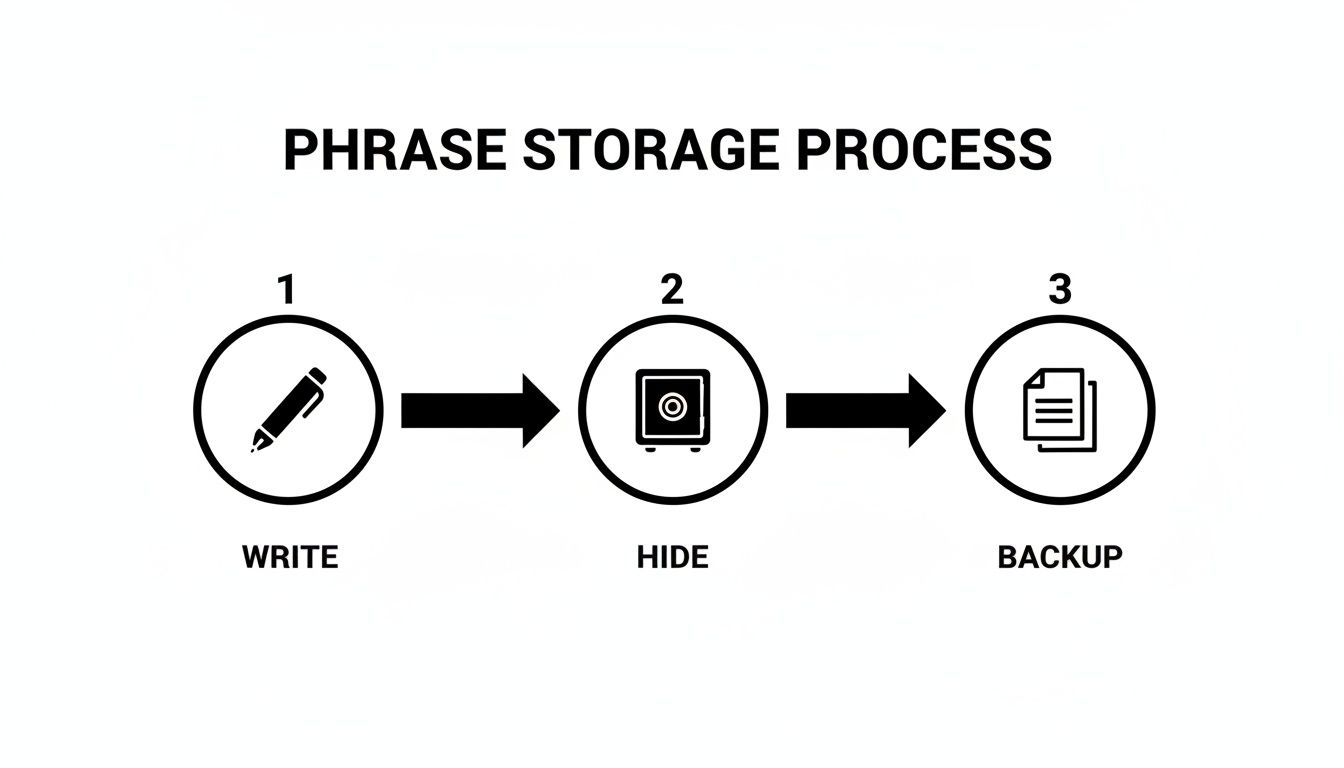
This simple three-step process is the heart of self-custody. It turns a big security idea into something you can actually do offline.
Preparing for a Secure Restoration
Before you even touch your phone, think about your surroundings. Never, ever try to restore your wallet on the public Wi-Fi at a coffee shop, airport, or hotel. Use a secure, private network that you control, like your home internet. It’s a simple rule, but it’s non-negotiable.
Also, make sure you have privacy. This isn't something to do with people looking over your shoulder. You’re about to type in your 12-word phrase, which is the key to everything. Treat it like you're typing in your bank password. Find a quiet, private space where you won't be distracted.
The Wallet Import Process
Alright, you've got your physical copy of the recovery phrase, and you're in a secure spot. Let's get this done. The whole thing should only take a couple of minutes.
- Download the Official App: Head over to the official Apple App Store or Google Play Store and download Trust Wallet. Be paranoid about this step—scammers create convincing fake apps designed to steal your phrase the moment you type it in.
- Launch and Select Your Option: Open the app. You’ll see a couple of choices. Instead of "Create a new wallet," you need to select the option that says, "I already have a wallet."
- Agree to the Terms: You'll see the standard terms of service and privacy policy. Go ahead and review and accept them.
- Choose "Multi-Coin Wallet": This is the standard choice for pretty much everyone. It sets up your wallet to handle all the different cryptocurrencies you might own.
- Enter Your Recovery Phrase: This is it—the most important step. Carefully type your 12 words into the box. Get the order exactly right. Every word must be spelled correctly, with a single space between each one. No more, no less.
- Click "Import": Take a deep breath and double-check everything one last time. Every word, every letter, and the order. Once you're sure it's perfect, tap the "Import" button.
Crucial Tip: The number one reason restorations fail is simple human error. Check for common misspellings (I see "recieve" instead of "receive" all the time). Make sure there isn't an accidental space before the first word or after the last one. And above all, confirm the word order is 100% correct. A single mistake will trigger an "Invalid mnemonic phrase" error and stop you cold.
If you did everything right, the app will import your wallet, and you'll see your familiar balance pop up. It's a great feeling. Your digital vault is now back online, safe and sound on your new device.
Common Scams That Target Your Recovery Phrase
In the crypto world, your Trust Wallet recovery phrase is the single most valuable secret you possess. Scammers are acutely aware of this, and they’ve built a whole bag of tricks designed to get you to hand it over. Knowing their playbook is the best way to keep your funds from disappearing forever.
These folks aren't hacking complex systems; they're hacking people. They manipulate you by creating a sense of fear, urgency, or confusion, making it seem like sharing your phrase is the only way to solve a pressing problem. The only rule you need to remember is simple but absolute: Never share your 12-word phrase with anyone or enter it anywhere except the official Trust Wallet app when you're restoring your wallet.

Let’s walk through the most common scams so you can spot them a mile away.
Fake Support and Impersonation Scams
This one is everywhere. You run into a problem and post a question on Reddit, X (formerly Twitter), or a Telegram group. Almost immediately, you get a direct message from someone whose profile picture and name look exactly like official Trust Wallet support.
They’ll seem friendly and professional, asking you about your issue. Then comes the hook: they’ll claim your wallet needs to be "re-synced," "validated," or "upgraded." To do this, they’ll send you a link to a website and tell you to enter your Trust Wallet recovery phrase. The second you do, your wallet is emptied.
Remember: Official support will NEVER ask for your recovery phrase or private keys. They will never DM you first on social media. Anyone who does is a scammer, every single time.
Malicious Browser Extensions and Apps
Scammers love creating fake versions of popular crypto browser extensions or mobile apps. These imposters look and function just like the real deal, but they’re packed with hidden code designed to snatch your secrets.
In one devastating real-world attack, a compromised Chrome extension update was used to drain between $4 million and $7 million from users. Hackers injected malicious code that captured recovery phrases as people typed them in to import their wallets, letting them restore and empty accounts automatically. This incident is a stark reminder to be paranoid about every app and extension you install. You can dive deeper into this major Trust Wallet security event with this expert analysis on OneSafe.io.
Phishing Websites and Emails
Phishing is an old-school trick that still works incredibly well. You might get an email that looks like it’s from Trust Wallet, warning you about a security breach or telling you to verify your account. It will include a link that takes you to a pixel-perfect clone of the real Trust Wallet website.
The goal is always the same: get you to type your recovery phrase into a form on their fake site. Always, always check the URL for tiny misspellings or an unusual domain extension.
Here are the dead giveaways to watch for:
- Urgent Language: Scammers love words like "URGENT," "ACTION REQUIRED," or "ACCOUNT SUSPENDED." They want you to panic and act before you think.
- Suspicious Links: Before you click, hover your mouse over any link to see the actual URL. If it doesn’t match the official website, it's a trap.
- Requests for Your Phrase: This is the ultimate red flag. No legitimate company will ever ask for your phrase in an email, a web form, or a Google Doc.
Your vigilance is your best defense. By learning to recognize these tactics, you can protect your Trust Wallet recovery phrase and make sure your crypto assets stay right where they belong—with you.
What to Do When Your Recovery Phrase Doesn't Work
You’ve carefully typed in your 12-word Trust Wallet recovery phrase, hit restore, and… nothing. Or worse, an error message pops up. It's a stomach-dropping moment for anyone, but take a deep breath. More often than not, this isn't a sign of a lost wallet, but a simple, fixable slip-up.
Let's walk through what's likely happening and how to get past it. When the app flashes an "Invalid mnemonic phrase" error, it's not being cryptic. It's telling you the sequence of words you entered doesn't compute into a valid wallet. Think of it like a checksum error—the math just isn't adding up. This is almost always a data entry problem, not a system glitch.
Before you jump to the worst conclusion, let’s rule out the usual suspects. A single wrong letter or an extra space is all it takes to throw the whole thing off.
That Dreaded "Invalid Phrase" Error
This is hands-down the most common hurdle people hit. The error is blunt, but the cause is usually a simple mistake made when writing down or re-entering the phrase. Grab your physical backup and let's go through the checklist.
- Typos are the #1 Culprit: A single misspelled word will invalidate the entire phrase. Did you jot down "legal" instead of "legacy"? Or "across" instead of "across"? Scrutinize every single word. If you're unsure about one, you can cross-reference it with the official BIP39 word list.
- Word Order is Everything: Your 12 words must be in the exact, original sequence. The order is just as crucial as the words themselves. Re-read your phrase to make absolutely sure it matches the numbered list you first created. Getting even two words swapped creates a totally different—and almost certainly empty—wallet.
- Watch Out for Extra Spaces: This one is sneaky. Make sure there’s only a single space between each word. A double space, or an accidental space at the beginning or end of your phrase, will cause the import to fail.
Once you’ve triple-checked these points, try entering your Trust Wallet recovery phrase again, slowly and deliberately. In the vast majority of cases, finding and fixing one of these small errors resolves the issue instantly.
Why Is My Wallet Empty After Restoring It?
Okay, so what if the restoration seems to work, but you open the wallet to a big, fat zero? This is probably the most terrifying scenario, and your mind might immediately jump to theft. But hold on—there are a few much more common and less disastrous explanations.
An empty wallet after a successful recovery usually means you've accidentally restored the wrong wallet. It's surprisingly easy to do if you've ever experimented with multiple wallets. You might be using a phrase from an old, empty wallet instead of your main one. This is why clearly labeling your physical backups is so important.
Beyond that, temporary glitches can also be the cause. Before you panic, run through these troubleshooting steps:
- Check Your Connection: A weak Wi-Fi or cellular signal can stop the app from syncing with the blockchain to pull in your balance. Make sure you have a stable internet connection and try refreshing the app.
- Manually Add Your Coins: Trust Wallet is good at finding major assets like Bitcoin and Ethereum, but it won't automatically display every single token out there. You might just need to add the token's contract address manually for your balance to appear.
- Try a VPN: In certain regions or on restrictive networks (like at work or school), access to blockchain nodes can be blocked. Firing up a reputable VPN can often bypass these restrictions and allow your wallet to sync properly.
Working through these issues methodically can usually turn that moment of panic into a sigh of relief.
Here's a quick cheat sheet to help you diagnose the problem when you're staring at an error screen.
Common Recovery Errors and How to Fix Them
| Error Message / Symptom | Common Cause | What to Do First |
|---|---|---|
| "Invalid mnemonic phrase" | A typo, incorrect word order, or an extra space. | Carefully re-check every word and the sequence against your backup. |
| Restored wallet is empty | Using the wrong recovery phrase or a network sync issue. | Confirm you're using the correct phrase; check your internet connection. |
| A specific token is missing | The token needs to be added manually to your wallet view. | Find the token's contract address and use the "Add Custom Token" feature. |
| App is stuck loading | Poor internet connection or temporary app/server issue. | Restart the app, check your Wi-Fi/cellular data, and try again later. |
By being patient and systematic, you can solve most of these common restoration roadblocks on your own.
Sometimes, even with the most careful troubleshooting, you hit a brick wall. A simple typo or putting words in the wrong order are mistakes you can usually fix yourself. But what happens when the problem is bigger than that?
There are some situations where DIY solutions just won't cut it. This is where a professional wallet recovery service might be your last and only real option. These services aren't for everyday glitches; they're for those heart-stopping moments when your recovery information is partially lost, damaged, or trapped behind another layer of security you've forgotten.
Trying to brute-force your way through these problems on your own is almost always a dead end and can even make things worse. Knowing when to stop and call for help is the most important decision you can make.
Drawing the Line: When to Call in the Pros
So, how do you know when you've crossed from a simple problem into expert territory? The line is actually pretty clear. If you have your full, correct 12-word phrase written down and it’s just not working, it's likely a technical issue you can solve. But if the phrase itself is incomplete or damaged, you're playing a whole different ballgame.
It’s time to think about a professional service in scenarios like these:
- You've lost part of the phrase. Maybe a word is smudged beyond recognition, a corner of the paper was torn off, or you simply cannot remember the last word. You might have 11 of the 12 words, but that last one is a complete mystery.
- Your encrypted backup is locked. You did the right thing and saved your phrase in an encrypted file or a password manager, but the master password to unlock it is gone from memory.
- The storage device is damaged. The USB drive holding your phrase is now corrupted, or the metal plate you stamped it on has been bent or scratched, making a word unreadable.
In these cases, a recovery service uses powerful software and serious computing horsepower to churn through millions, sometimes billions, of possibilities. They can systematically try every single word from the official BIP39 word list in that blank space you have, or run sophisticated algorithms to crack that forgotten password.
How Can They Possibly Succeed?
It might sound like finding a needle in a haystack, but it’s all about math. With 11 out of 12 words, the number of possible combinations drops from something impossibly large to just… huge. It’s often a number that powerful computers can actually work through in a reasonable amount of time.
A professional service turns a hopeless situation into a solvable math problem. They apply focused, high-speed computation to a puzzle that would be impossible for any human to solve by hand.
The explosion in self-custody wallets has created a real need for this kind of specialized help. Trust Wallet alone has soared past 220 million users, capturing a massive 35% market share. While this is incredible for crypto adoption, it also means millions more people are solely responsible for securing their own keys. You can learn more about this trend on Trust Wallet's official blog.
With more people holding their own phrases, the risk of losing access has grown right alongside it. Professional recovery services have stepped in to fill this gap, offering a lifeline while prioritizing the security of your data.
Deciding to use a service like this is a big step. It means you’ll be sharing sensitive information, so you absolutely must do your homework and choose a reputable company. But when the only other option is losing your crypto forever, it can be the best decision you ever make.
Frequently Asked Questions
When you're navigating the world of self-custody with a wallet like Trust Wallet, a few questions always pop up. Let's clear the air on some of the most common ones so you can manage your assets with confidence.
Can Trust Wallet Recover My Phrase For Me?
This is a big one, and the answer is a hard no. Trust Wallet is a non-custodial wallet, which is a fancy way of saying they never see, touch, or store your recovery phrase. It’s designed this way on purpose to give you absolute, sovereign control over your crypto.
Think of it this way: you are your own bank. That power means you're also solely responsible for your keys. There's no "forgot my phrase" link to click or a support agent who can hit a reset button for you. If that 12-word phrase is gone, so is access to your funds.
Is It Safe to Use My Phrase on Another Wallet App?
It can be safe, but you have to be 100% certain the other wallet app is legitimate and uses the same BIP39 standard. Your 12-word phrase is like a universal skeleton key that can unlock your crypto on other trusted platforms, like MetaMask.
But this is also where the danger lies. Scammers love to create fake wallet apps that look identical to the real thing. Their only goal is to trick you into entering your phrase so they can drain your account instantly. Before you even think about importing your phrase into a new app, triple-check its authenticity through official app stores, and see what the wider crypto community is saying. If you have any doubt at all, just don't do it.
What Is the Difference Between a Private Key and a Recovery Phrase?
It helps to think of your wallet like a master keychain.
Your Trust Wallet recovery phrase is the master key that can recreate the entire keychain from scratch. From this one phrase, your wallet mathematically generates a whole set of individual keys for every different cryptocurrency you own.
- Recovery Phrase: This is your 12-word master backup. It restores your entire wallet—all your coins, all your tokens, everything.
- Private Key: This is a single, specific key on the keychain. It’s a long string of characters that controls just one cryptocurrency in your wallet. Your Bitcoin private key is different from your Ethereum one, and so on.
In day-to-day use, you’ll rarely, if ever, need to mess with individual private keys. Your main job is simple: protect those 12 words at all costs.
The most important thing to remember is that your recovery phrase is the ultimate master key. If someone gets it, they don't just steal one asset; they get the keys to your entire crypto kingdom.
How Many Words Are in a Trust Wallet Recovery Phrase?
A standard Trust Wallet recovery phrase is made up of 12 words. While some other wallets might use 24 words for an extra layer of complexity, the 12-word standard provides a mind-boggling level of security. It's so secure that guessing it is practically impossible.
If you're in a tough spot—maybe your phrase is partially lost, unreadable, or locked away behind a password you can't remember—don't lose hope. Wallet Recovery AI offers specialized, secure services to help you get your funds back when all other options have failed. Find out more about how our AI-powered approach can help you at https://walletrecovery.ai.
Leave a Reply