
It’s a feeling that stops your heart cold. The login box is staring back at you, but your mind is a total blank. You’ve forgotten your wallet password.
Whether you can get back in depends entirely on one thing: your secret recovery phrase (also called a seed phrase). If you have it, you’re in good shape. If not, things get a lot more complicated.
That Dreaded Moment: You Forgot Your Wallet Password
Every crypto owner has nightmares about this, so if it's happened to you, know you’re not alone. With non-custodial wallets like MetaMask or a Ledger, you’re in complete control of your funds—you are your own bank. That freedom is powerful, but it also means there’s no "forgot password" link. No one can reset it for you.
And this isn't a rare problem. The number of people locked out of their digital fortunes is staggering. In 2025 alone, one recovery firm reported restoring access to over $2.5 million in non-custodial wallets. One of their most talked-about cases involved a $1.5 million wallet that had sat untouched for years because the owner lost their Bitcoin wallet password. You can read about these successful cryptocurrency recoveries to see just how common this is.
Before you panic, it's crucial to pause and take stock of the situation. Rushing can lead to mistakes. This quick checklist will help you gather your thoughts and materials in the first 15 minutes.
Your First 15 Minutes: What To Do Immediately
| Checklist Item | Why It Matters | Example Action |
|---|---|---|
| Stop Trying Passwords | Repeated failed attempts can sometimes lock a wallet or corrupt a file. Take a breath. | Close the wallet application. Step away from the computer for a few minutes. |
| Locate Your Seed Phrase | This is your master key. If you have it, the password doesn't matter. | Check your safe, password manager, or wherever you store critical documents. |
| Gather Wallet Information | Knowing the exact wallet type and version is vital for recovery. | Note down "MetaMask browser extension" or "Electrum version 4.3.4". |
| List Potential Password Hints | Your brain works in patterns. Jot down any fragments you remember. | Write down old pet names, important dates, or common special characters you use. |
Taking these initial steps puts you in a much better position to tackle the problem methodically instead of emotionally.
Understanding Your Recovery Path
Your next move is determined by one simple question: do you have your seed phrase? Think of it as the master key that can generate a completely new set of private keys, which lets you set a new password and regain access to your funds. The password is just for daily convenience; the seed phrase is your ultimate disaster recovery tool.
This chart lays out the two roads ahead of you.
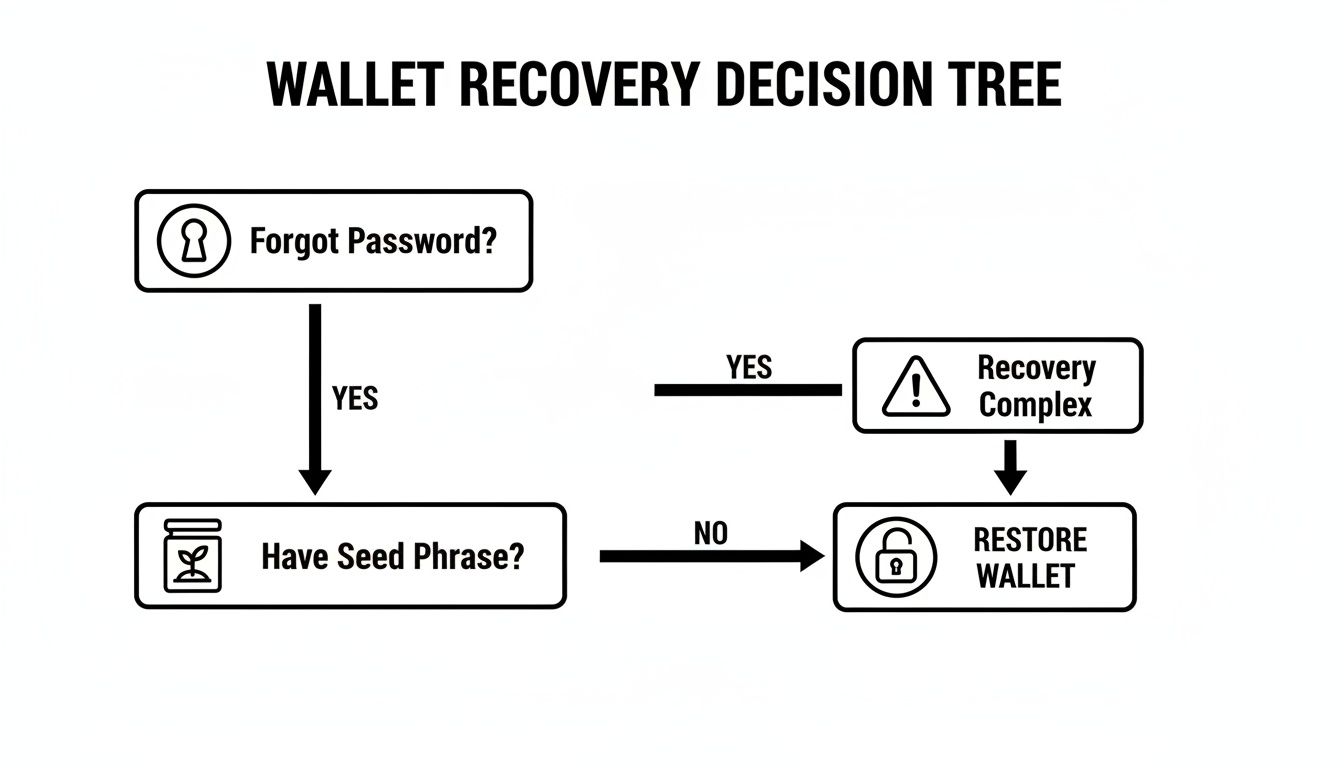
As you can see, the path is straightforward if you have your phrase. If not, recovery becomes a serious technical challenge.
Key Takeaway: Your password is for daily access; your seed phrase is for disaster recovery. Protecting your seed phrase is the single most important security measure you can take.
This guide will cover all your options, from the simple to the complex. We'll walk through:
- Initial Checks: The easy, non-technical things you can do right now to jog your memory or find saved credentials.
- DIY Recovery Techniques: Safe, methodical ways to try and crack your own password, like using personalized wordlists.
- Wallet-Specific Guides: Tailored advice for popular wallets, from software like Electrum to hardware like Trezor.
- Professional Help: Knowing when it's time to call in an expert like Wallet Recovery AI to give you the best shot without risking your crypto.
Let's start with the basics to calmly assess the situation before you try anything drastic.
Of course. Here is the rewritten section, crafted to sound like it was written by an experienced human expert, following all your specified requirements.
Start With the Simple Stuff: Your Own Memory
Before you even think about running complex software, let's start with the most likely place to find your password: your own head. I know it sounds obvious, but when you're locked out of a wallet, panic can make you forget the simple things. A calm, systematic approach to jogging your memory can often solve the problem before it becomes a technical nightmare.
First, think about your own password habits. We all have them—those little quirks and patterns we use to create and "strengthen" our passwords.
- Capitalization: Do you always capitalize the first letter? Or a specific word inside the password?
- Numbers: Are you known for tacking on your birth year, a favorite number, or the year you created the password?
- Special Characters: What's your go-to symbol? Most people stick to one or two, like
!or#or$. - Substitutions: Do you frequently swap letters for numbers? Think
efor3,afor4, orofor0.
Grab a piece of paper or open a simple spreadsheet and start listing out these common variations. Trying them one by one methodically is far more effective than randomly guessing. A tiny, forgotten detail is often the key.
Go Back to the Moment of Creation
If you're still stuck, try to mentally put yourself back in the exact moment you set up the wallet. The context surrounding the password's creation can be a powerful trigger for your memory.
Picture the environment you were in:
- Which device were you on? Your trusty old laptop, a brand-new work computer, or maybe your phone?
- What time of year was it? A holiday or a specific season can easily sneak its way into a password.
- Was anything significant happening in your life? Think about birthdays, anniversaries, a new pet, or a big project at work.
A password often isn't just a random jumble of characters; it's a snapshot of your life. Something like SummerTrip2021! feels obvious now, but it's the kind of detail that fades over time. Rebuilding that context in your mind might be all it takes to make it click.
Hunt for Digital and Physical Clues
Okay, so memory jogs didn't work. It's time to become a detective and search your personal files and spaces. Even people who know better sometimes write down credentials in a moment of haste.
Your password could be tucked away in a place you’ve long forgotten. A 2023 survey found that while 65% of people use password managers, many still fall back on less secure methods like notes apps or physical notebooks.
Check these common hiding spots thoroughly:
- Password Managers: Search every vault you have—1Password, LastPass, Bitwarden, and even your web browser's built-in manager. Don't assume you didn't save it; check anyway.
- Encrypted Notes: Did you use an encrypted note on your Mac or a secure app on your phone?
- Physical Documents: Sift through old notebooks, daily planners, or any important papers you keep in a desk drawer or safe.
- Computer Files: Do a deep search on your computer for common filenames like
password.txt,keys.txt, orwallet_info.doc. For more on this, check out our guide on how to find passwords stored on a computer.
Finally, and this is the most critical step of all, you absolutely must find the encrypted wallet file itself. For wallets like Bitcoin Core, this is usually a file named wallet.dat. For others, it might be a JSON keystore file. Without this file, no recovery is possible. Finding it is a non-negotiable prerequisite before you can move on to any other technique.
Safe DIY Password Recovery Techniques
If you’ve exhausted the simple memory jogs and note-hunting, it might be time to move on to more powerful do-it-yourself methods. This isn’t about some shadowy form of hacking; it’s about using specialized software to systematically run password combinations against your own wallet file. You’re in complete control of the entire process.
This basically automates what you were trying to do by hand, but on a massive scale. The main strategies are the dictionary attack, which uses a targeted wordlist, and the brute-force attack, which tries every possible combination of characters.
To pull this off, you'll need the right tools and, more importantly, a safe, secure process. Let's get into it.
Building Your Personal Password Dictionary
This is the single most critical part of any DIY recovery attempt. Before you even think about running a recovery tool, you have to build a custom wordlist. A generic list of common passwords you find online will be almost useless. The file needs to be built around you.
This is just a simple text file, with one potential password on each line. The more time you spend personalizing this list, the better your chances.
Fire up a text editor and start brainstorming everything you can. Think about:
- People: Your name, your partner’s name, kids, parents—first, middle, and last.
- Pets: Every dog, cat, or hamster you've ever owned.
- Dates: Anniversaries, birthdays, and other significant dates in formats like
MMDDYY,DDMMYYYY, etc. - Interests: Your favorite bands, book characters, sports teams, or video games.
- Old Passwords: Any password you’ve used before, for any account. It's incredibly common to reuse or slightly modify old passwords.
A personalized wordlist is your secret weapon here. Instead of trying billions of random combinations, you're giving the software a highly concentrated list of probable candidates based on your own patterns. If your dog's name was "Max," your list should include
Max,max,Max123,Max2023!, andM_a_x.
This is what narrows the search and dramatically improves your odds.
Choosing Safe and Reputable Recovery Tools
With your wordlist ready, you need the right software to test it against your encrypted wallet. I can't stress this enough: only use well-known, open-source tools from official sources like GitHub. Grabbing a random .exe from a forum is a fantastic way to get your crypto stolen by malware.
Two of the most trusted tools in the industry are:
- Hashcat: This is the powerhouse of password recovery. It’s incredibly fast, especially with a good GPU, and supports a massive range of wallet types. The downside is its steep learning curve; it’s not for the faint of heart.
- BTCRack: A tool built specifically for Bitcoin wallets that’s much more user-friendly than Hashcat. It’s especially good if you have a partial memory of the password, like knowing it's
SecretPhrasefollowed by four numbers you can't remember.
Running these tools securely is non-negotiable. In the first two months of 2026 alone, over $112.5 million was lost in crypto exploits, many stemming from compromised keys and passwords. You can read more on these recent crypto security trends from AMBCrypto. An offline recovery environment is the only way to ensure you don't become part of that statistic.
Setting Up Your Secure Recovery Environment
Never, ever run password recovery tools on your main computer while it's connected to the internet. All it takes is one piece of undetected spyware to log your wallet file and the successfully recovered password, sending them straight to a thief.
Here’s how to create a sterile workspace for the recovery attempt:
- Go Offline: Find a spare computer that you can completely disconnect from the internet. This is what we call an "air-gapped" machine.
- Use a Clean USB: Copy your encrypted wallet file (like
wallet.dat) and your custom wordlist onto a freshly formatted USB drive. Use this to move the files to your offline computer. - Transfer the Tools Safely: On a separate, trusted computer, download the recovery software. Scan it for viruses, then transfer it to the offline machine via your clean USB.
- Begin the Recovery: With everything on the offline computer, you can finally run the recovery command, pointing the tool at your wallet file and your wordlist.
This process can take a very long time—anywhere from a few hours to several weeks, depending on your computer's power and the password's strength. It demands patience and a solid level of technical skill. If you feel out of your depth or aren't 100% confident you can do this securely, it's probably time to look into a professional service.
Here is the rewritten section, crafted to sound natural and human-written, following all your specific instructions.
Recovery Paths and Common Pitfalls for Your Wallet
I can't tell you how many times I've seen someone panic because they're trying a recovery trick for a Ledger wallet on their MetaMask account. It just doesn't work. Every wallet is its own little universe with its own rules, and trying to apply a one-size-fits-all approach is a recipe for frustration.
The biggest mistake people make, hands down, is mixing up the different security credentials. Your daily password, your master recovery phrase, your hardware wallet PIN—they all serve very different purposes. Getting them confused can send you down a rabbit hole of wasted time and unnecessary stress. Let's clear up the confusion for some of the most common wallets out there.
MetaMask: The Password vs. The Master Key
MetaMask is the gateway into self-custody for millions of users, and it has one crucial distinction that trips people up all the time. The password you type in to unlock the browser extension is not your recovery phrase.
- Your Password: Think of this as a local convenience lock. It encrypts your wallet data on that specific computer or browser. If you forget it, don't panic. As long as you have your 12-word Secret Recovery Phrase (SRP), you're safe. You can simply remove and reinstall MetaMask, then use your SRP to import your wallet and set a totally new password.
- Your Secret Recovery Phrase (SRP): This is the holy grail. This is your master key that can restore your entire wallet on any device in the world. If you lose this 12-word phrase, your funds are gone. Period. There's no "forgot my phrase" button. MetaMask support can't help you.
Key Takeaway: For MetaMask, a forgotten password is a minor speed bump. A lost Secret Recovery Phrase is a total wipeout. Your absolute priority should always be securing that phrase.
Hardware Wallets: The Deal with Ledger and Trezor
Hardware wallets from companies like Ledger and Trezor are the gold standard for a reason—they keep your private keys completely offline. They rely on a PIN for daily access and a 24-word recovery phrase for the ultimate backup.
Just like with MetaMask, the PIN is only for unlocking the physical device in your hand. If you forget it, the fix is surprisingly simple: just enter the wrong PIN three times on purpose. This will wipe the device, but it does not touch your crypto, which is safe on the blockchain.
Once the device is wiped, you just grab your 24-word recovery phrase and use it to restore your wallet. You can do this on the same device or a brand new one. The process will even let you set a new PIN. The real danger isn't forgetting the PIN; it's losing that 24-word phrase. No phrase, no funds.
Software Wallets: Exodus and Electrum's Quirks
Desktop and mobile software wallets come with their own unique recovery challenges. You really have to know the specific backup system your wallet uses.
Exodus is incredibly popular for its beautiful interface and support for tons of different coins. It uses a standard 12-word secret recovery phrase, just like MetaMask. If you forget your password, that phrase is your lifeline to restore your wallet.
The pitfall I see here is people treating their wallet password like a social media password. A study found that an incredible 80-85% of people reuse passwords everywhere. For crypto, this is catastrophic. A single leaked password could let a thief empty multi-chain wallets like Exodus, Trust Wallet, or Atomic Wallet in seconds. The rising number of hacks makes strong crypto wallet security more critical than ever.
Electrum, a long-standing Bitcoin-only wallet, works a little differently. It gives you a seed phrase, but it also creates an encrypted wallet file on your computer. If you have the file and remember the password, you're in. If you forget the password but have the seed phrase, you can restore it.
The real problem arises when you only have the wallet file but have forgotten the password and lost the seed phrase. This is a classic dead-end scenario where your only hope is using brute-force recovery tools to try and crack that specific file's password. It’s a perfect example of why you need to understand your wallet’s backup system from day one.
To help visualize these differences, I’ve put together a quick comparison of the most common wallet types and their recovery credentials.
Recovery Options by Wallet Type
| Wallet Type | Primary Credential | Recovery Key | Common Pitfall |
|---|---|---|---|
| MetaMask | Password (local) | 12-word Secret Phrase | Confusing the local password with the master recovery phrase. |
| Ledger / Trezor | PIN Code | 24-word Recovery Phrase | Fearing a PIN lockout; the real risk is a lost phrase. |
| Exodus | Password (local) | 12-word Secret Phrase | Reusing passwords from other websites, creating a huge risk. |
| Electrum | Password (local) | 12/24-word Seed Phrase | Losing the seed phrase, leaving only a password-locked file. |
Understanding these distinctions is the first step. If you get the primary credential wrong (like entering a PIN incorrectly), you usually have a way back. But if you lose the recovery key, that’s almost always the end of the road for DIY recovery.
When to Call in a Professional Recovery Service

So, you’ve tried everything. You’ve dug through old notebooks, racked your brain for days, and even given the DIY tools a shot. Still nothing. Your wallet remains stubbornly locked, and your funds are just out of reach.
This is the point where many people either give up or, worse, make a costly mistake. It’s also the perfect time to consider calling in the experts.
Hiring a professional service isn’t admitting defeat; it’s a smart, strategic move. These services aren’t magicians, but they have two things most of us don’t: massive computing power and deep, specialized expertise. They can run through billions of password combinations at speeds your home PC couldn't manage in a lifetime.
The right time to reach out is when you’ve hit a brick wall. You have the encrypted wallet file, you've exhausted every password idea you can think of, but you just don’t have the hardware or technical chops to take the brute-force attempt any further. This is the hand-off point.
How Professional Services Actually Work
When you work with a reputable recovery firm, you’re not just blindly handing over your files and hoping for the best. The process is far more structured—and secure—than you might think. It all starts with a detailed consultation where you provide every clue you can possibly remember about that lost password.
Think of yourself as a detective handing over a box of puzzle pieces to a forensics lab. They’ll need things like:
- Any password fragments or patterns you recall.
- The custom dictionary file you might have built.
- Key details about your wallet type and its version.
They take this raw information and feed it into their powerful systems. Using high-performance computing clusters and custom algorithms, they can chew through permutations that would take a standard PC years to crack. And these aren't just random guesses; they are intelligent, targeted attacks built directly from the clues you provide.
A lot of people are hesitant to trust a third party with their wallet file, and that’s a healthy concern. But the best services have built their entire business on trust and security, often operating on a strict “no success, no fee” model.
This approach lines their interests up perfectly with yours. They only get paid if they successfully recover your crypto, which means they are just as motivated as you are to get the job done right—and to keep everything completely confidential along the way.
Finding a Service You Can Trust
Of course, not all recovery services are created equal. The crypto world has more than its fair share of scammers, so doing your homework is absolutely critical. The last thing you want is to add more risk to an already stressful situation.
Here’s what to look for in a trustworthy service:
- A Clear Fee Structure: Reputable firms are upfront about their costs. Typically, it’s a percentage of the recovered assets, and you only pay upon success. No upfront fees.
- A Non-Disclosure Agreement (NDA): A true professional will always offer to sign a legal document binding them to confidentiality. This protects your privacy and gives you peace of mind.
- A Secure, Transparent Process: They should be able to clearly explain their security protocols, like how they handle your wallet file and whether the recovery process is done in a completely offline environment.
For anyone wanting to dig deeper, you can learn more about how a professional wallet recovery service operates and what to expect from start to finish. A good partner will be transparent and keep you in the loop at every stage.
The AI Advantage in Modern Recovery
What really gives modern services their edge is the use of artificial intelligence. AI-powered algorithms can analyze the password hints you provide to spot complex patterns and variations that a human would easily miss. This is lightyears beyond a simple dictionary attack.
For example, the AI can learn your old password habits—like how you always used to swap the letter 'o' with '0' or add a specific year to the end—and apply those rules across millions of potential base words. This intelligent approach dramatically slashes the search time and seriously boosts the odds of a successful recovery.
Ultimately, it’s about combining your human memory with the raw, brute-force power of machine-speed computation.
Frequently Asked Questions About Wallet Password Recovery
It’s completely normal to have questions at this stage. Trying to recover a locked crypto wallet is a stressful and high-stakes process. We've gathered the most common questions we hear from clients to give you the clear, direct answers you need.
Let's tackle the concerns that really matter so you can figure out your next steps.
Can a Wallet Password Be Recovered?
The honest answer: it depends entirely on your specific situation. Unlike a forgotten social media password, there's no simple "reset" button here. Your ability to get back in all comes down to what other credentials you still have.
- If you have your seed phrase (or secret recovery phrase): Yes, absolutely. Your seed phrase is the ultimate master key. You can simply use it to restore your entire wallet on a new device or a fresh installation, setting a brand-new password in the process.
- If you only have the encrypted wallet file: Maybe. This is where it becomes a technical challenge. Success hinges on using specialized software to run through millions or billions of password combinations against that file. Your chances are significantly better if you can recall any parts or patterns of the original password.
The entire point of a non-custodial wallet is that only you hold the keys. This provides top-tier security, but it also means that without your seed phrase, recovery is never a guarantee.
What Is the Difference Between a Password and a Seed Phrase?
This is the single most critical distinction to understand, and it's where a lot of people get tripped up. They serve completely different functions.
A password is just a local lock. It encrypts your wallet on a specific device, like your phone or computer, and it's what you type in for daily use.
A seed phrase (also called a recovery phrase) is your master key for everything. It’s a list of 12 or 24 words that can mathematically regenerate every single private key for all the crypto assets inside your wallet. Think of it as your financial disaster recovery plan.
Here's an analogy: your password is the key to your front door. Your seed phrase is the deed to your house. You can change the locks (password) anytime, but if you lose the deed (seed phrase), your claim to ownership is in serious jeopardy.
Is It Safe to Use a Recovery Service?
This is a valid and crucial concern. In a world built on "not your keys, not your crypto," handing over any part of your wallet to a third party feels wrong. The safety of using a service comes down to its reputation, process, and transparency.
A reputable service will never ask for your seed phrase. They only require the encrypted wallet file and any password hints you can give them.
Look for these signs of a trustworthy recovery service:
- Success-Based Fees: They only get paid if they successfully recover your funds. They should never demand an upfront payment to begin the work.
- Legal Protections: A professional outfit will offer to sign a Non-Disclosure Agreement (NDA) to legally bind them to confidentiality and protect your privacy.
- A Secure Process: They must clearly explain their security protocols. All recovery attempts should be done on air-gapped, offline machines to shield your files from any online threats.
Choosing the right partner isn't a gamble; it's a calculated final step in your recovery effort.
How Long Does a Professional Recovery Take?
There's no one-size-fits-all timeline. A professional wallet recovery with a password can take anywhere from a few hours to several weeks—or even longer in extremely complex cases.
The time it takes depends on a few key factors:
- Password Complexity: An 8-character password using only lowercase letters is exponentially easier to crack than a 20-character password with mixed cases, numbers, and special symbols.
- Quality of Your Hints: The more accurate your password fragments and rules are, the narrower the search becomes. Good hints can cut the recovery time from months to hours.
- Wallet Type: Some wallet encryption algorithms are intentionally more difficult to crack than others, demanding more time and computational power.
A professional service should give you a rough time estimate based on your specific case, but patience is always part of the process.
If you've exhausted all your options and are still locked out, don't give up. Our team at Wallet Recovery AI uses specialized, AI-powered techniques in a secure, offline environment to maximize your chances of getting your funds back. Find out if we can help by submitting a confidential inquiry at https://walletrecovery.ai.
Leave a Reply