

That moment of pure, cold panic when you realize you can't get into your crypto wallet is something else. Your heart sinks, your mind starts racing, and it's easy to jump to the worst conclusions. But take a deep breath. The first 24 hours are critical, and acting methodically, not emotionally, is your best bet for getting your funds back.
Before you even think about complex recovery tools, you have to rule out the simple stuff. This whole process starts with figuring out exactly what you're looking for, because the recovery path for a MetaMask wallet is completely different from a forgotten Ledger PIN.
The First Steps When Your Crypto Wallet Is Missing

Figure Out What Kind of Wallet You Have
First things first: your entire search strategy hinges on the type of wallet you used. Let's get this sorted, as it's the foundation for everything else.
- Software Wallets (Desktop/Browser): Think of apps like MetaMask, Exodus, or Electrum. The key files that unlock your crypto live right on your computer.
- Mobile Wallets: If you used something like Trust Wallet or the mobile version of MetaMask, all the important data is on your smartphone.
- Hardware Wallets: These are the physical gadgets like a Ledger or Trezor that keep your keys offline. Here, the device itself isn't the prize—the recovery seed phrase you wrote down during setup is everything.
- Web Wallets: This usually means an account on an exchange. Access is typically just a standard username, password, and two-factor authentication.
Getting this right from the start is huge. If you know you used a Ledger, you can stop wasting time digging through your laptop's file system. Your mission is to find that physical backup.
Start the Search: Physical and Digital
Once you know the wallet type, it’s time to play detective and retrace your steps. Don't just give your desk a quick scan. Make a real checklist and go through every possible hiding spot, both in the real world and on your devices.
I can't tell you how many times the problem isn't some sophisticated hack but simple human error. People scribble a seed phrase on a sticky note, save it in a file named "stuff.txt," and then completely forget where they put it.
Start with the physical places. Where would you put something incredibly important? Check your safe, desk drawers, or that one filing cabinet you never open. Look inside books, taped to the back of a photo frame, or tucked away with your passport and birth certificate. Try to remember your mindset when you set up the wallet. Were you in a rush? Did you have that "I'll just put this here for now" thought?
Then, shift to your digital life. Scour your main devices—laptops, desktops, old phones. And don't forget cloud storage! So many people save a text file or an encrypted document in:
- Google Drive
- iCloud
- Dropbox
- Microsoft OneDrive
Use search terms like “wallet,” “seed,” “phrase,” “private key,” or the name of the crypto itself (e.g., “bitcoin”). Get creative. You might have tried to disguise the file name for security reasons.
Initial Wallet Recovery Checklist
To help you stay organized and make sure you don't miss anything, use this quick checklist. It breaks down where to look first based on your wallet type.
Running through these basics systematically is your best first line of defense.
| Wallet Type | Where to Look First | Key Information to Find |
|---|---|---|
| Software | Your primary computer's documents, downloads, and desktop folders. Also check cloud storage (Google Drive, Dropbox). | A 12-24 word seed phrase, a private key string, or a keystore file (e.g., a .json file). |
| Hardware | Physical locations: a safe, desk drawers, filing cabinets, or stored with other important personal documents. | The physical paper or metal card where you wrote down your 12, 18, or 24-word recovery phrase. |
| Mobile | Your smartphone's notes app (though not recommended) or secure file storage. Check for screenshots in your photo gallery. | The 12-word seed phrase you were given during the initial app setup. |
| Web/Exchange | Your password manager (like 1Password or LastPass) or browser's saved passwords. | Your username, password, and access to your two-factor authentication (2FA) method. |
By calmly working through these steps, you give yourself the best possible chance of finding what you need without having to move on to more advanced recovery techniques.
Searching Your Digital Footprint for Clues

Alright, you’ve checked the obvious places. Now the real detective work begins. It’s time to dig deep into your digital life and hunt for the breadcrumbs you left behind when you first set up your wallet. These clues are almost always tucked away in places you've completely forgotten about.
When people set up wallets, especially in a hurry, they often save critical info in the most unexpected spots. Think of it like losing your car keys—they’re rarely in a logical place. More often, they’re in the pocket of a jacket you haven't worn in months. Our goal is to methodically retrace those digital steps.
This isn't just about a simple search. It’s about knowing what to look for and using the right tools to find it. And if you're feeling discouraged, don't be. Losing access is incredibly common.
As of early 2025, estimates suggest somewhere between 2.3 to 3.7 million Bitcoins are considered permanently lost. That's a huge chunk of the roughly 19.7 million BTC in circulation, meaning up to 19% of all Bitcoin might be gone forever. In fact, 28% of the total supply hasn't moved in over five years, and a lot of that is likely due to lost access. You can read more about the scale of lost crypto and recovery success rates to see you're not alone.
Mastering Your Computer Search
Your computer's built-in search function is a lot more powerful than you probably think, but you need to point it in the right direction. Just typing "wallet" will drown you in thousands of useless results. The trick is to focus on specific file types associated with crypto wallets.
Here’s how to do it right:
- Search by File Extension: Different wallets create different files. Searching for these specific extensions can instantly uncover a long-forgotten wallet.
wallet.dat: The classic file for the original Bitcoin Core client..json: Used by many Ethereum-based wallets, like MyEtherWallet, for keystore files..key: A simple extension used by some older or less common wallets.
- Use Specific Keywords: Try combining file extensions with terms like “keystore,” “UTC,” “private,” or even the name of a coin like “ethereum.”
- Check Hidden Files and Folders: Wallet software loves to hide files in application data folders, which are hidden by default on both Windows and macOS. Before you search, make sure you enable "Show hidden files" in your system settings.
Your past self might have gotten clever and tried to disguise the file. Don't just search for "seed phrase." Search for things like "12 words," "24 words," "backup phrase," "mnemonic," or even random notes you might have titled "important" or "do not delete."
Scouring Your Email and Browser History
Your email inbox and browser history are a time capsule of your online life. They might not have your seed phrase saved directly, but they hold the context you need to figure out which wallet or service you used.
Think back to when you created the wallet. What exchange did you sign up for? What software did you download? The answers are probably sitting in your digital communication logs.
Effective Email Search Tactics
Your inbox is a goldmine. Search for:
- Welcome Emails: Look for messages from exchanges or wallet providers like "Welcome to Coinbase" or "Your MetaMask account is ready."
- Transaction Confirmations: Search for emails confirming deposits or withdrawals. They'll name the platform you used.
- Support Tickets: Did you ever contact customer support? Search for "support," "ticket," or "help."
- Security Alerts: Dig up old "new device login" or "password changed" notifications.
Leveraging Browser History
Even if you clear your cache regularly, fragments of your history might still be there. Search your browser history for the names of common wallets or exchanges. This can jog your memory about a service you tried once and forgot about. While you're at it, check your browser's saved bookmarks and passwords—you might have saved the login details years ago.
Inspecting Backups and Password Managers
Finally, let's turn to your archives. Old backups and password managers are often the last line of defense, but they can be the most rewarding places to look.
External Hard Drives and Cloud Backups
If you were diligent about system backups, an old wallet file could be sitting on an external hard drive or in a cloud service like Backblaze or Time Machine. Connect the drive and run the same targeted file extension and keyword searches mentioned earlier. Be patient here; searching massive backup files can take a while.
Your Password Manager
This one feels obvious, but it's easy to miss things. Don't just scroll through your list of logins. Use the search function inside your password manager and look for terms like:
- "Crypto"
- "Bitcoin" or "BTC"
- "Ethereum" or "ETH"
- "Seed" or "Phrase"
- "Private Key"
You might have stashed your seed phrase or private key in the "notes" section of an entry for a totally different service, like an exchange. A thorough, deep search is key. By leaving no digital stone unturned, you dramatically increase your chances of finding that one clue that leads back to your funds.
Getting Back Into a Hardware Wallet
Hardware wallets like Ledger and Trezor are basically the Fort Knox of crypto. They keep your private keys tucked away, completely offline and out of reach of hackers. But that level of security creates a unique headache if you lose or break the device. Suddenly, the fancy gadget in your hand doesn't matter anymore.
All that matters is one thing: your recovery seed phrase.
That little list of 12, 18, or 24 words is the master key to everything. The hardware wallet itself? It's just a secure box. Your seed phrase is the blueprint that lets you rebuild that box from scratch, anytime, on any compatible device.
Your Seed Phrase is Your Lifeline
Think of your seed phrase as the ultimate "get out of jail free" card. If your Ledger gets run over by a truck, you just grab a new one. During setup, you'll see an option to "restore from recovery phrase."
You just punch in your words, one by one, in the exact right order. The new device will then magically generate the very same private keys as your old one, and voilà—all your funds are right where you left them.
What’s great is that this system is mostly standardized, thanks to a protocol called BIP39. This means you can often restore a seed phrase from a Ledger onto a Trezor, or the other way around. It gives you incredible flexibility when you're in a tight spot.
The process is usually pretty simple:
- Get a new, sealed device. Only buy from the official manufacturer or an authorized reseller. Never, ever use a pre-owned wallet.
- Start the restore process. Fire up the new device and choose the option to restore an existing wallet.
- Enter the words. This is the crucial part. Carefully type each word of your seed phrase directly into the device using its physical buttons.
- Set a new PIN code. Once the device confirms the phrase is valid, you'll secure it with a new PIN.
- Re-add your apps. You might need to reinstall apps for specific coins (like Bitcoin or Ethereum) through the companion software (like Ledger Live) before you'll see your balances.
Remember, your crypto was never on the device. It lives on the blockchain. Your seed phrase is just the universal key that proves you own it.
What If I Only Have My PIN, Not My Seed Phrase?
This is where things get genuinely scary. If you have the physical wallet and the PIN, you're fine for now. You can unlock it, see your funds, and—most importantly—move everything immediately to a new wallet where you do have the seed phrase backed up.
But if the device is lost, broken, or has been reset, the PIN is completely worthless.
A PIN is just a local password for that specific piece of hardware. It’s there to stop someone from picking up your device and sending your crypto. It has zero power to help you recover your keys on a new device.
A hardware wallet is a one-way street by design. The private keys go in, but they can never be extracted. This is its greatest strength. Without the seed phrase backup, a lost or broken device means those funds are almost certainly gone for good.
This is why we say that protecting your written-down seed phrase is even more critical than protecting the hardware wallet itself. For a deeper dive into the technical side of things, especially for Ledger devices, check out our detailed guide on Ledger hardware wallet recovery.
A Quick Look at Recovery Paths
To get a clearer picture, it helps to see how the recovery process differs between hardware and software wallets. One relies entirely on an offline backup, while the other might have digital files you can work with.
Hardware vs Software Wallet Recovery Paths
| Feature | Hardware Wallets (Ledger, Trezor) | Software Wallets (MetaMask, Exodus) |
|---|---|---|
| Primary Key | 24-word Seed Phrase (BIP39) | 12-word Seed Phrase or Encrypted Keystore File |
| Recovery Point | The physical, offline backup of the seed phrase | The seed phrase or a backup of the wallet file/private key |
| PIN's Role | Device-specific access; useless for recovery | Often used to encrypt the local wallet file |
| Failure Scenario | Device lost/damaged, seed phrase lost | Device lost/damaged, no seed phrase or file backup |
| Restoration | Enter seed phrase on a new compatible device | Import seed phrase or wallet file into a new installation |
As you can see, with hardware wallets, it all boils down to having that physical piece of paper or metal plate where you stored your words.
Don't Get Scammed When You're Stressed
Panic makes you an easy target. When you're frantically searching for a way back into your wallet, scammers are waiting to pounce. They set up fake "official support" websites and lurk on social media, ready to trick you into giving them your seed phrase.
Burn these rules into your brain:
- NEVER type your seed phrase into a computer or phone. It only ever goes directly into the physical hardware wallet device itself. Period.
- Triple-check every URL. Only download software like Ledger Live or Trezor Suite from the official company websites.
- Legit support will never DM you first. Anyone messaging you out of the blue asking for your seed phrase is a scammer. Block and report them.
Once you understand that your seed phrase is your wallet, you can approach recovery calmly and safely. What feels like a catastrophe can become just a minor, manageable setback.
You've torn apart every digital drawer and physical safe space, but your wallet is still nowhere to be found. It’s easy to feel like you've hit a dead end, but this is really just where the search changes. We're moving on from retracing your steps to more technical, hands-on methods.
But be warned: this next phase is filled with traps.
Before you even think about downloading any specialized software, you need to understand the minefield you're about to walk into. Scammers absolutely prey on the desperate, building malicious tools that look exactly like legitimate recovery solutions. One wrong click here, and your funds could be gone for good.
The sheer scale of this risk is mind-boggling. In 2025 alone, crypto thefts and hacks led to an estimated $3.4 billion in stolen assets. Individual wallet compromises skyrocketed to 158,000 incidents that hit 80,000 unique victims. Phishing scams, often disguised as helpful tools, made up 45% of all losses in the first quarter, while simple wallet errors—the exact situation you’re in—accounted for 25%. You can dig into the grim details in these crypto hacking and theft statistics on Chainalysis.com. This isn't to scare you, but to make you paranoid in a good way.
Evaluating Legitimate Recovery Tools
Thankfully, there are some legitimate, often open-source, tools out there built by the community. These programs can be lifesavers in very specific scenarios, like brute-forcing a password on an encrypted wallet file you have or trying to fix a corrupted file.
Using them, however, demands a bit of technical know-how and a lot of caution.
- Cracking Passwords: If you have the
wallet.datfile and a vague idea of your password, tools likebtcrecoverorhashcatcan work wonders. They essentially try millions of password variations based on hints you provide. - Fixing Corrupted Files: Sometimes the fix is built right in. The Bitcoin Core client, for instance, has command-line functions that can try to salvage a corrupted
wallet.datfile.
A Critical Warning: Only download recovery software from its official source, like a well-known GitHub repository. Any random website promising a "miracle" tool is almost certainly malware designed to drain your wallet the second you use it.
Knowing Your Limits: The Signs to Stop
The most crucial skill at this stage is recognizing when you're out of your depth. Pushing forward without the right expertise can permanently lock your funds or, even worse, destroy the very files you’re trying to recover.
It's time to call it quits on the DIY approach if you find yourself in one of these situations:
- You Have a Partial Seed Phrase: You’ve found 10 of your 12 words, but the last two are a complete blank. Manually guessing the missing words and their correct order is a mathematical nightmare. We're talking about an insane number of possibilities.
- Your Wallet File is Corrupted: You have the file, but it just won't open, and the basic repair functions have all failed. Messing with it further without a deep understanding of file structures could corrupt it beyond any hope of recovery.
- You're Dealing with a Complex Setup: Things get tricky fast with multi-signature wallets, forgotten passphrases on a hardware wallet's seed (the BIP39 standard), or other non-standard configurations.
This decision tree gives you a clear picture of the recovery path for a hardware wallet. If you have the seed phrase, you're golden. If not… your options are extremely limited.
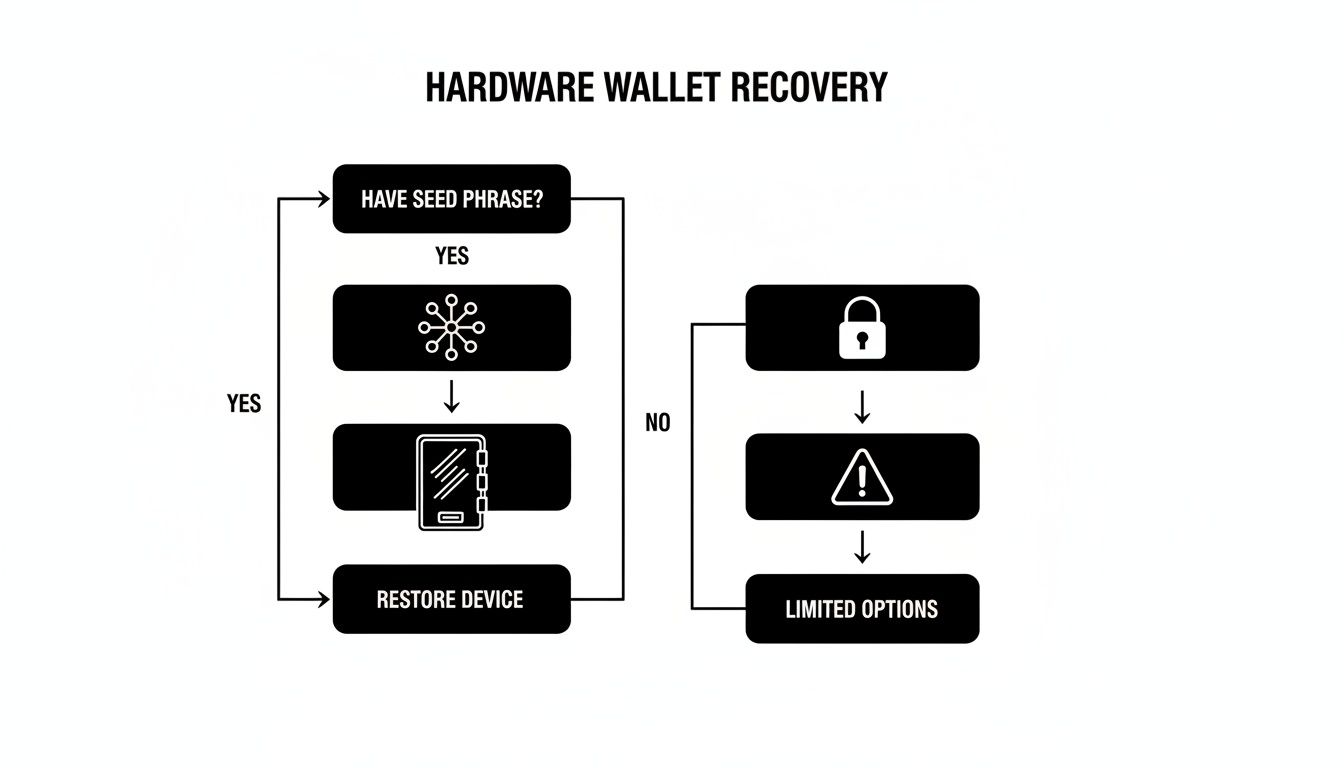
As the flowchart shows, for hardware wallets, that seed phrase is everything. It's the only reliable path to getting your funds back. When that key piece of the puzzle is missing or incomplete, it’s time to bring in the pros.
When a Professional Service Becomes Your Safest Bet
If you’ve hit any of these walls, continuing on your own is like trying to perform surgery after watching a YouTube video—you’re far more likely to cause irreversible damage than to fix the problem. This is the exact moment to start looking at a professional recovery service.
Specialists in this field have proprietary software, massive computing power, and years of experience needed to crack these tough cases. They can run advanced algorithms to find missing seed words, painstakingly repair damaged files, and navigate complex wallet setups without putting your funds at risk.
Yes, it means trusting a third party, but a reputable service like Wallet Recovery AI operates with strict privacy protocols and often on a "no-win, no-fee" basis. When you're at the end of your rope, it’s not just your best option—it's your safest and most logical next step.
When It’s Time to Call in the Experts

You’ve tried everything. You’ve scoured old hard drives, pieced together password hints, and stared at that incomplete seed phrase until your eyes blurred. The wallet is still locked tight.
At this stage, the thought of handing your problem over to someone else can feel like a massive leap of faith. And you're right to be cautious. Entrusting a third party with potential access to your crypto is a huge decision, but when you do it the right way, it can be the smartest move you make.
The crypto recovery space is a minefield of legitimate experts and outright scammers. Your job is to tell them apart. A trustworthy service isn't some mysterious black box; it’s a professional, transparent operation with a clear process and a history you can actually verify.
What a Reputable Service Looks Like
Before you share a single detail, you need to vet any potential recovery company with a healthy dose of skepticism. A legitimate service will have all the hallmarks of a trustworthy business, and they won't hide them. Think of it as a background check for your financial security.
Here’s what should be on your non-negotiable checklist:
- A "No-Win, No-Fee" Policy: This is the gold standard, period. It means the service only gets paid if they successfully recover your funds. Any company demanding an upfront fee, regardless of the outcome, is a giant red flag. Walk away.
- A Verifiable Track Record: Look for real-world case studies, testimonials, and reviews on independent platforms. Vague promises are worthless—you need to see proof they've handled situations like yours before.
- Strong Privacy and Security Guarantees: The company must have a detailed privacy policy explaining exactly how they handle your information. Ask them to articulate their security protocols. How do they protect your data during the recovery attempt?
- Transparent Methods: While they won't give away proprietary secrets, a good service can explain their general approach. Do they use brute-force computing clusters, AI-driven algorithms for pattern recognition, or advanced file repair techniques? This shows they’re experts, not just opportunists.
A professional will never need your complete seed phrase or private keys to assess your situation. They work with encrypted data and fragments of information you provide. They should only gain access at the final stage with your explicit permission.
The Power of Modern Recovery Tech
This isn't just one person in a dark room manually guessing passwords. Top-tier services use a combination of massive computing power and sophisticated AI to crack problems that are simply impossible for a human to tackle alone.
Modern AI-driven techniques can analyze millions of password variations per second, identify patterns in partially remembered seed phrases, or even reconstruct data from corrupted wallet files. It’s this technology that turns many previously hopeless cases into successful recoveries.
The impact is real. While personal wallet compromises affected 158,000 cases, specialized recovery technology is turning the tide. One top firm resolved over 3,200 cases in a single quarter, reclaiming $670-680 million for its clients. That's a 98% success rate, which blows the industry average out of the water.
These aren't just flashy numbers; they show what's possible when professional expertise meets powerful technology.
How to Prepare for Your Consultation (Safely)
Once you’ve found a service you trust, you need to arm them with the right information. The goal is to give them enough data to work with, without ever handing over the keys to the kingdom.
What you SHOULD prepare:
- Wallet Type: Be specific. "It was a MetaMask wallet I set up in 2019," or "It's a Ledger Nano S."
- The Story: Explain exactly what happened. Did you forget the password? Is a file corrupted? Do you have 10 words of a 12-word seed phrase?
- Your Best Guesses: Any fragment of a password, a list of possible words from your seed phrase, or the last time you successfully accessed the wallet can be incredibly valuable clues.
What you should NEVER share initially:
- Your complete seed phrase
- Your full private keys
- Any current, working passwords to other accounts
A legitimate service will walk you through a secure process for providing sensitive data only when it’s absolutely necessary for the final recovery step. If you want to get a better sense of this process, see our guide on how a professional assets recovery company works.
Engaging an expert isn’t admitting defeat. It's making a strategic decision to give yourself the best possible shot at getting your funds back.
Your Wallet Recovery Questions, Answered
When you're staring down the barrel of a lost wallet, a million questions probably race through your mind. It's a stressful spot to be in, so let's cut through the noise and get you some straight answers to the most common concerns.
How Can I Trust a Recovery Service With My Information?
This is, without a doubt, the most important question you should be asking. Trust isn't given; it's earned through transparency and rock-solid security.
A legitimate, professional service will never ask for your full seed phrase or all your private keys right out of the gate. That's a massive red flag. Instead, the process works by you providing fragments of information—a partial password, a list of words you think are in your seed phrase, or a jumbled order. We use these breadcrumbs to do the heavy lifting on our end.
Look for a company that operates on a "no-win, no-fee" basis. This isn't just a catchy phrase; it means our goals are perfectly aligned with yours. We only succeed if you do. Check for a public track record, real-world case studies, and a privacy policy that clearly spells out how your data is secured.
What Are My Chances of Actually Getting My Wallet Back?
Honestly, it all comes down to what pieces of the puzzle you still have.
If you've got a corrupted wallet file but a good idea of the password, your odds are excellent. If you're just missing a word or two from a 12 or 24-word seed phrase, advanced algorithms can often fill in those gaps with a very high success rate.
But I have to be direct: if you have absolutely nothing—no seed phrase, no private key, no wallet file, and zero password hints—the chances are practically zero. The blockchain is secure for a reason, and that security works against us when we lose everything.
The key takeaway is this: any piece of information, no matter how small, can dramatically increase your chances of a successful recovery. A half-remembered password hint or a single word from your seed phrase could be the very thing that unlocks your funds.
What Is the Most Common Mistake People Make?
Panic. The biggest mistake is acting out of desperation and making things exponentially worse. This usually happens in one of two ways:
- Downloading sketchy "recovery" tools: Scammers prey on fear. They create malicious software that looks like a legitimate recovery app. The moment you run it, it either siphons any crypto you still have access to or installs ransomware on your machine.
- Oversharing online: Never post your wallet address or specific details about your locked funds on public forums like Reddit or Telegram. You'll immediately be swarmed by scammers in your DMs pretending to be helpful support staff.
Is It Possible to Recover a Wallet Without a Seed Phrase?
This is a point of major confusion, so let's clear it up. In most scenarios, if you've lost the device your wallet was on and you don't have the seed phrase, it's game over. The seed phrase is the ultimate master key.
However, there are a few critical exceptions:
- You have the wallet file: If you managed to save the
wallet.dator the keystore.jsonfile, a recovery service can run a brute-force attack on the password. - You have the private key: A private key is just as powerful as a seed phrase. If you saved it somewhere, it can be used to restore full access to your funds.
If the seed phrase is gone, the entire recovery mission pivots. The new focus becomes a forensic search for any other credential that can unlock the wallet, like that original file or a saved private key string.
If you've hit a wall and are weighing your options, Wallet Recovery AI uses sophisticated, secure methods to crack even the toughest cases. Our "no-win, no-fee" guarantee means there's no risk to you. Start your confidential and secure wallet recovery process today.
Leave a Reply