

That sinking feeling when you realize you can't access your crypto is intense. We've all been there. But panicking is the absolute worst thing you can do right now. A frantic, disorganized search is a surefire way to overlook obvious clues or, even worse, accidentally expose your sensitive recovery information.
First things first: take a breath. Let's get methodical and turn that chaos into a structured plan.
Your Calm and Methodical Wallet Recovery Plan
Your immediate goal is triage. Is the wallet truly lost for good, just temporarily out of reach, or potentially compromised? To figure that out, we need to pinpoint exactly what kind of wallet we're even looking for.
Think back. How did you store your crypto?
- Software Wallet: Was it an application on a specific device, like Exodus on your old laptop or MetaMask as a browser extension?
- Hardware Wallet: Are you looking for a physical device like a Ledger or Trezor and, crucially, its associated recovery phrase?
- Exchange Account: Could your funds simply be sitting on a platform like Coinbase or Binance? Access there is usually just a login and password, not a private key you control directly.
Just figuring this out narrows your search field dramatically. You can immediately rule out entire categories and focus your energy where it counts. This decision tree can help visualize that first critical step.
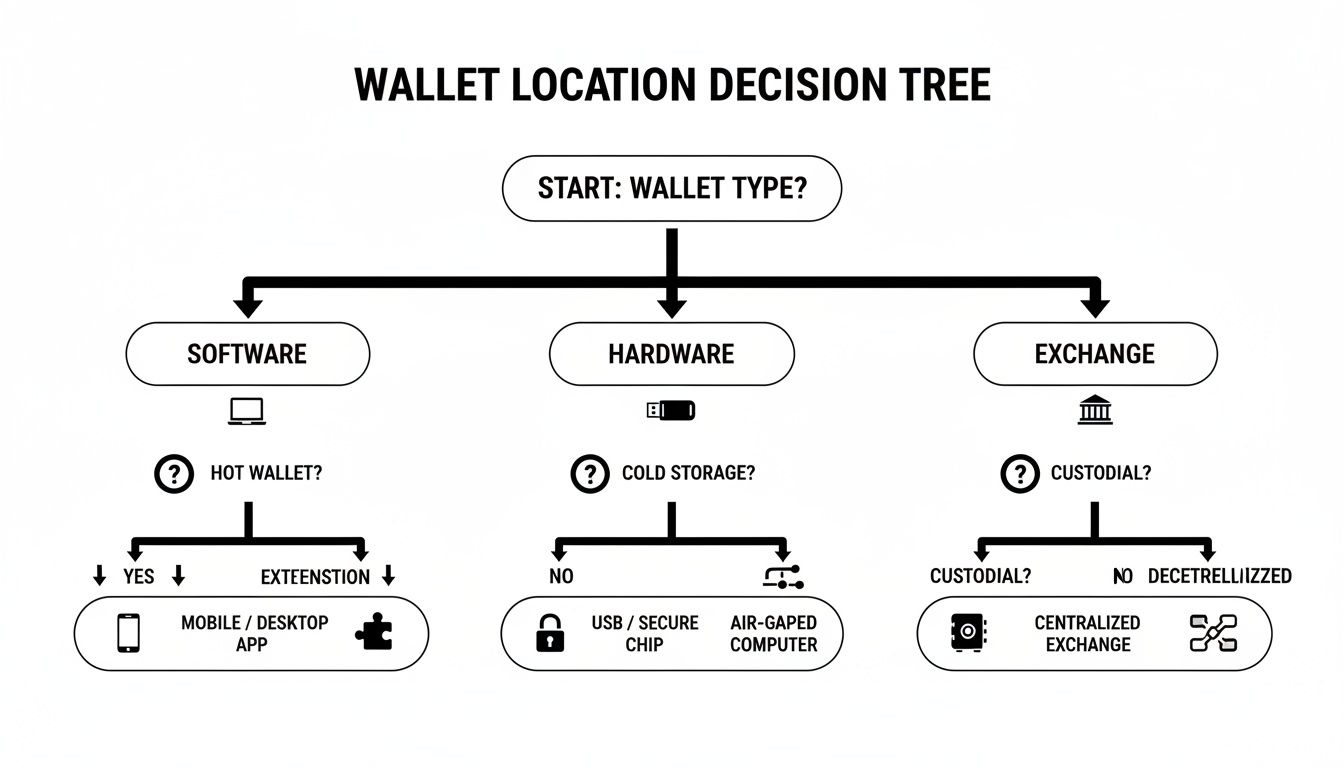
By identifying your wallet type, you can concentrate your efforts where they're most likely to pay off.
Creating Your Initial Search Checklist
Now, it’s time to brainstorm. Let's build a comprehensive checklist of every possible place your wallet information could be hiding. Don't dismiss any idea, no matter how unlikely it seems. You'd be surprised what you can remember just by listing out all the possibilities.
To get you started, here's a quick-reference table for the most common spots.
Initial Wallet Location Checklist
| Wallet Type | What to Look For | Common Locations |
|---|---|---|
| Software Wallets | A wallet.dat file, a JSON keystore file, or a 12-24 word seed phrase. |
Desktop, Documents folder, AppData folder (Windows), Application Support (macOS). |
| Mobile Wallets | The app itself on an old phone, or a written-down seed phrase. | Old smartphones in a drawer, cloud backups (iCloud/Google), handwritten notes. |
| Hardware Wallets | The physical device and its seed phrase (usually on a metal plate or paper card). | Safes, desk drawers, secure storage boxes, with important documents. |
| Exchange Accounts | Username, password, and 2FA access. | Saved logins in your browser, password manager entries. |
Think through this list carefully—it covers the most frequent places people leave their crypto keys.
Beyond that, consider these often-forgotten hiding spots:
- Old Computers and Laptops: That dusty machine in the closet is a prime suspect for old wallet files.
- External Storage: Systematically check every USB drive, external hard drive (HDD), and SD card you own.
- Cloud Services: Do a deep search in Google Drive, Dropbox, iCloud, and OneDrive for documents containing "seed phrase," "private key," or specific wallet names.
- Password Managers: Search within 1Password, LastPass, or similar tools for entries related to "crypto," "wallet," or the names of the coins you held.
- Physical Notes: Did you actually write it down? Check old notebooks, planners, office drawers, or even tucked inside a favorite book.
You're not just looking for a file; you're retracing your own digital and physical footsteps to find that one crucial piece of information. The importance of being methodical here can't be overstated.
The Scale of the Problem
If you're feeling overwhelmed, know that you are far from alone. Losing access is a shockingly common nightmare in the crypto world.
Chainalysis estimates that around 3.7 million BTC—about 19% of the total Bitcoin supply—are likely lost forever due to forgotten keys or destroyed devices. That staggering figure shows just how widespread this problem is.
With global active crypto wallets now exceeding 820 million and 59% of users preferring non-custodial options (where they are solely responsible for their keys), the need for careful management has never been greater. You can discover more insights about lost crypto and the challenges of recovery from various industry reports.
Alright, with a plan in hand, it's time to roll up your sleeves and start the deep dive across your digital life. This isn't just about randomly clicking through old folders. We're going on a targeted hunt for the specific files that hold the keys to your crypto. Honestly, knowing what you're looking for is half the battle.

A lot of the older or more "core" software wallets used a standard file name, which can be a dead giveaway. The most famous of these is wallet.dat, the default file for Bitcoin Core. If you were an early adopter, finding this one file could be your golden ticket.
For Ethereum-based wallets like the classic MyEtherWallet, you're probably looking for a JSON keystore file. These will have a .json extension and usually have a long, clunky filename that includes the date you created it and your public wallet address. That detail can make them a bit easier to spot in a sea of other files.
Wielding Your Device’s Search Function Like a Pro
Your computer's built-in search tool is way more powerful than most people realize. Forget just typing "wallet" into the search bar. You need to use its advanced features to conduct a more forensic search. This single shift in approach can make all the difference.
On a Windows machine, use the search bar in File Explorer to hunt for specific file extensions. For example, typing *.dat or *.json will pull up every single file of that type on your system. You can even filter by date if you have a rough idea of when you first set up the wallet.
macOS users have similar firepower with Finder. You can add search criteria to filter by file type, name, and creation date, which is perfect for whittling down thousands of files into a few likely candidates. A crucial step here: don't just search your main drive. Make sure you expand the search to include any external hard drives or USB sticks you have plugged in.
Pro Tip: Make sure your search includes hidden files and system folders. A lot of wallet apps tuck their data away in obscure locations to prevent you from accidentally deleting them.
One of the most common hiding spots is inside application support folders. These are the directories where programs stash all their user-specific data.
- On Windows: The go-to spot is the
AppDatafolder. The quickest way there is to type%appdata%into the search bar. Once you're in, look for folders with names like Exodus, Electrum, or Atomic Wallet. - On macOS: You'll want to navigate to your user Library folder, which you can find at
~/Library/Application Support/. Just like on Windows, you'll find similarly named folders in here.
Sometimes, just poking around in these directories manually can turn up files that a system-wide search might have missed, especially if they have an unconventional name.
Don't Forget to Check the Cloud
We've all done it. In a moment of security-conscious brilliance, we upload important files to cloud storage for safekeeping… and then promptly forget they ever existed. Your past self might have been smarter than you're giving them credit for.
Services like Google Drive, Dropbox, and iCloud can be accidental treasure troves.
Log into every single cloud account you've ever had. Use their search functions to look for the same terms and file types we've been discussing: wallet.dat, keystore, private key, seed phrase, and .json.
And remember, you might have disguised your seed phrase. I once worked with a client who found their 12-word phrase written inside an old Microsoft Word doc titled "shopping list" that they'd saved to Dropbox five years earlier. It’s a perfect reminder to think outside the box. Be thorough and check everything.
Common Wallet File Names and Types to Look For
To make your hunt more efficient, here’s a quick cheat sheet of common file names and extensions for some popular wallets. It's not a complete list, but it covers a lot of the big players you might have used over the years.
| Wallet/Coin | Common File Name/Extension |
|---|---|
| Bitcoin Core | wallet.dat |
| Ethereum (Keystore) | .json, UTC--... |
| Electrum | default_wallet |
| Exodus | seed.seco, wallet.seco |
| MultiBit | .wallet |
Searching for these specific terms will focus your efforts and stop you from getting bogged down in thousands of irrelevant files. This methodical approach is your best bet for leaving no digital stone unturned.
The Master Key: Using Your Seed Phrase for Recovery
If your wallet files are the locked doors, your seed phrase is the master key that opens them all. This sequence of 12, 18, or 24 words is, without a doubt, the single most important piece of information you can find. It’s not just a password; it’s the very seed from which all your private keys and public addresses are generated.
For many, finding this phrase is the light at the end of the recovery tunnel. Think back to when you first set up your wallet. The software practically screamed at you to write these words down and keep them safe. It's time to put yourself in your past self's shoes and figure out where you would have hidden something so critical.
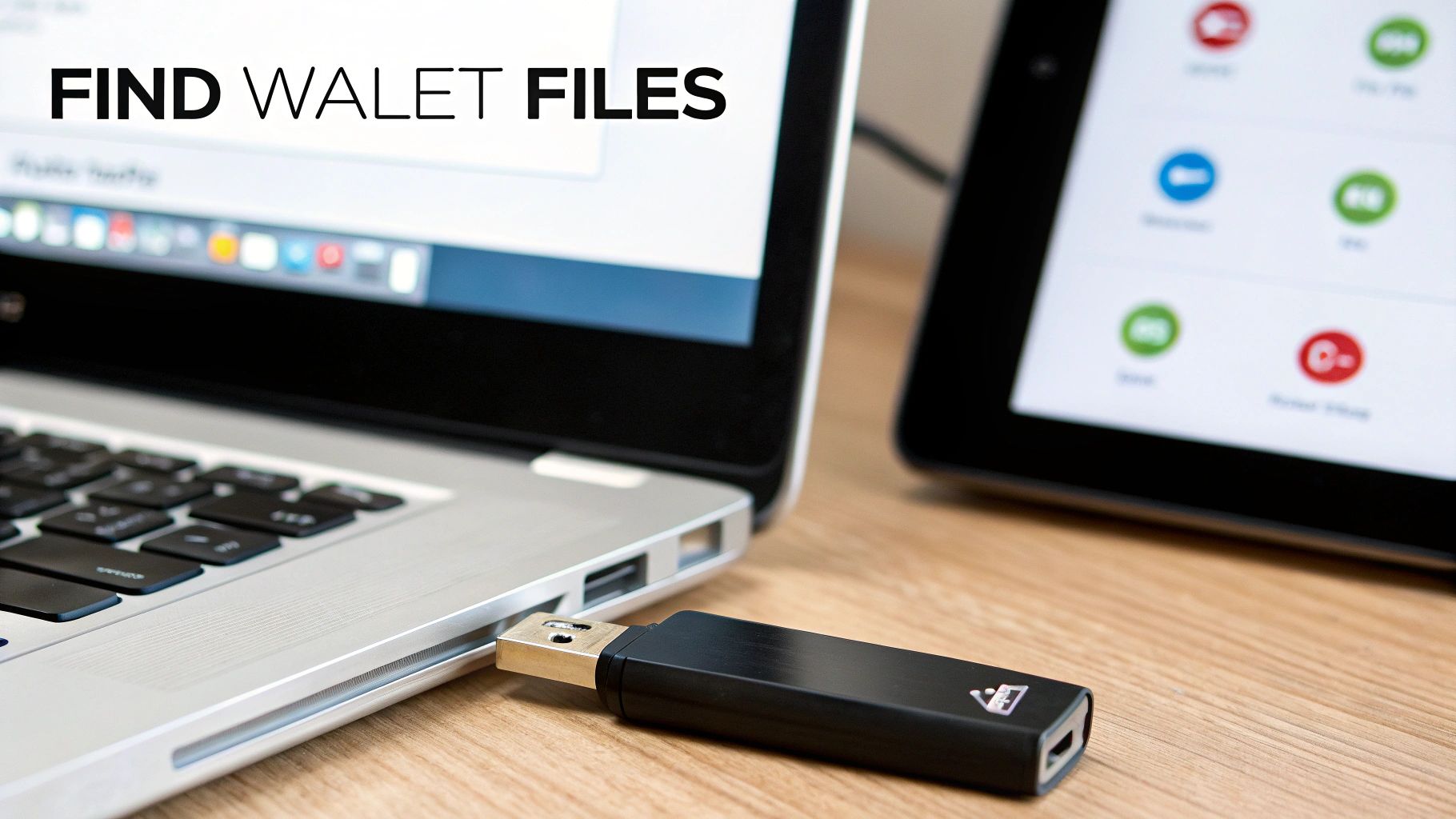
Where Could That Master Key Be Hiding?
The hunt for a seed phrase is a full-on physical and digital scavenger hunt. People's security habits vary wildly, so you need to check every place that seems even remotely plausible.
Let's start with the physical world:
- Safes and Lockboxes: This is the most obvious spot, so check it first. Look inside any fireproof safe, bank safe deposit box, or personal lockbox where you keep other vital documents like passports or property deeds.
- Notebooks and Planners: Did you have a dedicated notebook for your crypto activities? I've seen clients find their phrases scrawled in old journals, daily planners, or even on the last page of a favorite book.
- Official Recovery Sheets: Hardware wallets from companies like Ledger and Trezor usually come with special cards just for this purpose. Check the original box and any accompanying materials.
Now, let's check your digital life:
- Password Managers: A well-secured password manager like 1Password or Bitwarden is a common choice for storing a seed phrase. Search for entries like "wallet," "seed," or even the names of specific cryptocurrencies.
- Encrypted Files: You might have saved the phrase in an encrypted text document, a password-protected Word file, or on a VeraCrypt volume. Look for any files you remember specifically locking down.
- Photos: Some people snap a picture of their seed phrase for quick reference. This is risky, but it happens. Search your phone's photo gallery and cloud backups (like Google Photos or iCloud).
A critical warning: The moment you find that seed phrase, treat it like a brick of gold. Do not take a picture of it, email it to yourself, or type it into a random notes app. The only place it should ever be entered is directly into a legitimate wallet application during the official recovery process.
Putting the Key in the Lock: How to Safely Import Your Phrase
Got the magic words? Great. The next step is to use them to restore your wallet. The process is pretty standard across the board, though the user interface will vary slightly depending on the wallet.
First, and this is non-negotiable, download a fresh copy of the wallet software directly from its official website—that means going to metamask.io, trustwallet.com, ledger.com, and so on. This simple step is your best defense against malicious phishing apps designed to steal your phrase.
During the setup, you’ll see two main options: "Create a new wallet" or "Import/Restore an existing wallet." You want to hit "Import" or "Restore."
For a software wallet like MetaMask or Trust Wallet, a text box will appear, prompting you to enter your 12 or 24 words in the correct sequence. You'll then create a new password, which only serves to encrypt this new wallet instance on your device; it doesn't change your seed phrase.
If you're recovering a hardware wallet like a Ledger or Trezor, you'll do this on the device itself. Using the physical buttons, you will carefully enter each word of your 24-word seed phrase. Once that’s done, the desktop software (like Ledger Live) will sync up and restore your accounts.
Don't Fall at the Final Hurdle: Common Mistakes to Avoid
Entering your seed phrase incorrectly can be terrifying. It often generates a brand new, completely empty wallet, leading to a fresh wave of panic.
Here are the most common slip-ups I've seen:
- Wrong Order: The words must be in the exact numbered sequence you wrote them down. Swapping just two words will create an entirely different wallet.
- Spelling Errors: Every word comes from a standardized list of 2048 words (called the BIP-39 wordlist). A single typo will invalidate the whole phrase. Check each word carefully.
- Wrong Word Count: While most wallets auto-detect the length (12, 18, or 24 words), make sure you've entered every single word you have.
By finding your phrase and entering it with care, you can bring your wallet back from the dead on any new device. It’s the final, and most powerful, step in regaining control of your assets.
Troubleshooting Hardware Wallets Like Ledger and Trezor
Hardware wallets are the gold standard for a reason. They keep your private keys offline, creating a fortress around your crypto. But when that fortress locks you out, it can be incredibly frustrating. Whether you're using a Ledger, Trezor, or another device, the troubleshooting steps are quite different from software wallets.
The good news? As long as you have that all-important recovery phrase, your funds are almost certainly safe.
It’s crucial to understand that your crypto isn’t actually on the device. The hardware wallet is just a fancy key, a secure tool used to sign transactions. Your coins live on the blockchain, and your recovery phrase is the master key that can unlock access to them from anywhere.
Common Hardware Wallet Hiccups and How to Fix Them
Let's walk through some of the most common issues people run into. Before you assume the worst, always start with the simple stuff. Seriously. Try a different USB cable, plug it into another USB port, or just restart your computer. You'd be amazed how often a dodgy cable is the real villain.
If the basics don't pan out, here's what to check next:
- Device Won't Power On: This is usually a power issue. If your model has an internal battery (like some Ledgers), make sure it’s charged. If not, the problem almost always points back to the USB cable or port.
- Software Connection Fails: Apps like Ledger Live or Trezor Suite can be finicky. The number one cause of connection problems is a version mismatch. Make sure both your device's firmware and the desktop software are fully up to date.
- Forgot Your PIN Code: If you punch in the wrong PIN too many times (usually three strikes), the device will wipe itself. Don't panic. This is a security feature, not a bug. Your funds are fine. You’ll just need your 24-word recovery phrase to restore the wallet on the now-reset device or a brand new one.
Here's the core principle to remember: The physical device is disposable. Your recovery phrase is not. As long as you have those words, you have your crypto.
The Secure Restoration Playbook
So, what happens if your device is lost, stolen, broken, or wiped from too many failed PIN attempts? It’s time for a full restoration. This is the moment where having your recovery phrase safely stored becomes absolutely critical.
The process itself is surprisingly straightforward:
- Grab a New or Reset Device: You can use a brand-new hardware wallet or your original one that's been wiped clean.
- Choose 'Restore from Recovery Phrase': When you fire up the device, it'll ask if you want to set it up as new or restore from a backup. Choose restore.
- Enter Your Phrase: This is the painstaking part. Using the device's physical buttons, you'll enter each of the 12 or 24 words in the exact correct order.
- Set a New PIN: Once the phrase is verified, you get to create a fresh PIN.
- Reinstall Apps: For multi-currency wallets like Ledger, you'll need to reinstall the specific coin apps (Bitcoin, Ethereum, etc.) through the desktop software. Once you do, your balances will reappear.
This whole process underscores why protecting your recovery phrase is even more vital than protecting the device itself. Hackers are getting smarter, and personal wallet compromises are skyrocketing. A recent analysis found 158,000 incidents affecting 80,000 unique victims in just one year, leading to a staggering $713 million stolen. Attacks on personal wallets now account for 20% of all stolen value, a huge jump reflecting how hackers are targeting everyday users with phishing and malware. You can read the full analysis on crypto hacking trends to see just how prevalent this has become.
A Quick Word on Firmware Updates
A failed firmware update is a heart-stopping moment. The device can get stuck in "bootloader" mode, leaving you feeling helpless. But once again, if you have your recovery phrase handy before starting the update, your funds are safe.
If an update goes sideways, the official software from Ledger or Trezor will usually guide you on how to reboot or restore the device. The golden rule: Never, ever start a firmware update unless you’ve physically verified that you have your correct seed phrase right there with you.
When to Call in the Pros: Using a Wallet Recovery Service
You’ve turned your house upside down, scoured every old hard drive, and gone through every digital nook and cranny. You feel like you've hit a brick wall. But this isn't necessarily the end of the road. Sometimes, the last step in your search is realizing you need to bring in a specialist.
Professional wallet recovery services aren't magicians, but they have something you don't: massive computational power and highly specialized tools. Knowing when to make that call can be the difference between losing your funds forever and getting them back.
Is Your Situation a Job for an Expert?
Look, if you just misplaced a piece of paper with your seed phrase on it, that’s still on you to find. A recovery service can't help with that. But certain technical problems are their bread and butter.
You should seriously consider reaching out to a service if you find yourself in one of these situations:
- You have the wallet file but the password is gone. This is the classic scenario and the one with the highest success rate. These services use powerful server farms to brute-force the password, trying millions of combinations per second.
- Your wallet file is corrupted. Sometimes a
wallet.dator JSON file gets damaged. Experts can often piece together the broken data and salvage what seems lost. - You have a hint—any hint—about the password. Maybe you remember its length, a few of the words, or a pattern you always use. A small clue like that can slash the recovery time and dramatically boost the odds of a successful brute-force attack.
- You're wrestling with an old, obscure wallet. Many older wallets from the early days of crypto have quirks and technical oddities that require very specific knowledge to unlock.
Calling in a professional isn’t giving up. It's a strategic move. It's recognizing that the problem has graduated from a simple search to a complex cryptography puzzle that requires heavy-duty tools.
How to Spot a Legitimate Recovery Service (and Avoid Scammers)
The crypto world has its fair share of sharks. The last thing you want is for a recovery attempt to turn into a straight-up theft. Vetting any service is absolutely non-negotiable.
First and foremost, a real service will never ask for your seed phrase. They also work on a "no win, no fee" basis. This means they only get paid after they successfully recover your funds, usually taking a percentage as their commission. If someone demands an upfront fee, run.
Look for a professional website with clear terms, a transparent process, and real testimonials. The screenshot below shows the kind of clean, direct communication you should expect.
The focus is on secure, confidential help. They guide you through the process without making wild, unrealistic promises. That professionalism is a huge green flag.
And these services get results. Some firms have recovered over $2.5 million in a single year, with Bitcoin accounting for 70% of that value. The timeline can be anywhere from a few days to several months, depending entirely on the clues you can provide. While they typically charge a commission of around 20%, it's a small price to pay when the alternative is a total loss. You can dig into some of these amazing crypto recovery statistics and stories yourself.
So, What's the Process Actually Like?
When you engage a professional service, the whole process is designed to protect your privacy while giving them the best shot at success. It generally breaks down like this.
First, you'll fill out a secure form with details about your wallet and any password hints you can recall.
Next, you'll securely transfer the encrypted wallet file itself (like your wallet.dat). To be clear, you are not sending your crypto—just the locked digital box it’s in.
Then, they get to work. Their systems will launch a powerful brute-force attack, using sophisticated algorithms and your hints to systematically try to crack the password.
Finally, if they succeed, they'll let you know. They will then transfer the recovered funds to you, minus their agreed-upon commission.
This non-custodial model is critical. A legitimate wallet recovery service ensures you are always in control and are never asked to give up your most sensitive information. Making that call might just be the final, crucial step to getting your crypto back.
Answering Your Most Common Wallet Recovery Questions
When you're trying to find a lost wallet, a lot of questions pop up, especially when you feel like you're hitting a dead end. Let's tackle some of the most common ones I hear from people in this situation. Getting these answers straight can save you a ton of time and, more importantly, protect you from making a bad situation worse.
"I Have My Wallet Address. Isn't That Enough?"
I wish it were that simple. Unfortunately, your public wallet address is like your bank account number—anyone can look it up and send money to it, but you can't use it to take money out.
The only thing that gives you control over your crypto is your private key or the seed phrase that generates it. Without that, the funds are essentially locked in a digital vault on the blockchain. So, you have to stop focusing on the address and pivot your entire search toward finding that original seed phrase or wallet file.
"What About Using an Online Tool to Check My Seed Phrase?"
No. Absolutely, unequivocally, no.
This is probably the single most important rule in crypto security. Your seed phrase is the master key to everything. Punching it into a website, a random "recovery tool," or a Google Form is like handing a thief the keys to your house, your car, and your safe all at once. Scammers create these sites specifically to drain wallets instantly.
The only place you should ever enter your seed phrase is directly into a legitimate hardware wallet or a trusted software wallet you've downloaded from the official source. Never, ever type it into a browser.
Your seed phrase should never touch a device connected to the internet. If you even suspect it has been exposed online, consider it compromised. The first thing you do after recovery is move every last asset to a brand new, securely generated wallet.
"I Found My wallet.dat File but Forgot the Password. Now What?"
Okay, this is actually a great position to be in. Seriously, finding that file is a huge win, and it means there's a very real path forward.
That file is encrypted, and your password is the key. While you can't just guess it, this is precisely where a professional recovery service shines. They use powerful, specialized hardware to run through billions of password combinations, a process known as "brute-forcing." It's not just random guessing, though. They can use any clues you provide—fragments of old passwords, common words you use, important dates—to dramatically narrow the search. This requires massive computational power that just isn't available to most people, but it's often successful.
"How Do I Know if a Recovery Service Is a Scam?"
The crypto world is full of sharks, so you have to be careful. Thankfully, the difference between a legitimate service and a scam is usually pretty clear once you know what to look for.
Here are the green flags of a trustworthy recovery expert:
- They Don't Ask for Money Upfront: A reputable service operates on a "no win, no fee" model. They take a percentage of the recovered funds after they successfully get them back for you. Anyone demanding a fee beforehand is a huge red flag.
- They NEVER Ask for Your Seed Phrase: A real professional works with your encrypted wallet file and password hints. Your seed phrase is never part of the equation. If they ask for it, run.
- They Look and Act Professional: A legit service has a proper website, clear terms, and a transparent process. Scammers lurk in Telegram DMs, create fake urgency, and make wild promises. Trust your gut.
Knowing the answers to these questions helps you stay safe and focused. You can avoid the common traps and put your energy where it has the best chance of paying off.
If you've hit a wall and think you need professional help, Wallet Recovery AI uses a secure, confidential, and AI-powered process to help people regain access to their funds. You can learn more about our recovery methods here.
Leave a Reply