
The fastest way back into your crypto wallet is almost always your seed phrase (often called a recovery phrase). This string of 12-24 words is the master key to your funds. With it, you can restore everything on a new device or a fresh software install, completely bypassing a forgotten password.
Your First Moves When You Lose Wallet Access
It’s a gut-wrenching moment. That split second you realize you can't get into your wallet is something a lot of us in the crypto space have unfortunately felt. Panic is the first reaction, but it's your worst enemy here. Rushing things can lead to catastrophic mistakes, like getting scammed or, even worse, accidentally wiping the very data you need to recover.
So, before you do anything else, just stop. Take a breath. A cool head and a methodical approach are what will get you through this.
Your first job is to figure out what's gone wrong without making it worse. Think like a detective arriving at a scene—the priority is to secure the area and start gathering clues. What, exactly, is locking you out?
Identify the Root Cause
The right recovery path depends entirely on the problem at hand. Let's walk through the usual suspects so you can pinpoint your specific situation.
- Forgotten Password: You still have your hardware wallet or your wallet file, but the password to unlock it has vanished from your memory. The good news is your keys are still there; they're just behind a lock you can't pick.
- Lost or Misplaced Seed Phrase: This is a tough one. Your device is gone, the app was deleted, or the hardware died, and you have no idea where you wrote down that crucial 12-24 word phrase.
- Corrupted Wallet File: You've got the
wallet.dator keystore file, but it's been damaged. This can happen from a software bug, shutting down your computer improperly, or hard drive failure. The data might still be salvageable, but it’s unreadable for now. - Hardware Wallet Failure: Your Ledger or Trezor is broken, lost, or just won't turn on. In this scenario, the physical device is just a piece of plastic and metal. Your seed phrase is what truly holds the value.
Getting this initial diagnosis right is the most critical step you'll take. This flowchart shows how your options diverge based on one simple question: do you have your seed phrase?
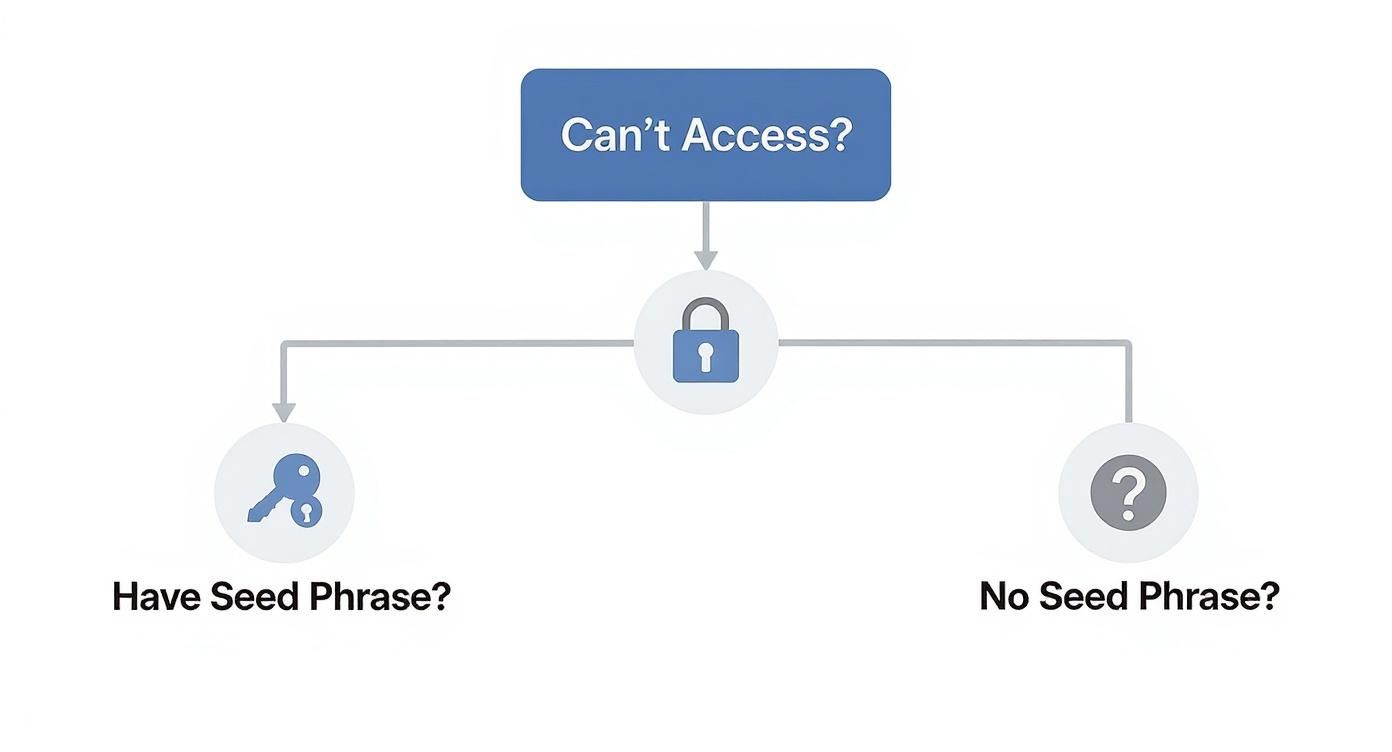
As you can see, having your seed phrase gives you a straight shot to recovery. Not having it means you're headed down a much more complex and uncertain road.
To help you get started, this table breaks down the common symptoms and gives you a clear first step.
Initial Crypto Wallet Recovery Assessment
| Symptom | Potential Cause | Immediate First Step |
|---|---|---|
| Can't remember login password for software/app | Forgotten Password | Do not uninstall the software. Begin compiling a list of all possible passwords. |
| Hardware wallet won't turn on or is lost | Device Failure/Loss | Find your written seed phrase. This is the key to restoring on a new device. |
| Wallet app crashes or shows an error | File Corruption | Locate the backup of your wallet file (wallet.dat, keystore) before trying any fixes. |
| Computer is dead/gone, software was on it | Lost Wallet File | Your only path forward is locating your original 12-24 word seed phrase. |
| I have a seed phrase but it says "invalid" | User Error | Double-check for spelling mistakes, correct word order, and extra spaces. |
Use this as your starting point. Correctly identifying the problem now will save you a world of hurt later.
What Not to Do Under Any Circumstances
That feeling of desperation makes you a prime target for scammers. They hang out in public forums, on X (formerly Twitter), and in Discord servers, just waiting for someone to post about losing their funds.
Crucial Security Warning: Never, ever share your screen, private keys, or seed phrase with anyone online claiming they can help you. A legitimate recovery professional will never ask for your seed phrase.
You need to be on high alert for:
- Unsolicited Direct Messages (DMs) from "support" offering to help.
- People asking you to connect your wallet to a strange website to "synchronize" it.
- Random software downloads that promise to magically find your crypto.
The scale of this threat is staggering. The crypto community has seen losses of around $1.5 billion from wallet issues, including scams and forgotten phrases. You can learn more about the state of digital asset recovery on uoevo.com. Keeping yourself safe from predators during this stressful time is just as important as the recovery itself.
Recovering a Lost Seed Phrase or Private Key
Your seed phrase is the master key to your crypto kingdom. If you have it, getting back into your wallet is usually a walk in the park. But what if you don't? What if that little piece of paper or text file is gone forever?
Losing your seed phrase is tough, but it doesn't always mean your funds are lost for good. It just means the recovery path gets a lot more creative.

This happens more often than you'd think. In fact, most crypto losses aren't from hacks—they're from people simply losing their seed phrase or private keys. It’s an easy mistake to make, especially as wallet security gets more and more complex.
When you're in this spot, your next moves are a mix of digital archaeology and jogging your own memory.
Reconstructing a Partial Seed Phrase
It's rare for someone to remember all 12 or 24 words of their seed phrase from memory. But it's surprisingly common to remember some of them. Maybe you remember a handful of words but have no idea what order they go in.
That partial information is gold.
Let's say you had a 12-word phrase. You're pretty sure you know 10 of the words, but two are a complete blank, and the order is a mess. Trying to guess the last two words and test every single combination by hand would take a lifetime.
This is where specialized recovery tools are a lifesaver. They can take the words you do know and blast through every possible combination for the missing ones, checking them against the official BIP39 wordlist of 2,048 words. The software automates the entire process, testing permutations until it finds one that unlocks a wallet with a balance.
A Note on Security: This is critical. Only run recovery tools on a computer that is completely offline. If that machine is connected to the internet, you're opening the door for malware to sniff out your partial phrase and, eventually, drain your wallet.
Key Tools and Techniques
When you need to recover crypto wallet access with just a few pieces of the puzzle, a few techniques can get you across the finish line.
- Mnemonic Code Converters: These are great for sanity-checking. You can plug in a sequence of words you think is right and see if it's even a valid phrase. It can also help you spot typos or words that aren't on the BIP39 list.
- Brute-Force Software: Tools like BTCRrecover are the heavy hitters. It's a powerful open-source program where you feed it the words you know, tell it how many are missing, and let it churn. It’s a demanding process for your computer, but if you have most of the information, the success rate is high.
- Wordlist Analysis: Sometimes your brain plays tricks on you. You might remember the word "army," but the actual word was "armor." Or "brain" instead of "train." Simply scanning the BIP39 list for words that sound similar or look similar can be the spark that helps you remember the correct one.
If you want to get a better handle on how these phrases work under the hood, our detailed guide on the wallet seed phrase is a great place to start.
Hunting for Private Keys in Backups
Okay, what if you never even wrote down a seed phrase? Maybe you set up a wallet years ago and just saved a digital backup somewhere. This is another solid path to recovery. Now, you’re not looking for a list of words; you’re hunting for the raw private key or the file that contains it.
It's time to go on a digital scavenger hunt. Scour your old hard drives, check your cloud storage like Dropbox and Google Drive, and dig through ancient USB sticks. You’re looking for very specific file types.
Here’s what to search for:
wallet.dat: This is the classic file for Bitcoin Core and many of its offshoots..json: The go-to format for Ethereum keystore files, often called UTC files..keyor.txt: It sounds simple, but many people just saved their raw private key in a plain text file.
If you find one of these files, you've won half the battle. The other half is remembering the password you used to encrypt it. If you have the file but are stuck on the password, that's a whole different challenge—but finding the file itself is a massive first step to getting your crypto back.
Practical Recovery Steps for Different Wallet Types
The path to recovering a crypto wallet is never one-size-fits-all. The strategy for a Ledger that took an unfortunate swim is worlds apart from restoring your MetaMask on a new laptop. Knowing your wallet type inside and out is the first and most crucial step to getting your funds back without breaking a sweat.
Let's walk through the real-world recovery steps for the most common wallets you'll encounter.
Restoring Hardware Wallets Like Ledger and Trezor
Picture this: your Trezor accidentally went through a full wash cycle. It’s toast. But you, being smart, have that 24-word seed phrase tucked away safely. Here's the good news—your crypto is completely fine. That little device was just the key; your assets live securely on the blockchain.
Your only goal now is to use that seed phrase to bring your wallet back to life on a new device. It doesn't even need to be the same brand. Since most hardware wallets, including Ledger and Trezor, use the same BIP39 standard, you can restore a Ledger phrase on a Trezor, or vice-versa.
The process is refreshingly simple:
- Get a New Device: Buy a new, factory-sealed hardware wallet directly from the manufacturer or an authorized reseller. Never, ever buy a used hardware wallet.
- Kick off Recovery Mode: When you first power on the new device, it will ask if you want to set it up as new or restore an existing wallet. Choose the "Restore" or "Recover" option.
- Enter Your Seed Phrase: This is the most critical part. You'll carefully type your 12, 18, or 24 words, in the exact order, directly onto the device's screen or using its buttons. Your phrase should never touch your computer's keyboard or an online form.
Once you’ve confirmed the phrase, the new device will sync up and grant you access to all your old addresses and funds.
One common snag people hit is seeing a zero balance after a successful restore. Don't panic. This is almost always a firmware issue. Make sure your new device's firmware is fully updated, then try reinstalling the specific crypto apps (like the Bitcoin or Ethereum app on a Ledger). That usually does the trick.
Recovering Software Wallets Like MetaMask and Exodus
Now for a different scenario. You’ve got a shiny new phone and need to get your MetaMask wallet running on it. You already deleted the app from your old phone, but thankfully, you have that 12-word seed phrase written down.
With software and mobile wallets like MetaMask or Exodus, that seed phrase is everything. You aren't fixing broken hardware; you're simply re-establishing the link to your funds from a fresh installation.
A word of advice from experience: Before you ever delete a wallet app, double-check that you have the correct seed phrase. If you're not 100% sure, test it by importing it into a different temporary wallet first. Relying on memory has cost people fortunes.
The recovery workflow is just as straightforward:
- Download the official wallet app from its official website or the App Store/Google Play. Beware of fakes.
- When setting it up, look for an option like "Import with Secret Recovery Phrase."
- Carefully type in your seed phrase.
That's it. Your wallet, with all its assets and transaction history, should reappear. If you're on a desktop wallet like Exodus and lost the phrase but still have the old computer, there's a slim chance. You might be able to find the local wallet files tucked away in a hidden application folder. These are a last resort and will still require your password to unlock.
Niche Scenarios: Keystore Files and Multi-Sig Wallets
Some recovery situations are a bit more old-school or complex. For example, many early Ethereum users don't have a seed phrase. Instead, they have a keystore file—a JSON file that contains their encrypted private key. To get access, you need two things: the keystore file itself and the password you created when you made it. Wallets like MyEtherWallet (MEW) still have a specific feature to "Access Wallet" using this file-and-password combo.
Then you have multi-signature wallets, which add a layer of human coordination to the mix. These wallets need multiple approvals (say, 2-of-3 signatures) to send a transaction. What happens if one of the keyholders goes MIA or loses their key?
A well-designed multi-sig setup plans for this. The recovery process is baked right into its structure. If you control two of the three keys, for instance, you can still access the funds. If you lose your key, the recovery plan involves contacting the other signers. Together, you would create and move the funds to a brand-new, secure multi-sig wallet where you're issued a new key. It's less of a technical puzzle and more of a coordinated human process.
Advanced Password Cracking and File Recovery
So far, we’ve been talking about recovering access with a seed phrase. But what happens when you’re facing the opposite problem? You've stumbled upon an old wallet.dat file on a dusty hard drive, but the password you set a decade ago is completely gone from your memory.
In this situation, your seed phrase is useless. Your only way in is to crack the password.
This is where we get into more advanced, and frankly, more technical territory. It’s a path that takes time and patience, but for many people holding onto old wallets, it's the last and only hope. The goal isn’t to find a key anymore—it’s to build one from scratch that fits the lock.
The process boils down to using specialized software to systematically guess the password. It’s definitely not a simple point-and-click operation, but with the right strategy and a bit of luck, it can work wonders.
Using Brute-Force Password Tools
When you need to get through a password, you bring out the heavy hitters. Two of the most respected open-source tools for this job are Hashcat and John the Ripper. These programs are designed to take your encrypted wallet file and throw millions—or even billions—of password combinations at it per second until something clicks.
Think of it as a bank vault with a digital keypad. A pure brute-force attack is like trying every single number combination, starting from 000001 and going all the way up. It’s a slow, methodical grind. While cracking a truly random, 12-character password this way could take centuries, the reality is that most people don't use truly random passwords.
And that’s exactly where you have a massive advantage.
Creating a Targeted Wordlist for Higher Success
Instead of trying every character combination in the universe, the smarter move is to give the software a targeted list of educated guesses. After all, you know yourself better than anyone. Your password is very likely some variation of something personal to you.
The trick is to create a custom "wordlist"—a simple text file containing every possible password piece you can remember. This dramatically narrows down the search space and massively boosts your chances of success.
Your list should include things like:
- Old Passwords: Every password you've ever used for email, social media, banking, you name it.
- Personal Info: Names of family, pets, and close friends. Don't forget nicknames.
- Important Dates: Birthdays, anniversaries, and other key dates in all formats (e.g.,
04151992,Apr1592,15041992). - Hobbies and Interests: Favorite bands, sports teams, book characters, or video games.
- Common Patterns: People often tack numbers or symbols onto a base word. Think
Password!,Password123, orPassword2024.
Pro Tip: Before you start any password cracking, disconnect your computer from the internet. This creates an "air-gapped" environment. It ensures that even if your machine has some hidden malware, your wallet file and potential passwords can't be siphoned off to an attacker.
Once you have this personalized list, tools like Hashcat can run a much more intelligent attack, combining words, adding numbers, and swapping characters until it finds that one magic combination.
Recovering Deleted or Corrupted Wallet Files
But what if the wallet file itself is the problem? Maybe you accidentally deleted it, or the hard drive it lived on got corrupted. Before you throw in the towel, you need to know that data is rarely ever truly "deleted."
When you delete a file, the operating system typically just marks the space it occupied as available for new data. The file is often still there, just invisible, waiting to be overwritten.
For this kind of digital archaeology, you'll need data recovery software. Tools like Recuva (for Windows) or PhotoRec (which works on multiple platforms) are designed to scan a drive for the digital ghosts of deleted files.
You can point these tools to search for specific file types, like .dat for old Bitcoin wallets or .json for Ethereum keystore files. If the software finds your missing wallet file, you can restore it and then move on to cracking the password if you need to. It’s a technical last resort, for sure, but it has reunited plenty of people with their lost crypto.
Should You Hire a Professional Recovery Service?
After grinding through every DIY method you can think of—from password crackers to file recovery tools—it's easy to feel like you've hit a brick wall. That feeling of frustration is completely normal. I've been there, and I've talked to countless others who have too.
While the temptation is to just keep hammering away, sometimes pushing forward on your own can do more harm than good. This is especially true when you're dealing with corrupted files or failing hardware. Knowing when to stop is just as important as knowing what to try next.
When to Call in the Experts
Look, not every locked wallet needs a professional. If you have your seed phrase tucked away somewhere, you're golden. But certain situations are notoriously difficult and are prime candidates for professional help. If you find yourself in one of these scenarios, it’s a strong signal that it’s time to bring in someone with more firepower.
Consider getting professional help if you're dealing with:
- Physically Damaged Hardware: A hardware wallet that's been crushed, drowned, or burned isn't something you can fix at home. This requires forensic-level data recovery in cleanroom environments, where experts can carefully extract data directly from the memory chips.
- Complex Password Cracking: You've tried every password variation you can think of, and brute-force tools are getting you nowhere. Professionals use massive, powerful computing clusters—we're talking thousands of GPUs working in parallel—to blast through trillions of combinations at speeds no home computer could ever hope to match.
- Corrupted Wallet Files: A badly corrupted
wallet.datfile often needs more than a simple recovery tool. Experts can manually piece together fragments of the file, repair its delicate structure, and extract the private keys using advanced data recovery techniques that aren't publicly available.
These situations move beyond simple user error and into the realm of digital forensics. Trying to tackle these yourself without the right training can easily turn a recoverable situation into a permanent loss.
Choosing the Right Path: DIY vs. Professional Help
Deciding whether to continue on your own or bring in an expert is a critical choice. Here’s a quick comparison to help you figure out what's best for your specific situation.
| Scenario | DIY Approach | Professional Service Recommended |
|---|---|---|
| Forgotten but Simple Password | Use memory-jogging techniques and password lists you've created. Run a basic brute-force tool on your own PC. | If your password is long and complex, and your own attempts have failed, a professional's computing power is needed. |
Slightly Corrupted wallet.dat |
Try wallet recovery tools like PyWallet or specific repair scripts if you're comfortable with the command line. | If basic tools fail or the file is severely damaged, experts can perform manual structural repairs. |
Lost wallet.dat File |
Use file recovery software like Recuva or TestDisk to scan your hard drive for deleted files. | If the drive has been overwritten or is physically failing, forensic data recovery is your only real option. |
| Physically Damaged Hardware | None. Do not attempt to open or power on a damaged device. | Immediately. This requires specialized cleanroom facilities and hardware to prevent further data loss. |
Ultimately, the decision comes down to the complexity of your problem and your own technical comfort level. Don't risk making things worse if you're out of your depth.
Vetting a Reputable Recovery Service
The crypto recovery industry, unfortunately, attracts its fair share of scammers preying on people's desperation. Finding a trustworthy partner is everything. You absolutely need to do your homework and look for clear signs of legitimacy.
A legitimate service will have a transparent, verifiable process. They should be able to explain their methods without asking for sensitive information upfront. For example, leading services have achieved a 97% success rate in traceable cases, recovering over $815 million in lost funds. This is a testament to their advanced forensic tools and experienced teams. You can read more about how these services operate on sites like uoevo.com.
Key Takeaway: A trustworthy service will never guarantee a 100% success rate. They also won't ask for payment until after they've successfully recovered your assets. Their fee should be a percentage of the recovered funds, paid only after you regain access.
Red Flags to Watch Out For
As you search for a crypto recovery expert, you need to be hyper-vigilant for warning signs. Scammers are clever—they use sophisticated language and slick, professional-looking websites to lure you in.
Steer clear of any service that:
- Demands Upfront Fees: This is the single biggest red flag. If they ask for a "deposit" or "processing fee" before the work is done, run. It's almost certainly a scam.
- Asks for Your Seed Phrase: No legitimate recovery professional will ever ask for your 12 or 24-word seed phrase. They work with encrypted files and hardware, not your master key.
- Guarantees Success: Recovery is never a sure thing. An honest service will be upfront about the chances of success after a free, initial evaluation of your situation.
- Uses High-Pressure Tactics: If they rush you into a decision or claim a "limited-time offer," just walk away. A true professional understands the weight of this decision and will give you space.
Choosing the right partner is a critical final step. Take your time, ask a ton of questions, and trust your gut. Making the right choice here is often the last, most important part of your recovery journey.
Got Questions About Crypto Wallet Recovery? Let's Unpack Them.
Diving into crypto wallet recovery can feel like navigating a maze in the dark. It's totally normal to have a ton of questions. Getting straight answers is the first step to feeling in control and avoiding costly mistakes. Let's tackle some of the most common questions I hear from people trying to get their funds back.
Can I Recover a Crypto Wallet Without the Seed Phrase?
The short answer is: maybe, but it's a long shot and your options shrink dramatically. Your seed phrase is designed to be the ultimate master key, the one thing that can get you back in no matter what. Without it, you're looking for an unlocked back door, and that depends entirely on your specific situation.
Think of it this way: your wallet is a house, and the seed phrase is the master key that opens every single lock. Lose that, and you're left jiggling windows, hoping one was left open.
Here are the potential "unlocked windows" you might have without a seed phrase:
- You Still Have the Device and Password: If you have the original phone or computer where your wallet lives and you remember the password, you're in business. You can simply open the wallet, access your funds, and—most importantly—finally find and back up your seed phrase properly this time.
- You Have a Private Key Backup: Some older or more advanced wallets let you export individual private keys. If you happened to save one of these, you can often import it into a new wallet and get control of the funds tied to that specific address.
- You Have a Locked Wallet File: For desktop wallets like Bitcoin Core, you might have the all-important
wallet.datfile. If you have this file but can't remember the password, you're not out of options. Specialized tools can be used to try and crack the password.
The Hard Truth: If you've lost the device, the data is gone, and you have zero backups of your seed phrase or private keys, your funds are very likely lost forever. This is the harsh reality of self-custody and underscores why protecting your seed phrase is the single most critical thing you can do.
How Long Does Wallet Recovery Usually Take?
This is the "how long is a piece of string" question. A successful recovery can take anywhere from a few minutes to several months—or even longer. It all comes down to what went wrong and what tools you have left.
A lightning-fast recovery happens when you have your seed phrase. The whole process of importing it into a new wallet and letting it sync up with the blockchain usually takes less than five minutes. It’s the gold standard for a reason.
But if you're trying to crack a forgotten password on an encrypted wallet file, the timeline is completely different. It hinges on two big factors: how complex your password was and the raw computing power you can throw at it. A simple, weak password might pop in a few hours. A strong, complicated one could take a professional service with a farm of specialized hardware weeks or even months to break through.
Most professional services will give you a time estimate after an initial (and usually free) look at your case. Simple password issues might be sorted in days, while complex forensic work on a physically busted hardware wallet could easily take several weeks.
What’s the Best Way to Prevent Losing Access Again?
Prevention is always, always better than the cure—especially in crypto, where the "cure" is often impossible. Protecting yourself from another lockout isn't about finding one perfect solution; it's about building layers of redundant, smart security habits.
Here are the most effective strategies to lock down your access for good:
- Create Multiple Physical Backups: Don't just write your seed phrase on a piece of paper. Stamp it into metal plates. Store these backups in at least two different, secure, and geographically separate places. Think of a fireproof safe at home and a safe deposit box at a bank.
- Never Store Your Seed Phrase Digitally: This is a non-negotiable rule. Do not save your seed phrase in a text file, take a picture of it, or keep it in a cloud drive or password manager. The second it's on a connected device, it's a target for hackers.
- Use a Trusted Password Manager: For the passwords that unlock your wallet apps (not the seed phrase!), a good password manager is your best friend. It helps you create and remember ridiculously strong, unique passwords for everything.
- Consider a Multi-Signature Wallet: If you're managing a significant amount of crypto, a multi-sig setup is a fantastic security upgrade. It requires more than one key to sign off on a transaction, which means losing a single key doesn't mean you've lost your funds.
- Explore Social Recovery: This is a newer concept, talked about a lot by people like Vitalik Buterin. It involves designating trusted friends or family ("guardians") who can help approve a recovery if you get locked out. It spreads out the trust so no single point of failure can take you down.
Put these strategies into practice, and you'll build a safety net so robust that losing access to your crypto becomes nearly impossible.
If you've tried everything and are still locked out, don't give up hope. The expert team at Wallet Recovery AI uses advanced techniques to help people securely regain access to their lost crypto wallets. Submit your case online for a confidential evaluation.
Leave a Reply