

That pit-in-your-stomach feeling when you can’t remember a password is bad enough. But when a crypto wallet is locked behind that forgotten password, it’s a special kind of terror.
Recovering access isn't like hitting a "Forgot Password?" link on a normal website. In crypto, getting back in means you need to have the right keys—literally. Your recovery path depends entirely on the type of wallet you have and what kind of backup you created, whether it's a seed phrase, a keystore file, or another method.
The High Stakes of a Forgotten Crypto Password
Forgetting a password is a common, everyday annoyance. In the world of cryptocurrency, it can be a catastrophic, multi-million dollar mistake.
Unlike your bank account or email, there's no customer service hotline to call. The decentralized promise of crypto puts you in complete control, which means you are solely responsible for your own security. This isn't a design flaw; it's a core feature. It's also what makes losing access so final.
Just how big is this problem? Experts estimate that a staggering 20% of all Bitcoin—around 3.7 million BTC—is likely lost forever, locked away in wallets with forgotten passwords. This isn't just a statistic. Think of Stefan Thomas, the programmer who famously forgot the password to a hard drive holding 7,002 BTC. Those coins are now worth hundreds of millions of dollars, and he’s still locked out. You can read more about the sheer scale of lost crypto over on ainvest.com.
Why Standard Password Resets Don't Exist
That missing "Forgot Password" button is there for a reason—or rather, it's not there for a reason. Traditional finance relies on a bank as a trusted middleman. They verify your identity with a driver's license or a phone call and can grant you access.
Crypto wallets, especially non-custodial ones, throw that model out the window.
- No Central Server: Your password isn't stored on some company's server. It lives on your device and is used to encrypt your private keys.
- Privacy First: Blockchains are pseudonymous by design. Since your real-world identity isn't tied to your wallet, there’s no way for a service to "verify" it's you.
- Ultimate Control: The system is built so that only the holder of the private keys (or the seed phrase that creates them) can move the funds. This is what stops anyone—from hackers to governments—from touching your assets without your permission.
The core principle is simple but unforgiving: if you lose the keys to your digital vault and forget the combination, no one else has a spare copy.
Understanding Your Wallet Type Is the First Step
Before you can even start trying to get back in, you have to know what you're dealing with. The recovery method you'll use is completely dictated by your wallet type. Is it a software wallet on your computer? A hardware device? Or are your funds on an exchange?
This flowchart breaks down the different paths you might take.
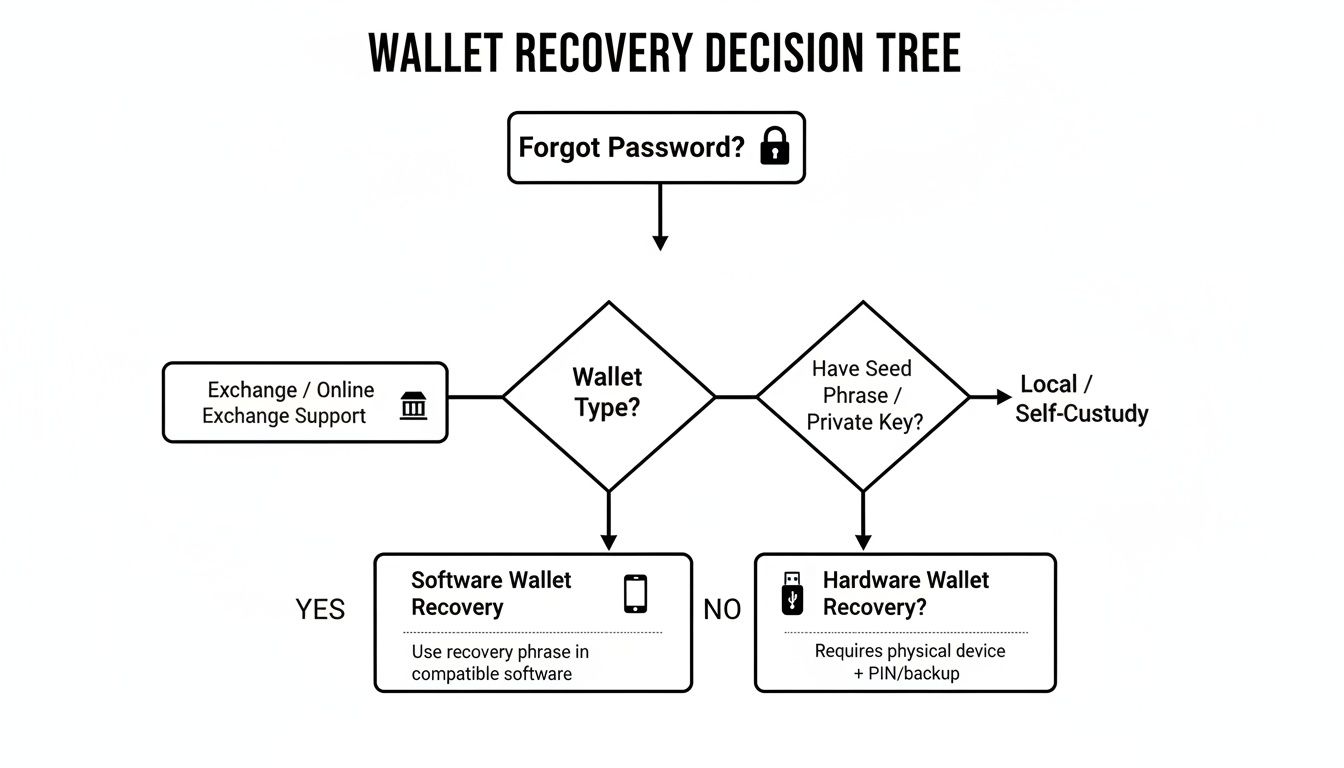
As you can see, your first move is figuring out which category your wallet falls into. Each one has its own playbook for getting you back in control of your funds.
To make it even clearer, here’s a quick summary of the primary recovery methods for different crypto wallets. This should help you identify the right path from the start.
Crypto Wallet Recovery Methods at a Glance
| Wallet Type | Primary Recovery Method | What You Need | Key Challenge |
|---|---|---|---|
| Exchange Wallet | Standard Password Reset | Access to your account email or phone number | Passing the platform's KYC/identity verification process |
| Software Wallet | Seed Phrase Restoration | Your 12, 18, or 24-word seed phrase | Finding the physically written-down seed phrase |
| Hardware Wallet | Seed Phrase Restoration | Your 24-word seed phrase and a new/reset device | Physically locating the seed phrase backup |
| Encrypted File Wallet | Password Cracking | The wallet file (e.g., wallet.dat, Keystore JSON) |
Brute-forcing the password without corrupting the file |
This table lays out the fundamental differences. For exchanges, it's about proving your identity. For nearly everything else, it all comes down to that seed phrase you hopefully wrote down and stored somewhere safe.
That moment of panic when you realize you’ve forgotten your wallet password is a feeling most crypto veterans know well. But before you spiral, take a deep breath. Your most powerful recovery tool isn't some complex hacking method; it's the seed phrase you were given when you first set up the wallet.
This string of 12, 18, or 24 words is the master key to everything. It’s not just a backup. If the password is the key to your front door, the seed phrase is the deed to the house—it proves ownership and lets you change the locks entirely. With it, your old password becomes completely irrelevant.
Putting Your Seed Phrase to Work: A Walkthrough
Using a seed phrase is a pretty standard process across most non-custodial wallets, whether you're on MetaMask, Trust Wallet, or Exodus. The basic idea is always the same: you're telling a fresh installation of the wallet to "restore" your account from its master key instead of creating a new one.
Let's walk through it using MetaMask as an example, since the steps are nearly identical on both the desktop extension and the mobile app.
First things first, you need a clean slate. If the old, locked wallet is still on your device, you’ll have to either uninstall and reinstall the app or dig into the settings for a "Reset Wallet" option. Don't worry, this just wipes the encrypted local file; your crypto is safe on the blockchain, and your seed phrase is what grants access to it.
Once you open the fresh app, you'll see a welcome screen. Look for the option that says something like "Import an existing wallet" or "Restore with Secret Recovery Phrase." This is the path you want.

Now for the most important part: carefully type in your seed phrase. Every word has to be in the correct order, with a single space separating them. No extra spaces at the beginning or end. This step is what regenerates your private keys on the new device and brings your funds back under your control.
After the wallet accepts the phrase, it will ask you to create a new password. This is just for this specific installation on this device and has zero connection to the password you originally forgot.
Where Things Can Go Wrong (And How to Fix It)
This process is precise. One tiny mistake and it will fail, leaving you to think your seed phrase is wrong when it's probably just a simple typo. I’ve seen it happen countless times.
Here are the usual suspects:
- Wrong Word Order: The sequence is everything. Word #3 has to be in the third spot, no exceptions.
- Spelling Mistakes: Every word is pulled from a specific list (the BIP-39 wordlist). "Future" and "futuree" are not the same thing to the algorithm.
- Pesky Extra Spaces: Make sure there's only a single space between words. A double space or a space at the very end can throw the whole thing off.
Pro Tip: If the import fails, don't panic. Just go back and meticulously check every single word against your written backup. It’s amazing how easily you can misread your own handwriting or fat-finger a word when you're stressed.
In some rarer cases, you can have the words perfectly right and still see an empty wallet. This sometimes points to a more technical issue called the derivation path. While most modern wallets use a standard path to generate your addresses from the seed, some older or more obscure ones didn't. If you're stuck, you might need to figure out if your original wallet used a non-standard path. For those wrestling with these more advanced problems, digging into how a https://walletrecovery.ai/wallet-seed-phrase/ actually works can be a real eye-opener.
Recovering Wallets with Keystore Files and PINs
While a seed phrase is the master key for getting back into most modern wallets, it's not the only game in town. Some scenarios, especially with older Ethereum wallets or hardware devices, throw different tools into the mix—things like keystore files or device PIN codes. Knowing how these work is your best bet when a forgotten password stands in your way.
A keystore file, which you might see as a UTC or JSON file, is basically your private key locked inside an encrypted file. You set the password. Think of it like a digital safe: the file is the safe itself, but you still need the right combination (your password) to open it up and get what's inside. This was a popular method used by wallets like MyEtherWallet (MEW) and MyCrypto back in the day.
So, what if you have the file but the password is a total blank? You're not completely stuck. Unlike losing a seed phrase, this is a memory game. You have the encrypted data; you just need to find the key.
Jogging Your Memory for a Keystore Password
Since the password is the only missing piece, the entire recovery process boils down to one thing: remembering it. The good news is you can methodically work through every possibility without getting permanently locked out after a few wrong guesses.
Start by brainstorming every password variation you've ever used. Most of us fall into predictable patterns without even realizing it.
- Base Words: Did you have a go-to word or phrase? Something like
SummerSun2018? - Common Suffixes: Do you always tack on the same numbers or symbols at the end? Think
!,?,#,2020, or123. - Capitalization: Try all the different ways you might have typed it, like
summersun,SummerSun, or evenSUMMERSUN. - Substitutions: What about common character swaps? It's easy to switch an
Sfor a$or anafor an@.
The goal here isn't just to guess randomly. It's a systematic process of reverse-engineering your own habits. More often than not, the "forgotten" password is just a slight twist on one you still use today.
Hardware Wallets and Forgotten PINs
Hardware wallets from companies like Ledger and Trezor add another security layer with a device-specific PIN. A huge misconception is that forgetting this PIN means your crypto is lost forever. Let me be clear: this is absolutely not true.

That PIN is just there to protect your device from someone getting their hands on it. If a thief steals your Ledger, they can't get to your funds without knowing the PIN. In fact, most hardware wallets will completely wipe themselves after a few wrong attempts—usually three.
I know, that sounds terrifying. But it’s a self-destruct feature that protects you. A wiped device is just a blank piece of hardware. Your funds aren't actually on the device; they live on the blockchain. The one thing that truly connects you to them is that 24-word recovery phrase you wrote down when you first set it up.
So, if you forget your PIN, here’s how you get back in:
- Let the device wipe itself. Just enter the wrong PIN a few times.
- Follow the prompts on the device to restore it from a recovery phrase.
- Carefully enter your 24-word seed phrase.
- Once it's restored, you get to set a brand-new PIN.
Your old, forgotten PIN is now completely irrelevant. This whole process drives home a critical point: the real security of your hardware wallet isn't the PIN you punch in every day. It’s the physical safety of your seed phrase backup.
Seed Phrase vs Keystore File Recovery
It really helps to see how these two software wallet recovery methods stack up. One is your ultimate master key, while the other is a locked box that still needs a password.
Here's a quick breakdown to help you figure out which path you're on.
| Feature | Seed Phrase Recovery | Keystore File Recovery |
|---|---|---|
| What It Is | A 12-24 word master key that regenerates all private keys. | An encrypted file containing your private key. |
| What You Need | The correctly ordered list of words. | The keystore file and the password. |
| Password Role | Not needed. You create a new password after restoring. | Absolutely essential. The password unlocks the file. |
| Best For | Universal recovery across most modern wallets. | Situations where you have the file but just need to recall the password. |
This comparison should make it clear. If you have your seed phrase, you hold the golden ticket. If all you have is a keystore file, your mission becomes a focused investigation to dig up that forgotten password.
You've tried everything. You've torn apart old notebooks looking for your seed phrase, wracked your brain for every password variation you've ever created, and gone down the rabbit hole of every self-help guide online. Nothing.
That feeling of finality starts to creep in, but this doesn't have to be the end of the road. When you've truly exhausted all your options, it’s time to consider calling in the experts.
Professional recovery services aren’t your first move. They're the final, calculated play when the situation has gone far beyond typical DIY methods. Think of it like escalating from a simple lock-picking kit to a specialized safecracker. These scenarios often involve complexities that demand immense computational power and highly specialized software.
Maybe you only have a fuzzy memory of your password—the first few characters, perhaps, and a vague idea of the symbols you used. Or maybe the wallet file itself is corrupted and completely unreadable by standard software. These are precisely the moments where a professional service can make all the difference.
Complex Problems Need Advanced Solutions
Recovery specialists don't just randomly guess passwords. They use sophisticated, methodical approaches to crack them, and one of the most powerful is AI-driven brute-force attacks.
This isn't the chaotic, wild guessing you might be picturing. Instead, it starts with you providing every single scrap of information you can remember about your password.
- Any words, names, or phrases you might have included.
- Significant dates or important numbers.
- Your usual patterns for capitalization or where you place symbols.
- The approximate length of the password.
The AI then takes these hints and intelligently builds millions of targeted password variations. It actually learns from your patterns to prioritize the most likely combinations, which massively increases the odds of success compared to a blind attempt. This targeted approach is what makes reclaiming "lost" funds possible.
When you're dealing with a partially remembered password or a non-standard wallet setup, AI-powered brute-force isn't just a shot in the dark—it's a guided missile aimed directly at the right combination. It methodically tests possibilities that would take a human lifetime to attempt.
Vetting a Service for Security and Trust
Handing over your wallet file, even an encrypted one, requires a huge leap of faith. The crypto space has its share of scammers, so it's absolutely critical to vet any service you're thinking of using.
Your number one concern should always be security and privacy. A reputable service will never ask for your seed phrase. They only need the encrypted wallet file itself and your password hints to do their work.
Look for transparency. Do they explain their process clearly? Do they have verifiable testimonials or case studies from past clients? A professional outfit gets how sensitive their work is and puts client confidentiality above all else. Their entire business is built on trust and results. For those facing these tough situations, understanding what a dedicated wallet recovery service can offer is a critical next step.
Services leveraging these AI-driven techniques are equipped to crack forgotten passwords for a whole range of wallets—Ledger, Trezor, MetaMask, and Electrum included—without ever compromising your privacy. They're set up to handle everything from corrupted keystores to inaccessible files across Bitcoin and Ethereum, using brute-force optimization and mnemonic reconstruction to achieve surprisingly high success rates.
Preventing Future Lockouts with Smart Security Habits
Getting your wallet back is a huge relief, but the real win is making sure you never have to go through that panic again. That whole ordeal of figuring out how to recover forgotten passwords? It's a wake-up call to build a better system—one you control. This isn't just about generic advice; it's about creating a personal security protocol that protects you from hackers and your own forgetfulness.
Let's be real: the crypto space is unforgiving, and the threats are only getting worse. Wallet takeovers are skyrocketing, often because people fall for phishing scams while desperately trying to recover a lost password. Chainalysis data shows these attacks jumped to 158,000 in 2025 from just 54,000 in 2022. That surge led to $2.17 billion stolen by mid-July 2025 alone. Proactive security isn't just a good idea—it's a survival skill.

Embrace a Top-Tier Password Manager
Your brain is not a secure vault. Trying to rely on memory for long, unique passwords is a recipe for disaster. A solid password manager is the single best tool you can use to prevent lockouts.
Instead of juggling dozens of passwords, you just need to remember one: the master password to your manager. This lets you generate and store ridiculously complex, random passwords for all your crypto accounts without ever having to type them out.
Just make sure you pick a manager with a bulletproof reputation and a zero-knowledge architecture. That means not even the company that runs the service can see your data. Good options to look into are 1Password, Bitwarden, and Keeper.
Create Indestructible Physical Backups
Your seed phrase is your ultimate lifeline. A flimsy piece of paper can get lost, soaked, or burned to a crisp. And saving it as a .txt file on your computer? That’s like leaving your front door wide open for malware. It’s time to upgrade.
Invest in a steel wallet or plate. These things are designed to be fireproof, waterproof, and corrosion-resistant. You physically stamp or etch your seed phrase into the metal, creating a backup that can survive just about anything. Think of it as a financial fossil record.
A digital note can be deleted with a click, and a piece of paper can turn to ash. A steel plate etched with your seed phrase is designed for permanence, giving you peace of mind that a simple accident won't cost you everything.
But don't keep all your backups in one basket. Store one in a fireproof safe at home and maybe another in a safe deposit box at a bank. Redundancy is your best friend against theft and disaster.
Develop a Wallet Security Checklist
A formal plan takes the panic out of a crisis. Create a document—stored securely, of course—that maps out your entire crypto security setup. This becomes your personal recovery guide.
Your checklist should include things like:
- Wallet Details: List every wallet you use (e.g., MetaMask, Ledger Nano X) and its type (software, hardware).
- Backup Locations: Write down exactly where each seed phrase or keystore file is located. Use codenames if you're worried about the list being found.
- Password Manager Info: Note which manager you use and where to find your master password hint (not the password itself!).
- Regular Verification Schedule: Set a reminder on your calendar—every six months or once a year—to check your backups. This ensures your steel plate is still where you left it and your password manager subscription is up to date.
Test Your Backups Periodically
A backup you’ve never tested isn’t a backup; it’s a prayer. Don't wait until you're locked out to discover your recovery phrase has a typo. The best time to practice is when you're calm and have full access.
Once a year, run a "fire drill." Grab a spare device or a freshly reset hardware wallet and walk through the full restoration process. Use your steel plate or written backup to punch in the seed phrase and confirm your funds show up correctly.
This simple test does two things: it confirms your backup is accurate and readable, and it builds muscle memory. If you ever have to do it for real, the process will feel familiar, not terrifying. By adopting these habits, you move from reacting to problems to preventing them, and the question of "how to recover forgotten passwords" becomes one you'll hopefully never need to ask again.
Got Questions About Crypto Password Recovery? We Have Answers
When you're staring at a locked wallet, questions and a sense of panic are completely normal. The world of crypto recovery can feel like a maze, especially under stress. Let's clear up some of the most common and pressing questions people have when they're trying to get back into their accounts.
Can You Really Recover a Wallet Without a Seed Phrase or Password?
This is the big one, and the honest answer is almost always no—at least not by yourself. For any non-custodial wallet, the entire security model is designed to make recovery impossible without either the seed phrase or the password. It's a feature, not a bug.
Your seed phrase is the master key. It's the ultimate backdoor that lets you regenerate your wallet anywhere, on any device. If you lose that and you forget the password that encrypts your local wallet file (like a wallet.dat file), the very cryptography protecting you now locks you out for good.
But here's the critical exception: if you only forgot the password but still have the actual encrypted wallet file, you're not out of luck. In that specific scenario, a professional service can use powerful computers to try and crack the password. This is exactly why safeguarding your seed phrase is the most important thing you can do.
How Long Does a Professional Wallet Recovery Actually Take?
There's no single answer here—it all comes down to the password's complexity and how much you remember about it.
If you can provide solid hints, the process can be surprisingly quick. Maybe you remember a base word, roughly how long it was, or the kind of special characters you like to use. With good clues, an AI-powered system can sometimes nail down the password in just a few hours or days. The more you can narrow the search, the faster it goes.
On the flip side, a really complex password with zero hints could take weeks, months, or even longer to crack. The timeline really depends on a few things:
- Password Complexity: A long, random password with mixed characters creates a massive number of possibilities to test.
- Encryption Strength: Some wallets use heavy-duty encryption designed to deliberately slow down guessing attempts.
- Quality of Hints: Your memory is the biggest accelerator. Even a tiny detail can cut the search time dramatically.
A reputable service won’t promise you the moon. They’ll give you a realistic estimate after hearing your story.
Are Crypto Wallet Recovery Services Safe?
Trust is everything, and the safety of a service boils down to its reputation, security measures, and transparency. A good service is built on protecting your privacy; a bad one preys on your desperation.
Here’s the biggest red flag: a legitimate service will never ask for your seed phrase. Full stop.
Their process should be designed so you never have to hand over your ultimate master key. Often, they'll provide specialized software you run on your own computer, meaning your encrypted wallet file never even leaves your machine.
When you're checking out a service, look for a crystal-clear process that puts your privacy first. Their business should depend on success, not on charging you upfront or mining your data. Security and confidentiality have to be their core mission.
Do your homework. Look for real, independent reviews, make sure you understand their technical approach, and run away from anyone guaranteeing success or demanding big payments before they’ve proven they can get your funds back.
What's the Difference Between a Wallet Password and a Seed Phrase?
This is one of the most fundamental concepts in crypto security, and it's vital to understand the difference. They both protect your assets, but they do it in completely different ways.
Think of it like this:
-
A wallet password is the key to the front door of your house. It just locks the wallet software on your computer or phone. It’s a local line of defense to stop someone with access to your device from opening the app and swiping your funds.
-
A seed phrase (or recovery phrase) is the deed to your property. It's a list of 12-24 words that represents the master private key to all your funds on the blockchain. With it, you can restore your entire wallet on a brand new device, completely bypassing the old password.
In short, the password protects your device, but the seed phrase protects your assets everywhere. You can often recover from a lost password, but losing your seed phrase is usually a permanent, heartbreaking loss.
When you've exhausted every option and need expert assistance, Wallet Recovery AI offers a secure and confidential path forward. Using advanced, AI-driven techniques, we specialize in helping individuals regain access to their locked wallets without compromising privacy. Find out how we can help at https://walletrecovery.ai.
Leave a Reply