
A mnemonic code converter is the tool that turns your human-readable recovery phrase into the digital keys that actually control your crypto wallet. It’s the magic decoder ring that translates 12 or 24 simple words into the complex addresses where your funds live, making crypto backups something a normal person can actually manage.
What's Really Happening During a Mnemonic Conversion?
Think of a mnemonic code converter as a bridge. On one side, you have a sequence of words you can easily write down and understand. On the other, you have the gnarly cryptographic data that a blockchain wallet needs to function. Without this system, you’d be stuck trying to back up a long, unforgiving string of random characters—a recipe for disaster.
This whole process works because of an industry standard called BIP-39, or Bitcoin Improvement Proposal 39. Rolled out back in 2013, this proposal laid out the exact rules for turning randomness into a mnemonic phrase and then, crucially, into a wallet's master key.
This standardization is everything. Because nearly every major wallet provider—from hardware giants like Ledger and Trezor to software wallets like MetaMask—uses the BIP-39 standard, you can almost always restore your wallet on a completely different app or device just by punching in your original phrase. Today, over 90% of hardware wallets and 80% of software wallets support BIP-39, making it the undisputed champ for wallet recovery.
From Random Noise to Your Crypto Addresses
The journey from a blank wallet to a list of usable addresses isn't just a single step. It’s a precise mathematical sequence where each stage builds on the last, designed from the ground up for security and reliability.
This infographic lays out the basic flow from that first spark of randomness to the final, usable seed.
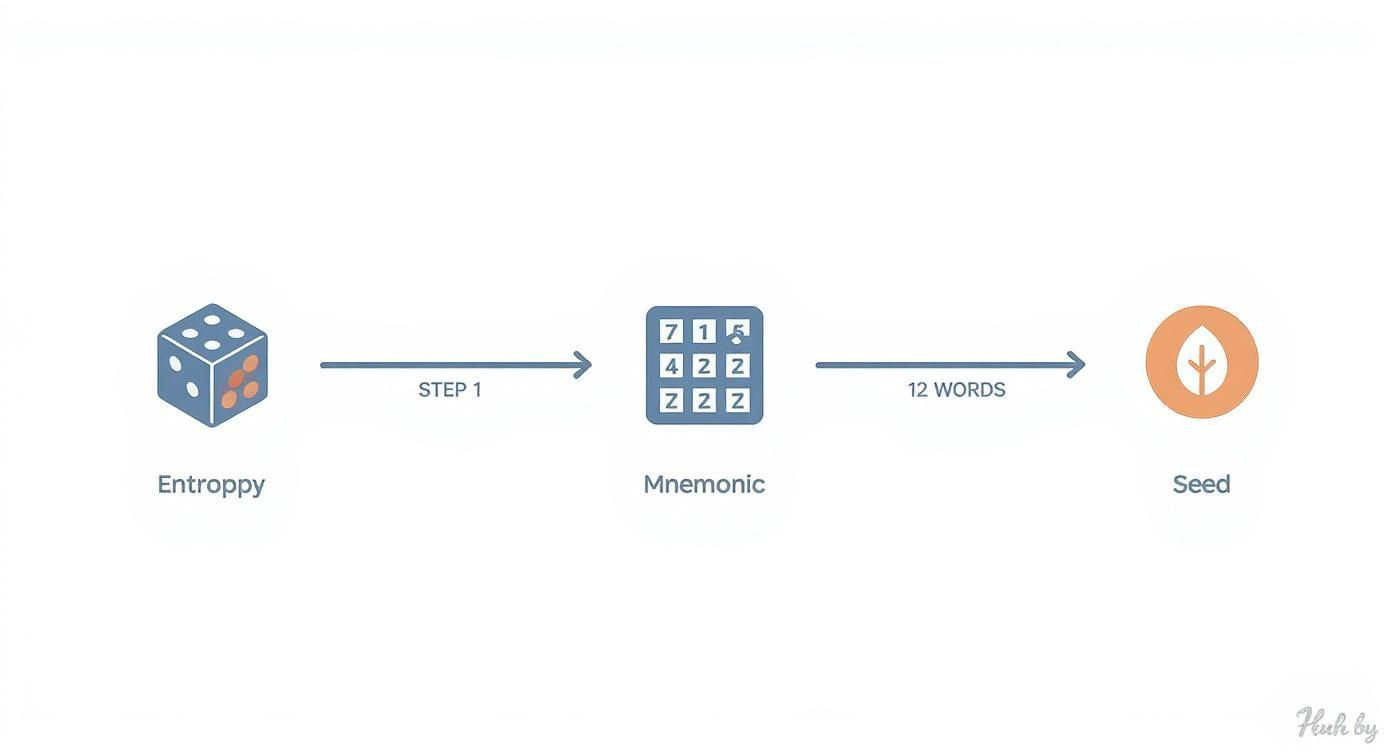
As you can see, it all starts with pure randomness. This is then molded into a memorable phrase before being forged into the master seed that controls everything.
The journey starts with something called entropy. This is just a technical term for a source of true randomness, usually generated by your wallet's software or a dedicated chip in a hardware device. Picture it as a digital coin being flipped hundreds of times to create a long string of 1s and 0s.
That long binary number is then chopped up into 11-bit chunks. Each of those chunks corresponds to a specific word from the official BIP-39 wordlist, which contains 2,048 carefully chosen words. A small piece called a "checksum" is tacked on at the end to make sure the phrase is valid and to catch typos when you're trying to recover your funds. This final list of words is your mnemonic phrase, which you might also hear called a seed phrase or recovery phrase.
To really get into the weeds of this critical component, check out our deep dive on what a wallet recovery phrase is.
The BIP-39 Conversion Process at a Glance
To put it all together, here’s a simplified look at how those random bits and bytes become the keys to your crypto.
| Stage | What It Is | Why It Matters |
|---|---|---|
| 1. Entropy | A long string of random binary data (1s and 0s). | This is the source of your wallet's security. More randomness means it's harder to guess. |
| 2. Mnemonic Phrase | The binary data is converted into a list of 12 or 24 easy-to-read words. | It's a human-friendly backup. You can write it down, unlike a massive string of numbers. |
| 3. Seed | The mnemonic phrase is put through a hashing algorithm to create a single master key. | This is the true root of your wallet. It's used to generate all your private keys and addresses. |
| 4. Keys & Addresses | The seed generates a tree of private keys and corresponding public addresses. | These are what you actually use to receive and send crypto. All of them are derived from that one seed. |
This table shows the logical progression. It's a one-way street designed to be irreversible, making it secure.
The Final Step: The Master Seed
The last piece of the puzzle is turning your mnemonic phrase into the master seed. The phrase (along with an optional passphrase you can add for extra security) is run through a special hashing algorithm thousands of times. This intensive process spits out one final string of data: the master seed.
This seed is the real key to your kingdom. From this single source, a hierarchical deterministic (HD) wallet can generate a practically infinite tree of private keys and public addresses, all mathematically linked back to that original list of words you wrote down. A mnemonic code converter is simply the tool that runs this entire sequence whenever you need it.
Using an Offline Converter for Maximum Security
Let’s be blunt: typing your seed phrase into any website or online tool is a catastrophically bad idea. The only truly secure way to convert or check your mnemonic is in a completely offline, air-gapped environment. This just means isolating your computer from any network—no Wi-Fi, no Bluetooth, no ethernet cable. It’s the digital equivalent of a sealed, soundproof room for your most valuable secret.
When it comes to the right tool for the job, the undisputed champion is the open-source BIP39 tool by Ian Coleman. It's a trusted, powerful resource that shines because it can be run entirely on an offline machine. The numbers speak for themselves: its official GitHub repository shows it's been accessed over 10 million times. That’s the kind of battle-tested reliability we’re looking for.
Preparing Your Secure Environment
Before your seed phrase comes anywhere near a computer, you need to create a sterile digital workspace. Using your everyday laptop or PC is out of the question. It’s been connected to the internet for years and could be harboring anything. The goal here is to leave zero digital fingerprints.
Here’s my security-first checklist for getting your air-gapped setup right:
- Get the Tool From the Source: Head straight to the official Ian Coleman BIP39 GitHub repository. Find the "Releases" page and download the latest
bip39-standalone.htmlfile onto a clean USB drive. Never, ever download this from a third-party site. - Verify the File's Integrity: The repository provides checksums (hashes) for its files. This is like a digital fingerprint. You can use a built-in command on your computer (
shasumon Mac/Linux orCertUtilon Windows) to generate a hash for the file you just downloaded. If your hash matches the one on GitHub, you know the file is authentic and hasn't been tampered with. - Create a Bootable OS: For ultimate paranoia (which is a good thing here), don't trust your computer's installed operating system. Instead, download a lightweight Linux distribution—like Ubuntu or Tails—and create a bootable USB drive. This ensures you're working from a completely fresh, clean slate.
- Go Completely Offline: Now it’s time to pull the plug. With the tool on one USB and the bootable OS on another, disconnect from everything. Turn off Wi-Fi, unplug any network cables, and kill the Bluetooth. This physical separation is the "air gap" that keeps you safe.
Deriving Keys and Addresses Offline
Okay, your secure, air-gapped environment is ready. Now you can safely work with your mnemonic. The process itself is simple, but precision is key. You're now acting as your own security manager, which is the whole point of using non-custodial wallets.
Here's what the bip39-standalone.html file looks like when opened in a browser on a completely offline machine.

This simple interface is your command center for turning that phrase back into keys and addresses.
First, boot your computer from the Linux USB you made. Once it’s running, plug in the other USB drive that has the bip39-standalone.html file. Just double-click to open it in a web browser—it all runs locally, no internet required.
Crucial Security Tip: If you have any reason to suspect the computer itself has been physically compromised, don't type your mnemonic phrase. Hardware keyloggers are a real threat. Using a fresh bootable OS nearly eliminates this risk, but the truly paranoid can enter the words out of order using the mouse to be extra safe.
Now, inside the tool, it's just a few clicks:
- Enter Your Mnemonic: Carefully type your 12 or 24-word phrase into the "BIP39 Mnemonic" field. The tool will figure out the length on its own.
- Select the Coin: From the dropdown menu, pick the right cryptocurrency (e.g., BTC – Bitcoin, ETH – Ethereum). This step is critical, as it sets the correct address format and other parameters.
- Check the Derivation Path: The tool automatically fills in a default derivation path. For 99% of cases, this will be correct, but it’s a vital piece of the puzzle for more complex recoveries, which we’ll dig into later.
- Find Your Keys and Addresses: Scroll down to the "Derived Addresses" table. This is the treasure chest. You'll see a list of public addresses, their corresponding private keys, and public keys. You can now check an address to confirm your backup is correct or grab a private key you need to sweep a wallet.
Once you have the information, write it down on paper. Don't save it to a file on the computer or the USB drive. When you’re done, shut the computer down completely. The moment it powers off, the temporary OS and all your secrets vanish. When you reboot into your normal operating system, it's as if nothing ever happened.
This is how you keep your master secret yours and yours alone. To get a better handle on what it means to truly own your keys, check out our guide on custodial vs non-custodial wallets.
Navigating Derivation Paths and Wallet Compatibility
Ever had that heart-stopping moment? You restore a wallet with your 12-word seed phrase, absolutely certain it's correct, only to see a big fat zero. Before the panic sets in, take a breath. The culprit is almost always something called a derivation path.
This is easily one of the most common tripwires people hit when they're trying to recover or move funds. Getting a handle on what it is and how it works is non-negotiable if you want to succeed.
Think of your seed phrase as the master key to a massive library. The derivation path is like a specific address—aisle, shelf, and book number—that tells your wallet exactly where to find your funds. A path like m/44'/0'/0'/0/0 isn't just a jumble of numbers and slashes; it’s a precise set of directions for locating the specific private keys and addresses your crypto is on.
If you use the right master key but give the wrong directions, you're just looking in the wrong part of the library. The money is still there, still secured by your seed, but the wallet software can't see it.

This becomes a huge deal when you switch between different wallet apps or hardware. They don’t all use the same filing system by default, which is where things get messy.
Understanding BIP44, BIP49, and BIP84
To keep this potential chaos in check, the community created standards for these paths. They're called "Bitcoin Improvement Proposals," or BIPs, and they create a logical tree structure for generating keys. This ensures different wallets can find the same addresses from the same seed.
You'll mostly run into three main ones:
- BIP44 (Legacy): The original standard. It's used for older Bitcoin addresses, the ones that start with a "1". Lots of altcoins adopted this structure, too.
- BIP49 (SegWit): This path points to "Pay to Script Hash" (P2SH) addresses, which typically start with a "3". They were a step up, offering better efficiency.
- BIP84 (Native SegWit): This is the modern gold standard for Bitcoin. It generates the most efficient "bech32" addresses that start with "bc1". Nearly all new wallets default to this for BTC.
Here’s the kicker: a single seed phrase can generate valid addresses across all three of these standards at the same time. A wallet that only looks down the BIP84 path won't see funds you have on a BIP44 address, even though both come from the same 12 words. This is exactly why picking the right path in a tool like a mnemonic code converter is so critical.
A classic case I see all the time: someone tries to access Bitcoin they received on a Ledger years ago, but they're using a new software wallet on their phone. The old funds are sitting on a Legacy (BIP44) path, but the new wallet is only looking at Native SegWit (BIP84). Unless they manually switch the derivation path in the recovery tool, the balance shows zero. It's a simple fix, but it causes a lot of stress.
Common Derivation Paths for Major Coins
While Bitcoin set the standard, other cryptocurrencies followed suit—with a twist. They use a different number in the "coin type" slot of the path to keep their addresses separate. Finding your funds is all about knowing that number.
The standard BIP44 path looks like this: m/44'/c'/a'/0/i. Let's break it down:
mis for the master key.44'tells you it's the BIP44 standard.c'is the coin type index. This is the number that changes for each cryptocurrency.a'is the account number, starting from 0.iis the address index, also starting from 0.
Here's a quick cheat sheet for some of the most common coin types you'll need.
| Cryptocurrency | Coin Type Index (c') |
Full BIP44 Derivation Path (First Account) |
|---|---|---|
| Bitcoin (BTC) | 0' |
m/44'/0'/0' |
| Ethereum (ETH) | 60' |
m/44'/60'/0' |
| Litecoin (LTC) | 2' |
m/44'/2'/0' |
| Dogecoin (DOGE) | 3' |
m/44'/3'/0' |
| Solana (SOL) | 501' |
m/44'/501'/0' |
When you're using a tool like the Ian Coleman converter, you can often just pick the coin from a dropdown menu. But it pays to be paranoid—always glance at the derivation path tab to make sure it matches the structure you expect. If you're coming from a wallet that used a non-standard path, you might have to punch it in manually.
Always start by checking the standard paths. More often than not, your "lost" crypto is just hiding in plain sight.
Critical Security Mistakes You Must Avoid

Knowing how to use a mnemonic code converter is one thing. Knowing how not to use one is what will actually keep your crypto safe. The crypto world is a minefield, and I've seen countless stories of catastrophic losses that boil down to a few simple, avoidable blunders.
Let's get past the basic "don't share your seed phrase" talk. We need to dig into the real-world traps that can, and will, cost you everything if you're not careful. These are the subtle but devastating mistakes that make the difference between a successful recovery and a permanent loss.
The Siren Song of Online Convenience
This is the big one. The single most dangerous mistake you can make is typing your seed phrase into any online tool or website. I don't care how legit it looks or what it promises. The second those words touch an internet-connected device, you have to assume they're compromised.
Here’s where people get tripped up:
- Phishing Sites: Scammers are masters of disguise, creating pixel-perfect clones of legitimate tools. A quick search for a "mnemonic code converter" can easily lead you straight into a trap designed to drain your wallet the moment you paste your phrase.
- Malicious Browser Extensions: That cool new crypto extension you installed? It could be quietly logging every single thing you type, including your precious mnemonic phrase.
- Clipboard Hijacking: This is a nasty one. Sophisticated malware can watch your computer's clipboard. You copy your seed phrase, but when you paste it, the malware instantly swaps it with an attacker's address, sending your funds into a black hole.
Let me be crystal clear: Never, under any circumstances, type, paste, or photograph your seed phrase on a device connected to the internet. The only truly safe way is to use a trusted, open-source tool on a completely air-gapped machine.
Poor Digital and Physical Hygiene
Your security is only as strong as its weakest link. So many people I've talked to didn't lose their funds to a sophisticated hack, but to simple carelessness in how they stored or handled their phrase.
For example, saving your seed phrase in a "secure" note on Google Drive, Dropbox, or even in your email drafts is just asking for trouble. Those accounts can be breached. Once an attacker is in, all they have to do is search for terms like "seed," "mnemonic," or "recovery," and they’ve hit the jackpot.
Using a shared or family computer for a recovery is another huge risk. You have no idea if that machine is riddled with keyloggers or spyware that records every keystroke. My rule of thumb? Always assume any computer you don't exclusively control is hostile.
Misunderstanding Advanced Features
Sometimes, the very tools meant to protect you can become your biggest liability if you don't fully understand them. The optional passphrase, often called the "25th word," is a perfect example.
A passphrase adds an incredible layer of security to your BIP-39 mnemonic. It's an extra word that, when combined with your 12 or 24-word phrase, creates a completely different, unique wallet. This is fantastic protection if someone finds your physical seed phrase backup.
But here's the danger: forgetting it. There is no recovery process for a lost passphrase. None. If you forget that 25th word, the wallet it unlocks is gone forever, even if you have the other 24 words perfectly recorded.
I've seen these passphrase mistakes happen again and again:
- Forgetting you even set one up in the first place.
- Making a tiny typo when you created it.
- Failing to back it up with the same level of care as your main seed phrase.
If you decide to use this feature, you must treat the passphrase with the same reverence as the mnemonic itself. Write it down, store it separately from your main phrase, and burn it into your memory that losing it means losing everything. Dodging these common but critical errors is the foundation of secure self-custody.
Knowing When to Stop and Ask for Help
A mnemonic code converter is a fantastic tool for very specific, controlled situations. It’s perfect for double-checking a backup you’re already sure about, or for finding a particular address when you have the complete, correct seed phrase. Think of it as a precision instrument—incredibly powerful, but only for the right job.
Where it falls short is when things get messy. The moment you're dealing with uncertainty, missing pieces of the puzzle, or a potential security breach, continuing to try and fix it yourself can turn a recoverable problem into a permanent, heartbreaking loss.
Honestly, knowing your own limits is probably the most underrated security skill in all of crypto.
Red Flags: When to Call in a Professional
If you find yourself in any of these spots, the best thing you can do is stop. Immediately. Pushing forward with random guesses or downloading sketchy scripts from the internet can overwrite the very data you need to recover or expose what little information you have to new threats.
These are the clear signs you've gone beyond what a simple mnemonic converter can handle:
- A Partial or Damaged Seed Phrase: You've got most of the words, but one or two are missing, or maybe a few are smudged and unreadable. A standard converter is useless here; it needs the full, valid phrase to work.
- You Forgot the Word Order: You wrote down all 12 or 24 words, but now you have no idea what sequence they go in. Manually trying every possible combination is not just impractical—it's mathematically impossible for a human to do.
- The Lost or Forgotten Passphrase (The "25th Word"): You have the complete seed phrase, but you can't remember that extra password you added for security. Without it, the wallet your seed generates is completely different, and your funds are nowhere to be found.
- You Suspect Your Wallet Has Been Compromised: You've seen transactions you didn't make or have a sinking feeling your seed phrase was exposed. Using any online tool on a compromised machine is like handing thieves the keys to the vault after you've unlocked it.
In situations this complex, you need specialized algorithms designed to intelligently search for the missing pieces. This isn't about blind luck; it's a methodical hunt that requires a secure, completely offline environment to prevent making things worse.
Why DIY Attempts Can Go Terribly Wrong
That gut instinct to solve the problem on your own is strong, I get it. But when it comes to crypto recovery, that instinct can be your worst enemy. A recent survey showed that while 85% of users successfully got their funds back using a mnemonic phrase, that statistic only applies to people who had the complete and correct information to begin with. You can read more about these recovery success rates on CoinGecko.com.
For everyone else trying to piece together partial data, the risks of going it alone are huge. Running random scripts you found on a forum can infect your computer with malware, and too many failed login attempts on certain hardware wallets can actually trigger them to wipe themselves clean.
This is exactly where a service like Wallet Recovery AI comes in. Professional recovery specialists use custom software and serious hardware in secure, air-gapped labs to run incredibly advanced algorithms. They can test billions of possibilities for missing words, unscramble the correct order, and execute sophisticated attacks to find a lost passphrase—all without ever connecting your sensitive data to the internet.
Handing a complex problem over to an expert isn't giving up. It's making a smart, calculated decision to give yourself the best possible chance of success while avoiding a catastrophic mistake.
Common Questions About Mnemonic Converters
Even after you get the hang of the basics, a few practical questions always pop up right when you’re about to use a mnemonic code converter. These tools are incredibly powerful, but that power comes with some serious responsibilities and nuances that can be confusing. Let's clear up some of the most common sticking points so you can move forward with confidence.
Think of this as your final pre-flight check before handling your most sensitive crypto data. Getting these things straight can be the difference between a smooth recovery and a catastrophic, and totally preventable, mistake.
Is Using an Online Converter Ever Safe?
Let me be blunt: no. You should never, under any circumstances, type or paste your mnemonic seed phrase into any website or online tool. The second your phrase touches an internet-connected device, you have to assume it's compromised. It's that simple.
Online converters are basically magnets for a whole host of threats:
- Phishing: Scammers are masters at creating convincing fake versions of legitimate tools just to steal your phrase. A quick Google search can easily land you in one of these traps.
- Malware: Your own computer or browser could be infected with keyloggers or clipboard hijackers that snatch your phrase without you ever knowing it happened.
- Network Snooping: Any data you send over the internet can potentially be intercepted by someone watching the traffic.
The only truly secure method is to use a trusted, open-source tool like the Ian Coleman BIP39 converter on a completely offline, air-gapped machine. There is simply no substitute for this level of security.
What’s the Difference Between a Seed Phrase and a Private Key?
This is a huge one that trips a lot of people up. A seed phrase and a private key are definitely related, but they are not the same thing at all.
A seed phrase (or mnemonic) is the master key to your entire wallet. It’s used to algorithmically generate a nearly infinite number of individual private keys. A private key, on the other hand, controls the funds at a single, specific crypto address.
Here’s an analogy: think of your seed phrase as the master key that can create a key for every single apartment in a massive building. A private key is just the key to one of those apartments, like Apartment #101. A mnemonic code converter is the locksmith's machine that uses your master key to cut that specific apartment key whenever you need it.
Can a Converter Tool Steal My Cryptocurrency?
A legitimate, well-regarded, open-source converter tool used correctly cannot steal your funds. The code for tools like Ian Coleman's is public, meaning thousands of developers have picked it apart looking for any malicious behavior. When you use it completely offline, it has no way to phone home and send your information to an attacker.
The danger isn't in the tool itself, but in the environment where you use it and where you get it from.
The real risks are:
- Using a Fake Tool: Downloading a converter from some random website or clicking a shady link instead of the official source.
- Using it on a Compromised Computer: Running even a legit tool on a PC that’s already riddled with spyware.
- Using it Online: Exposing your phrase to the internet, which we've already established is a cardinal sin.
Always, always download the tool directly from its official GitHub repository and verify its integrity. By controlling the tool and the environment, you control your security and pretty much eliminate the risk of theft. Following these strict protocols is non-negotiable if you want to safeguard your assets.
If you're dealing with something more complex—like a partial seed phrase, a forgotten passphrase, or you suspect your wallet is already compromised—DIY attempts can go from risky to downright dangerous. These situations demand specialized tools and a secure environment that a standard mnemonic converter just can't provide. Wallet Recovery AI uses advanced, AI-driven algorithms in a completely offline setting to tackle these tough cases, maximizing your chances of a successful recovery without risking any further loss.
Start Your Secure Wallet Recovery Process with Wallet Recovery AI
Leave a Reply